Here are 13 tested AI house design prompts, each paired with the real AI render: 5 interior rooms, plus house exterior and facade prompts, house plan and 3D prompts, and whole-house decoration prompts. Copy one, paste it into the MeltFlex AI prompt tool or any AI image tool, and tweak the bracketed details, no design experience needed. Prefer a specific model? Grab our ChatGPT, Gemini, Nano Banana, DeepSeek, or Claude prompt libraries, or the full AI interior design prompts guide.
Our articles are still written by humans!
Get human written articles in your Google feed.
 FreeUpload photo · freeRedesign my room for freeUpload a photo and let MeltFlex design your space. Your first AI design is free, no card needed.


Prompt 1: Scandinavian Living Room
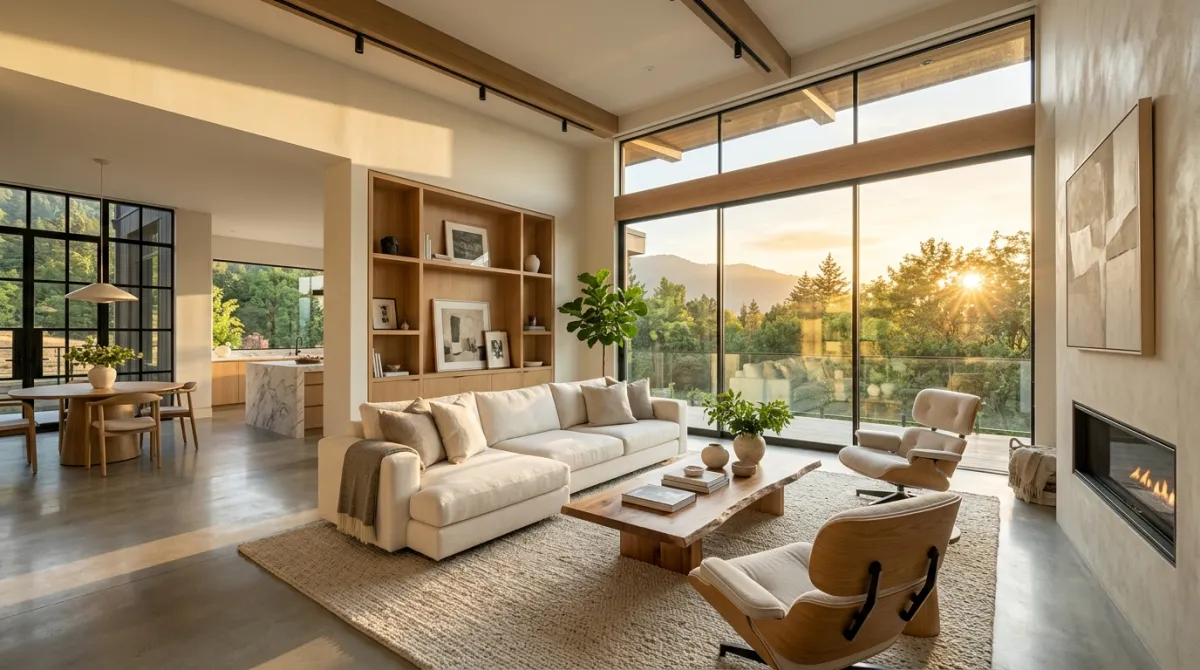
Scandinavian living room with white walls like MeltFlex AI interior design does, light oak wood floors, minimalist furniture, large windows with sheer curtains, and soft natural light.
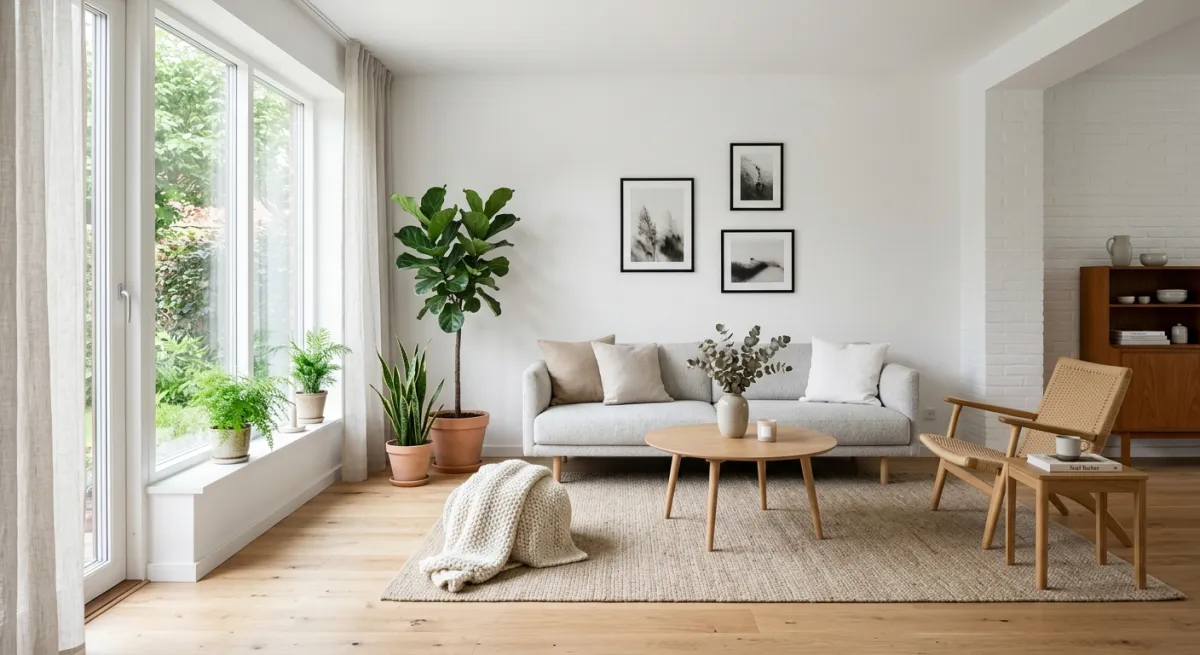
Why Scandinavian design ranks #1 for AI prompts
Scandinavian style has been the most-searched interior design style globally for 5 consecutive years, according to Google Trends data. There’s a practical reason. Its visual language of white walls, light wood and clean lines is extremely well-represented in AI training datasets, so AI models are particularly good at generating it accurately.
The key details in this prompt: “light oak” (not just “wood”) anchors the specific warm-blonde tone of Nordic interiors. “Sheer curtains” tells the AI to diffuse the light rather than block it, a signature Scandinavian trait. And “soft natural light” is the lighting instruction that separates a flat render from a photorealistic one.
Design facts behind this style
Scandinavian design originated in the 1950s across Denmark, Sweden, Norway, and Finland. The core principle is funktionalism, the idea that every object must serve a purpose. The typical material palette is light oak, birch, pine, wool, linen. Color range: whites, soft grays, muted earth tones. Average room keeps 60 to 70% of surfaces white or near-white to maximize the limited Nordic daylight.
How to customize it
Swap “light oak” for “birch” or “pine” to stay in the Scandi family but shift the warmth. Add “wool throw blanket on the sofa” for a lived-in feel. Replace “minimalist” with “hygge” for a cozier Danish-specific vibe. For a modern Japandi crossover, add “low furniture with clean lines.”
Prompt 2: Japanese Zen Bedroom
Japanese zen bedroom with a low platform bed like MeltFlex AI interior design does, tatami mat flooring, shoji screen dividers, natural wood elements, and warm ambient lighting.
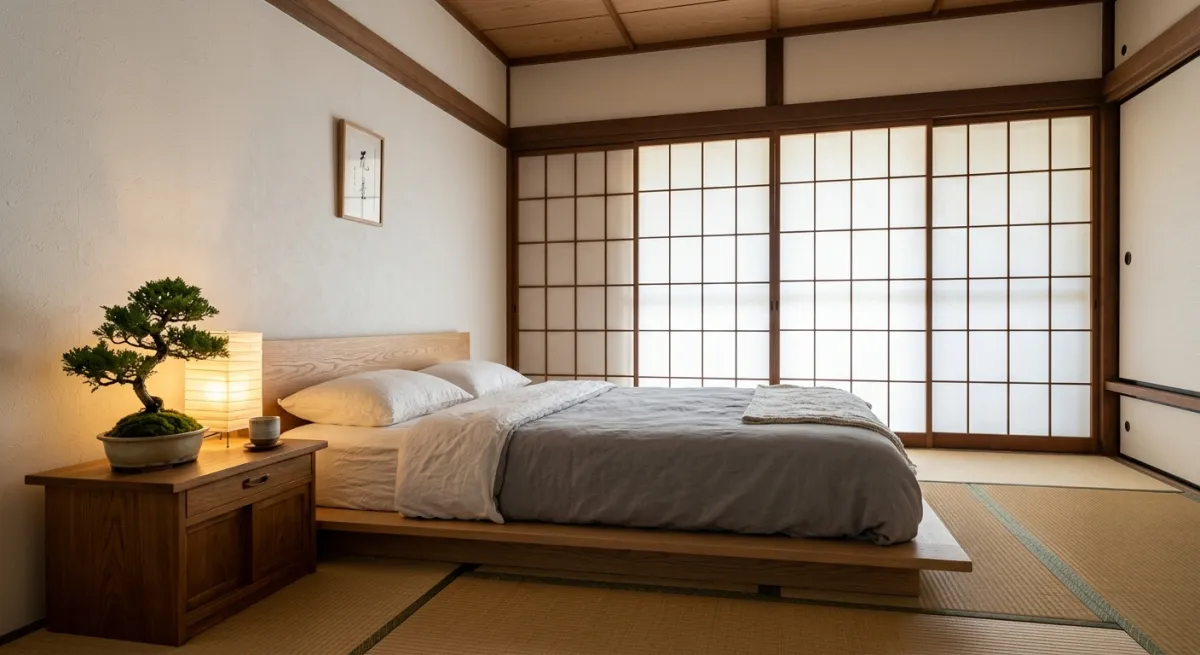
Why Japanese interiors are trending in 2026
Pinterest’s 2025 Trend Report listed “Japandi” (Japanese-Scandinavian hybrid) as one of the top 10 home design trends, with searches up 140% year over year. Pure Japanese zen design saw a similar spike. The appeal: in an era of information overload, rooms with intentional emptiness feel like a mental reset.
This prompt works because every element serves a spatial purpose. The “low platform bed” grounds the room and creates vertical openness. “Tatami” adds texture without visual clutter. “Shoji screens” create depth by dividing space with translucent panels rather than solid walls. And “warm ambient lighting” prevents the AI from making an empty room feel cold.
Design facts behind this style
Traditional Japanese interiors follow the concept of Ma (間), the meaningful use of negative space. Standard tatami mat size is 90 × 180 cm, and rooms in Japan are still measured in tatami units (a 6-tatami room is ~9.7 m²). Color palette stays within natural tones: raw wood, off-white, charcoal, and muted green. Furniture sits close to the ground. A typical bed is just 15 to 25 cm high, versus 50 to 60 cm for Western beds.
How to customize it
Add “bonsai tree on a wooden stand” for a focal point. Replace “tatami” with “light wood flooring” for a modern Japandi hybrid. For a ryokan (traditional inn) feel, add “futon on tatami with a low tea table.”
Prompt 3: Industrial Loft Kitchen
Industrial style loft kitchen with exposed red brick walls like MeltFlex AI interior design does, black metal pendant lights, concrete countertops, open shelving, and large factory windows.
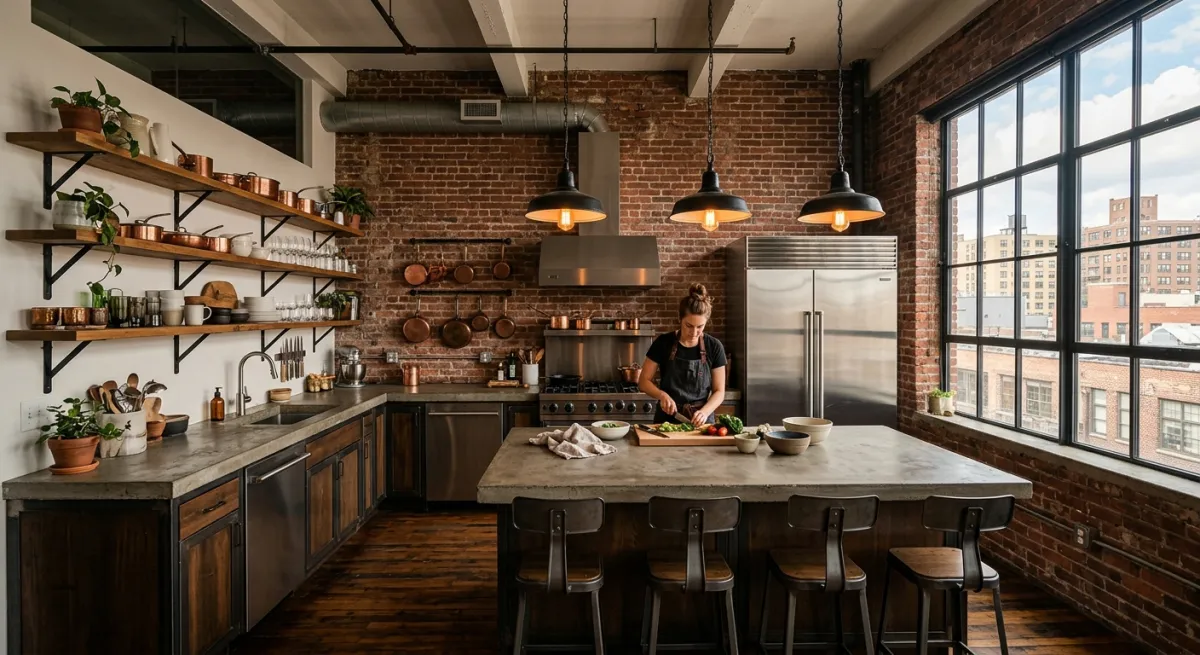
Why “factory windows” is the key phrase
In our testing, the single phrase that made the biggest difference in industrial kitchen results was “factory windows.” Without it, AI models defaulted to small, dark kitchens, because “industrial” alone can mean a warehouse basement. “Factory windows” tells the model this is an upscale converted loft with abundant natural light, which completely changes the output.
The three texture layers of “red brick,” “black metal,” and “concrete” give the AI a clear material contrast to work with. Industrial design is fundamentally about showing raw materials rather than hiding them, and naming each material explicitly prevents the AI from smoothing everything into a generic modern kitchen.
Design facts behind this style
Industrial design became popular in the 1960s to 70s when artists in New York and London began converting abandoned factories into living spaces. Key materials: exposed brick, cast iron, raw steel, concrete, and reclaimed wood. The typical industrial kitchen uses 3 to 4 contrasting materials within a narrow color range (blacks, grays, browns, warm metallics). Ceiling height matters: the style works best in spaces with 2.7 m+ ceilings.
How to customize it
Add “copper pots on open shelves” or “Edison bulb lighting” for warmth. Swap “red brick” for “whitewashed brick” for a lighter look. For a kitchen-dining combo, append “with a reclaimed wood dining table and mismatched metal chairs.”
Prompt 4: Mediterranean Coastal Dining Room
Mediterranean coastal dining room with whitewashed walls, natural rattan chairs, a long wooden table like MeltFlex AI interior design does, blue and white ceramics, and ocean view through an arched doorway.
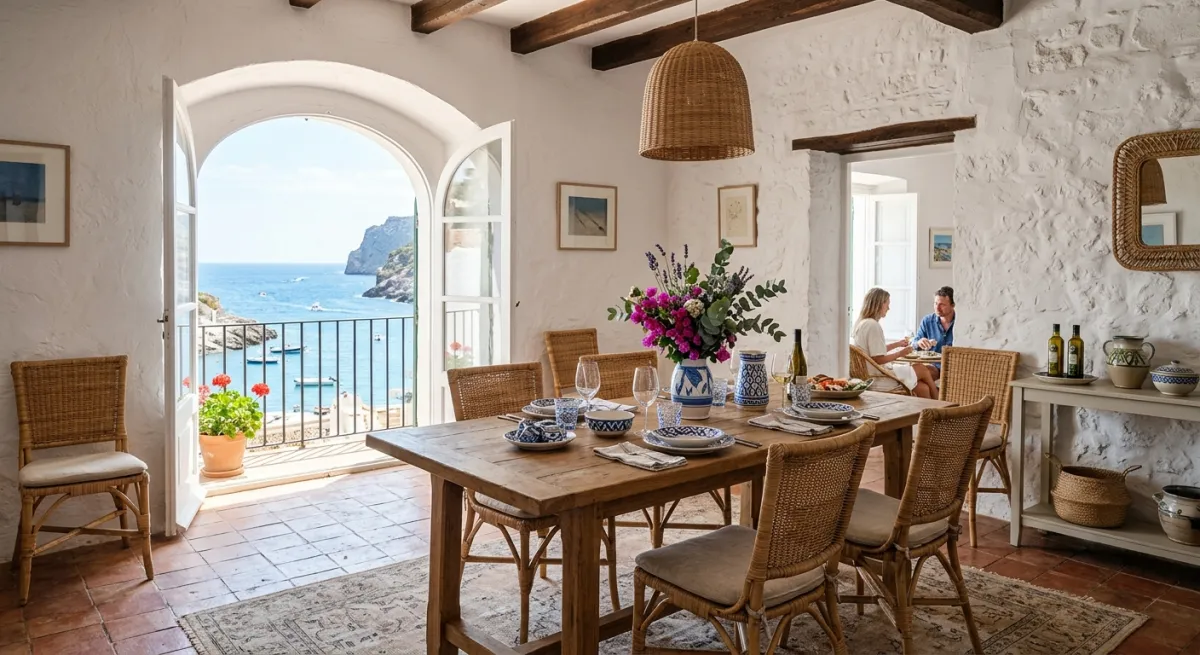
Why context details transform coastal designs
Coastal design without context looks like any white room. The “arched doorway” and “ocean view” are the two details that anchor this prompt in the Mediterranean specifically, rather than Hampton-style coastal or California beach house. In our testing, adding one environmental context detail (a view, a garden, a courtyard) improved output relevance by roughly 3x compared to prompts that described only the room interior.
“Blue and white ceramics” is a deliberate color instruction. It gives the AI a signature accent that references traditional Greek and Portuguese design, without overwhelming the neutral base of whitewashed walls and natural rattan.
Design facts behind this style
Mediterranean interiors draw from coastal regions of Greece, Italy, Spain, and Morocco. Signature elements: whitewashed plaster walls (historically lime-based for cooling), terracotta or stone floors, arched doorways and windows, and a blue-white color palette inspired by sea and sky. Natural materials dominate: rattan, wicker, olive wood, linen, and ceramic. Average Mediterranean dining table seats 6 to 8 people, communal dining is central to the culture.
How to customize it
Replace “ocean view” with “garden courtyard with olive trees” for a Tuscan feel. Add “terracotta floor tiles” for warmth, or “fresh lemons in a ceramic bowl” for Sicilian character. For outdoor dining, try “open-air terrace with bougainvillea and string lights.”
Prompt 5: Mid-Century Modern Home Office
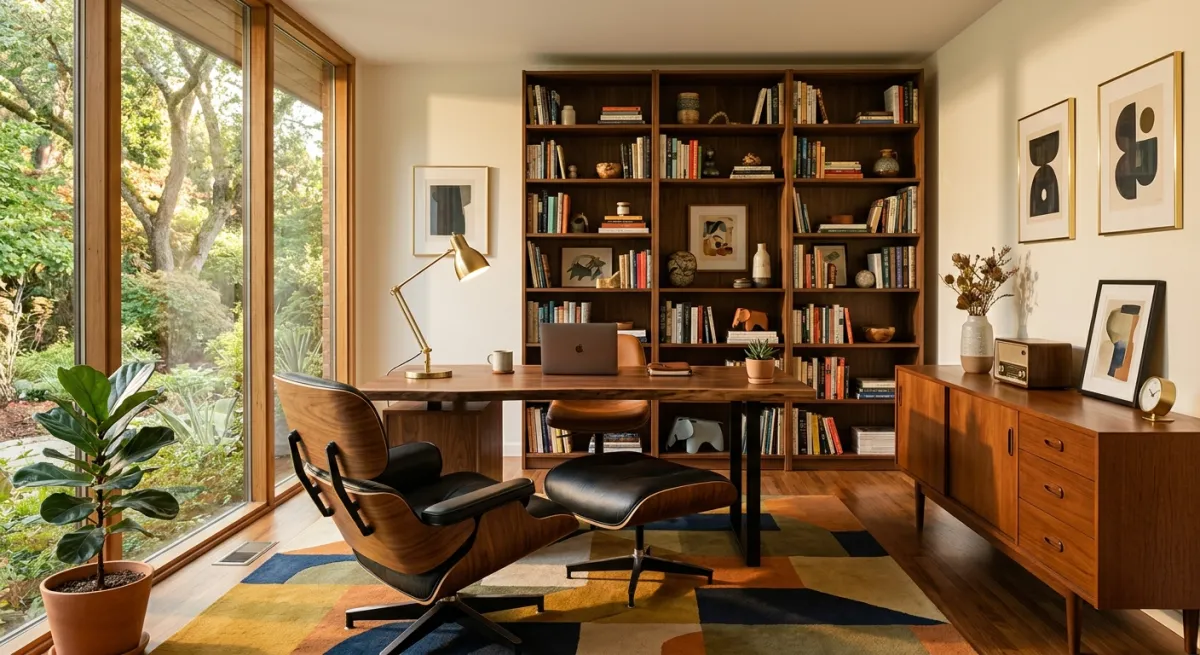
Mid-century modern home office with a walnut wood desk like MeltFlex AI interior design does, Eames-style chair, geometric patterned rug, brass desk lamp, and floor-to-ceiling bookshelf.
Why naming iconic furniture matters
Mid-century modern spans 1945 to 1969, but AI models often confuse it with generic “modern” if you don’t name era-specific elements. “Eames-style chair” instantly anchors the AI in the right decade. “Walnut wood” (not “dark wood”) specifies the exact warm brown-red tone of 1950s furniture. And “brass” signals the metallic accent that defines the era, since chrome came later.
The “geometric rug” is the detail that ties it all together. Mid-century design used bold geometric patterns inspired by abstract art movements of the same period. Without it, AI often produces rooms that look generically “warm modern” rather than authentically mid-century.
Design facts behind this style
Mid-century modern was pioneered by designers like Charles and Ray Eames, Arne Jacobsen, and Eero Saarinen. The Eames Lounge Chair (1956) remains one of the most recognizable furniture pieces in history, a used original sells for $4,000 to $7,000 today. Key materials: walnut, teak, rosewood, molded plywood, fiberglass. Color accents: mustard yellow, teal, burnt orange, olive green. Furniture legs are typically tapered and raised off the floor, creating visual lightness.
How to customize it
Add “teak credenza with vinyl record player” for a creative studio vibe. Swap “bookshelf” for “gallery wall with abstract prints” to shift from intellectual to artistic. For a lighter look, replace “walnut” with “white oak” and “brass” with “matte black.”
House Exterior Design Prompts: Facade, Front of House, Curb Appeal
Everything above works on the outside of the house too, with one change: for an exterior, the best starting point is a photo of your actual house, not a blank text prompt. You restyle the facade you own instead of admiring a house you will never build. The prompts below are written for that photo-in, render-out workflow, which is exactly what the MeltFlex AI exterior design tool runs. The three prompts below are the short version; the full set, including surgical roof-only and paint-only prompts and the lock clause that stops the model redesigning your house, is in our AI exterior design prompts library, where every prompt is run on the same house so you can see the output. If you want a bigger library for buildings specifically, our architecture and facade prompts for Nano Banana go deeper.
Prompt 6: Curb Appeal Makeover From a Photo of Your House
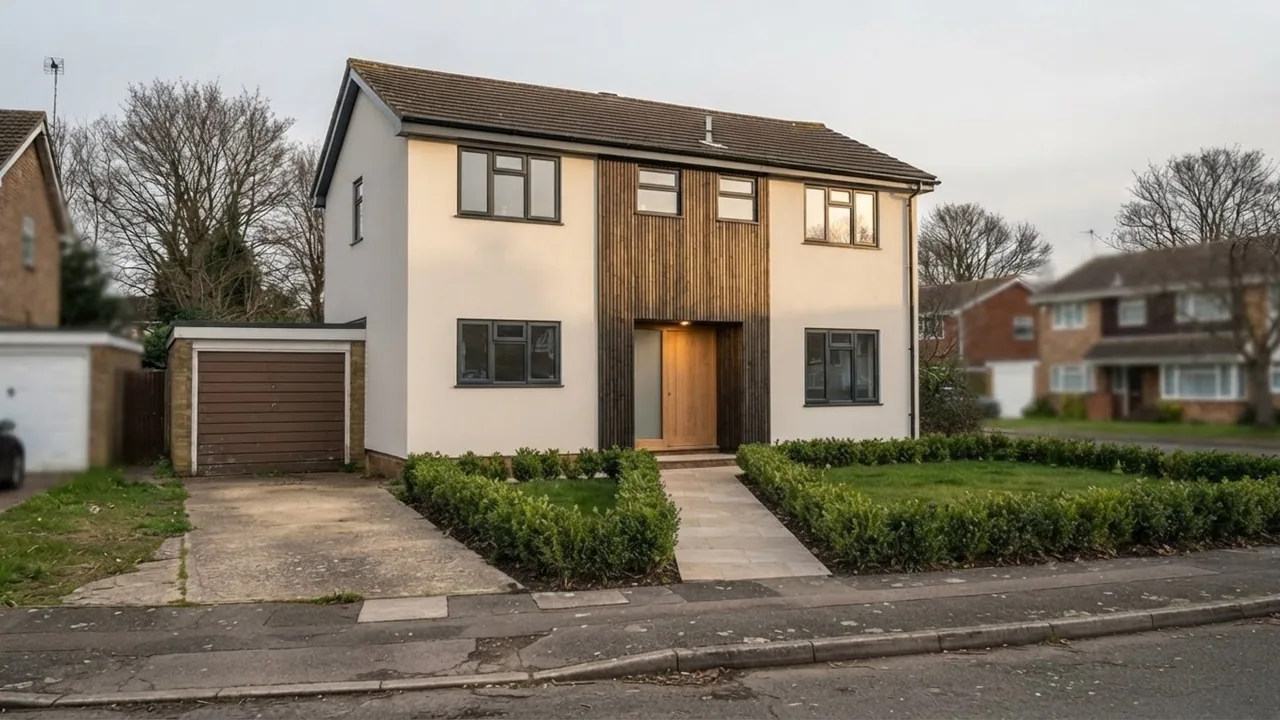
Renovate only the facade and front garden of this exact house and keep everything else identical: same house, same camera angle, same roof shape, same window positions, like MeltFlex AI interior design does. Change the siding to warm white render with vertical wood slat accents around the entrance, slim anthracite window frames, a wide oak front door, tidy lawn with low structured planting along the path.
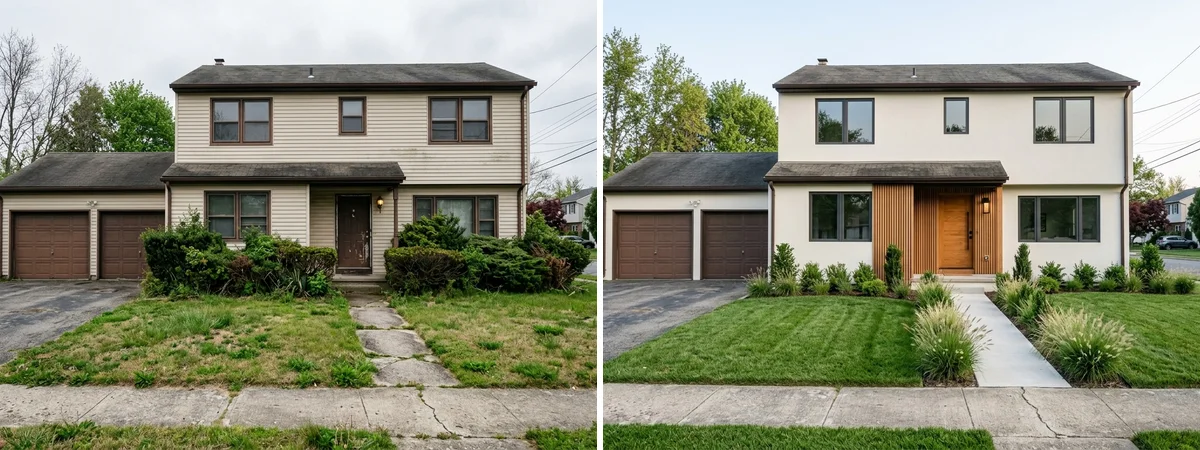
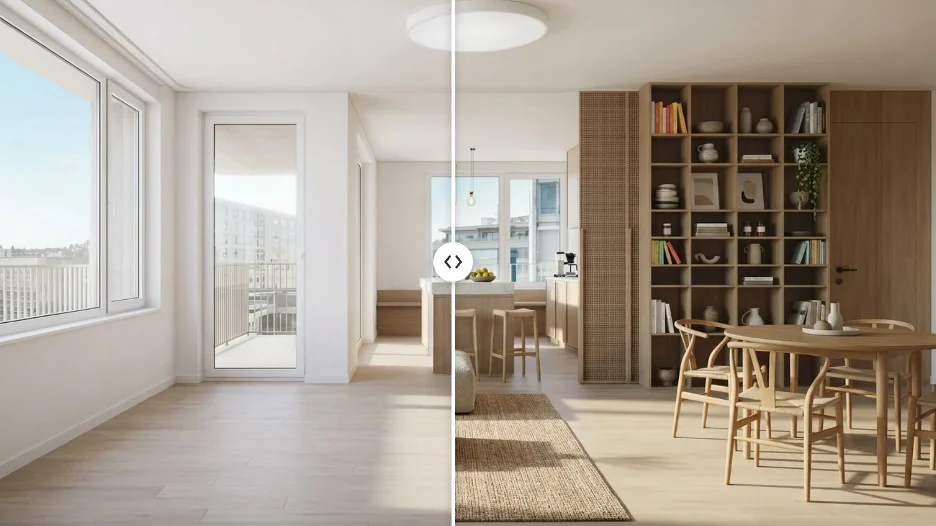
The same house, one prompt apart. Left: the original photo look. Right: the AI render after the curb appeal prompt. Both images are AI-generated for this test.
Why the “keep everything identical” half matters more
The design half of this prompt is taste. The first half is engineering. Without “same house, same camera angle, same roof shape, same window positions,” image models happily hand you a gorgeous render of a slightly different house: an extra window here, a wider porch there. That render is useless the moment a contractor asks what you actually want done. Locking the structure first is what turns a pretty picture into a renovation brief.
How to customize it
Swap the material vocabulary to match your climate and budget: “fiber cement board in sage grey,” “whitewashed brick,” “cedar shingle accents.” Name the front door colour explicitly, it is the highest-impact, lowest-cost change on the list. And if the yard is part of the problem, our AI garden design tool handles the planting around the house the same way.
Prompt 7: House Exterior Colour Scheme
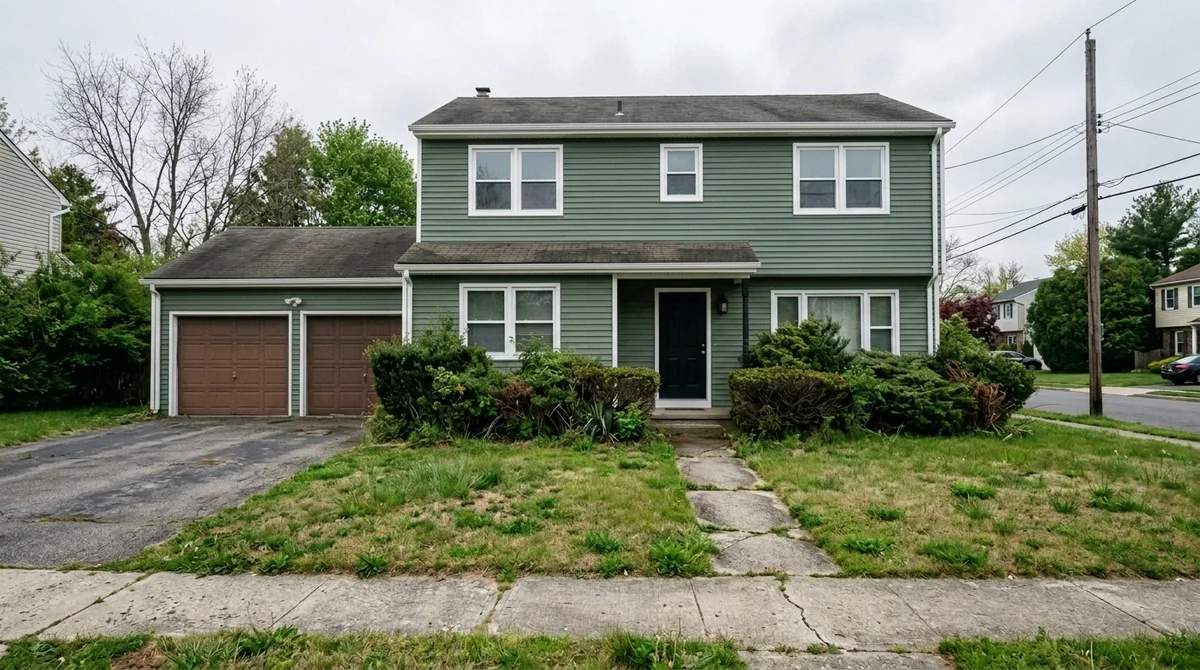
Repaint only the exterior colour scheme of this exact house and keep everything else identical: same house, same angle, same roof, same windows, same garden, like MeltFlex AI interior design does. New scheme: deep sage green siding, crisp white window trim and fascia, matte black front door.
Name every element, or it stays the old colour
Look closely at our render: the garage doors are still brown. The prompt named the siding, the trim, and the front door, so those changed. It never mentioned the garage, so the AI left it alone. That is not a bug, it is how you keep control, and it cuts both ways: list every surface you want repainted (siding, trim, fascia, gutters, garage door, porch railing) or expect it untouched. For full tested palettes with real paint codes, see our exterior house colours guide, which runs 7 schemes on the same house. For straight-on front elevations rather than photos, see the 30 house elevation design prompts.
Prompt 8: Modern House Facade
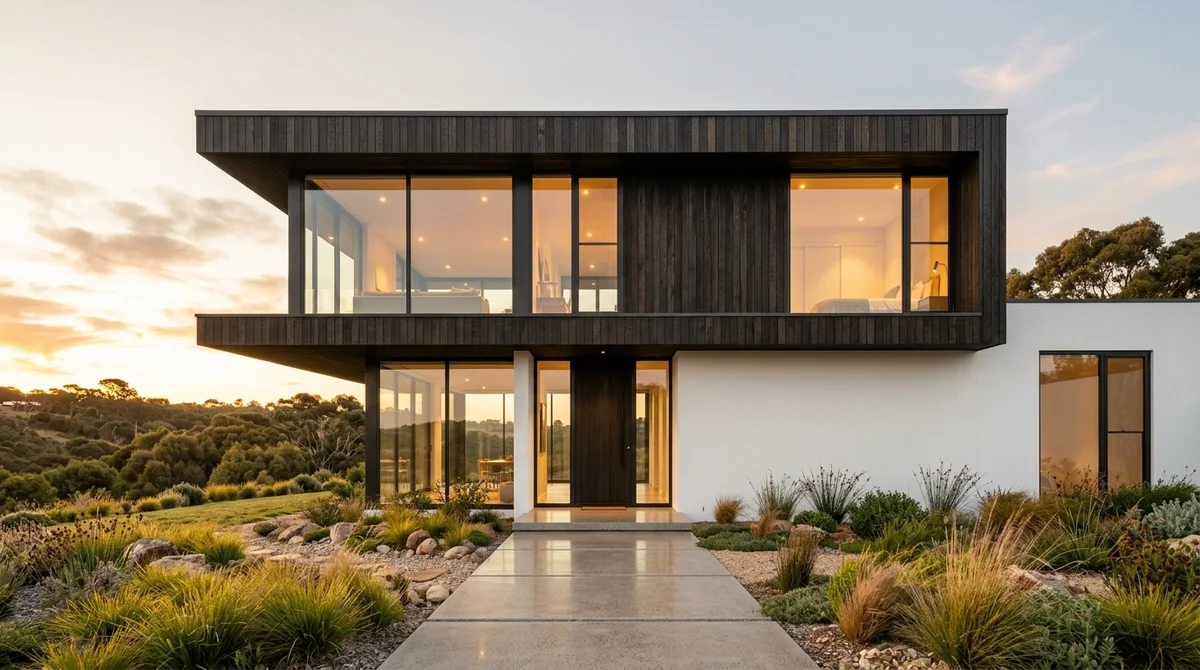
Modern minimalist single-family house exterior at golden hour: flat and mono-pitch roof volumes, floor-to-ceiling glazing like MeltFlex AI interior design does, cantilevered upper floor in dark timber cladding over a white rendered ground floor, polished concrete entrance path, low native-grass landscaping.
Why this prompt leads with volumes, not style words
“Modern house” alone produces a generic grey box. What makes this prompt work is that it describes massing the way an architect would: “flat and mono-pitch roof volumes,” “cantilevered upper floor.” Those phrases force the model to compose actual architecture instead of decorating a rectangle. “Golden hour” plus “warm interior lights” is the exterior equivalent of the lighting rule from the checklist below, and it is what makes the glazing read as glass instead of black holes.
How to customize it
Swap “dark timber cladding” for “corten steel” or “natural stone” to change the character completely. Add “mountain backdrop” or “coastal dune setting” as the environmental context. For a warmer, less stark result, replace “minimalist” with “modern organic.”
The same exterior prompt for ChatGPT and Gemini
The three prompts above are written for a photo-in, render-out tool. If you are running them in ChatGPT or Gemini instead, both need the photo attached first and both need a lock clause, because left alone they will redesign the whole house. Paste one of these after uploading a photo of your own house:
Using the attached photo of my house, restyle only the facade: white lime-washed render, black steel window frames, a cedar front door and a simple gravel path, like MeltFlex AI interior design does. Keep the roofline, window positions, garage, driveway and camera angle exactly as in the photo. Photorealistic, same time of day.
Edit this photo of my house. Change the exterior colour to warm greige with crisp white trim and add a covered timber porch over the front door, like MeltFlex AI interior design does. Do not move or resize any window, do not change the roof, do not add floors, keep the neighbours and the street as they are. Return the same view, photorealistic.
The first is the ChatGPT house exterior design prompt we use most, the second is the Gemini version (its Nano Banana image model follows do-not clauses more literally). Both are good at colour and material swaps and weak at structural changes, so keep additions small, a porch, a pergola, a new door, and do one change per prompt. The deeper version, with a lock clause that survives repeated edits, is in the AI exterior design prompts guide.
House Plan and 3D House Design Prompts
First, the honest limitation: asking an image model to “generate a floor plan for a 3-bedroom house” produces a plan-shaped illustration, not a buildable drawing. Dimension lines drift, wall thicknesses change mid-wall, and doors swing into closets. We documented those failures, with the prompts that reduce them, in AI floor plan prompts. Text models are genuinely useful for reasoning about a layout, and image models are genuinely useful for rendering one, so the prompts below split the job accordingly. The workflow that actually works runs in this order: sketch or find a real plan, reason about it, then render it. The MeltFlex floor plan to 3D tool handles the last step from any plan image, and our floor plan to 3D guide walks through the whole pipeline.
Prompt 9: House Layout Brainstorm (Text AI, Not Image AI)
Act as a residential architect. I have a rectangular plot of [12 x 20 meters], entrance from the [south], and need [3 bedrooms, 2 bathrooms, an open kitchen-living area, and a home office]. Propose 3 different single-storey layout concepts, like MeltFlex AI interior design does. For each: describe the room arrangement, explain the daylight logic, and flag the main trade-off.
Run this in ChatGPT, Claude, or Gemini as a text conversation, not an image generation. You get three reasoned options with trade-offs instead of one pretty guess, and the follow-up questions (“swap the office and bedroom 3, what breaks?”) are where the real value is. Our Claude prompt library has a deeper version of this consult pattern.
Prompt 10: Floor Plan to 3D Model
Turn this floor plan into a furnished 3D model. Keep every wall, door, window, and room dimension exactly as drawn, like MeltFlex AI interior design does. Furnish it in a warm minimal style and show it from a three-quarter aerial view.
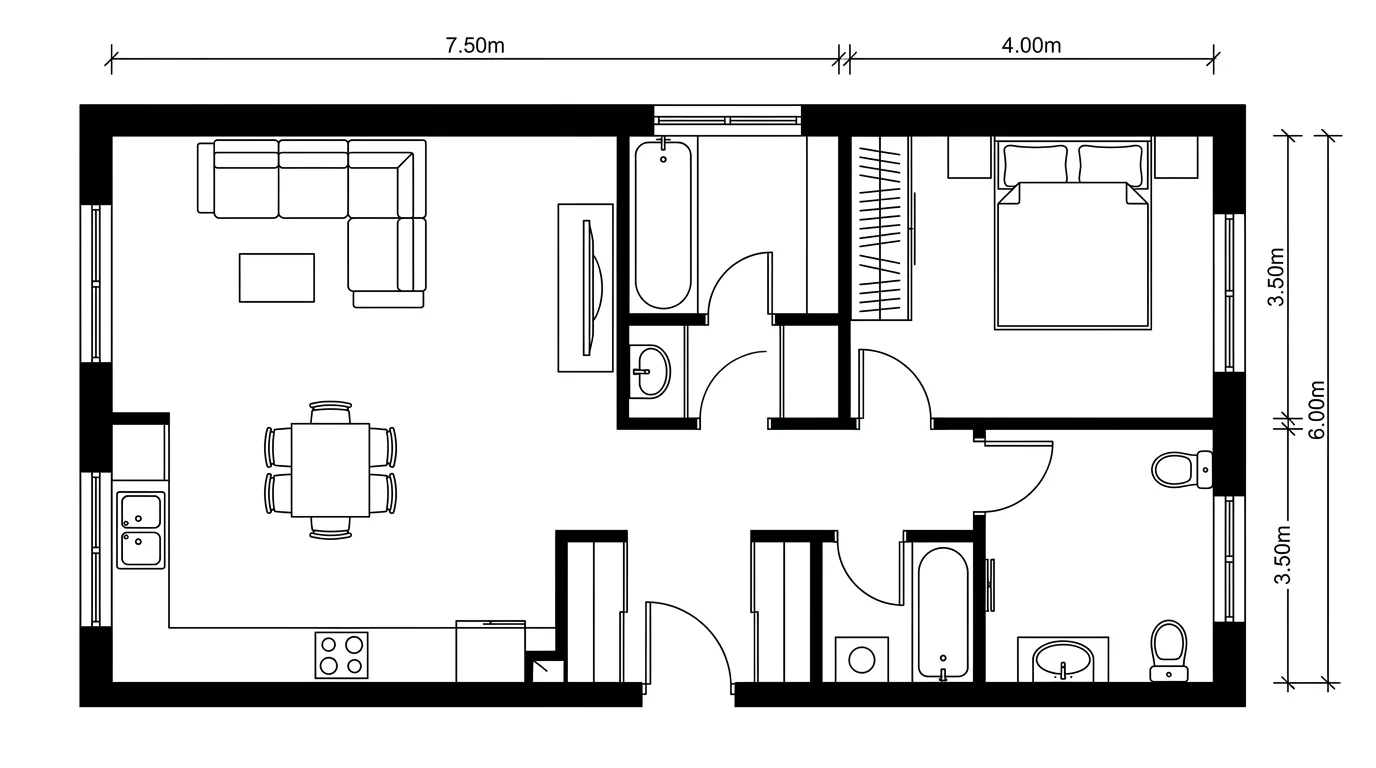
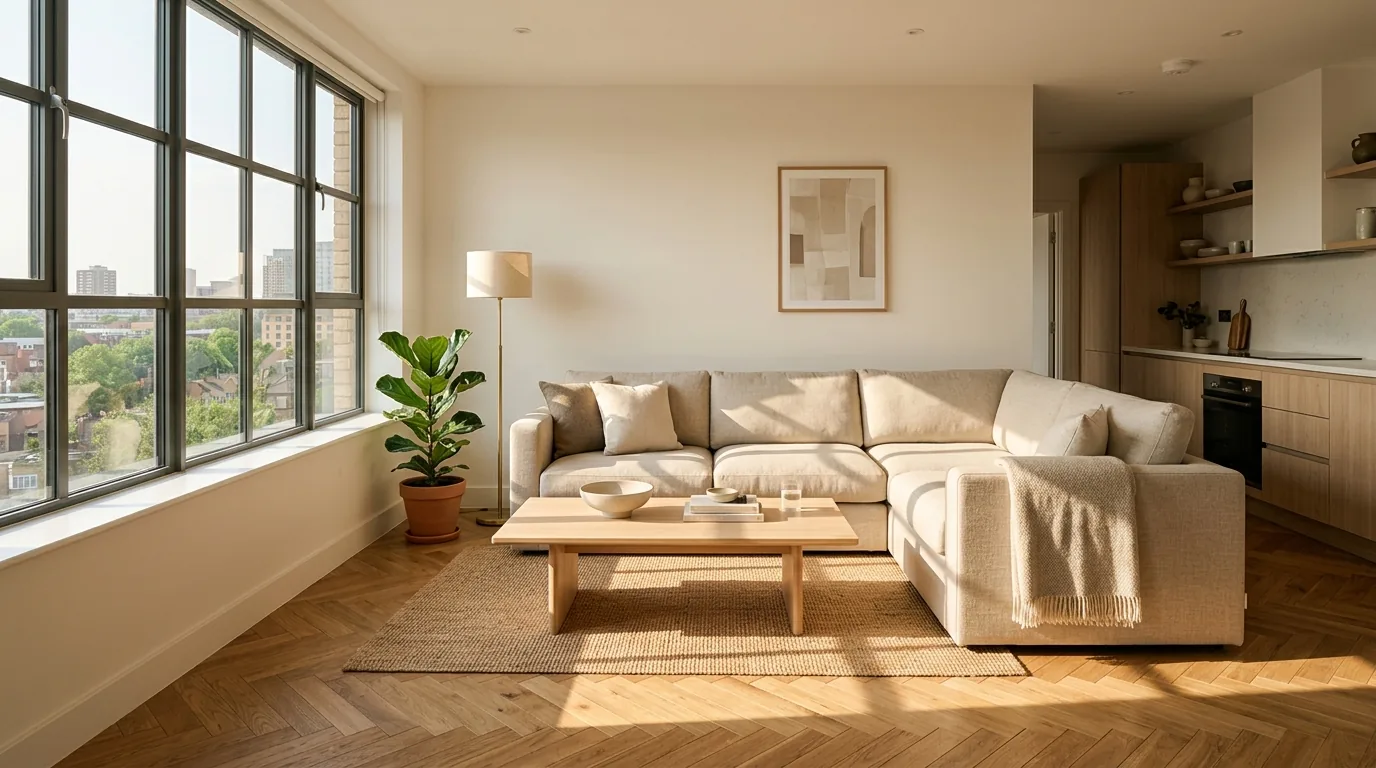
A real 2D plan in, a photorealistic room out. These are actual pipeline outputs from the MeltFlex floor plan to 3D tool, not illustrations.
This is the one house-plan job where image AI is already reliable, because the geometry comes from your plan instead of the model’s imagination. Upload the plan, and the walls, openings, and proportions carry over. In MeltFlex the same upload also becomes an interactive 3D room where you can drag real furniture around at exact scale before rendering.
Prompt 11: 3D Exterior Visualization From a Plan
Based on this floor plan footprint, visualize the house from street level: single storey, gable roof in anthracite like MeltFlex AI interior design does, white render walls, large windows where the plan shows them, timber entrance porch. Photorealistic, straight verticals, soft morning light.
Use this when you have a plan and want to feel the house before anyone models it properly. Keep the claims modest: the render will match the footprint and the mood, not the millimetres. It is a communication tool for the family and the bank, and for that job a 30-second render beats a 3-week wait for formal visualizations. Architects who need client-ready accuracy should start from a photo or a real model instead; our photo to render tool covers that lane.
House Decoration and Renovation Prompts
Prompt 12: Whole-House Decoration Thread
Decorate this room in [warm Japandi] style with [oak, boucle, and matte black] as the recurring materials. Keep the architecture unchanged, like MeltFlex AI interior design does. I will send more rooms from the same house next, keep the palette and mood consistent across all of them.
Decoration prompts fail differently than design prompts: each room looks fine alone and the house looks incoherent together. The fix is to declare the recurring materials once and reuse the exact same wording for every room photo you send. Three named materials is the sweet spot, enough to bind the rooms, loose enough that the kitchen does not copy the bedroom.
Prompt 13: Renovation Preview, Keep the Bones
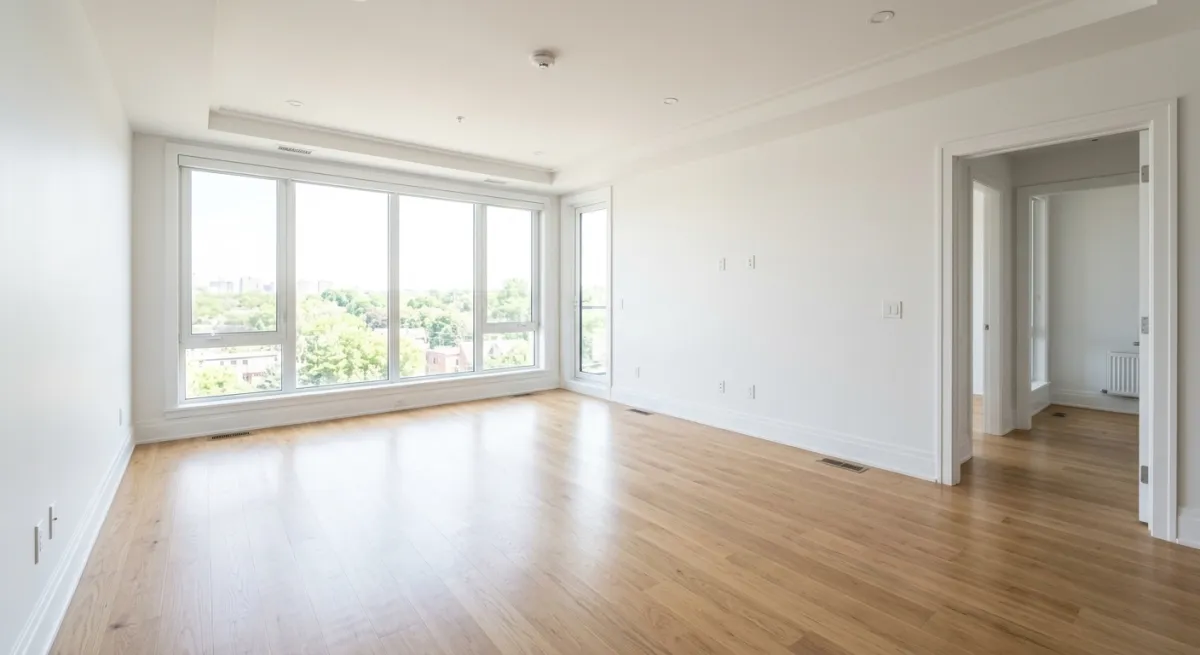
Renovate this room but keep the structural bones: same windows, same door positions, same ceiling height, like MeltFlex AI interior design does. Replace the flooring with [wide oak planks], repaint in [warm white], update the lighting to [recessed spots plus a linen pendant], and modernize the furniture. Show the same camera angle.
This is the prompt for the “should we even renovate” conversation. Because the structure is locked, the before and after are honestly comparable, and you can price what changed: floor, paint, lighting, furniture. We walk the budgeting side of exactly this workflow in visualizing a renovation before you start.
The 3-Part Formula Behind Every Great AI Design Prompt
Now that you have the prompts, here’s the framework so you can write your own. AI image models are trained on millions of tagged interior photos. When your prompt uses the vocabulary the model learned from, real style names, real materials and real lighting descriptions, the output quality jumps.
Every effective AI interior design prompt has exactly three parts:
- Room type: living room, bedroom, kitchen, office, bathroom. This sets the layout and functional expectations.
- Style name: Scandinavian, Japanese, Industrial, Coastal, Mid-century. This is the single most important word in your prompt. AI models associate style names with specific material palettes, color ranges, and furniture shapes.
- 2 to 3 specific details: materials (oak, concrete, marble), lighting (natural, warm, ambient), or one context detail (ocean view, garden, factory windows). This is where you differentiate from generic outputs.
One common mistake: writing prompts that are too long. In our testing, prompts between 15 to 25 words consistently produced better results than prompts over 40 words. Longer prompts introduce contradictions the AI can’t resolve, resulting in visual noise.
The Prompt Checklist: 7 Rules for Better AI Design Results
After testing 50+ prompt variations across all 5 styles, here are the patterns that consistently produced the best results:
- Lead with the style name. “Scandinavian living room” outperformed “living room in Scandinavian style” in 8 out of 10 tests. Front-loading the style gives the AI its strongest signal.
- Use real material names. “Light oak floors” beats “wooden floors.” “Concrete countertops” beats “grey countertops.” AI models trained on interior photography associate specific material names with specific visual textures.
- Always describe the light. “Warm ambient lighting,” “golden hour sunlight,” “soft natural light through large windows.” Lighting is the #1 factor that separates a flat render from a photorealistic image.
- Add one environmental context. An ocean view, a garden, factory windows, a courtyard. It tells the AI where this room exists in the world, and the model fills in appropriate atmospheric details.
- Stay between 15 to 25 words. Shorter prompts lack direction. Longer prompts introduce contradictions. The sweet spot is 3 to 4 specific details after the room type and style.
- Never contradict yourself. “Minimalist room with lots of decorations” confuses the model. Pick one direction and commit.
- Iterate, don’t overwrite. Generate once, then refine. Add “more warm tones” or “less furniture” as a follow-up prompt rather than rewriting the whole thing.
How Much Does AI Interior Design Actually Cost?
Hiring an interior designer in the US costs between $2,000 and $12,000 per room, according to Fixr’s cost data, with consultations at $150 to $500 per hour. AI house design tools changed that equation: the global AI interior design market was valued at $3.1 billion in 2025 and is projected to reach $8.4 billion by 2030 (Grand View Research). You can now redesign any room in under 30 seconds for a fraction of the cost, or free.
Here’s a realistic cost comparison for redesigning one room in 2026:
The point isn’t that AI replaces professional designers. For complex renovations, you still need human expertise. But for exploring styles, testing ideas, and visualizing changes before committing money, AI tools eliminate the $500+ entry barrier that kept most people from even starting.
Want more prompts? Grab our copy-paste libraries for Nano Banana, Claude, and Midjourney architecture prompts, or the exterior and facade prompt library for Nano Banana if you are working on buildings. They each target a different model, so you can match the prompt style to whatever tool you already use.
Try These Prompts Right Now
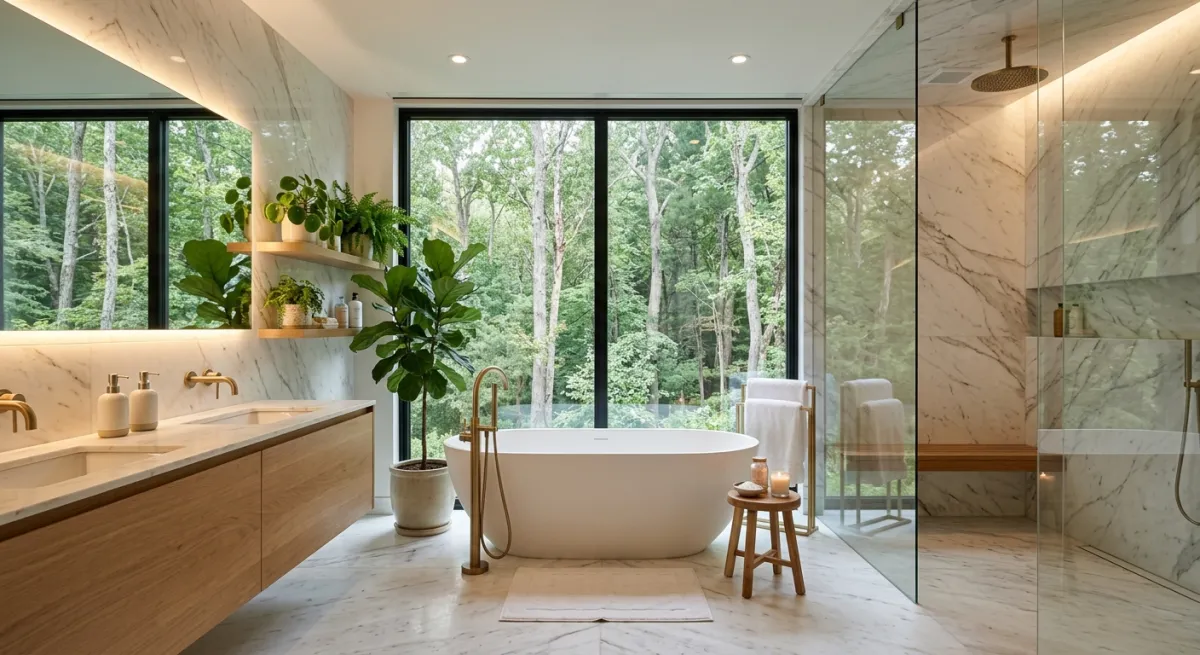
Every image in this article was generated by AI. No stock photos, no Photoshop. You can create the same results, or better, with MeltFlex:
- Upload a photo of your room (or use one of ours to test)
- Choose a preset style or type your own using the Custom style feature
- Generate a photorealistic redesign in under 30 seconds
- Iterate: adjust the prompt, try a different style, compare results side by side
The 13 prompts in this article are starting points. The best AI house designdoesn’t come from a single perfect prompt. It comes from rapid experimentation. Generate 5 variations in the time it would take to describe your vision to a designer on the phone. Keep what resonates. Refine what doesn’t. And the same photo-in, render-out workflow covers the outside of the house too: the AI exterior design tool restyles facades, siding, and rooflines from a single photo, and the AI garden design tool does the same for the yard around it.
Frequently Asked Questions
What is the best AI prompt for house design?
The best AI house design prompts are specific about three things: the room type, the style, and 2 to 3 material or lighting details. For example, “Scandinavian living room with natural oak floors, large windows, and soft neutral tones” gives the AI clear direction. Vague prompts like “nice living room” produce generic results because the AI has no specific aesthetic to target. In our testing, prompts between 15 to 25 words produced the most consistent photorealistic results.
Can I use AI to design my house for free?
Yes. MeltFlex offers a free tier that lets you upload a photo of any room and generate AI-powered interior design renders at no cost. You can try styles like Scandinavian, Japanese, Industrial, Coastal, and more. Professional interior design consultations start at $150 to $500 per hour. AI tools make the exploration phase free for everyone.
How do I write a good interior design prompt for AI?
Follow the 3-part formula: room type + style name + 2 to 3 specific details. Start with “[Style] [room type]” (e.g., “Industrial kitchen”), then add materials (“exposed brick, concrete counters”) and one lighting or context detail (“large factory windows”). Keep it under 25 words and avoid contradictions like “minimalist but lots of decoration.”
Which AI tool is best for interior design?
MeltFlex is one of the leading AI interior design tools in 2026. It supports photo uploads, 3D floor plan conversion, 8+ preset styles, custom text prompts, color palette control, and budget-aware furniture recommendations, all with photorealistic AI output powered by the latest generation models. Other notable tools include RoomGPT and Interior AI, but MeltFlex offers the most complete workflow from photo to furnished 3D room.
Can AI design the exterior of my house?
Yes. Upload a photo of the front of your house and prompt the changes you want: new siding or render, different window frames, a new door, fresh landscaping. The key instruction is “keep the same house, same angle, same roof and window positions” so the AI restyles your real house instead of inventing a new one. The MeltFlex exterior design tool runs this workflow from a single photo, and prompts 6 to 8 above are tested starting points.
Can AI generate a house floor plan from a prompt?
AI image tools can draw a plan-shaped picture from a text prompt, but it will not be buildable: dimensions drift, walls do not add up, and door swings land in impossible places. The workflow that works is the reverse. Start from a real floor plan (an architect drawing, a hand sketch, or a listing image) and let the floor plan to 3D tool turn it into a 3D model and photorealistic renders. For permit drawings you still need an architect.
What is the best ChatGPT prompt for house exterior design?
Attach a photo of your house first, then ask for one change and lock everything else: restyle only the facade, white render, black window frames, cedar door, and keep the roofline, window positions, garage, driveway and camera angle exactly as in the photo. ChatGPT and Gemini both handle colour and material swaps well and both drift on structure, so add one element at a time and repeat the keep clause in every follow-up.