API Documentation
MeltFlex REST API for AI interior design
Upload a room photo, describe the desired style or provide furniture references, and receive a photorealistic result. Each generate call costs 10 credits (auto-refunded on failure).
Furniture placement is the flagship. Send reference product photos and the API stages them into the room with correct scale, perspective and shadows. The same /v1/generate endpoint also powers a full suite of design tools (interior restyling, exteriors and gardens, surface and fixture swaps, photo-to-render), and dedicated endpoints add video generation, floorplan-to-3D, furniture-to-3D models and walkable 3D worlds. See AI Tools for a recipe per tool.
API access requires an active subscription (any paid plan). After you subscribe, you can generate your API key in account settings.
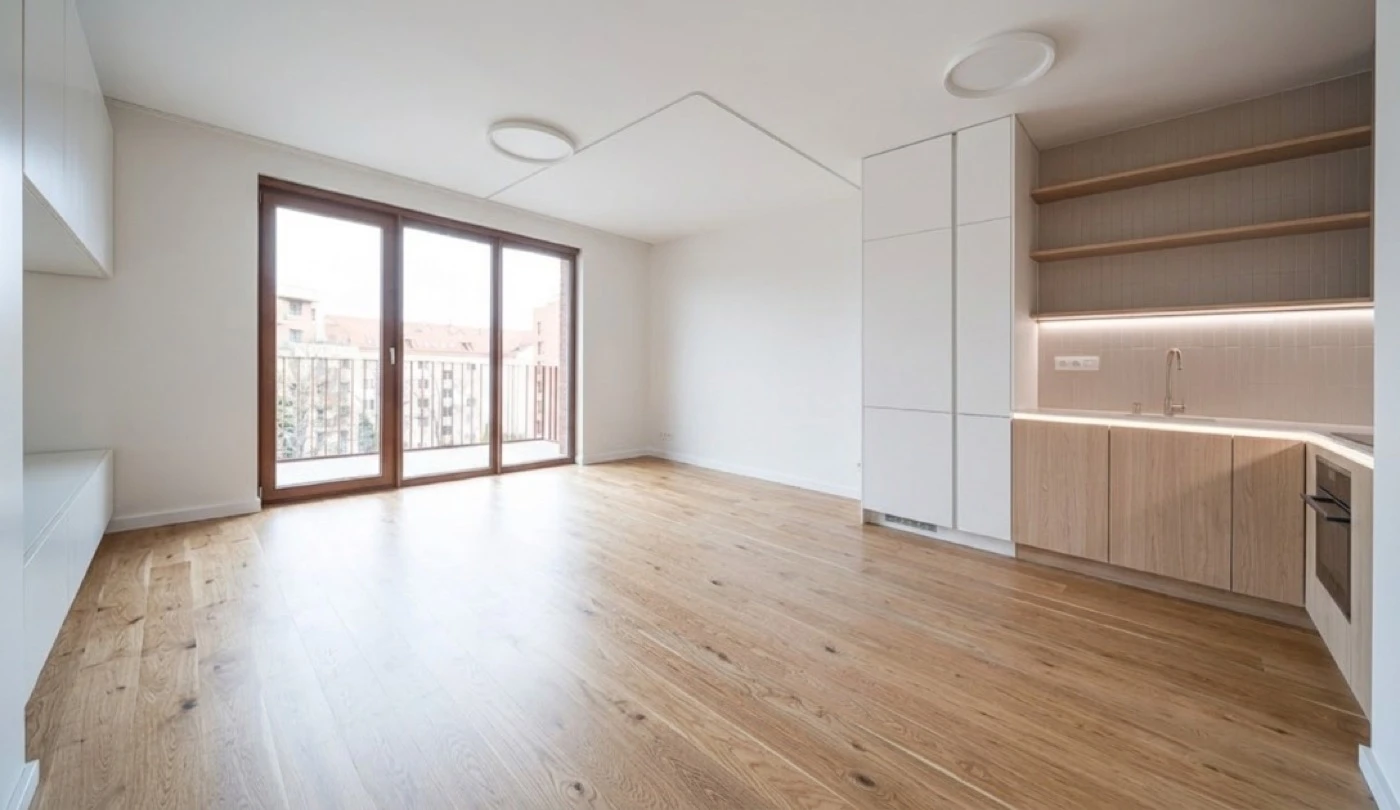
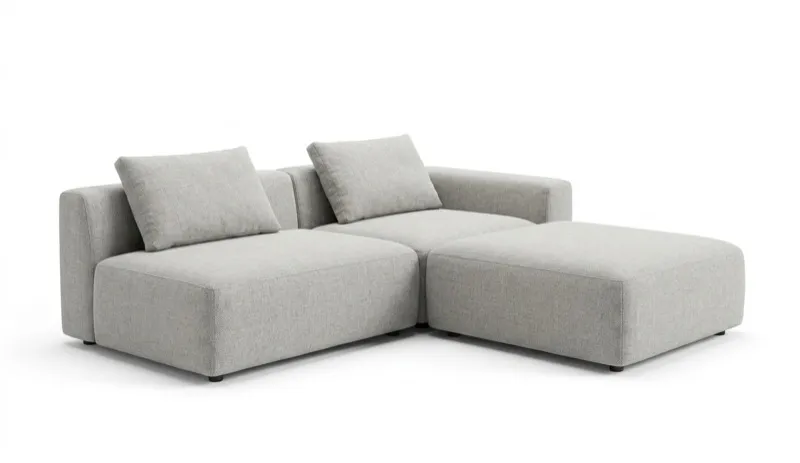
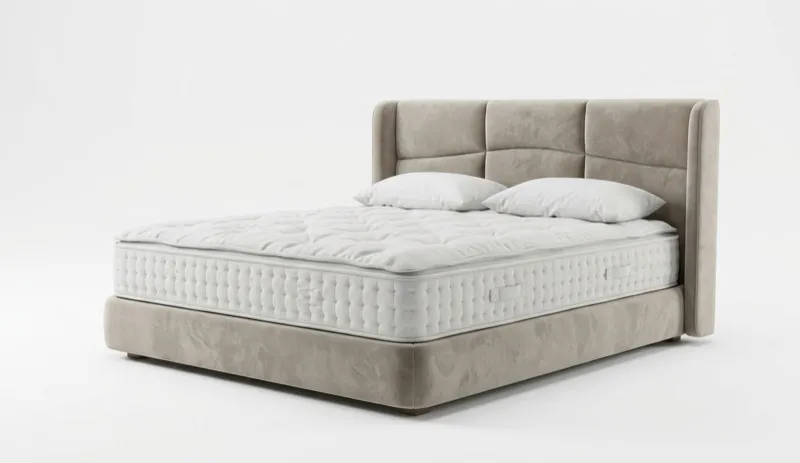
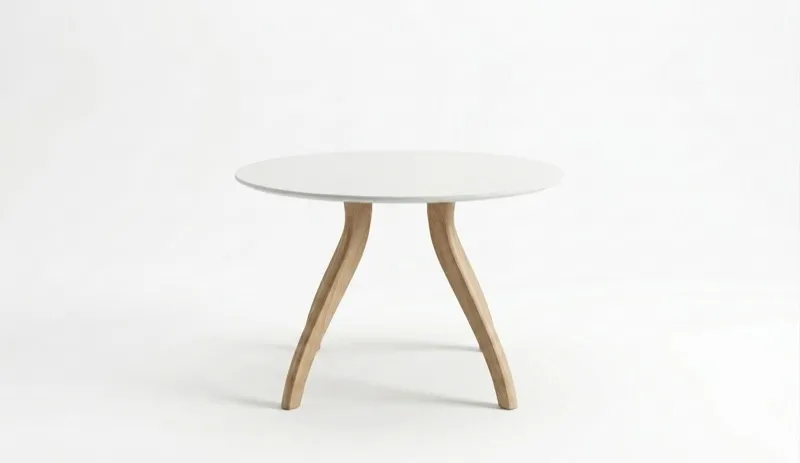
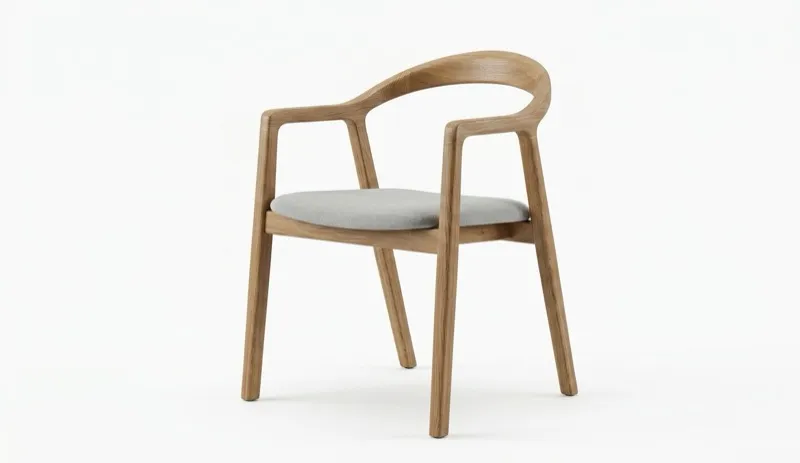
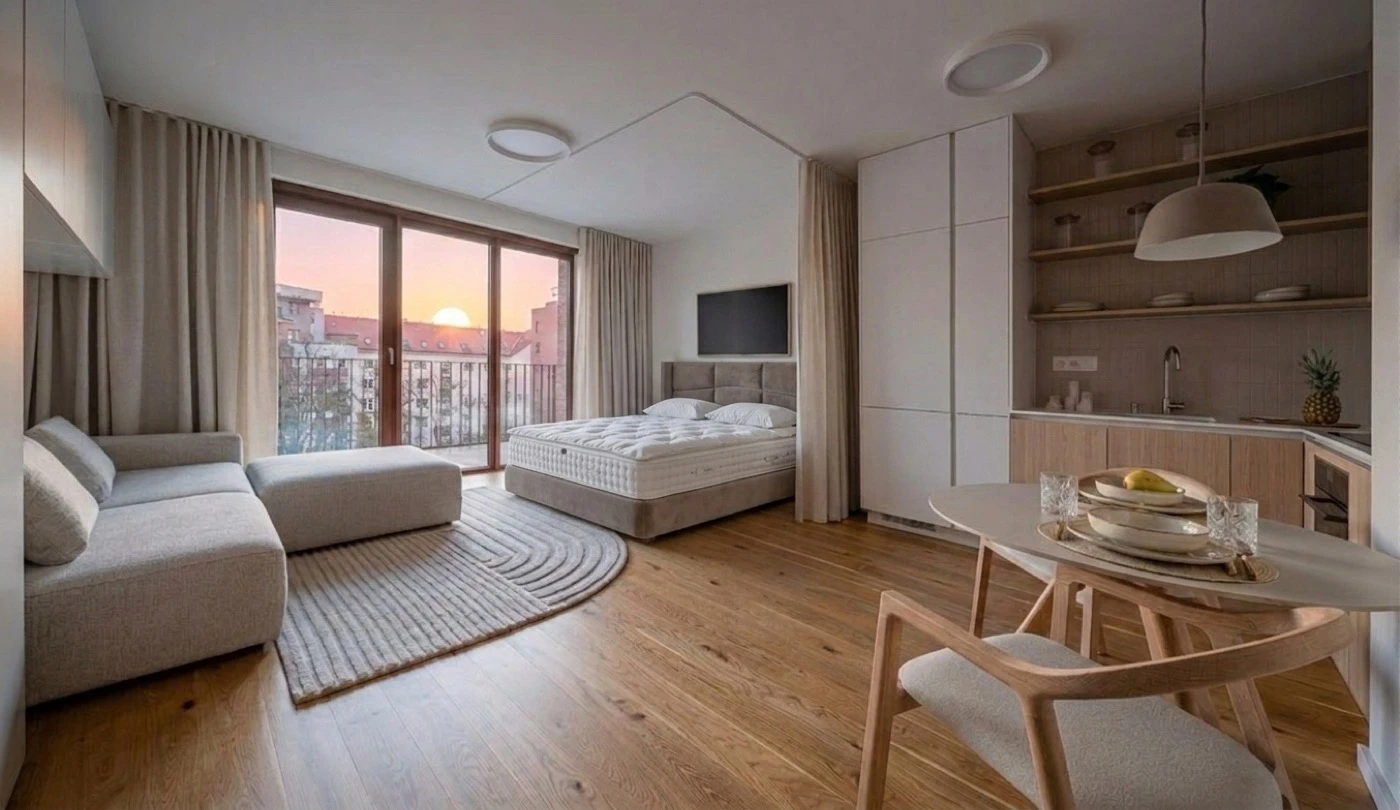
Take the result and restyle it with a single prompt:
"Design this room as Italian contemporary"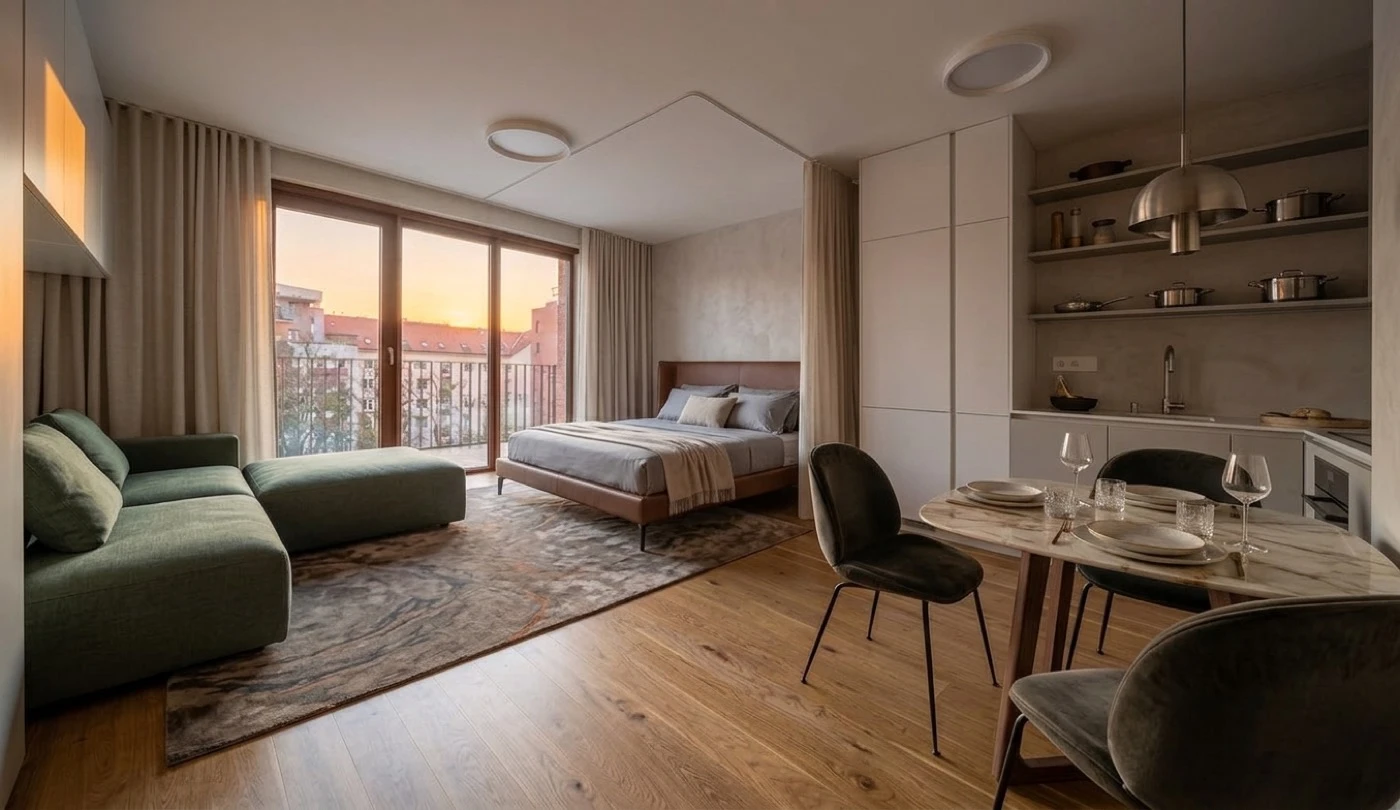
"Design this room as Japanese"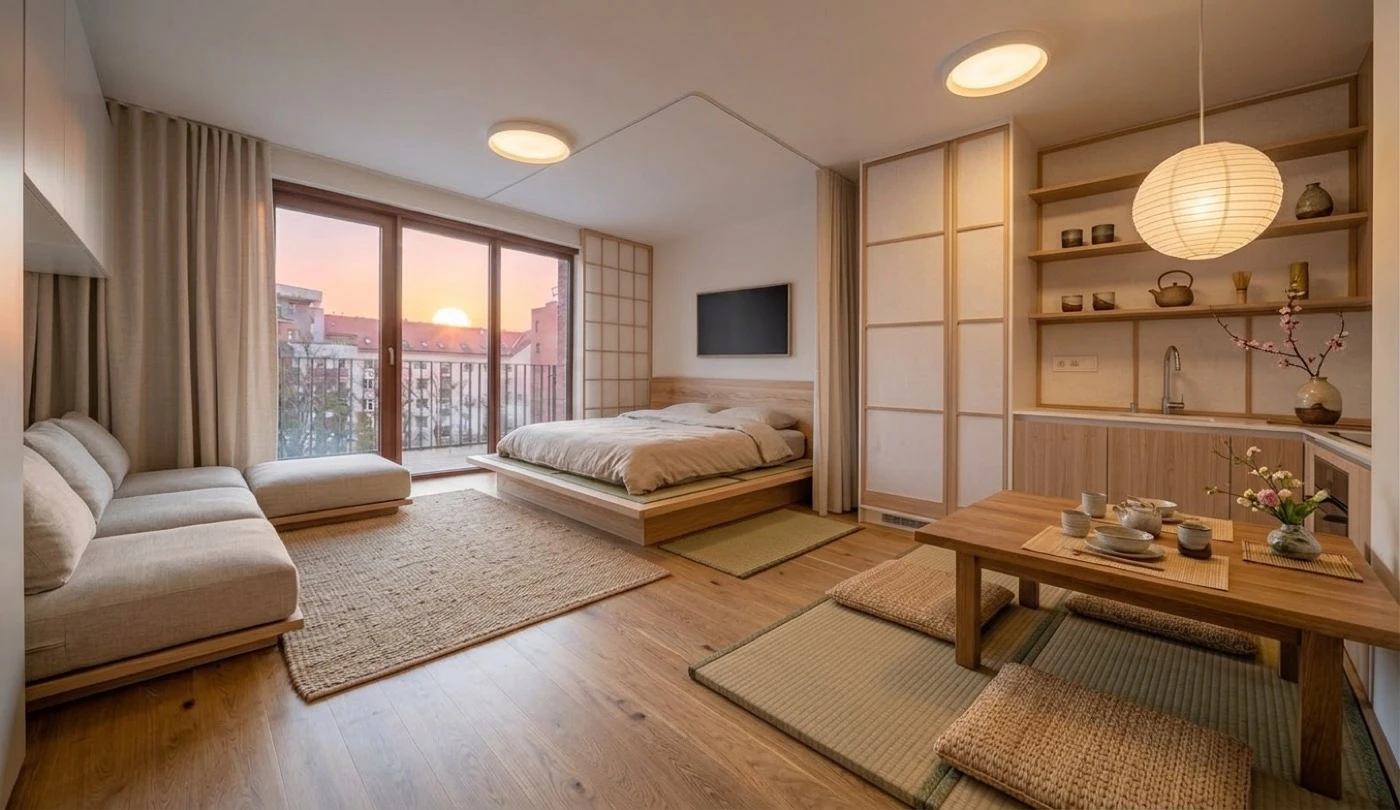
Tutorial
Before you start
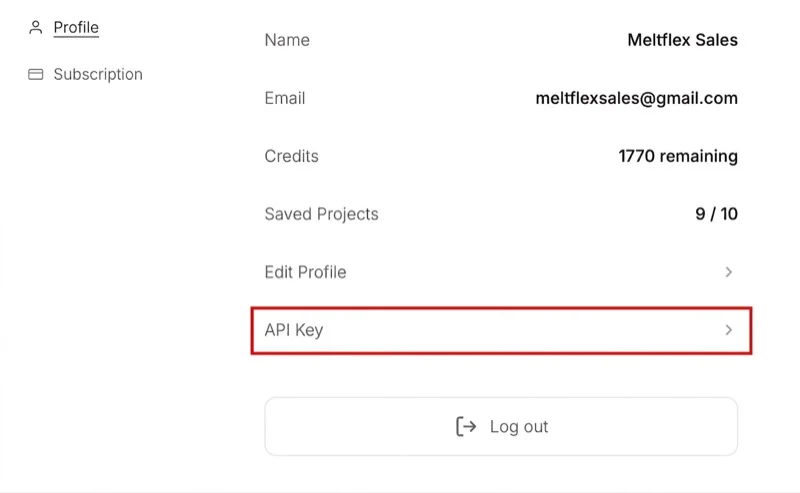
You need an active subscription (any paid plan) to use the API. Once subscribed, go to your account settings and click API Key under Profile:
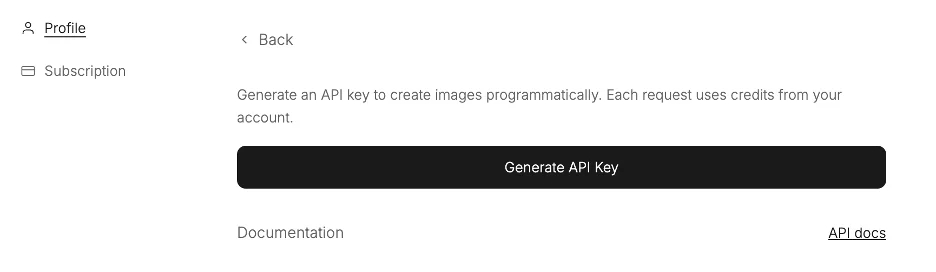
Then click Generate API Key. The key is shown only once, copy it immediately.
- Auth: Send
Authorization: Bearer mf_sk_...in every request header. - Content-Type:
application/json - Credits: Each generation costs 10 credits, deducted before processing. Failed generations are refunded automatically.
- Timeout: Requests have a 2-minute timeout. Large images may take 30–90 seconds to process.
Basic usage: Restyle a room
The simplest call takes a room image and a text prompt. The API returns a base64-encoded PNG of the transformed room.
export MELTFLEX_API_KEY="mf_sk_..."

curl -X POST "https://www.meltflexai.com/api/v1/generate" \
  -H "Authorization: Bearer $MELTFLEX_API_KEY" \
  -H "Content-Type: application/json" \
  -d '{
    "imageUrl": "https://your-cdn.com/empty-room.jpg",
    "prompt": "Transform this empty room during sunset with warm golden light"
}'The response contains a data:image/png;base64,... string. Decode it and save to a file, display in your UI, or upload to your CDN.
Furniture placement
To place specific furniture in a room, send reference images alongside the main room photo. The AI will match each item's appearance (colors, materials, textures) and position them naturally.
referenceImageUrlsarray of public URLs pointing to furniture/decor photos (up to 10)referenceProductsoptional metadata for each image: name for accurate placement
import requests

API_KEY = "mf_sk_..."
URL = "https://www.meltflexai.com/api/v1/generate"

response = requests.post(URL, json={
    "imageUrl": "https://your-cdn.com/empty-room.jpg",
    "prompt": "Place these furniture items naturally in this room during sunset",
    "referenceImageUrls": [
        "https://your-cdn.com/modular-sofa.jpg",
        "https://your-cdn.com/upholstered-bed.jpg",
        "https://your-cdn.com/dining-table.jpg",
        "https://your-cdn.com/oak-chair.jpg"
    ]
}, headers={
    "Authorization": f"Bearer {API_KEY}",
    "Content-Type": "application/json"
})

data = response.json()
if data.get("success"):
print(f"Room furnished with 4 items during sunset")For best results, use clean product photos on white/neutral backgrounds.
Production tips
- Use image URLs over base64 when possible. The request body is capped at 4.5 MB and base64 inflates every input by a third, so inline images are really limited to about 3.3 MB of pixels. An oversized body is rejected at the edge with
413before anything is charged. Downscaling references to roughly 800 px is usually enough. - Retry on 429: Implement exponential backoff (e.g. 1s, 2s, 4s, up to 30s).
- Timeouts: Set a client-side timeout of ~2 minutes. If the request times out, credits are refunded server-side.
- Image quality: Input images of at least 1024px on the longest side produce the best results.
- Prompt specificity: Be specific. "Scandinavian style with warm oak flooring and linen curtains" works better than "make it nice".
- Security: Never expose your API key in client-side code. Make API calls from your backend.
Embed on your website
No coding needed. Put a MeltFlex AI design tool on your own website with your logo, colour and language. Visitors upload a photo of their room and design it right on your page, without a MeltFlex account. No API key is involved: you paste one piece of code.
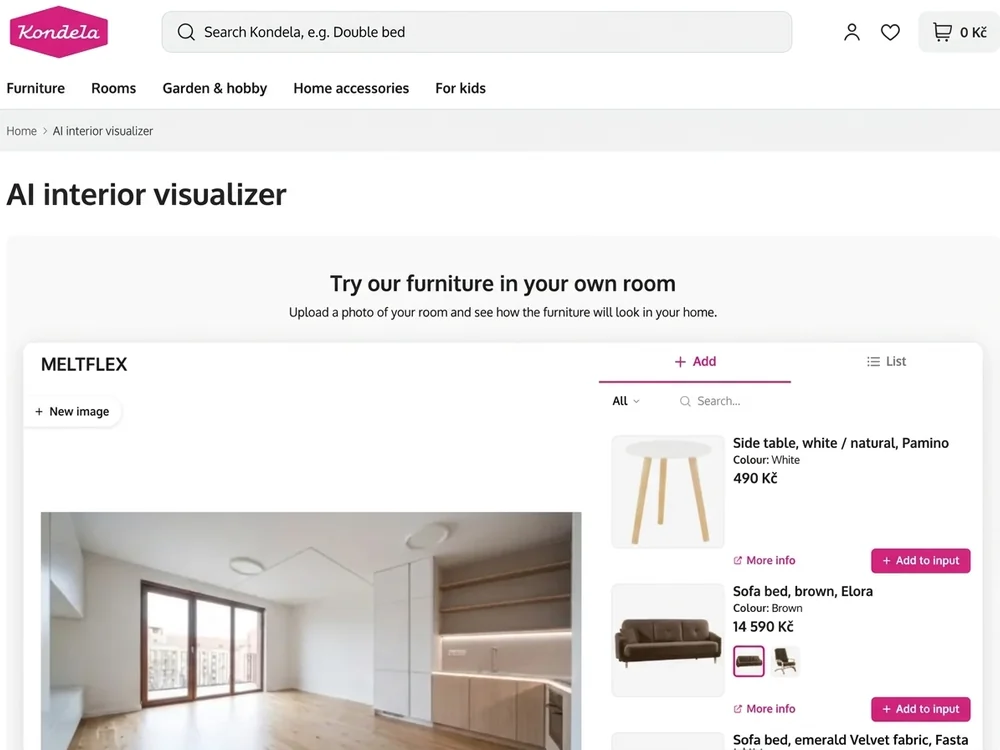
- Furniture brands and e-shops: shoppers place your products in a photo of their room.
- Design studios and real estate: visitors restyle a room, or see an empty listing furnished.
Building an embed and getting its code is free with any account, and its first 10 designs are free. After that it runs on an Enterprise plan. Every design a visitor makes uses 10 credits from your account.
Set it up (5 min)
Open the Website Embed Builder and click New embed. The live preview on the right shows what your visitors will see.
- Tool: pick who it is for: a furniture shop, a design studio or real estate.
- Website: type your domain, e.g.
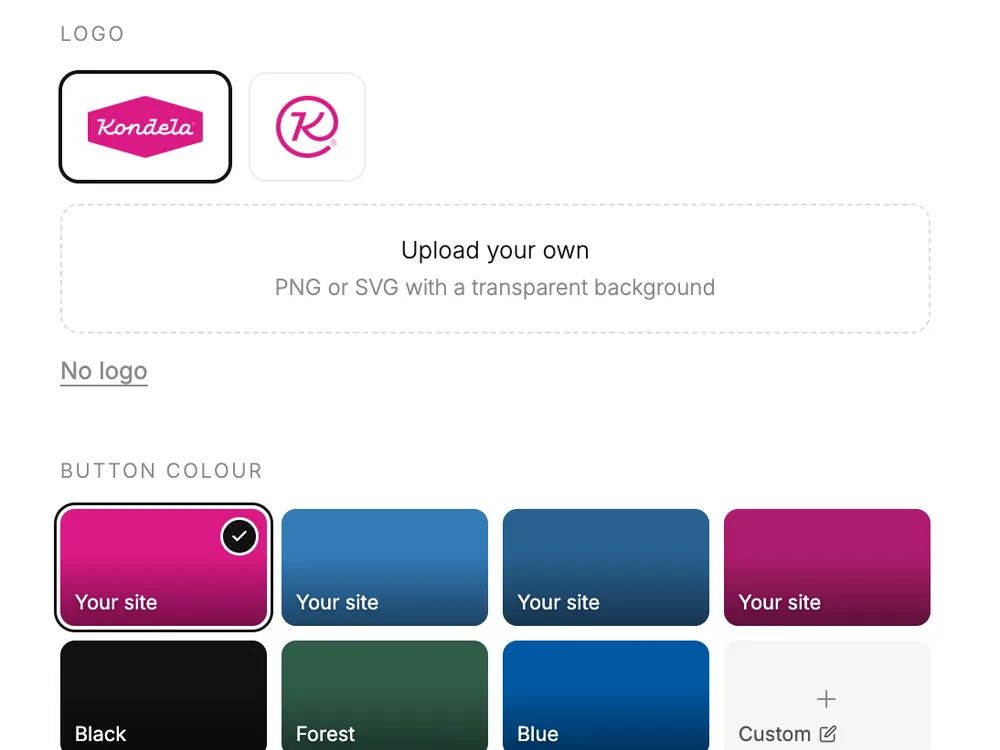
yourshop.com. The tool only loads on that site and its subdomains, so nobody can copy it to theirs and spend your credits. Up to 10 domains. - Brand: your logo and button colour are read from your website and you can change them. Pick the language: English, Spanish, German, French or Portuguese.
- Products (shops only): paste your product feed link, or add products by hand.
- Code: click Copy code and paste it into your page.
- Designs: later, come back here to see what your visitors made: before and after, the prompt and the products used. You can download them as a ZIP.
Add the code
The code is one iframe. Copy yours from the builder, it has your own embed ID in it:
<iframe
  src="https://widget.meltflexai.com/YOUR_EMBED_ID"
  title="AI Interior Design by MeltFlex"
  width="100%"
  height="720"
  style="border:0;border-radius:12px;max-width:100%;"
  allow="clipboard-write"
  loading="lazy"
></iframe>Paste it where the tool should appear:
- WordPress: edit the page, add a "Custom HTML" block, paste, Update.
- Shopify: add a "Custom Liquid" section in the theme editor (or use the page's HTML editor), paste, Save.
- Webflow: drag an "Embed" element onto the page, paste, Publish.
- Any other site: paste it into the page's HTML.
Give it the full width of the page. On desktop it needs about 1000 px of width to show the photo and the design panel side by side; on phones it switches to a mobile layout automatically. Change height to fit your page, and keep src as it is.
You never need to paste the code again. Pause the embed or change its logo, colour, language, products or domains in the builder and your site shows it right away.
Shops: your products
- Product feed: paste the link to the feed you already use for Google Shopping (Google Merchant RSS or Atom, exported by Shopify, WooCommerce, Shoptet, Magento or Mergado) or a Heureka XML feed. Names, pictures, prices, stock, categories and colour variants come from it. Up to 3,000 products, refreshed every hour.
- By hand: no feed? Add up to 60 products with a photo, name, price and link. You can use both together.
- Choose what shows: Choose products lists everything from your feed and your own products. Switch off single products or whole categories; a hidden category stays hidden when your feed adds to it.
- On a product page: add
?product=with the page's address tosrcand the tool opens with that product ready to place. The address must be the same product link as in your feed or product list.
<!-- any product page -->
src="https://widget.meltflexai.com/YOUR_EMBED_ID?product=https://yourshop.com/products/oak-sofa"

<!-- Shopify product template -->
src="https://widget.meltflexai.com/YOUR_EMBED_ID?product={{ shop.url }}{{ product.url }}"Set it up with AI or the API
Hundreds of products and no feed? Let an AI agent (Claude Code, Cursor, ChatGPT with code) or your own script build the embed and load the products for you. It needs an API key (any paid plan). Give your agent this:
Set up a MeltFlex website embed for my shop with the API at
https://www.meltflexai.com/api#embed-api (my key: mf_sk_...).
Tool "retailer", website yourshop.com. Take the products from
<my feed link / my product pages / this spreadsheet>: name, price,
currency, product link and one photo URL each./api/v1/embeds takes the same fields as the builder. Products added this way may use any public https photo URL; we keep our own copy. A feed is read before saving, and one we can't read returns 422 with the reason.
curl -X POST https://www.meltflexai.com/api/v1/embeds \
  -H "Authorization: Bearer mf_sk_..." \
  -H "Content-Type: application/json" \
  -d '{
    "tool": "retailer",
    "name": "Main shop",
    "allowedDomains": ["yourshop.com"],
    "language": "en",
    "accentColor": "#1f2937",
    "logoUrl": "https://yourshop.com/logo.png",
    "productFeedUrl": "https://yourshop.com/feed.xml",
    "manualProducts": [
      { "name": "Oak sofa", "price": 1299, "currency": "EUR",
        "link": "https://yourshop.com/products/oak-sofa",
        "image": "https://yourshop.com/img/oak-sofa.jpg",
        "category": "Sofas" }
    ]
}'GET /api/v1/embeds: your embeds.PATCHwithidand any fields to change (manualProductsreplaces the whole list),enabled: falseto pause.DELETEwithid.tool:retailer(shop products),interior,stagingorkitchen.language:en,es,de,frorpt.- Retailer embeds need
productFeedUrl,manualProducts(up to 60), or both. Up to 10allowedDomains. - Keep products out of the embed with
productFilter:{ "hidden": ["<product id>"], "hiddenCategories": ["Sofas"] }. The product id is the feed'sitem_group_id(oridwhen it has none). A hidden category also hides products the feed adds to it later. Send it whole on each change. - The reply's
link.tokenis the embed ID forhttps://widget.meltflexai.com/<token>. It is there for every account.locked: truemeans no Enterprise yet: the embed runs on the account's free designs (freeDesignsLefton GET), then visitors see a popup that the site needs Enterprise, as in the builder. Everything made here also shows in the builder.
Credits, limits, FAQ
- Who pays? Your account. Each design is 10 credits from your (team) balance. Failed designs are refunded automatically.
- Daily limit: set a maximum number of designs per 24 hours for all visitors together (default 100 = up to 1,000 credits a day), or choose No limit. Either way, each visitor can make up to 10 designs a day.
- Out of credits, plan ended or embed paused? Visitors see "this service is not available right now" and nothing is spent.
- Your team: everyone added under Team access sees and edits the same embeds and their designs.
- Testing locally? Add
localhostto the website list. - Blank frame on your site? The page's domain is not in the embed's website list. Check the spelling (no
https://needed) and that your site runs onhttps. - Your site has its own Content Security Policy? Allow the frame:
frame-src https://widget.meltflexai.com. - Wix: not supported. Wix shows custom code from a different domain than your site, so the domain lock blocks it.
AI Tools
Overview
Every image tool in the app is one call: POST /v1/generate with a photo and a prompt. Each card below shows the tool's clip and the request body that does the same job. Paste it into this request:
export MELTFLEX_API_KEY="mf_sk_..."

curl -X POST "https://www.meltflexai.com/api/v1/generate" \
  -H "Authorization: Bearer $MELTFLEX_API_KEY" \
  -H "Content-Type: application/json" \
  -d '{
    "imageUrl": "https://your-cdn.com/empty-room.jpg",
    "prompt": "Transform this empty room during sunset with warm golden light"
}'Say what to keep. The model keeps the room's walls, windows and flooring unless the prompt says otherwise, so name the one thing to change and what stays. Every body below does this. Add referenceImageUrls to any of them to place real products.
| Tool | Endpoint | Credits |
|---|---|---|
| AI Interior Design | /v1/generate | 10 |
| Virtual Staging AI | /v1/generate | 10 |
| AI Layout Boost | /v1/generate | 10 |
| AI Furniture Changer | /v1/generate | 10 |
| AI Add People to Photos | /v1/generate | 10 |
| AI Exterior Design | /v1/generate | 10 |
| AI Garden Design | /v1/generate | 10 |
| AI Walls Texture | /v1/generate | 10 |
| AI Floor Restyle | /v1/generate | 10 |
| AI Staircase Design | /v1/generate | 10 |
| AI Doors Design | /v1/generate | 10 |
| AI Windows Design | /v1/generate | 10 |
| Gallery Wall Layout Generator | /v1/generate | 10 |
| AI Kitchen Design | /v1/generate | 10 |
| AI Bathroom Design | /v1/generate | 10 |
| AI Office Design | /v1/generate | 10 |
| AI Closet Design | /v1/generate | 10 |
| Dorm Room Planner | /v1/generate | 10 |
| AI Coffee Shop Designer | /v1/generate | 10 |
| AI Restaurant Designer | /v1/generate | 10 |
| AI Photo to Render | /v1/generate | 10 |
| MeltFlex Video (image to video) | /v1/video | 100 (4s) / 150 (8s), +25 at 1080p |
| AI Floorplan to 3D | /v1/floorplan-to-3d | 10 (render) / 100 (3D model) |
| AI 3D Furniture Generator | /v1/furniture-3d | 75 |
| AI 3D Interior Design (3D world) | /v1/world | 30 (draft) / 200 (hd) |
Interior & layout
Restyle a whole room, fully furnished.
{
  "imageUrl": "https://your-cdn.com/living-room.jpg",
  "prompt": "Redesign this room in Scandinavian style with warm oak floors, linen textiles and soft natural light, keeping the walls, windows and layout unchanged."
}Furnish an empty room for a listing.
{
  "imageUrl": "https://your-cdn.com/empty-room.jpg",
  "prompt": "Stage this empty room as a bright modern living room with a sofa, rug, coffee table and floor lamp, keeping the walls, windows and flooring unchanged."
}Re-plan the furniture already in the room.
{
  "imageUrl": "https://your-cdn.com/living-room.jpg",
  "prompt": "Rearrange the existing furniture into a more open layout with a clear walkway from the door, keeping the same pieces, walls, windows and flooring."
}Swap one piece for a real product from its photo.
{
  "imageUrl": "https://your-cdn.com/living-room.jpg",
  "prompt": "Replace the sofa with the sofa in the reference photo, keeping every other piece, the walls and the flooring unchanged.",
  "referenceImageUrls": [
    "https://your-cdn.com/sofa.jpg"
  ]
}Bring a render or an empty space to life.
{
  "imageUrl": "https://your-cdn.com/cafe.jpg",
  "prompt": "Add two people chatting at the counter in natural poses, lit like the room, keeping everything else unchanged."
}Exterior & garden
New facade, door and entry on the same building.
{
  "imageUrl": "https://your-cdn.com/house.jpg",
  "prompt": "Redesign this house in modern farmhouse style with white siding, a black front door and warm entry lights, keeping the structure, roofline and proportions unchanged."
}Landscape a yard with planting, paths and seating.
{
  "imageUrl": "https://your-cdn.com/backyard.jpg",
  "prompt": "Design this yard as a low-maintenance Mediterranean garden with gravel paths, olive trees and a seating area, keeping the plot boundaries and the house unchanged."
}Surfaces & fixtures
One element changes, the rest of the photo stays.
Paint, plaster, panelling or wallpaper on the walls only.
{
  "imageUrl": "https://your-cdn.com/living-room.jpg",
  "prompt": "Change the wall finish to warm greige micro-cement, keeping the flooring, ceiling, furniture and fixtures exactly as they are."
}Preview a flooring before you buy it.
{
  "imageUrl": "https://your-cdn.com/living-room.jpg",
  "prompt": "Replace the flooring with light oak herringbone in a matte finish, keeping the walls, furniture and lighting unchanged."
}New treads, risers and railing in place.
{
  "imageUrl": "https://your-cdn.com/hallway.jpg",
  "prompt": "Redesign this staircase with floating oak treads and a slim black steel railing, keeping its position and the surrounding walls and floor unchanged."
}Try a new door without touching the room.
{
  "imageUrl": "https://your-cdn.com/hallway.jpg",
  "prompt": "Replace the door with a black steel-framed glass door, keeping the walls, flooring and everything else unchanged."
}New frames and glazing in the same openings.
{
  "imageUrl": "https://your-cdn.com/living-room.jpg",
  "prompt": "Change the windows to slim black aluminium frames with clear glazing, keeping the wall openings and the interior unchanged."
}Plan framed art on a real wall.
{
  "imageUrl": "https://your-cdn.com/living-room.jpg",
  "prompt": "Hang a grid of six black-framed prints above the sofa, keeping the furniture and the rest of the room unchanged."
}Rooms & spaces
Cabinets, island, worktops and finishes.
{
  "imageUrl": "https://your-cdn.com/kitchen.jpg",
  "prompt": "Redesign this kitchen with handleless matte-white cabinets, oak open shelving and a quartz island, keeping the footprint, windows and plumbing positions unchanged."
}Tiles, vanity, shower and fixtures.
{
  "imageUrl": "https://your-cdn.com/bathroom.jpg",
  "prompt": "Redesign this bathroom as a warm travertine spa with a walk-in rain shower and an oak vanity, keeping the layout and plumbing positions unchanged."
}Turn any room into a home office.
{
  "imageUrl": "https://your-cdn.com/spare-room.jpg",
  "prompt": "Turn this room into a home office with a walnut desk by the window and built-in shelves, keeping the walls, windows and flooring unchanged."
}A walk-in or fitted closet in your space.
{
  "imageUrl": "https://your-cdn.com/spare-room.jpg",
  "prompt": "Turn this room into a walk-in closet with oak shelving, hanging rails and a central island, keeping the walls, window and flooring unchanged."
}Fit a single, double or triple dorm.
{
  "imageUrl": "https://your-cdn.com/dorm-room.jpg",
  "prompt": "Furnish this dorm room for two students with twin beds, two desks and under-bed storage, keeping the walls, windows and flooring unchanged."
}A cafe fit-out from a photo of the unit.
{
  "imageUrl": "https://your-cdn.com/retail-unit.jpg",
  "prompt": "Design this space as a coffee shop with a service counter, an espresso bar, small tables and warm pendant lights, keeping the walls, windows and ceiling unchanged."
}A dining room from a photo of the space.
{
  "imageUrl": "https://your-cdn.com/retail-unit.jpg",
  "prompt": "Design this space as a restaurant with banquette seating, tables for two and four and warm low lighting, keeping the walls, windows and ceiling unchanged."
}Photo to render
A grey 3D draft or SketchUp screenshot in, a photograph out.
{
  "imageUrl": "https://your-cdn.com/sketchup-draft.png",
  "prompt": "Turn this 3D draft into a photorealistic interior photograph with soft natural daylight, keeping the exact geometry, materials and camera angle."
}Video generation (MeltFlex Video)
Turn one still into a short cinematic clip with sound. Send a MeltFlex render, a listing photo or an exterior shot and get back a hosted MP4: 4 or 8 seconds, landscape 16:9 or vertical 9:16, at 720p or 1080p. It is the same engine as the Video Walkthrough tool in the app (MeltFlex Video, built on Google's Gemini Omni Flash), so a clip you like in the workspace can be reproduced through the API.
| Option | Values | Credits |
|---|---|---|
| Length | durationSeconds: 4 or 8 | 100 / 150 |
| Resolution | resolution: 720p (1280×720) or 1080p | +25 for 1080p |
| Format | aspectRatio: 16:9 or 9:16 | Free |
| Closing frame | endImageUrl / endImage: the clip ends on this still | Free |
| Camera & mood | prompt: one sentence. A slow dolly forward is used if you leave it out | Free |
import time
import requests

API_KEY = "mf_sk_..."
URL = "https://www.meltflexai.com/api/v1/video"
HEADERS = {"Authorization": f"Bearer {API_KEY}"}

# A MeltFlex render (or any interior / exterior still) in, an MP4 with sound out.
job = requests.post(URL, json={
    "imageUrl": "https://your-cdn.com/living-room-render.jpg",
    "prompt": "Use the uploaded image as the first frame. A slow, steady push forward of about ten percent toward the sofa, no pan and no tilt. Keep vertical lines straight. Quiet ambient room tone.",
    "durationSeconds": 8,       # 4 (100 credits) or 8 (150 credits)
    "aspectRatio": "16:9",      # "16:9" or "9:16" for Reels / TikTok / Shorts
    "resolution": "1080p",      # "720p" (default) or "1080p" (+25 credits)
    # "endImageUrl": "https://your-cdn.com/staged.jpg",  # optional closing frame
    "async": True,              # get the jobId now instead of holding the request
}, headers=HEADERS, timeout=60).json()

if "jobId" not in job:
    raise SystemExit(f"Error: {job.get('error')}")

# 200 = finished, 202 = still rendering. Credits come back if it fails.
while True:
    r = requests.get(URL, params={"jobId": job["jobId"]}, headers=HEADERS, timeout=60)
    data = r.json()
    if r.status_code != 202:
        break
    time.sleep(12)

if data.get("success"):
    print("Video ready:", data["videoUrl"])
else:
print("Failed (refunded):", data.get("error"))Waiting for the clip. A 4-second 720p clip usually takes 40 to 60 seconds, and 8 seconds or 1080p takes longer. Without async, the request holds open for up to 230 seconds and returns the MP4 inline. If it is still rendering at that point, you get a 202 with a jobId and the render keeps going. For batches and serverless callers, send async: true and poll GET /v1/video?jobId=… every 10 to 15 seconds.
Nothing gets lost. Every response carries the jobId, failures included, and GET /v1/video with no query lists every clip this key has started. A job that fails or expires is refunded in full within ten minutes, even if nobody polls it.
Before and after in one clip
Send the empty room as imageUrl and the staged render from /v1/generate as endImageUrl, and the clip travels from one to the other. Both stills must share the same camera angle, which a /v1/generate render of that same photo already does. This is a common pattern for virtual staging listings and furniture shops: two calls give you a reveal clip for the listing or the product page.
Floorplan to 3D
One endpoint, two outputs. output: "render" turns a flat 2D floorplan into a rendered 3D picture in any of the six styles the Floorplan to 3D tool offers (photorealistic, 3D model, architectural drawing, hand-drawn sketch, wireframe, clay), with the same view, furniture, interior-style and labels options. Costs 10 credits.
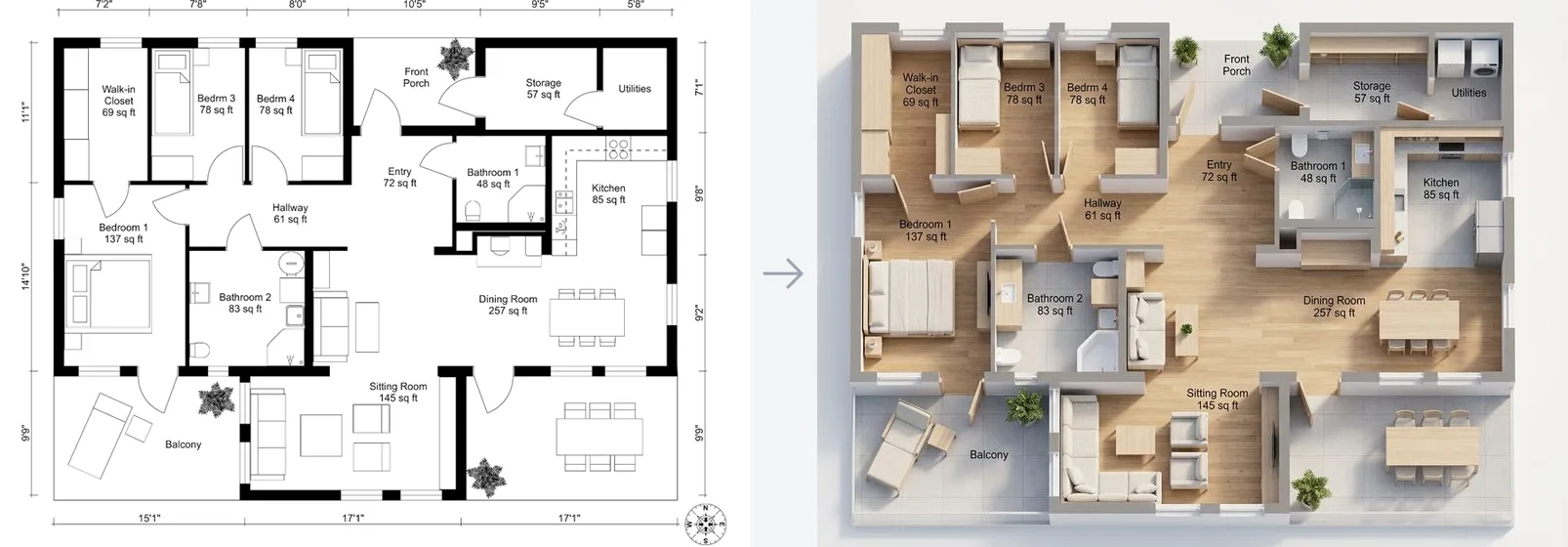
output: "model" (the default) returns a downloadable GLB 3D mesh instead. The plan is first rendered as a 3D cutaway view (walls, doors and windows detected), then reconstructed into geometry, textured or bare. Costs 100 credits.
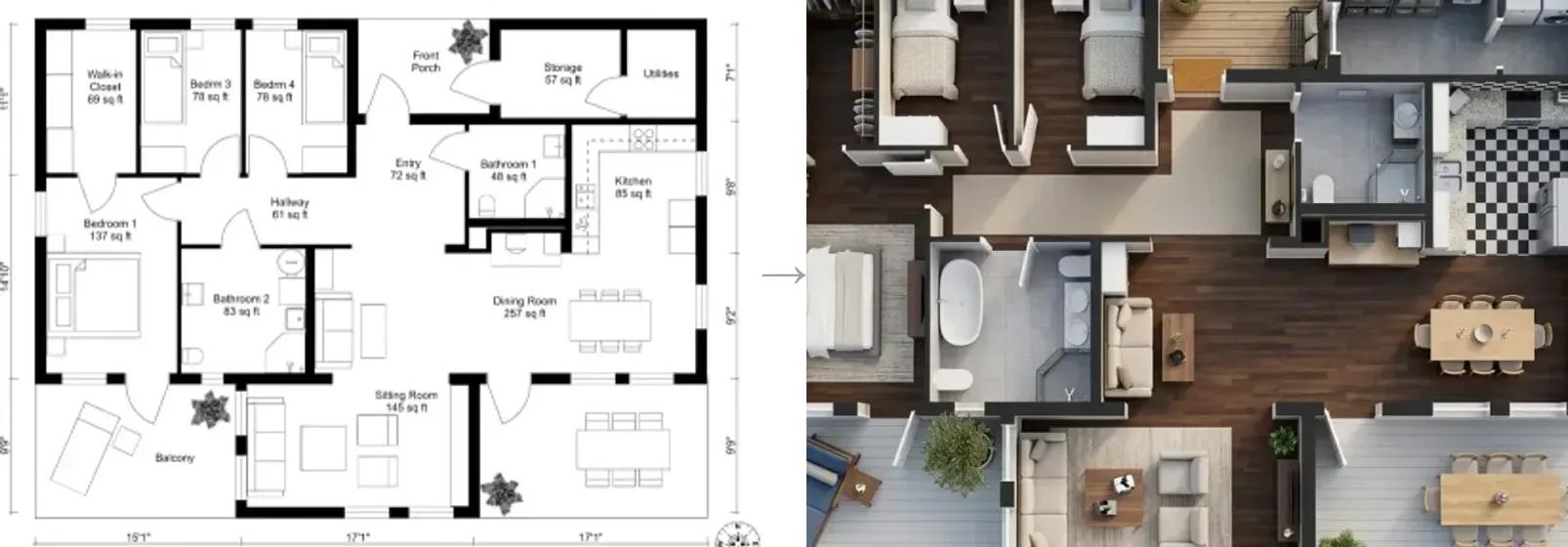
import requests

API_KEY = "mf_sk_..."
URL = "https://www.meltflexai.com/api/v1/floorplan-to-3d"

headers = {"Authorization": f"Bearer {API_KEY}", "Content-Type": "application/json"}

# 1) A rendered 3D picture of the plan (10 credits, ~20 s)
render = requests.post(URL, json={
    "output": "render",
    "imageUrl": "https://your-cdn.com/2d-floorplan.png",
    "style": "photorealistic",   # 3d-model | drawing | sketch | wireframe | clay
    "view": "isometric",         # topdown
    "furniture": "furnished",    # empty | styled
    "interiorStyle": "scandinavian",
    "labels": "names",           # full | none
}, headers=headers, timeout=120).json()
print("Render:", render.get("imageUrl"))

# 2) A downloadable GLB 3D model of the plan (100 credits, ~3 min)
model = requests.post(URL, json={
    "output": "model",
    "imageUrl": "https://your-cdn.com/2d-floorplan.png",
    "textured": True,  # False → bare geometry, no texture pass
}, headers=headers, timeout=300).json()
if model.get("success"):
    print("3D model (GLB):", model["modelUrl"])
else:
print("Error:", model.get("error"))Both images are real responses: the same plan went in, the render and the model came back. A render takes about 20 seconds and always returns inline. A GLB conversion takes about 2–3 minutes; if it is still building when this request's own time budget runs out, the response is HTTP 202 with a taskId instead of holding the connection open — poll GET /api/v1/floorplan-to-3d?taskId=... every 5–10 seconds the same way as Furniture to 3D below. For best results use a clean, high-contrast floorplan with clear walls. The GLB can be dropped straight into three.js, Blender, Unity or any glTF viewer.
Furniture to 3D model
One photo of a furniture piece in, a textured, downloadable GLB 3D model out. This is the AI 3D Furniture Generator as an endpoint: the same photo-to-mesh engine and the same 75 credits. Build a 3D catalogue from product photography, drop pieces into a game engine or an AR scene, or hand a client a model they can spin. Full parameters are in the API Reference.
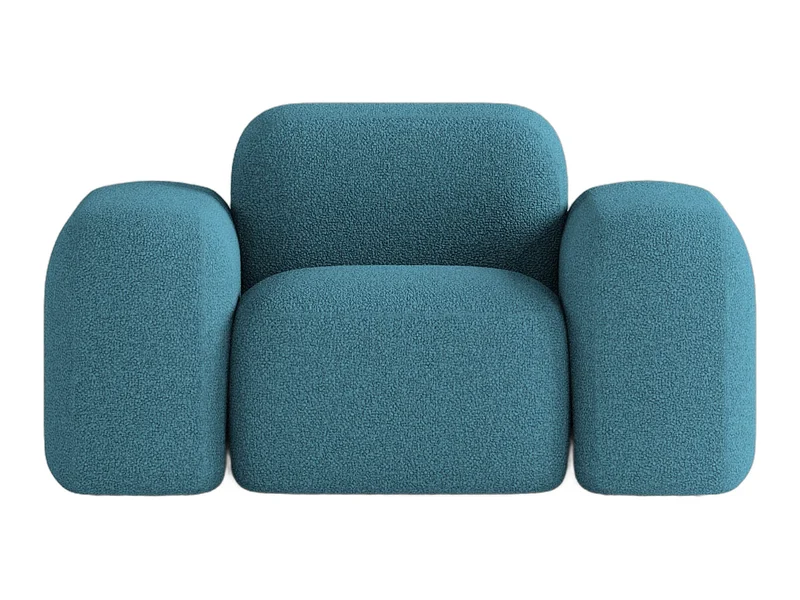
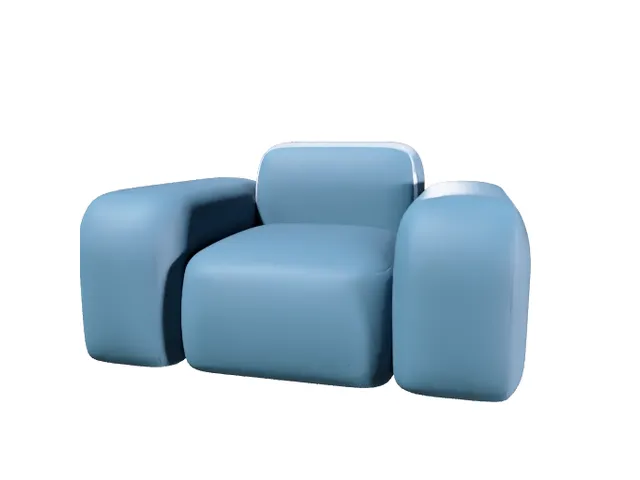
POST /v1/furniture-3d and the model on the right is the GLB that came back, untouched.import time, requests
API_KEY = "mf_sk_..."
URL = "https://www.meltflexai.com/api/v1/furniture-3d"
headers = {"Authorization": f"Bearer {API_KEY}", "Content-Type": "application/json"}
# One furniture photo in → a textured GLB 3D model out (75 credits, ~2–3 min)
r = requests.post(URL, json={
"imageUrl": "https://your-cdn.com/armchair-photo.jpg",
"textured": True, # False → bare geometry, no texture pass
}, headers=headers, timeout=300)
data = r.json()
# Still building when the server's wait ran out (HTTP 202)? Poll the taskId.
while data.get("status") in ("PENDING", "IN_PROGRESS"):
time.sleep(8)
data = requests.get(URL, params={"taskId": data["taskId"]}, headers=headers, timeout=60).json()
if data.get("success"):
print("3D model (GLB):", data["modelUrl"])
print("Thumbnail:", data.get("thumbnailUrl"))
print("USDZ (signed, ~72 h):", data["formats"].get("usdz"))
else:
print("Error:", data.get("error"))Best input: one piece, seen from a front three-quarter angle, on a plain or white background, nothing cropped off. A mesh takes about 2 to 3 minutes. The request stays open until the model is ready; if the build outlives the wait you get HTTP 202 with a taskId to poll. Failed builds are refunded automatically. Set textured: false when you only need the geometry.
Photo to 3D world
A single interior photo or render in, an explorable 3D world out: a Gaussian-splat scene you can look around and walk through from the camera's own viewpoint. This is the AI 3D Interior Design tool as an endpoint. Two tiers: draft (30 credits, about a minute) and hd (200 credits, about five minutes, sharper up close). Chain it after /v1/generate: redesign the room first, then let the client step into the result.
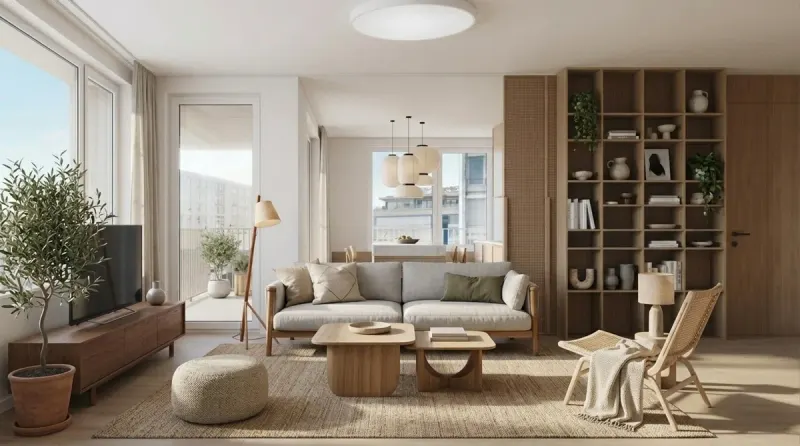
POST /v1/world; the world streams in over the picture and you are standing where the camera stood. Drag to look around.import time, requests
API_KEY = "mf_sk_..."
URL = "https://www.meltflexai.com/api/v1/world"
headers = {"Authorization": f"Bearer {API_KEY}", "Content-Type": "application/json"}
# A room photo or render in → an explorable 3D world out.
# "draft" = 30 credits, ~1 min. "hd" = Marble's full model, 200 credits, ~5 min.
data = requests.post(URL, json={
"imageUrl": "https://your-cdn.com/living-room-render.jpg",
"model": "draft",
"name": "Client living room, option B", # optional label
}, headers=headers, timeout=300).json()
# HTTP 202 means the build outlived the wait: poll the operationId until done.
while data.get("done") is False:
time.sleep(8)
data = requests.get(URL, params={"operationId": data["operationId"]}, headers=headers, timeout=60).json()
if data.get("success"):
print("World id:", data["worldId"]) # store this; the links below expire
print("Splat (.spz):", data["spzUrl"]) # load in three.js + Spark
print("Hosted viewer:", data.get("viewerUrl"))
else:
print("Error:", data.get("error"))
# Later: fresh signed links for a stored world
fresh = requests.get(URL, params={"worldId": data["worldId"]}, headers=headers, timeout=60).json()The response carries the splat file (spzUrl, plus lighter densities in spzUrls) that three.js and Spark load straight from the browser, and a hosted viewerUrl. The splat links are signed and expire after a few days, so store the worldId and call GET /v1/world?worldId= for fresh links whenever you show the world. A build that outlives the wait returns HTTP 202 with an operationId to poll; failures are refunded automatically.
API Reference
Generate Image
Transform a room photo into a photorealistic interior design image. Optionally attach reference images of furniture to place in the room.
https://www.meltflexai.com/api/v1/generateRequest Headers
| Field | Value | Description |
|---|---|---|
Authorization | Bearer mf_sk_... | Your API key from account settings. |
Content-Type | application/json | Request body format. |
Request Body
| Field | Type | Required | Description |
|---|---|---|---|
prompt | string | Yes | Describes the desired transformation. E.g. "Transform into scandinavian style", "Make it minimalist with warm lighting", "Place the furniture naturally". |
image | string | Conditional* | Base64 data URL of the room image. Format: data:image/jpeg;base64,... |
imageUrl | string | Conditional* | Publicly accessible URL of the room image. The server fetches it directly. Preferred over base64. |
referenceImages | string[] | No | Array of base64 data URLs for reference images (furniture, decor). Up to 10. |
referenceImageUrls | string[] | No | Array of public URLs for reference images. Up to 10. Preferred over base64 for better performance. |
referenceProducts | object[] | No | Metadata for each reference image. Each object: {"name": "Sofa"}. Helps the AI identify and place items correctly. |
resolution | string | No | Output quality: "512", "1K", or "2K" (sharpest). Defaults to model auto. |
designLevel | string | No | "lite" (faster & cheaper, −2 credits), "quick" (default), or "pro" (most detailed, HIGH thinking, +5 credits). |
mask | boolean | No | Region edit. When true, the input image must have the area to change painted solid red; the prompt is applied only to those red-marked regions and the rest is preserved. |
variations | number | No | Batch of 1–3 images in one call (default 1). Credits are charged per image; failed variations are refunded. |
* Either image or imageUrl must be provided. If both are sent, imageUrl takes priority.
Response Body
A successful request returns HTTP 200 with a JSON body:
{
  "success": true,
  "image": "data:image/png;base64,iVBORw0KGgo...",
  "images": ["data:image/png;base64,iVBORw0KGgo..."],
  "count": 1,
  "creditsUsed": 10
}| Field | Type | Description |
|---|---|---|
success | boolean | true if the image was generated successfully. |
image | string | Base64-encoded PNG data URL of the first generated image (backward compatible). |
images | string[] | All generated images as data URLs (length equals count; 1 unless variations was used). |
count | number | Number of images returned. |
creditsUsed | number | Total credits charged for this request (per image × successful variations). |
Generate Video
Animate a still image into a short clip with sound (MeltFlex Video). Returns a hosted MP4 URL. Recipes and prompts are in Video generation.
https://www.meltflexai.com/api/v1/video| Field | Type | Required | Description |
|---|---|---|---|
imageUrl | string | Conditional* | Public URL of the opening still. Preferred over base64. |
image | string | Conditional* | Base64 data URL of the opening still. Format: data:image/png;base64,... |
prompt | string | No | Camera move and mood, in one sentence. Defaults to a slow cinematic dolly forward. |
durationSeconds | number | No | 4 (default, 100 credits) or 8 (150 credits). |
aspectRatio | string | No | "16:9" (default) or "9:16". |
resolution | string | No | "720p" (default) or "1080p" (+25 credits). |
endImageUrl | string | No | Public URL of a closing still. The clip ends on it. Use the same camera angle as the opening still. |
endImage | string | No | The closing still as a base64 data URL. Both stills count toward the 4.5 MB body limit, so prefer URLs. |
async | boolean | No | true returns 202 with a jobId at once. Default false waits up to 230 seconds for the clip. |
* Either image or imageUrl must be provided. Any other field is refused with a 400 before credits are charged, so a typo never costs a render.
A finished clip returns HTTP 200:
{
  "success": true,
  "jobId": "7c1f0b2e-...",
  "videoUrl": "https://.../api-videos/.../clip.mp4",
  "durationSeconds": 8,
  "aspectRatio": "16:9",
  "resolution": "1080p",
  "processingTime": "74.10",
  "creditsUsed": 175
}With async: true, or when the render outlives the 230-second wait, you get HTTP 202 instead:
{
  "success": false,
  "status": "running",
  "jobId": "7c1f0b2e-...",
  "durationSeconds": 8,
  "aspectRatio": "16:9",
  "resolution": "1080p",
  "creditsUsed": 175,
  "pollUrl": "https://www.meltflexai.com/api/v1/video?jobId=7c1f0b2e-..."
}https://www.meltflexai.com/api/v1/video?jobId=…Poll one job. Returns 202 while it renders, 200 with videoUrl once it succeeds, and 200 with status: "failed", the error and refunded: true if it fails. Polling costs nothing. Without jobId, it lists this key's recent clips (limit 1 to 100, default 20), newest first.
Floorplan to 3D
Convert a 2D floorplan image into a rendered 3D picture (output: "render", 10 credits) or a downloadable GLB 3D model (output: "model", 100 credits).
https://www.meltflexai.com/api/v1/floorplan-to-3d| Field | Type | Required | Description |
|---|---|---|---|
imageUrl | string | Conditional* | Public URL of the floorplan image (JPEG, PNG or WebP). |
image | string | Conditional* | Base64 data URL of the floorplan. Format: data:image/png;base64,... |
output | string | No | model (default) returns a GLB 3D mesh, 100 credits. render returns a rendered 3D picture of the plan, 10 credits. The fields below apply to one output or the other. |
textured | boolean | No | model only. Default true: the mesh comes with baked textures (walls, floors, window glass). Set false for the bare geometry only, when you will apply your own materials or just need the walls. Untextured runs finish faster and the GLB is smaller. Same credit cost. |
style | string | No | render only. The look: photorealistic (default), 3d-model, drawing, sketch, wireframe, clay. |
view | string | No | render only. Camera: isometric (default) or topdown. |
furniture | string | No | render only. furnished (default, matches the plan's symbols), empty, or styled (furnished plus rugs, art, plants, a set table). |
interiorStyle | string | No | render only, photorealistic and 3d-model styles. auto (default), modern, scandinavian, minimalist, japandi, coastal, industrial, luxury, traditional. |
labels | string | No | render only. What text survives from the plan: full (default, names + sizes + dimension lines), names, or none. |
* Either image or imageUrl must be provided. An unknown field or value returns HTTP 400 listing what's valid, before any credit moves. A render takes about 20 seconds and always returns inline. A GLB conversion takes about 2–3 minutes; a build still running when this request's own budget runs out gets HTTP 202 with a taskId — poll GET with that taskId, same as Furniture to 3D.
A successful render request returns HTTP 200 with a hosted image URL and the options that were applied:
{
  "success": true,
  "output": "render",
  "imageUrl": "https://.../floorplans/render.png",
  "format": "png",
  "style": "photorealistic",
  "view": "isometric",
  "furniture": "furnished",
  "interiorStyle": "scandinavian",
  "labels": "names",
  "creditsUsed": 10
}A successful model request returns HTTP 200 with a hosted model URL:
{
  "success": true,
  "output": "model",
  "modelUrl": "https://.../floorplans/model.glb",
  "format": "glb",
  "textured": true,
  "creditsUsed": 100
}If storage is temporarily unavailable, the file is returned inline instead as base64: the GLB under a model field, the render as a data URL under image.
Furniture to 3D
Turn one photo of a furniture piece into a textured GLB 3D model. 75 credits, refunded if the build fails.
https://www.meltflexai.com/api/v1/furniture-3d| Field | Type | Required | Description |
|---|---|---|---|
imageUrl | string | Conditional* | Public URL of the furniture photo (JPEG, PNG or WebP). One piece, plain background, nothing cropped. |
image | string | Conditional* | Base64 data URL of the photo. Format: data:image/jpeg;base64,... |
textured | boolean | No | Default true: the mesh comes with baked PBR textures. false skips the texture pass for bare geometry: faster, smaller, same credit cost. |
* Either image or imageUrl must be provided. A model takes about 2 to 3 minutes and the request stays open until it is ready, so allow a 300 s timeout.
A finished model returns HTTP 200. modelUrl and thumbnailUrl are hosted by MeltFlex and permanent; formats are the engine's own signed links in other formats, valid for about 72 hours:
{
  "success": true,
  "status": "SUCCEEDED",
  "taskId": "0193f1a2-...",
  "modelUrl": "https://.../meshes/api_..._0193f1a2.glb",
  "thumbnailUrl": "https://.../meshes/api_..._0193f1a2.png",
  "format": "glb",
  "formats": {
    "glb": "https://assets.meshy.ai/.../model.glb?Expires=...",
    "usdz": "https://assets.meshy.ai/.../model.usdz?Expires=...",
    "fbx": "https://assets.meshy.ai/.../model.fbx?Expires=...",
    "obj": "https://assets.meshy.ai/.../model.obj?Expires=..."
  },
  "textured": true,
  "creditsUsed": 75
}If the build is still running when the request's time budget ends, you get HTTP 202 instead. Nothing is lost: the credits stay on the job and you poll it.
{
  "success": false,
  "status": "IN_PROGRESS",
  "taskId": "0193f1a2-...",
  "progress": 64,
  "pollUrl": "https://www.meltflexai.com/api/v1/furniture-3d?taskId=0193f1a2-...",
  "creditsUsed": 75
}https://www.meltflexai.com/api/v1/furniture-3d?taskId=...Poll every 5 to 10 seconds. While building it returns status PENDING or IN_PROGRESS with a progress percentage; on success the same body as above; on FAILED an error and refunded: true. The refund happens exactly once no matter how often you poll.
Loading the result in a page is one line with three.js:
import * as THREE from "three";
import { GLTFLoader } from "three/addons/loaders/GLTFLoader.js";

// data = the JSON from POST /v1/furniture-3d (or /v1/floorplan-to-3d)
new GLTFLoader().load(data.modelUrl, (gltf) => scene.add(gltf.scene));3D World
Turn one interior photo or render into an explorable Gaussian-splat 3D world. 30 credits for a draft world, 200 for hd, refunded if the build fails.
https://www.meltflexai.com/api/v1/world| Field | Type | Required | Description |
|---|---|---|---|
imageUrl | string | Conditional* | Public URL of the room photo or render (JPEG, PNG or WebP). A normal photo; a 360° panorama is detected automatically. |
image | string | Conditional* | Base64 data URL of the image. Format: data:image/jpeg;base64,... |
model | string | No | draft (default): fast walkable world, 30 credits, about a minute. hd: Marble's full model, sharper and holds up close, 200 credits, about five minutes. Anything else is HTTP 400. |
name | string | No | A label for the world, up to 64 characters. Shown in the hosted viewer. |
* Either image or imageUrl must be provided. Draft worlds usually finish inside the request; hd builds usually do not, so treat HTTP 202 as the normal path for hd and poll.
A finished world returns HTTP 200:
{
  "success": true,
  "done": true,
  "worldId": "8641d179-d7c6-4b39-94b6-101a420e8d80",
  "spzUrl": "https://cdn.marble.worldlabs.ai/.../full_res.spz?...",
  "spzUrls": {
    "full_res": "https://cdn.marble.worldlabs.ai/.../full_res.spz?...",
    "500k": "https://cdn.marble.worldlabs.ai/.../500k.spz?...",
    "100k": "https://cdn.marble.worldlabs.ai/.../100k.spz?..."
  },
  "thumbnailUrl": "https://cdn.marble.worldlabs.ai/.../thumbnail.jpg?...",
  "caption": "A bright Scandinavian living room with a balcony",
  "viewerUrl": "https://marble.worldlabs.ai/world/8641d179-...",
  "format": "spz",
  "operationId": "op_...",
  "model": "draft",
  "creditsUsed": 30
}spzUrl is the densest splat; spzUrls adds lighter tiers for a progressive open (the 100k file is about 1 MB). All of them are served with open CORS, so a browser loads them directly. They are signed and expire after a few days: persist worldId, not the links.
A build that outlives the request returns HTTP 202:
{
  "success": false,
  "done": false,
  "status": "IN_PROGRESS",
  "operationId": "op_...",
  "model": "hd",
  "pollUrl": "https://www.meltflexai.com/api/v1/world?operationId=op_...",
  "creditsUsed": 200
}https://www.meltflexai.com/api/v1/world?operationId=...Poll every 5 to 10 seconds. done: false while building; the finished body above on success; on failure status: "FAILED" with an error and refunded: true, exactly once.
https://www.meltflexai.com/api/v1/world?worldId=...Fresh signed links for a world you built earlier, in the same finished-world shape. Free, no credits. Call it right before you show the world.
Showing the world in a page, with three.js and Spark (the renderer this page uses for the live world above):
import * as THREE from "three";
import { SplatMesh, SparkControls } from "@sparkjsdev/spark";

// data = the JSON from POST /v1/world. The camera sits at the origin: that is
// the photo's own viewpoint, so the world opens exactly where the picture was taken.
const world = new SplatMesh({ url: data.spzUrls?.["500k"] ?? data.spzUrl });
world.quaternion.set(1, 0, 0, 0); // .spz is Y-down
scene.add(world);

const controls = new SparkControls({ canvas: renderer.domElement });
renderer.setAnimationLoop(() => { controls.update(camera); renderer.render(scene, camera); });List jobs
Everything this key has started, newest first — the recovery path when a job id goes missing. A dropped connection, a killed process or a gateway timeout can take the id with it; the render carries on regardless, and this is how you find it again. Free, no credits.
https://www.meltflexai.com/api/v1/jobsOptional query: kind (video, world, furniture_3d, floorplan_3d), status (pending, running, succeeded, failed — video only, see below) and limit (1–100, default 20).
Video carries a definite state and the finished result inline, because it is tracked in its own job row the moment it starts. world, furniture_3d and floorplan_3d come back with status: "started" (or "failed" once refunded) and a pollUrl instead — this endpoint hands back the id you lost, it does not poll Marble or Meshy on your behalf for every job in your history. Call the pollUrl to get the real state.
{
  "success": true,
  "count": 3,
  "jobs": [
    {
      "jobId": "04c942b2-4359-4a26-a383-ea49124614d7",
      "kind": "video",
      "status": "succeeded",
      "createdAt": "2026-09-11T12:05:34Z",
      "creditsUsed": 100,
      "videoUrl": "https://.../api-videos/....mp4",
      "durationSeconds": 4,
      "aspectRatio": "16:9"
    },
    {
      "jobId": "7c1f0b2e-...",
      "kind": "video",
      "status": "running",
      "createdAt": "2026-09-11T12:11:02Z",
      "creditsUsed": 100,
      "pollUrl": "https://www.meltflexai.com/api/v1/video?jobId=7c1f0b2e-..."
    },
    {
      "jobId": "b7f2...",
      "kind": "world",
      "status": "started",
      "createdAt": "2026-09-11T11:40:02Z",
      "creditsUsed": 30,
      "pollUrl": "https://www.meltflexai.com/api/v1/world?operationId=..."
    }
  ]
}Get Credits
Read your account's current credit balance and the per-operation cost table. Useful for pre-flight checks before a batch.
https://www.meltflexai.com/api/v1/creditscurl "https://www.meltflexai.com/api/v1/credits" \
-H "Authorization: Bearer $MELTFLEX_API_KEY"Returns HTTP 200:
{
  "balance": 340,
  "totalEarned": 500,
  "totalSpent": 160,
  "email": "you@studio.com",
  "pricing": {
    "POST /api/v1/generate": {
      "perImage": { "lite": 8, "quick": 10, "pro": 15 },
      "note": "Multiplied by variations (1-3). Reference images and products are free."
    },
    "POST /api/v1/video": { "4s": 100, "8s": 150, "1080p": 25 },
    "POST /api/v1/world": { "draft": 30, "hd": 200 },
    "POST /api/v1/furniture-3d": 75,
    "POST /api/v1/floorplan-to-3d": 100
  },
  "costs": { "...": "the app's internal ledger, kept for backward compatibility" }
}Budget from pricing: it is generated from what each endpoint actually deducts. The older costs object is the web app's internal ledger — its photo_furniture rate is not something this API charges.
Resources
Limits
| Limit | Value |
|---|---|
| Credit cost, image generation | 10 credits |
| Credit cost, floorplan to 3D | 10 credits (render) / 100 credits (GLB model) |
| Credit cost, video (4s / 8s) | 100 / 150 credits, +25 at 1080p |
| Credit cost, furniture to 3D | 75 credits |
| Credit cost, 3D world (draft / hd) | 30 / 200 credits |
| Max request body size | 4.5 MB (about 3.3 MB of pixels — base64 adds a third) |
| Request timeout, generate | 2 minutes |
| Request timeout, video / floorplan / furniture-3d / world | Video waits 230s then hands back a jobId (202); the 3D jobs return 202 with a poll id |
| Refund after a failed or abandoned job | Automatic, within 10 minutes, whether or not you poll |
| Max reference images per request | 10 |
| Max active API keys per account | 5 |
| Output, generate | PNG (base64 data URL) |
| Output, video / floorplan / furniture-3d / world | Hosted URL (MP4 / GLB / GLB / SPZ) |
There is no self-imposed request rate limit today — a 429 you see is the underlying engine's own limit (currently only /api/v1/world can surface one, from Marble), passed straight through, not a MeltFlex-side ceiling raised by plan tier. If you receive one, implement exponential backoff before retrying.
Error codes
Error responses include a JSON body with an error field:
{
  "error": "Insufficient credits",
  "message": "You need 10 credits. Check your balance at meltflexai.com/settings",
  "required": 10
}| Status | Meaning | Details |
|---|---|---|
| 200 | Success | Image generated successfully. |
| 400 | Bad Request | Missing, unknown or invalid field. The body names what went wrong: unknownFields with the allowedFields list, or validValues for a bad value. Nothing is charged, so this is the safe way to discover what an endpoint accepts. |
| 401 | Unauthorized | Invalid, missing, or revoked API key. |
| 402 | Payment Required | Insufficient credits. Top up your account. |
| 413 | Payload Too Large | Request body over 4.5 MB. Rejected at the edge, nothing charged. |
| 405 | Method Not Allowed | Only POST is supported. |
| 429 | Rate Limited | Only from /api/v1/world, passed through from Marble when too many builds start at once — not a MeltFlex-side limit. Retry with exponential backoff; credits were refunded. |
| 500 | Server Error | Generation failed. Credits are refunded automatically. |
| 502 | Conversion Failed | Floorplan-to-3D: the conversion service failed after retries. Credits refunded. |
| 503 | Service Unavailable | Video/floorplan service temporarily down. Retry shortly. Credits refunded. |
| 504 | Timeout | A render outlived the request budget. Credits refunded before the response. Video no longer returns this — a slow render comes back as 202 with a jobId instead. |

