Repainting a house costs $3,000 to $8,000. New siding can run $15,000 or more. Adding a porch runs $6,000 to $18,000, and our modern front porch ideas guide shows why the depth you pick moves that number more than any finish does. A wrong color or a style that fights your roofline is an expensive mistake you live with for fifteen years. And the worst part is that you usually cannot picture the result until the work is already done.
Our articles are still written by humans!
Get human written articles in your Google feed.
That is the exact problem AI exterior design solves. You upload one photo of your house, describe the change you are thinking about, and in seconds you get a photorealistic render of your actual home in the new style. Same rooflines, same windows, same footprint, just with the white board-and-batten siding, the charcoal metal roof, or the sage-green paint you were debating. You see it before you spend a dollar. Getting the “same rooflines, same windows” part to actually hold is a wording problem rather than a tool problem, and the prompts that do it are in our AI exterior design prompts library.
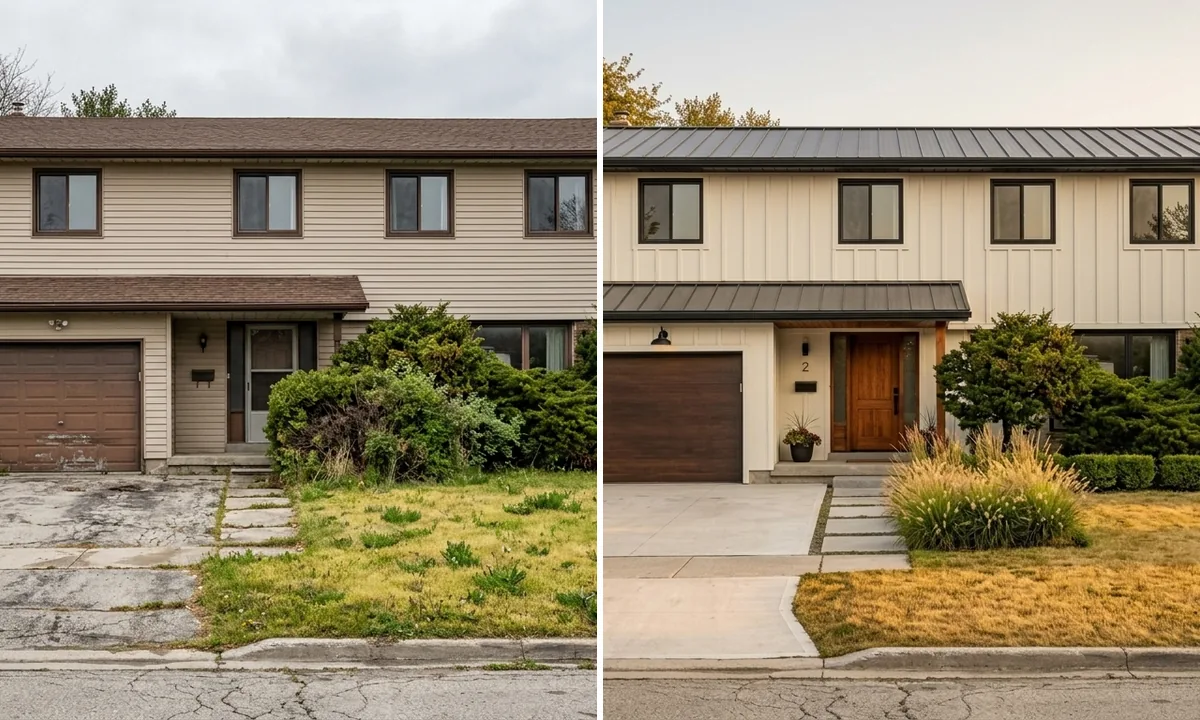
The image above is one house. Left is the tired 1980s version with beige vinyl and a brown asphalt roof. Right is the same home reimagined as a modern farmhouse, generated by AI from a single photo. Nothing was rebuilt. This guide breaks down how it works, shows real before-and-after renders, compares the tools that actually deliver in 2026, and is honest about where AI exterior design still falls short.
What is AI exterior design?
AI exterior design uses image generation models trained on millions of buildings to take a photo of your home and re-render its facade in a new style, color, or material while keeping the real structure intact. It reads your rooflines, windows, doors, and proportions, then applies the look you describe with realistic shadows and textures. The result is a photorealistic preview of your specific house after a renovation, ready in seconds instead of the days a traditional rendering takes.
The key word is your house. Early AI design tools generated a generic pretty building that had nothing to do with your property. The tools worth using in 2026, including MeltFlex, work from your uploaded photo and preserve the actual geometry, so what you see is genuinely your home transformed, not inspiration you then have to imagine onto your own walls.
What you can change with AI exterior design
People assume AI exterior design only swaps paint colors. It does far more than that. Here is what you can realistically visualize from one photo.
Paint and color
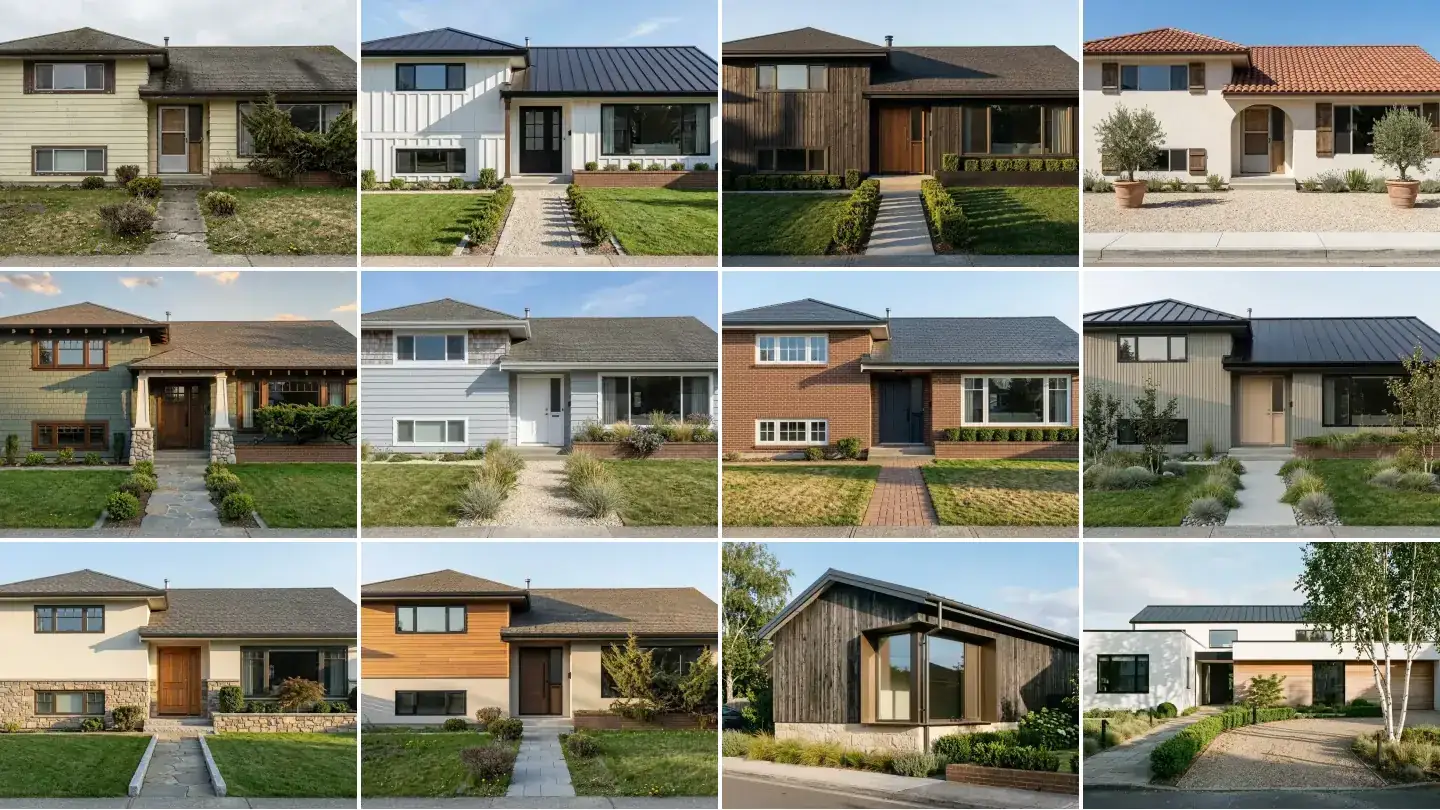
This is the most common use, and for good reason. An exterior paint visualizer lets you see your house in any color before you commit, which removes the single biggest source of regret in a repaint. The render below shows the same house in three schemes: warm white with black trim, deep charcoal, and sage green. Same house, three completely different personalities.
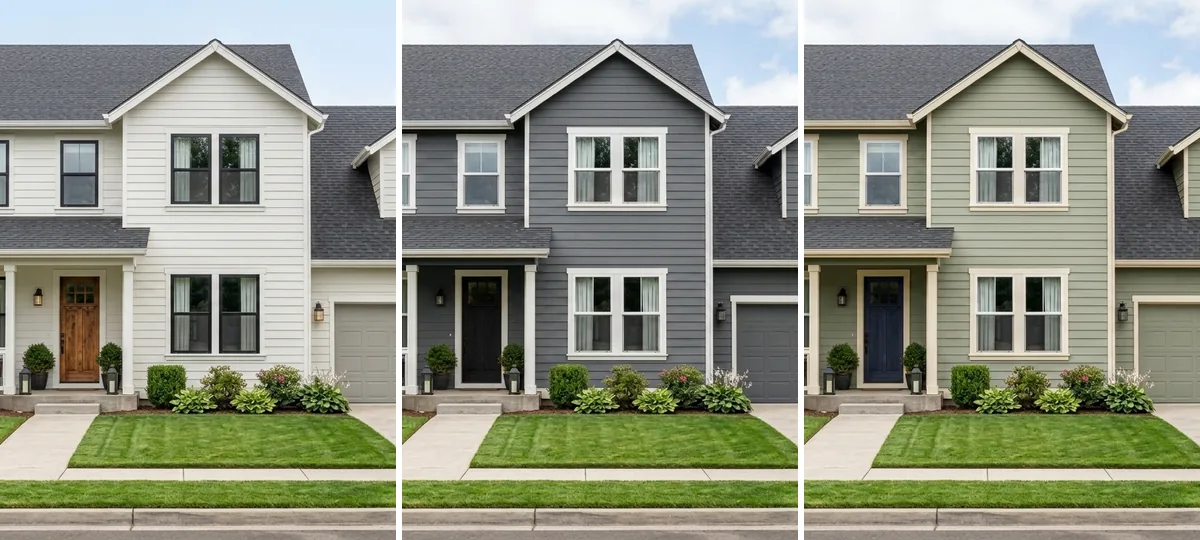
Color is not just taste, it moves money. Zillow analysed more than 135,000 photos of sold homes and found that houses with black or charcoal front doors sold for about $6,271 more than expected, greyish-beige stucco exteriors brought in around $3,500 more than tan or brown, and a creamy bright-yellow exterior sold for roughly $3,408 less (Zillow 2018 Paint Color Analysis). The point is not to copy those exact colors, it is that the wrong exterior color is a measurable mistake, and testing it on your own facade first costs nothing.
Seeing colors on your actual facade also beats a paint chip every time. A chip the size of a playing card tells you almost nothing about how a color reads across a full two-storey wall in real daylight. For a deeper dive on choosing the shade itself, see our guide on how to choose paint colors with AI, and for what is current this year, our 2026 exterior house colors guide shows one house repainted in all seven trending palettes.
Siding and cladding
Swap vinyl for board-and-batten, brick for limewashed brick, or flat stucco for warm wood cladding. Because re-siding is one of the most expensive exterior projects, being able to compare two or three cladding directions on your own house before getting quotes is genuinely valuable. It is the difference between a confident decision and a $20,000 gamble.
Facade style and architecture
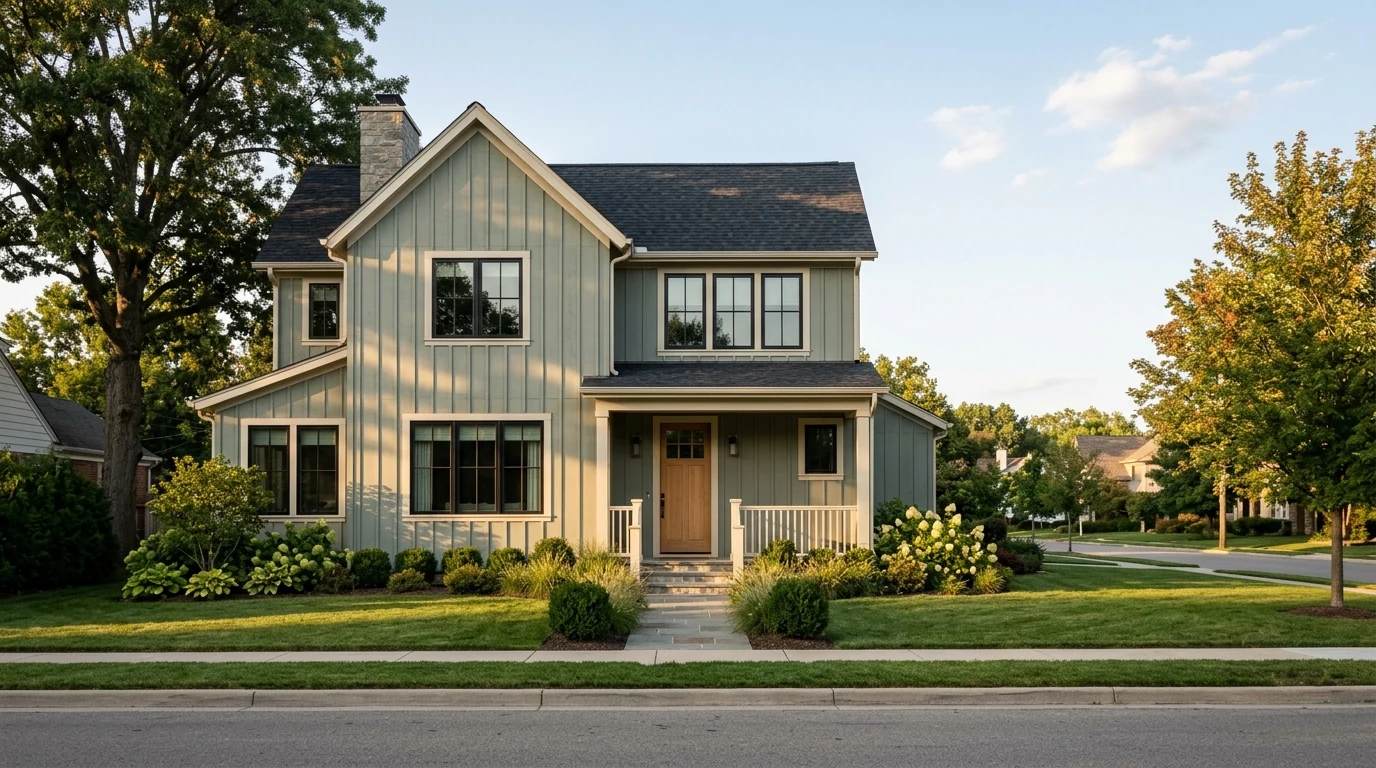
This is where AI exterior design gets fun. Take a plain 1970s ranch and see it as a modern farmhouse, a clean contemporary box, a craftsman, or a mid-century revival. The AI keeps the bones, the footprint and roof pitch, and reworks the surface language. It is the fastest way to discover that your dated house has great potential hiding under bad finishes.
Roof, windows, doors, and garage
Dark standing-seam metal roof instead of brown shingles. Black-framed windows instead of small aluminium ones. A modern flush garage door instead of the builder-grade panel. These details quietly drive most of the visual upgrade in a remodel, and AI lets you test them individually so you can see which ones are worth the money.
Landscaping and curb appeal
The facade is only half of curb appeal. The path, the planting beds, the trees, and the lighting do the rest, and the research here is striking. A Virginia Tech study found that upgrading a home's landscape from average to excellent raised perceived value by 10 to 12 percent, with the biggest driver being design sophistication rather than just more plants (Virginia Cooperative Extension). Research summarised from Michigan State University points the same way: quality landscaping is associated with homes selling for roughly 5 to 11 percent more, and several weeks faster. AI exterior design lets you test that "design sophistication" (a stone walkway, layered boxwoods, ornamental grasses, entry planters) before you spend on plants or hardscaping. For outdoor spaces specifically, MeltFlex has a dedicated garden and outdoor design mode, and our AI garden furniture guide covers patios and backyards in depth.
Which exterior upgrades actually pay off (the data)
AI makes it cheap to picture any change, but not every change earns its keep. Before you fall in love with a render, it helps to know which exterior projects actually return money. The numbers are clear: exterior work consistently beats interior work on return.
In Remodeling's 2026 Cost vs. Value data, eight of the ten highest-return remodeling projects are on the exterior of the house, not inside it. A garage door replacement leads the entire report, recouping well over 200 percent of its cost in resale value, because buyers form an opinion of a home before they ever walk through the door (2026 ROI rankings). Manufactured stone veneer and new siding round out the top of the list, while a fresh front-door color, as the Zillow data above shows, can swing thousands on its own.
This is exactly where visualizing first pays for itself. The highest-ROI exterior moves (garage door, siding, stone veneer, entry color, landscaping) are also the ones where a wrong choice is expensive and permanent. Generating a render of each one on your real house, for free, before you commit a contractor is the cheapest insurance you can buy on a five-figure decision.
How to visualize your home exterior in 4 steps
The whole process takes about a minute. The only step that actually matters for quality is the photo.
1. Take a good photo of the facade
Stand across the street, or far enough back to fit the entire front of the house including the roofline. Hold the phone level so the vertical lines stay straight. Shoot on an overcast day or in soft morning light. Flat, even light gives the AI clean geometry to work with and avoids the harsh shadows that confuse a render. This one habit is the biggest difference between a believable result and a mushy one.
2. Upload it to an AI exterior design tool
Open MeltFlex exterior design and upload your photo. The AI reads the structure: the walls, roof, openings, and the ground in front.
3. Describe the change you want
Be specific. "Modern farmhouse: white board-and-batten siding, black metal roof, black-framed windows, cedar front porch" gives a far better result than "make it modern." You can request a full makeover or change one element at a time.
4. Generate and compare
In about 10 to 30 seconds you get your render. Then do the thing that makes this so useful: generate three or four versions and put them side by side. Comparing real options on your own house is how you actually decide.
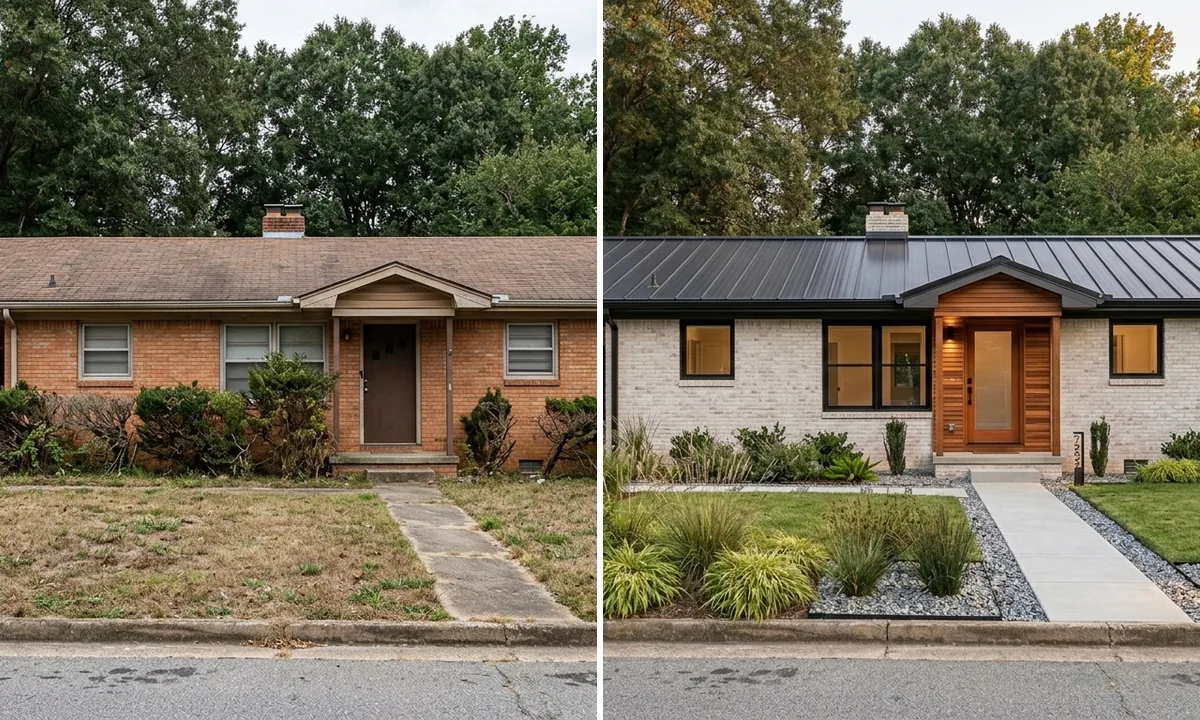
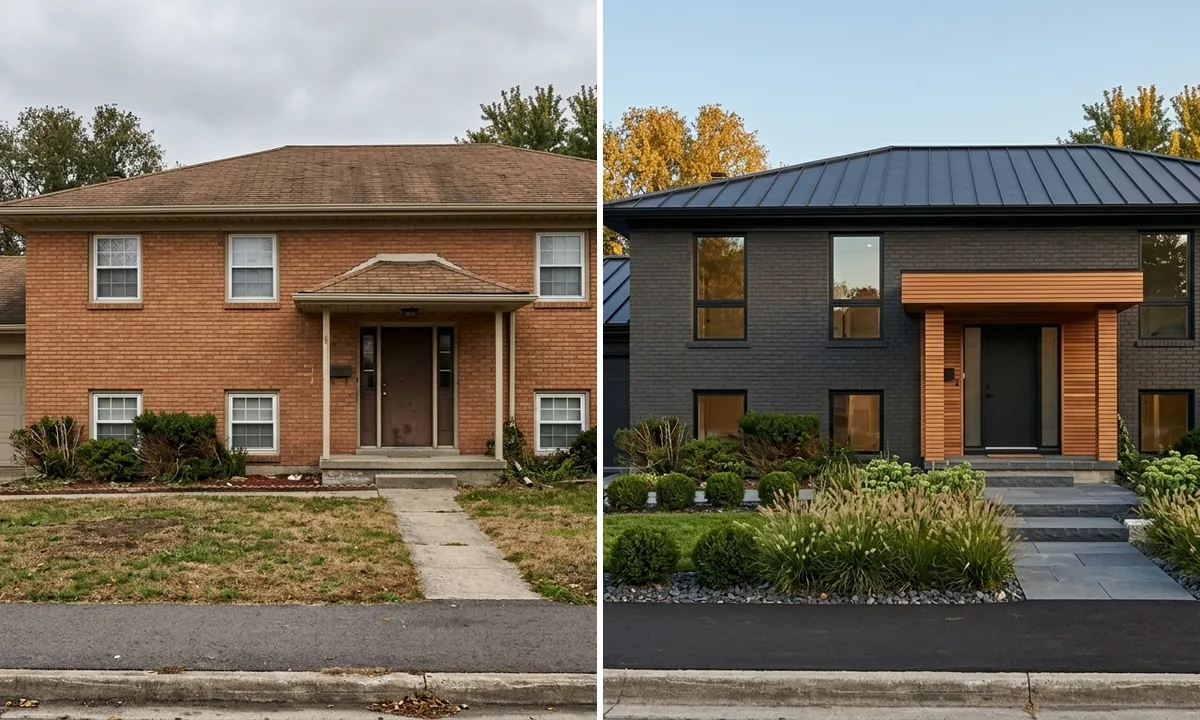
Above: a tired orange-brick ranch on the left, restyled with limewashed brick, a dark metal roof, larger windows, and modern planting on the right. Same single-storey footprint, same roof pitch. This is the kind of transformation that would cost hundreds of dollars and a week of waiting from a rendering studio.
Before and after: real AI exterior transformations
Curb appeal is not only about the house. The render below changes nothing about the facade and everything about the approach to it: a plain concrete path and patchy lawn become a stone walkway with layered planting, boxwood spheres, lavender, and entry planters.
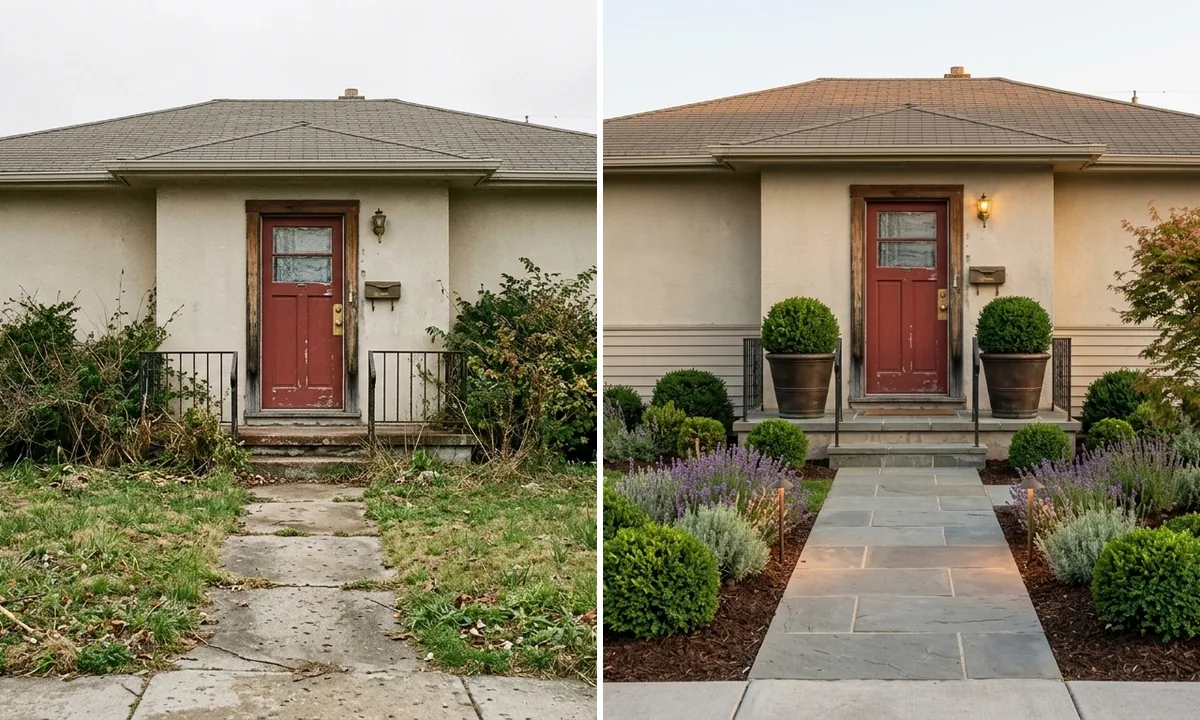
Two takeaways from these examples. First, the structure stays put in every render, which is exactly what you want when the goal is to picture your real home. Second, landscaping is the most underrated, highest-return part of any exterior project, and it is free to test in AI before you dig.
AI exterior design tools compared (2026)
Plenty of tools claim to do exterior design. In practice they fall into two camps: ones that keep your real house, and ones that generate a generic building loosely inspired by your photo. Here is an honest comparison of the names that come up most.
The honest take: if you only ever want to preview paint, a single-purpose paint visualizer is fine and free. If you want to actually plan a renovation, front facade, color, landscaping, and the rooms inside, a tool that keeps your real house and covers more than one space saves you from juggling five apps. That breadth is why we built MeltFlex to handle exterior, interior, and garden from the same photo upload. Brand visualizers like Renoworks are the exception worth keeping: when you are ready to buy specific siding, they show the actual product on your house, which AI cannot.
How much does AI exterior design cost vs traditional rendering?
The cost gap is the whole story. A professional 3D exterior rendering from a studio typically runs $500 to $2,000 per image and takes a few days to two weeks, according to 2026 3D rendering price guides. That is the right call for a developer marketing a $2M new build. It is overkill for a homeowner deciding between two paint colors.
AI exterior design lands at the opposite end: a few cents per render, results in seconds, and a free tier on most tools. The trade is precision. The studio render is dimensionally exact and uses your real material specs; the AI render is a fast, photorealistic concept. For the decision most homeowners are actually making, which is "will this direction look good on my house," the AI version answers the question for free in under a minute.
From AI render to real renovation
A render is only useful if it helps you build. Here is how to use AI exterior design through an actual project.
With contractors, it is a superpower. Instead of describing "something modern with dark trim," you hand over an image of exactly what you want on your exact house. That removes the interpretation gap that causes mid-project change orders, and it speeds up quoting because the contractor can see the scope. This alone often pays for the time you spent generating renders.
With an HOA, it is a starting point, not the submission. A render communicates intent clearly, which helps. But most boards require real product samples and brand specifications to approve exterior changes, and the AI does not know your community's architectural rules. Use the render to get everyone aligned, then submit the official documentation your HOA asks for.
For material selection, verify before you buy. The AI shows a convincing white siding or charcoal roof, but it is not pulling from a manufacturer catalog. Once you have a direction you love, take the render to a supplier and match it to a real product and a real color code. House flippers and renovators do exactly this; our guide on AI for house flippers walks through the full render-to-renovation workflow.
The honest take: where AI exterior design still falls short
It would be easy to oversell this, so here is the straight version. AI exterior design is excellent for direction and decisions, and weak on specifics.
It will not give you exact material specs, it occasionally invents a detail that is not on your house, and a complex or heavily obscured facade (trees in the way, a sharp angle, deep shadow) produces weaker results than a clean straight-on shot. It also has no idea what your local codes, setbacks, or HOA rules allow, so a render that looks stunning could be something you are not permitted to build. None of that makes it less useful. It just means you treat the render as a confident concept, the thing that gets you and your contractor on the same page, and let the professionals handle the millimeters.
It is also worth keeping perspective on how new this is. A 2025 study by the American Institute of Architects found only 6 percent of architects regularly use AI tools, though 53 percent have already experimented with them, and 90 percent flagged concerns about accuracy and authenticity (AIA, 2025). The professionals are circling the same tools you now have on your phone, and they are circling them carefully. For a homeowner the calculus is simpler: you are not signing off construction documents, you are deciding whether a direction is worth pursuing, and for that an instant, free, photorealistic render is hard to beat.
Frequently asked questions
Is there an app to see what my house exterior would look like in a different color or style?
Yes. MeltFlex lets you upload one photo of your house and see it repainted, re-sided, or fully restyled in seconds. It keeps your real structure, rooflines, and window positions and changes only what you ask for, so you are looking at your actual home. You can start free, no credit card.
How accurate is AI exterior design?
Accurate for proportions, lighting, and overall look, which is what you need to choose a direction. Approximate for exact materials: it shows a convincing white board-and-batten or charcoal metal roof, but cannot reproduce a specific manufacturer's profile or paint code. Treat it as a high-quality concept to share with a contractor, not a construction drawing.
How much does AI exterior design cost compared to a traditional rendering?
A traditional studio rendering runs roughly $500 to $2,000 and takes days to weeks. AI exterior design costs a few cents per render and finishes in about 10 to 30 seconds, with a free tier on most tools including MeltFlex.
Can I use AI exterior renders for my HOA or contractor?
They are excellent for contractors because they remove guesswork and speed up quotes. For an HOA, a render helps communicate intent, but most boards still want real product samples and brand specs for approval, and the AI does not know your community's rules. Align everyone with the render, then submit the official materials your HOA requires.
What photo works best for AI exterior design?
Stand back far enough to capture the full front facade including the roofline, hold the phone level so verticals stay straight, and shoot on an overcast day or in soft morning light. A clean, straight-on photo gives the AI the best geometry and the most believable result.
Can AI exterior design change siding, roof, and landscaping at once?
Yes. You can request a full makeover in one prompt (siding, roof, windows, garage door, and landscaping together) or change one thing at a time, for example only the paint color, to see what each upgrade does on its own.
Is AI exterior design free?
Several tools have a free tier. MeltFlex gives you free designs to start with no credit card. After that, paid plans are typically $5 to $50 per month, still a fraction of a single professional rendering.
Does AI exterior design work for the back of the house and garden too?
Yes. The same upload-a-photo workflow handles backyards, patios, decks, and pool areas. MeltFlex has a dedicated garden and outdoor mode so you can plan the entrance, the landscaping, and the back of the house in one place.
Visualize your own home exterior
Every house is different, and the only render that matters is the one of yours. The examples above started as ordinary photos and took seconds to transform. Yours will too.
Comparing the software first? We ran one tired 1970s house through nine of them in the best AI exterior design tools, tested, with verified prices and the roofline test every tool has to pass.
Upload a photo of your house to MeltFlex exterior design, describe the style, color, or siding you are considering, and see your real home in its new look before you spend a thing. No design skills, no downloads, no waiting on a studio. When you are ready to handle the inside as well, the same photo workflow covers interior design and your garden, and you can browse the creations gallery for hundreds of real AI transformations.