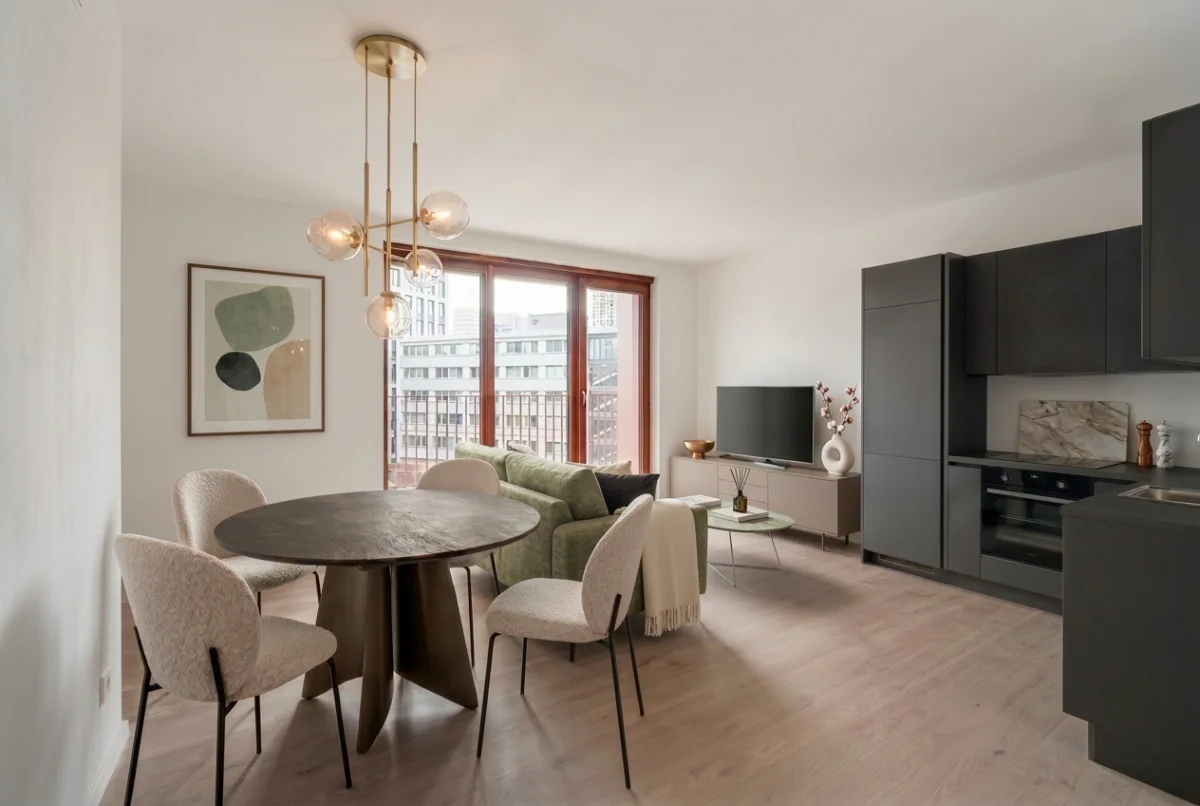
Sarah has been an interior designer for the better part of two decades. She trained on plans and elevations, spent years running a builder’s design center, and can walk into an empty room and see the finished space before anyone else has decided where the sofa goes. She is exactly the kind of designer you would expect to roll her eyes at AI.
Our articles are still written by humans!
Get human written articles in your Google feed.
She did, at first. Then she tried it on one real project, and it quietly became part of how she works. This is her case study: what changed, what did not, the projects she ran through it, and the honest places where AI still lets her down.
Sarah is a real working designer who uses MeltFlex. Her name and a few identifying details are changed at her request. The project images here are illustrative: real room photos redesigned with the same AI tool she uses, so the “before” is a genuine room and the “after” is a real AI redesign of it.
Quick answer: no, AI is not replacing experienced interior designers, and the ones using it are the least worried about it. It is fast at the slow parts, visualizing ideas and showing clients real images instead of descriptions, and useless at the parts that actually need a designer. Used that way, it has made Sarah faster and more persuasive without touching her judgment. Here is how.
Key takeaways
- AI did not replace Sarah’s expertise. It removed the bottleneck between having an idea and showing it to a client.
- Her biggest win is communication: a photoreal image of the client’s actual room closes decisions a mood board never could.
- She uses it for concepts and client buy-in, then takes the chosen direction into her normal sourcing and drawing process.
- Experience makes AI more useful, not less. She knows what good looks like, so she directs it precisely and rejects weak output fast.
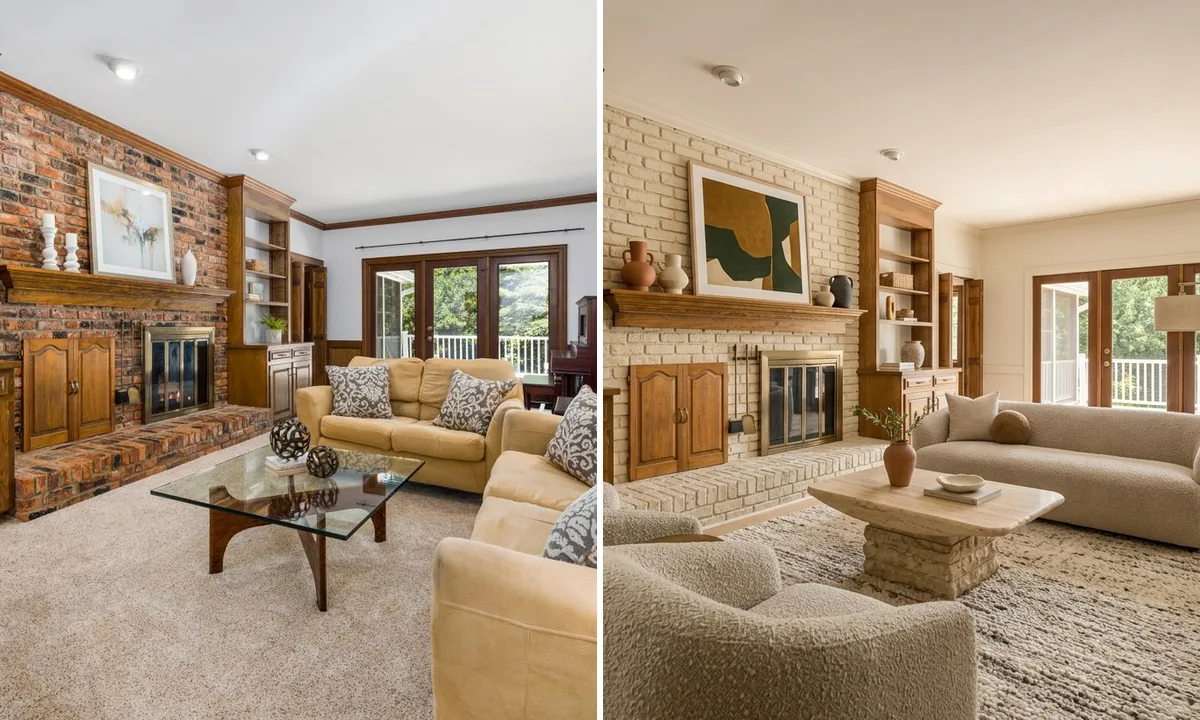
One direction Sarah presents: a dated brick-fireplace living room, left, redesigned in a warm modern organic style, right. Same room, same fireplace, same doors, redesigned from one photo.
The 20-year skeptic who changed her mind
Sarah’s skepticism was not the lazy kind. She had watched a decade of tools promise to automate design and deliver pretty, generic renders full of furniture that did not exist and rooms that ignored the actual architecture. Her objection was specific: a render you cannot build is worse than useless, because it sets a client expectation you then have to walk back.
What changed her mind was not a better render. It was a tool that kept the real room. When she uploaded a photo of a client’s actual living room and got back the same space, same window, same proportions, restyled in a direction she had chosen, the objection fell away. It was no longer a fantasy room. It was her client’s room, shown as it could be.
She is not an outlier anymore. According to the 1stDibs 2026 Designer Trends Report, the share of interior designers using AI tripled to 29 percent in 2025, up from 9 percent in 2023, with another 20 percent planning to adopt soon. Notably, 24 percent remain strongly against it, which tells you this is still a real debate inside the profession, not a settled one.
Will AI replace interior designers? Sarah’s answer
This is the question every designer is actually asking, so it is worth answering plainly. Sarah’s view, after a year of daily use, is a flat no, and her reasoning is the most reassuring part of this whole case study.
AI has no taste of its own. It has never sat in a client’s home and noticed that they have three kids and a white sofa is a terrible idea. It cannot hold a budget, coordinate a contractor, choose between two fabrics that photograph identically but feel completely different, or take responsibility when something goes wrong. It generates options. A designer decides, sources, and is accountable. Those are different jobs, and only one of them is in danger.
What AI replaced was not Sarah. It was the slowest, least creative part of her week: the redrawing, the re-explaining, the endless “can you show me that but in grey” revision loop. Handing that to a machine gave her more time for the judgment clients actually pay her for.
She is in good company. Reggie Waterman of Yorkville University framed it well in a widely shared piece: “just like a calculator didn’t replace accountants, AI won’t replace designers”, because designers “tell stories, interpret emotion, and design for human connection” that AI can mimic but not replicate. And this is not only the view from the middle of the market: Kelly Wearstler, one of the most celebrated interior designers working today, has been an early adopter who approaches AI as a creative collaborator rather than a threat. When both a working designer like Sarah and a name like Wearstler land in the same place, the “AI will take our jobs” panic starts to look misplaced.
The workflow she actually uses
Sarah’s process is not glamorous, which is exactly why it works. It looks like this:
- Photograph the real room. A clean, straight, daylight shot of the client’s space. This is the foundation; a bad photo gives a confused redesign.
- Generate two or three directions. Not twenty. She picks the directions she already believes in and uses AI to make them visible, fast.
- Bring images, not adjectives, to the client. Instead of describing “warm modern organic,” she shows it, in their room.
- Take the chosen direction into her real process. Real products, real measurements, real drawings, real sourcing. The AI image is the brief, not the deliverable.
The shift is subtle but huge. The render used to be the end of a long process. Now it is the start of the conversation, which means the client commits to a direction on day one instead of week three.
The setup that actually makes it work (steal this)
The results in this case study are not luck. They come from two unglamorous things Sarah gets right every time: the photo and the prompt. Get these two and your output jumps from gimmicky to genuinely usable. Here is exactly how she does both, so you can copy it on your next room.
The photo checklist
- Shoot in daylight, lights off. Even, natural light gives the AI clean material and depth cues. Mixed artificial light confuses it.
- Stand in a corner or doorway. Capture the floor, two walls, and the window in one frame, not a tight crop of one spot.
- Hold the phone level, at chest height. Keeps verticals straight so the redesign keeps believable proportions.
- Tidy first. AI reads clutter as furniture and will dutifully redesign around your laundry.
- One room, one clear shot. Wide enough to read the whole space. This single habit is the biggest quality difference.
Three prompts she reuses
Specific beats poetic. “Make it nice” gives mush. Naming the style, three to five concrete materials, and what to keep gives a render you can actually use. These are the shapes she copies and edits:
“Redesign this living room in warm modern organic style: oatmeal bouclé sofa, travertine coffee table, limewashed fireplace, wool rug, olive tree. Keep the same windows, fireplace, and layout.”
“Same room, change only the color: a sage-green accent wall behind the bed, keep all the furniture and the window exactly where they are.”
“Show this kitchen with deep green shaker cabinets and brushed-brass hardware, keep the same layout, window, and appliances.”
Two rules live inside every one of those: name the style plus three to five real materials, and add a “keep” clause. The keep clause is what stops the AI quietly inventing a different, more flattering room you cannot actually build.
What to hand the AI, and what to keep human
The designers who get burned are the ones who blur this line. Sarah is strict about it, and it is the single most useful rule in this whole case study.
What used to take days now takes an afternoon
The clearest before and after in this case study is not a room, it is Sarah’s calendar. Communicating a vision used to mean hand sketches, a render request, and several rounds of revision, often a week of elapsed time for a single room. Now she generates the same set of options in an afternoon and spends the saved days on sourcing and detailing.
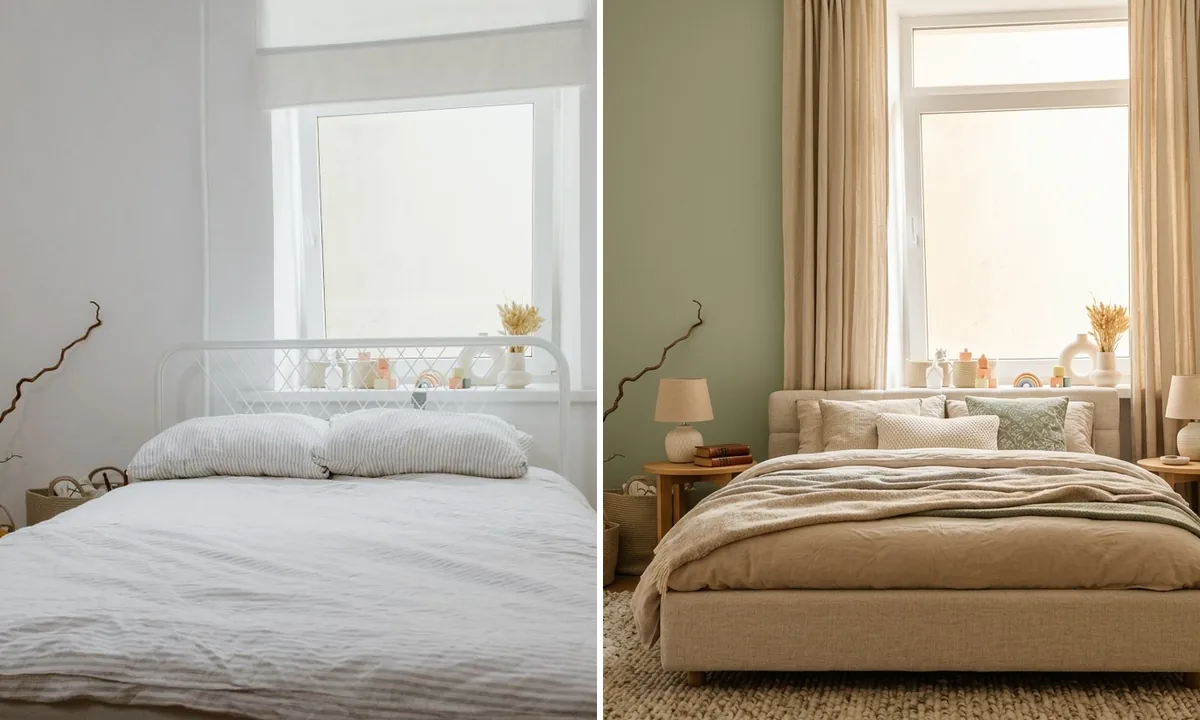
A client bedroom, before and after. The sage direction was approved from this image in one meeting, with no sketching round.
She is careful about what this does and does not save. It compresses the front end, the concept and revision stage where clients change their minds. It saves nothing on the parts that still need a human: measuring, specifying real products, managing the install. But the front end was where projects used to stall, so compressing it is where the time actually comes back.
One project, room by room
To show how this plays out across a whole job, here is one of Sarah’s recent projects, a tired family home she took on room by room. Each image started as a phone photo of the real, dated space.
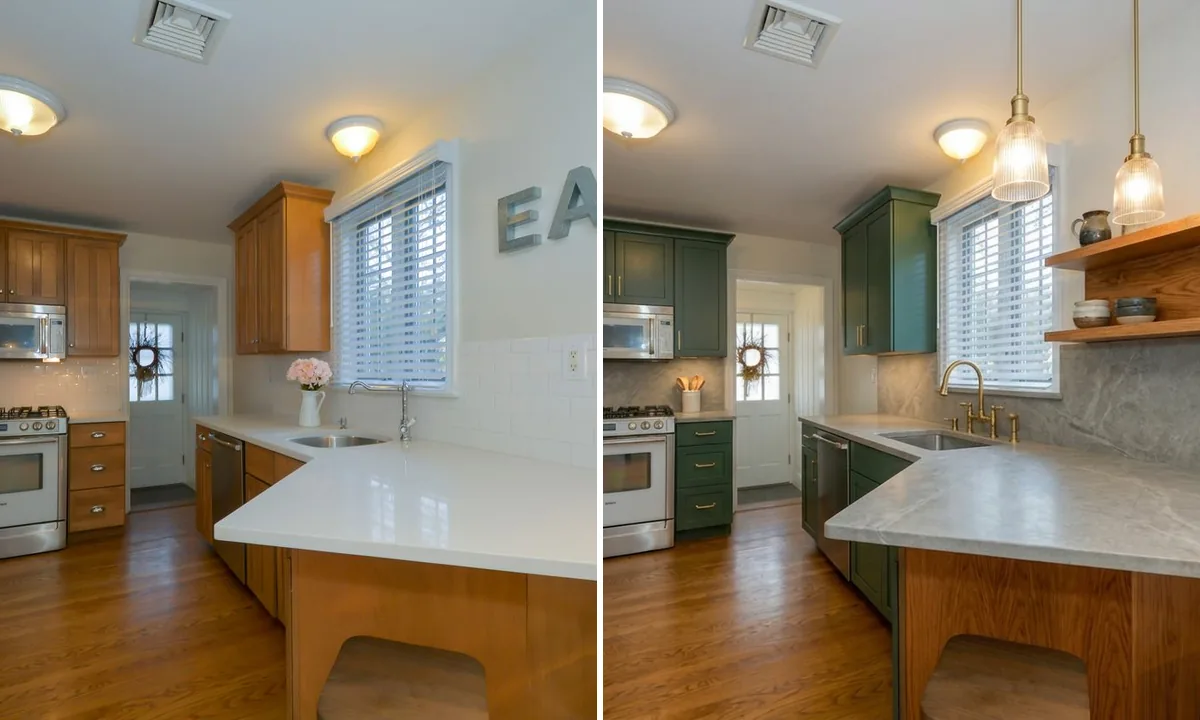
The kitchen. Same window, same layout, same appliances kept in place, with the cabinetry and finishes restyled in green and oak.
The point Sarah makes about these is that the bones never change. The window stays where it is, the kitchen keeps its layout, the room keeps its proportions. That is what lets her use these with a client honestly: she is not selling them a different, better house, she is showing them their own house, realized. A render that quietly enlarges the room or moves the window is the fastest way to lose a client’s trust.
How it changed her client work
The surprise benefit was not speed, it was closing. Design is a confidence business. A hesitant client who cannot picture the result delays, second-guesses, and shrinks the scope. The same client looking at a photoreal image of their own room redesigned tends to say yes, and yes to more.
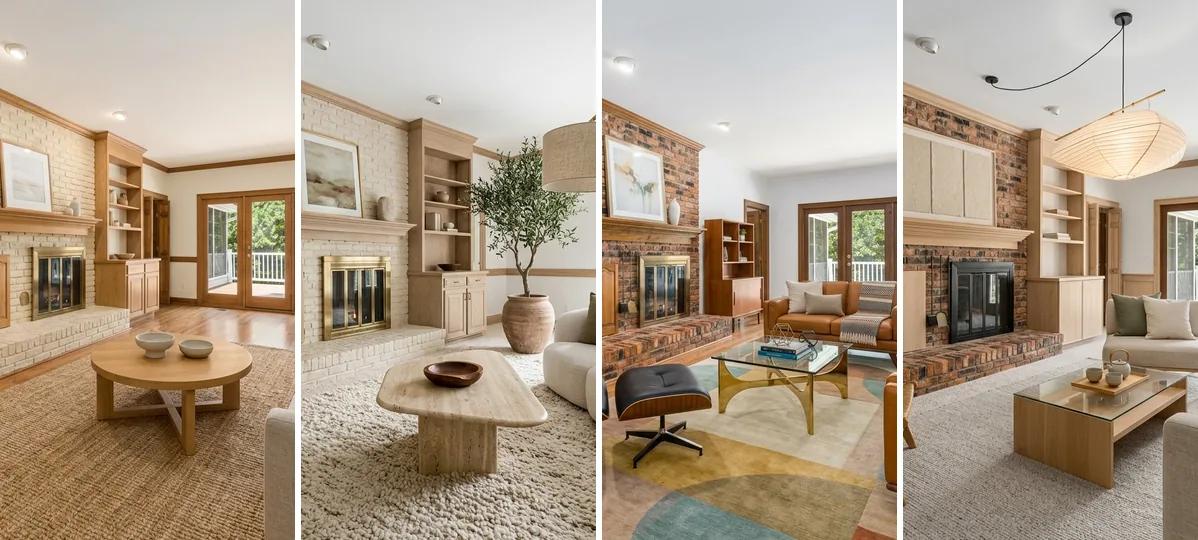
How Sarah presents options: the same room in four directions, so the client reacts to real images instead of style names they half-understand.
This is not just Sarah’s intuition. The National Association of Realtors’ 2025 staging report found that 83 percent of buyers’ agents say staging helps people visualize a property as their home, and roughly half said it shortened time on market. The same psychology drives design sign-off: people commit to what they can see, not what they have to imagine. Showing four real directions, as above, turns a vague conversation into a clear choice.
Where AI still fails her (the honest part)
If this reads too glowing, here is the corrective. Sarah is blunt about where AI still lets her down, and a case study without this part is just an ad.
It does not know real products, so every generated piece has to be matched to something that actually exists, in stock, in budget. It occasionally invents a detail or softens an awkward corner that is still going to be awkward in real life. It has no idea about building codes, load-bearing walls, plumbing locations, or the client’s actual lifestyle. And on a complex or badly lit photo, the output gets unreliable fast. Sarah treats every render as a confident proposal to react to, never as a spec. The judgment, the sourcing, and the accountability are still entirely hers, which is precisely why she is not worried about her job.
The one feature that closes the gap for her is shoppable output. A render she cannot source is a pretty dead end. Tools like MeltFlex link the furniture in the result to real products from retailers like IKEA, Amazon, and Wayfair with prices, which turns a concept image into the start of an actual sourcing list. That is the difference between a tool that makes her look good in a meeting and one that saves her real hours afterward.
Would she recommend it?
Yes, with a caveat she repeats often: use it as an assistant, not an author. The designers who get burned are the ones who try to let AI do the design. The ones who thrive use it to express a vision they already have, faster and more persuasively than they could by hand. For a profession that has spent years afraid of exactly this technology, that turns out to be a quietly optimistic conclusion.
If you are a designer weighing it up, the comparison most relevant to your clients is laid out in our guide on AI versus hiring a designer, and if you want to see the iterative process in detail, the step-by-step AI design process walks through it.
Frequently asked questions
Will AI replace interior designers?
No, and the designers using it are the least worried. AI is fast at rendering and visualization but has no taste, no client relationship, no site knowledge, and no accountability. It cannot run a budget or read what a family needs from a room. It removes the slow parts so the designer spends more time on the judgment only a human brings.
How are professional interior designers actually using AI?
Mostly for speed and client communication, not the final design. The pattern is: photograph the space, generate a few directions in minutes, get the client reacting to real images, then take the chosen direction into the normal process of real products and drawings. Adoption tripled to 29 percent of designers in 2025, almost entirely as an assistant.
How much time does AI save an interior designer?
The big saving is the concept and revision stage. Work that meant a day or more of sketching and back-and-forth becomes a handful of options in an afternoon. It saves nothing on sourcing, measuring, or project management, but it compresses the slow front end where clients change their minds.
Is AI interior design only for beginners?
No. Experienced designers often get more from it, because they know what good looks like, can direct it precisely, and reject weak output fast. A beginner takes whatever the AI gives them; a veteran uses it to express a vision they already have. The skill is in the editing, not the generating.
Can interior designers use AI to win and close clients?
Yes, and it is where many see the clearest payback. Showing a hesitant client a photoreal image of their actual room, rather than a mood board, makes the decision feel real. NAR found 83 percent of buyers’ agents say staging helps people visualize a space as their own, and the same psychology applies to design proposals.
What should a designer try first with AI?
Start with one real client room. Photograph it in daylight, upload it to a tool like MeltFlex that keeps the real room and links to shoppable furniture, and generate two or three directions before your next meeting. Use it as a conversation starter, not a deliverable.
Try the same starting point Sarah uses
Whether you are a designer, a realtor, or a homeowner, the move is the same: upload a photo of a real room, choose a direction, and see it fully realized before anyone commits a cent. That is the starting point that turned a 20-year skeptic into a daily user.
Upload your room to MeltFlex, or browse the creations gallery for hundreds of real before-and-after redesigns. If you are still comparing tools, our test of 14 AI interior design tools shows which ones actually keep your real room and link to furniture you can buy. And if you run a studio, see AI for interior design business: 15 ways to grow.