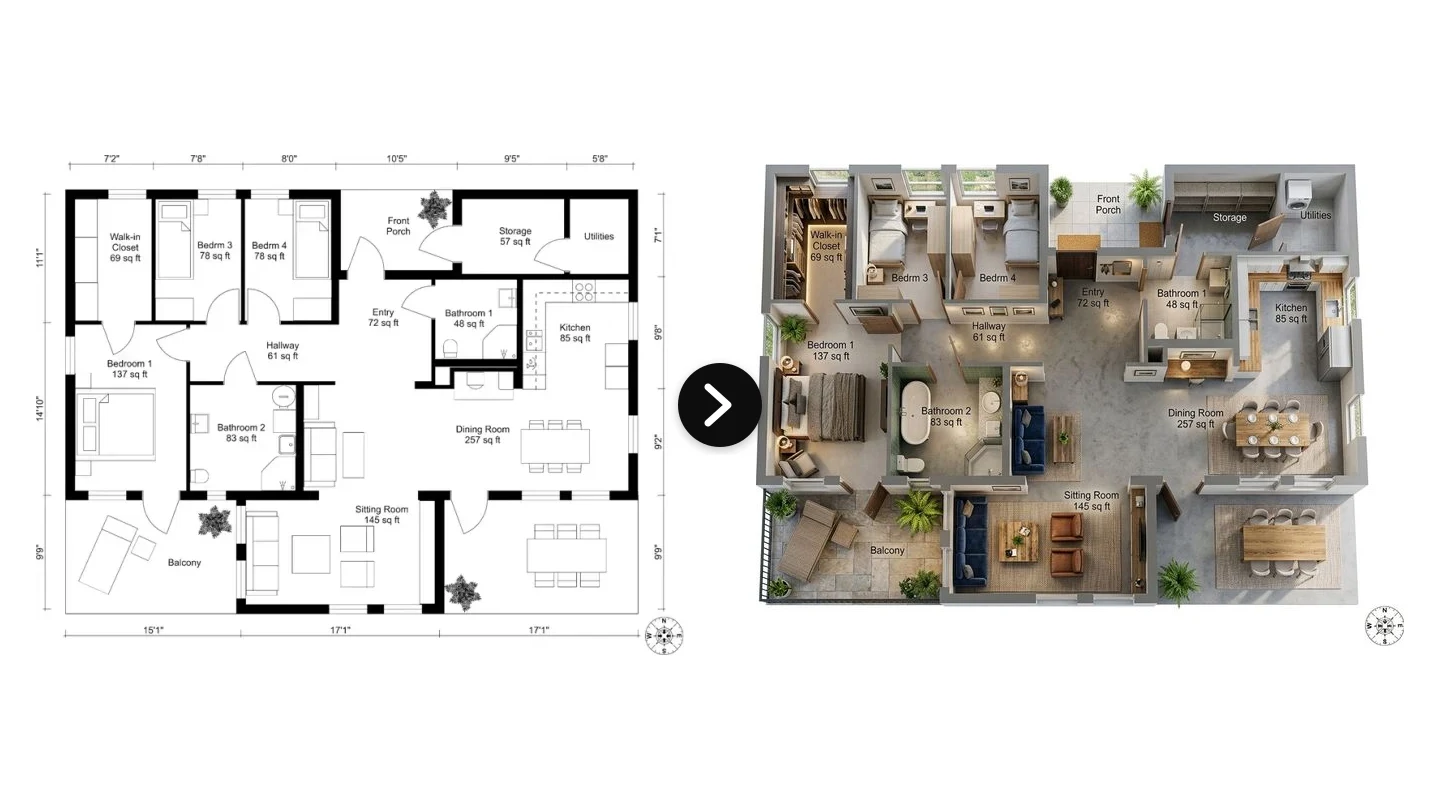
Coohom is one of the most capable interior design tools you can open in a browser, and its own homepage sums up the pitch in four words: "Design, Model & Visualize." That word in the middle, model, is the whole story. Coohom is a proper 3D design platform. You build the room, furnish it from a catalog of tens of thousands of pieces, and render it in photorealistic quality. If that is exactly what you need, it is excellent. If you just want to see your actual living room in a new style, it is a lot of tool for the job.
Our articles are still written by humans!
Get human written articles in your Google feed.
This is an honest review of Coohom for interior design in 2026: what it is, what its AI actually does, what it costs, where it genuinely shines, and where it frustrates people. We build a competing tool, MeltFlex, so treat the comparison section with that in mind. We have kept the facts straight and flagged the places where Coohom is simply the better pick.
Quick verdict: Coohom is the right choice when you need to model a space in precise 3D, kitchens, cabinetry, new builds, retail catalogs, technical drawings. It is the wrong choice when you already have a room and just want to restyle it fast. For that second job, a photo-first tool gets you a finished, shoppable design in seconds instead of an afternoon of modeling.

Coohom describes itself as home design software you use to design, model and visualize. The "model" step is what separates it from one-click photo tools.
FreeUpload photo · freeRedesign my room for freeUpload a photo and let MeltFlex design your space. Your first AI design is free, no card needed.


What Is Coohom, Exactly?
Coohom is a cloud-based 3D interior and home design platform made by Manycore Tech, a spatial-intelligence company founded in Hangzhou in 2011 by three University of Illinois graduates. Manycore runs the Chinese design platform Kujiale, and launched Coohom in 2018 as the international version. It now serves users in more than 200 countries and rates around 4.5 out of 5 across G2, GetApp and Capterra.
In plain terms, Coohom sits in the same family as Homestyler, Planner 5D, Cedreo and SketchUp: tools where you construct a space rather than photograph one. The typical workflow looks like this:
- Draw or import a floor plan in 2D, wall by wall, or upload a plan image or PDF.
- Extrude it into a 3D room and set ceilings, windows, doors and materials.
- Furnish from the catalog of 60,000-plus 3D furniture and decor models, dropping pieces in and adjusting them.
- Render the scene into photorealistic images, 360 panoramas or a walkthrough, using Coohom cloud GPUs (it advertises renders in under a minute).
Because everything is a real 3D model, Coohom can output things a pure image generator cannot: dimensioned 2D drawings, CAD-ready files, bills of materials with cost estimates, and branded product catalogs for furniture retailers. That is its actual center of gravity. It is a design and manufacturing-adjacent tool that also happens to render beautifully, not a casual "restyle my room" app.
What Coohom AI (AIHom) Actually Does
The AI layer is called AIHom, and it is still labeled Beta in Coohom navigation. It is Coohom answer to the wave of prompt-based interior tools, and it is more flexible than most people expect. You can start an AIHom design from any of these:
- A text prompt describing the space you want.
- A floor-plan image in JPG, PNG or PDF.
- A photo of an existing room you want to restyle.
- A screenshot or hand sketch from another tool.
From there it runs a five-step pipeline: generate or import a 2D layout, convert it into a furnished 3D scene, let you pick or describe a style, and render photorealistic images up to 4K, along with 3D walkthroughs and panoramas. Because it plugs into the full Coohom workspace, the outputs go beyond a picture: 2D floor plans with dimensions, bills of materials with cost estimates, and CAD-ready drawings.

AIHom lives inside the Coohom workspace behind a free account. The render behind the login is Coohom own work, and the quality is genuinely good.
Here is the honest framing though. AIHom is an AI assistant for building a 3D model, not a one-tap photo restyle. Even when you feed it a room photo, the value shows up once you are inside the 3D scene, adjusting the layout and materials. That is powerful if you want control. It is friction if you just wanted to see your room in a different style and move on. The difference matters, and it is the reason a lot of people who try Coohom end up wanting something lighter.
Coohom Pricing in 2026: Is Coohom Free?
Coohom has a free tier, with real limits, and three paid steps above it. Here are the 2026 plans pulled from Coohom own pricing page (prices shift and vary by region, so confirm before you buy):

Yearly billing knocks about 17 percent off, so Pro works out to roughly 299 dollars a year. So is Coohom free? Technically yes, but the free plan is a demo, not a workhorse. The catch that annoys people most: Coohom moved some previously free capabilities, such as watermark-free 1K renders, behind the Pro paywall, and long-time users have complained about paying to get back what used to be included. If clean, high-resolution exports are the entire point of the exercise, budget for Pro.
One billing warning worth knowing before you subscribe. Coohom's public reviews on Trustpilot and Capterra include repeated complaints about auto-renewal: people describe being charged monthly, then hit with an annual renewal they did not expect, in one case a 453 dollar credit-card invoice after a cancellation that did not take. A separate common gripe is that the free plan technically gives you renders you then cannot view or download without upgrading. None of this is unique to Coohom, most subscription software has similar stories, but if you start a trial, set a calendar reminder before it converts and cancel through the account settings, not just by closing the tab. It is a genuinely good tool; just go in with your eyes open on the billing.
What Coohom Is Genuinely Good At
Set the comparison aside for a moment, because Coohom deserves credit where it earns it. This is where it is hard to beat:
- Precise 3D modeling. You control every wall, ceiling height, window and material. For a design you actually intend to build, that accuracy is the whole point, and photo-only AI tools cannot match it.
- A massive catalog. Tens of thousands of furniture and material models, including branded, manufacturer-accurate products. For furniture retailers building configurable catalogs, this is a serious platform.
- Fast cloud rendering. Photorealistic images, 360 panoramas and walkthroughs generated on Coohom GPUs, often in under a minute, without a powerful local machine for the render itself.
- Technical output. Dimensioned drawings, CAD-ready files and bills of materials with cost estimates. This is the professional deliverable side that most AI "restyle" tools do not touch.
- Kitchen and cabinetry work. Parametric, catalog-driven kitchen and cabinet design is a real strength, and a common reason pros choose it.
If your work is designing a space from scratch, specifying real products, or producing drawings a contractor can build from, Coohom is squarely in the right category, and it is one of the best options in it.
Where Coohom Frustrates People
The complaints in reviews are consistent, and they all trace back to the same root: Coohom is a modeling tool, and modeling has costs.
- The learning curve is real. Reviewers repeatedly describe a steep ramp before they are productive, and note that even the AI layout tools take time to master. This is not a five-minute tool.
- It is demanding on your machine. Users report screen flicker, darkened corners and sluggishness on ordinary laptops, since the browser workspace pushes a lot of 3D.
- You have to build the room first. Before you see anything, you model the space. For a from-scratch project that is fine. For "I already have this room and want to restyle it," it is a heavy detour.
- The free tier is thin. Limited renders, lower resolution and watermarks, plus the move of formerly-free features behind Pro. Casual users hit the wall quickly.
- Cost adds up for occasional use. At around 29 dollars a month for Pro, it is fair for a working designer and expensive for someone redoing one room.
None of this makes Coohom bad. It makes it specialized. The mismatch happens when a homeowner or a busy agent wants a quick restyle and downloads a full CAD-adjacent design suite to get it.
Coohom vs MeltFlex: Two Different Jobs
This is the comparison most people searching for Coohom actually want, so here it is straight. The honest summary is that Coohom and MeltFlex are built for two different jobs, and the right pick depends entirely on which job is yours.
Coohom is a build-the-room tool. You model the space in 3D, furnish it from a catalog, and render it. Maximum control and precision, at the cost of time and a learning curve.
MeltFlex is a photograph-the-room tool. You upload one photo of a room you already have, pick a style, and in about 20 seconds you get a photorealistic redesign that keeps your exact walls, windows and proportions. No modeling. And every piece it places is a real, shoppable product from IKEA, Amazon, Wayfair, Pottery Barn and Ashley, shown at true scale with live prices and links to buy.
Upload an empty or dated room, and MeltFlex restyles the real space rather than asking you to rebuild it:


A MeltFlex redesign from a single photo, no 3D modeling step. The furniture is real and shoppable, placed to scale in the actual room.
Read that table honestly and the split is obvious. If you need CAD drawings, a bill of materials, or a precisely modeled kitchen, Coohom wins and MeltFlex does not even compete in that lane. If you want to restyle a real room fast and actually buy the furniture, MeltFlex does in one step what Coohom asks you to model your way toward. MeltFlex also converts a 2D floor plan to a 3D model and keeps the shoppable, buy-what-you-see layer that pure render tools skip.
See the Output: 10 Photorealistic Interiors, Rendered by MeltFlex AI
Since this whole comparison is about how good the final image looks, here is the honest proof. The ten interiors below were generated by MeltFlex AI from a text prompt alone, no 3D model, no scene to light by hand. Look closely at the things that separate a real photograph from a render: the way morning light rakes across a floor, the soft falloff of a shadow, water droplets on glass, the weave of a bouclé cushion, the grain in a plank. That physical detail is what modern AI rendering gets right, and it is why you no longer have to build a scene to get a photoreal one.

Early-morning light through sheer linen, casting long soft shadows across wide-plank oak. Rendered by MeltFlex AI from a text prompt.

Golden-hour sun painting a warm rectangle onto textured plaster, with deep shadow in the corners. Rendered by MeltFlex AI.

Midday daylight catching brushed brass, copper pans and the veining in honed marble. Rendered by MeltFlex AI.

Soft, even overcast light on limewash plaster and a wood-slat wall. Rendered by MeltFlex AI.

Water droplets on the shower glass, faint steam and specular highlights on wet stone. Rendered by MeltFlex AI.

A green banker's lamp glowing against deep shadow and a blue-hour city bokeh. Rendered by MeltFlex AI.

Patterned leaf shadow on plaster, warm brass pendants and refracted highlights in the glassware. Rendered by MeltFlex AI.

Late-day light throwing a bold window-grid shadow across a microcement floor. Rendered by MeltFlex AI.

Dappled leaf light filtering across jute, terracotta plaster and textured cushions. Rendered by MeltFlex AI.

Warm bedside lamps and velvet sheen balanced against a cool dusk skyline. Rendered by MeltFlex AI.
Every one of those came from a written description in seconds. Point MeltFlex at a photo of your own room instead, and you get the same photoreal quality applied to your actual space, with the furniture in it real and shoppable. Try it free and see your room rendered like this.
The Best Coohom Alternatives in 2026
If Coohom is not the right fit, the good news is that the interior design tool space is crowded, and the alternatives split cleanly by what you actually want to do. Here are the ones worth knowing, grouped by job:
- To restyle a real room fast, from a photo: MeltFlex is the closest photo-first alternative and free to start, with shoppable furniture placed to scale. Other photo tools include ReimagineHome and Spacely AI.
- To build in 3D like Coohom does: Homestyler (a Coohom sibling, also from Manycore, with unlimited free 1K renders), Planner 5D (the friendliest free floor planner) and Cedreo (aimed at home builders and remodelers) are the usual swaps.
- For serious CAD and modeling: SketchUp paired with a render plugin like V-Ray or Enscape, or D5 Render for a real-time engine, cover the professional end.
- For pure AI staging on listings: Collov AI and ReimagineHome are built for volume real-estate work.
The honest short version: Coohom is best when you need precise 3D and technical output, and a photo-first tool like MeltFlex is best when you just want a real room restyled and furnished quickly. We put Coohom, MeltFlex and every major rival head to head in our guide to the best AI interior design tools of 2026, if you want the full comparison before you decide.
When to Pick Coohom, and When to Pick MeltFlex
Match yourself to a row and the decision makes itself:
- You are designing a space from scratch or need dimensioned drawings: Coohom. Its modeling and technical output are the point.
- You design kitchens, cabinetry or built-ins: Coohom. Parametric, catalog-driven design is a real strength.
- You are a furniture retailer building a configurable catalog: Coohom, or its enterprise tier specifically.
- You have a room and want to restyle it in seconds: MeltFlex. No modeling, keeps your real room.
- You want to actually buy the furniture you see: MeltFlex. Real products, live prices, to scale.
- You want a genuine free way in before paying: MeltFlex gives you a full redesign free, no card. Coohom free tier is more of a limited demo.
- You are an agent or homeowner, not a CAD user: MeltFlex. Coohom is more tool than you need.
How to Try Both Free
Both have a free way to test, so use it. For Coohom, sign up for the free Basic plan and try modeling a small room to feel the workflow and the learning curve honestly. For MeltFlex, take a single photo of the room you care about, open the MeltFlex redesign tool, upload it and pick a style. You will have a photorealistic, shoppable redesign of your real room before you would have finished drawing the walls in Coohom.
If you would rather see the whole field first, we tested and ranked the category in our guide to the best AI interior design tools, which puts Coohom, MeltFlex and the main alternatives side by side.
Coohom FAQ
What is Coohom used for?
Coohom is a cloud based 3D home and interior design platform. You draw or import a floor plan, build the room as a 3D model, furnish it from a catalogue of tens of thousands of models, and generate photorealistic renders, 360 panoramas, and walkthroughs. Its users are mostly interior designers, kitchen and cabinet specialists, furniture retailers, and architects who need dimensioned scenes, technical drawings, and bills of materials rather than one good looking picture.
How much does Coohom cost in 2026?
Four tiers: Basic is free, Pro is about 29 dollars a month with a 7 day trial, Elite is about 69 dollars a month per seat for teams, and Enterprise is custom priced. Yearly billing saves roughly 17 percent. Pro is the line that matters for most people, because it unlocks unlimited watermark free high resolution renders and the full AI tools. Coohom prices its plans regionally and changes them, so treat these as a guide and confirm on its own pricing page before you buy.
Is Coohom good for interior design?
Yes, if your job is to model a room in detail. It is genuinely strong at precise 3D layouts, the catalogue is large, cloud rendering is fast, and it exports CAD ready drawings and material lists. It sits around 4.5 out of 5 on G2, GetApp, and Capterra. The trade off is real: a learning curve, and the fact that you have to rebuild the space as a 3D model before you see anything at all. If you only want to restyle a room you can photograph, that is a lot of work for a picture.
What is Coohom AIHom (AI Home Design)?
AIHom is Coohom's AI layer, still labelled Beta. You start from a text prompt, a floor plan image, a room photo, or a sketch; it generates a 2D layout, converts it to a furnished 3D scene, applies a style, and renders up to 4K. Worth being precise about what it is: it sits on top of the normal Coohom workspace, so it is an assistant for building and styling a 3D model, not a one click photo restyle.
What is the difference between Coohom and MeltFlex?
Two different jobs. Coohom is a build the room tool: model the space in 3D, furnish it from a catalogue, render it. Powerful for precise dimensioned work, slow and technical for everything else. MeltFlex is a photograph the room tool: one photo in, a photorealistic redesign out in about 20 seconds, keeping your exact walls, windows, and proportions, with real shoppable furniture placed to scale. Coohom wins on 3D precision and technical output. MeltFlex wins on speed and on buying what you designed.
What are the best Coohom alternatives?
It depends what you were using it for. For CAD style floor planning, Cedreo, Planner 5D, Homestyler, and SketchUp with a render plugin are the usual swaps. For pure AI staging, ReimagineHome and Spacely AI are strong. For fast photo based restyling with shoppable furniture, MeltFlex is the closest fit and free to start. The whole field is compared in our guide to the best AI interior design tools.
The Bottom Line on Coohom AI
Coohom is a genuinely strong 3D interior design platform, and AIHom is a capable AI layer bolted onto it. If your work is modeling spaces, specifying real products and producing technical output, it is one of the best tools you can use, and the free tier is enough to see whether the workflow fits you. Just go in knowing what it is: a design and modeling suite with a learning curve, not a quick restyle button.
If what you actually want is to see a real room reimagined in seconds, with furniture you can buy, you do not need to model anything. Try a free MeltFlex redesign with your own room photo and compare the two with your actual space in front of you. That is the only test that really settles it.