Add People to Photosbring life to any RenderLobbyTerraceRestaurantOfficeLiving RoomStreet View



 D5 Render


Add People to Photosbring life to any RenderLobbyTerraceRestaurantOfficeLiving RoomStreet View
D5 Render



1200+ reviews
Add People to Your Own Photo or Render
What This Tool Actually Produces
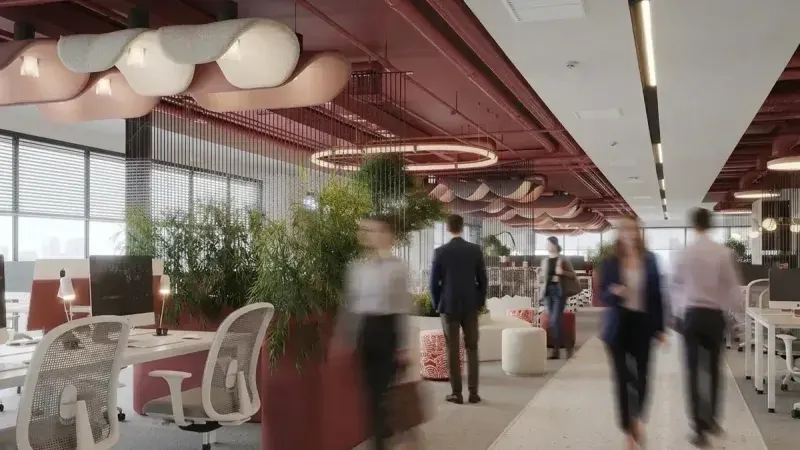
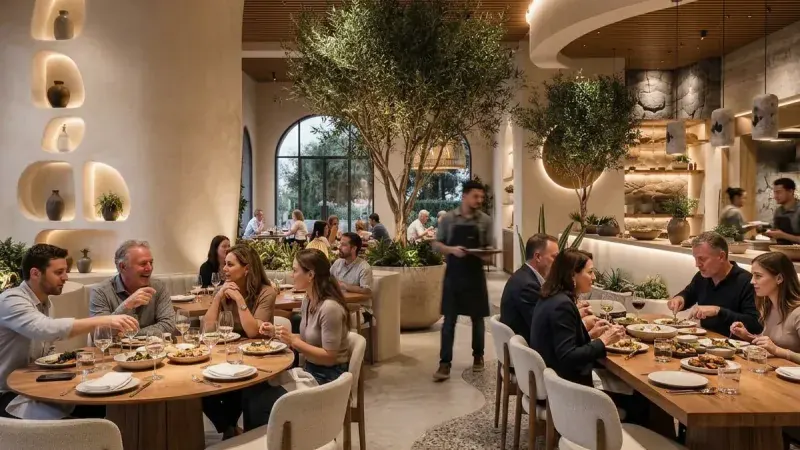
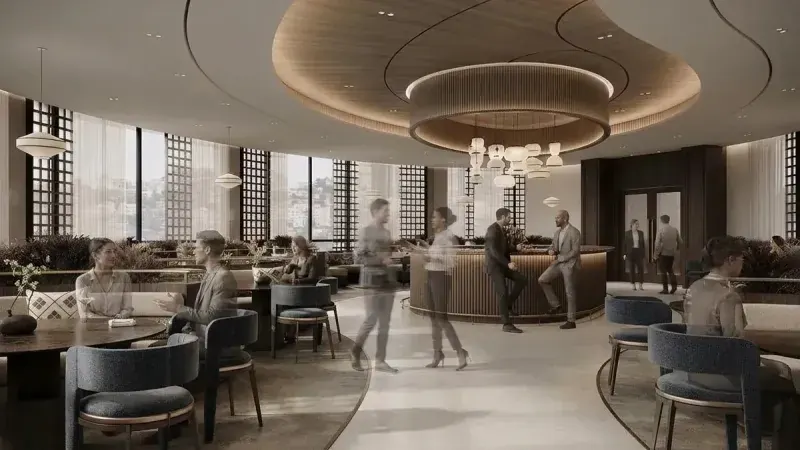
Renders from the MeltFlex gallery with the people added by this tool: one person, a few, several or a busy crowd, realistic, in motion blur, ghosted or as silhouettes, indoors and out.


For interior designers
Become our interior designer and get clients
Publish your design so clients can find you.

A Space With No People in It Looks Unfinished
An empty render shows the materials and hides everything else: how big the room is, what it is for and how it feels when it is in use. Adding people the usual way means a library of cut-out figures, each one lit for a different photo, scaled by eye and given a fake shadow, and it is the step most renders skip because it takes the longest.
Architects & Visualizers
Entourage is the last hour of every render. Cut-outs never match the light, and the scale of the space is only as believable as the people in it.
Hospitality & Retail
A restaurant or a shop with nobody in it looks closed. Investors and tenants need to see the room busy, at the hour that matters.
Developers & Agents
Marketing renders of a new building, a model unit or a terrace sell a lifestyle. A couple on the balcony says more than another sofa.
Add the people with AI. Upload a photo or render, choose one person, a few, several or a busy crowd, who they are and how they look, and MeltFlex AI draws them into your image in under 30 seconds, in its own light and perspective, at a believable size.
Trusted by 213,000+ Architects, Designers & Homeowners

“My contractor literally asked me who did the renders. It was just me and MeltFlex lol. Did 3 rooms in one weekend.”

“found the exact sofa on Amazon for $200 less than in store. The AI matched it perfectly.”

“I use this for client presentations now. Upload their room, show them 3 different styles in 10 minutes. They love it and I close faster.”

“Just moved into a new flat and had zero idea what furniture to get. This thing let me try like 20 diffrent setups and then it showed me where to buy each piece. Way cheaper than I expected.”
“Tested all paint colors in 5 min. love it.”
“pretty impressed honestly. Full design in under a minute and the furniture sugestions were spot on.”

“I returned so much furniture before finding this. Now I design the room first, find the cheapest option online, and buy with confidence. Saved me hundredss of dollars already.”
“found a coffee table for half the price I saw in store. Nice.”

“Designed my whole apartment in one evening. Showed my boyfriend and he tought I hired someone. Nope, just AI.”
“I'm not a designer at all but this made me feel like one. Tried scandinavian style for my bedroom and actualy went and bought everything from the render.”

“Only tool where the furniture is real stuff you can actually buy. Huge diffrence compared to others.”

“used it to plan my parents living room. They saw the renders and the prices and were like okay do the whole house lol.”

“Been using it for 3 months on my renovation project. The AI finds you the cheapest alternatives for every piece of furniture it detects. Saved me probably 2000+ euros so far.”
“genuinely fun to use. The shopping feature is addicting.”
“This replaced my Pinterest boards, my mood boards, and my interior designer. Not even exagerating. Plus it shows you where to buy everything which pinterest never did.”

“virtual staging sold my listing in 4 days. Worth every penny.”

“Tried japandi style on my apartment and it linked me to the exact bookshelf on Amazon for $89. Same one was $240 at the local store.”

“Does in seconds what took me hours on SketchUp. Shows real products too. No lerning curve at all.”

“On the free plan and its been enough for my reno planning. Already bought 3 things it suggested. Will probably upgrade when I start the bedroom.”
“Wife approved the design on the first try wich never happens lol. Ordered the rug same day.”

“Was going back and forth between 3 sofas for weeks. Put them all in MeltFlex and the answer was obvious inmediately. Should have done this first.”

“used it for a client pitch and got the project. Big time saver.”
“upload photo, pick a style, buy the furniture. 20 minutes total.”
“Tried 4 or 5 similar apps before this one. The render quality here is noticably better and it actually shows real furniture with prices wich none of the others did. Game changer.”
“quick, easy, good results. Using it for my rental propery staging.”
“My neighbors kept asking who designed my apartment. Told them it was an AI and they all signed up the same week haha. One of them saved like $500 on furniture thru the app.”

“As an interior designer I was skeptical but honestly this speeds up my workflow so much. Clients can see the design AND shop the products right away.”

“Where was this when I furnished my first house?? Now I test everything in the AI first and find the best deal online.”
How to Add People to a Photo or Render So They Look Like They Belong
People in an architectural image do three jobs: they show how big the space is, what it is for and how busy it gets. They only do those jobs when they sit in the picture's own light and perspective, at a size the eye believes. Upload a photo or render and the AI handles all three; the guide below is how to choose the right people for the shot.
How many people: from one figure to a busy crowd
One Person gives a living room or a bedroom its scale without turning it into a portrait. A Few suits a terrace, a cafe table or a residential street. Several is the normal working day of an office, a restaurant or a lobby. Busy Crowd is the atrium at nine in the morning, a station or a shopping street on opening day. Pick the count for the moment the image is selling, not the most people the space can hold.
People scale in renders: the numbers to check against
A person who is the wrong size breaks a render faster than a wrong material. These are the measurements a figure is read against, so a result that looks off can be checked with a ruler rather than an opinion.
| Item | Imperial | Metric | Where it comes from |
|---|---|---|---|
| Average adult woman, standing | 5 ft 3.5 in (63.5 in) | 161 cm | CDC NHANES 2015–2018, mean height of women 20 and over |
| Average adult man, standing | 5 ft 9 in (69.0 in) | 175 cm | CDC NHANES 2015–2018, mean height of men 20 and over |
| Shortest to tallest common adult | 4 ft 11 in to 6 ft 2 in | 150 to 187 cm | CDC NHANES 2015–2018, 5th percentile of women to 95th percentile of men. A standing figure outside this range reads as a scale mistake |
| Interior door | 6 ft 8 in (80 in) | 203 cm | The standard US door height. An average man's head sits about 11 in (28 cm) below the top of the frame |
| Lowest legal ceiling in a habitable room | 7 ft | 213 cm | International Residential Code R305.1. In a common 8 to 9 ft room a standing adult fills roughly 60 to 70 percent of the wall height |
| Camera at standing eye height | about 5 ft | about 150 cm | Perspective, not a code: from this height the heads of standing adults line up close to the horizon line at any distance, near or far |
Sources: CDC National Center for Health Statistics, Anthropometric Reference Data for Children and Adults: United States, 2015–2018 (Vital and Health Statistics Series 3, No. 46, Tables 9 to 12), and the International Residential Code section R305.1, checked October 2026.
Realistic, motion blur, ghosted, silhouettes or soft focus
Realistic is for marketing images, where the people are part of the lifestyle being sold. Motion Blur draws walkers as a long exposure would: the building stays sharp and the space reads busy without anyone becoming the subject. Ghosted figures are see-through, the architect's way of showing scale and use while the design behind stays visible. Silhouettes suit dusk, backlit glazing and moody terraces, and need no faces approved. Soft Focus puts people out of focus in the foreground, like an editorial photo, so the room behind stays the sharpest thing in the frame.
Choose people who match the brief
The people tell the viewer who the space is for. Business for offices, co-working and hotel lobbies. Casual for homes, cafes and streets. Couples for residential terraces, balconies and restaurants. Friends for rooftops, bars and outdoor lounges. Seniors for retirement living, gardens and quiet residential streets. Mixed Adults when the space is for everyone. Every type is adults only.
What to check before you publish
Look at the feet: a standing figure should touch the floor, with a contact shadow, not float above it. Check the heads against the horizon line when the camera was at eye height. Make sure nobody is walking through furniture or standing in a doorway that blocks the view you are selling. And compare the space itself with your original, because an image model redraws the whole picture and small details can shift.
Finish the image
Turn a rough draft into a finished render first with AI Photo to Render, take the result to print size with the AI image upscaler, or set it moving with an AI video walkthrough. Your first image with people is free, no credit card needed.
Live now
Weekly Creator Contest $10,000
Make your design in MeltFlex and submit by Sunday. Any room, any style.



Affiliate program


Share MeltFlex, earn $2,000+ a month
30% of every subscriber you bring, every month35 subscribers ≈ $2,100
Frequently Asked Questions
How do I add people to a photo with AI?
Upload a photo or render of a space, choose how many people you want, then who they are and how they look if you want those too. MeltFlex AI draws the people into your own image in under 30 seconds, standing, sitting and walking where the space allows, in the same light and perspective as the rest of the picture.
Can I add people to an architectural render?
Yes. That is what the tool is built for. Export the render from V-Ray, Enscape, Lumion, D5, SketchUp or any other program as an image, upload it, and add people as the last step instead of placing entourage in the 3D scene.
What is architectural entourage?
Entourage is everything an architect adds to a render to show how a space is used and how big it is: people first, then cars, trees and furniture. People give the scale; a viewer reads the height of a room against the height of the person standing in it.
What is the motion blur look?
Motion Blur draws people walking as if the photo had a long exposure: the building stays sharp and the people streak. It shows a busy space without anyone becoming the subject, which is why it is common in lobby, station and office renders.
What are ghosted people in a render?
Ghosted figures are semi-transparent people. Architects use them to show scale and activity while the architecture behind stays visible. Choose Ghosted and the AI draws see-through figures in the poses of real people.
Can I add a specific person, like a family member, to a photo?
No. This tool adds people who fit the space: adults of the type and look you choose. It does not put a particular person from another photo into the picture.
Can it add children?
No. Every people type is adults only, and with no type chosen the AI is asked for adults.
Does it change the room or the building?
It is asked only to add people. The space, furniture and light usually stay as they are, but an image model redraws the picture, so small details can shift. Compare the result with your original before you publish it.
How big should people be in a render?
The average US adult is 5 ft 3.5 in for women and 5 ft 9 in for men (CDC, 2015–2018), so a standing figure should reach roughly 80 to 86 percent of a standard 80 inch door. With the camera at standing eye height, the heads of standing people line up near the horizon line.
Is it free to add people to a photo?
Yes. You can upload an image and add people for free, with no account needed to get started.

