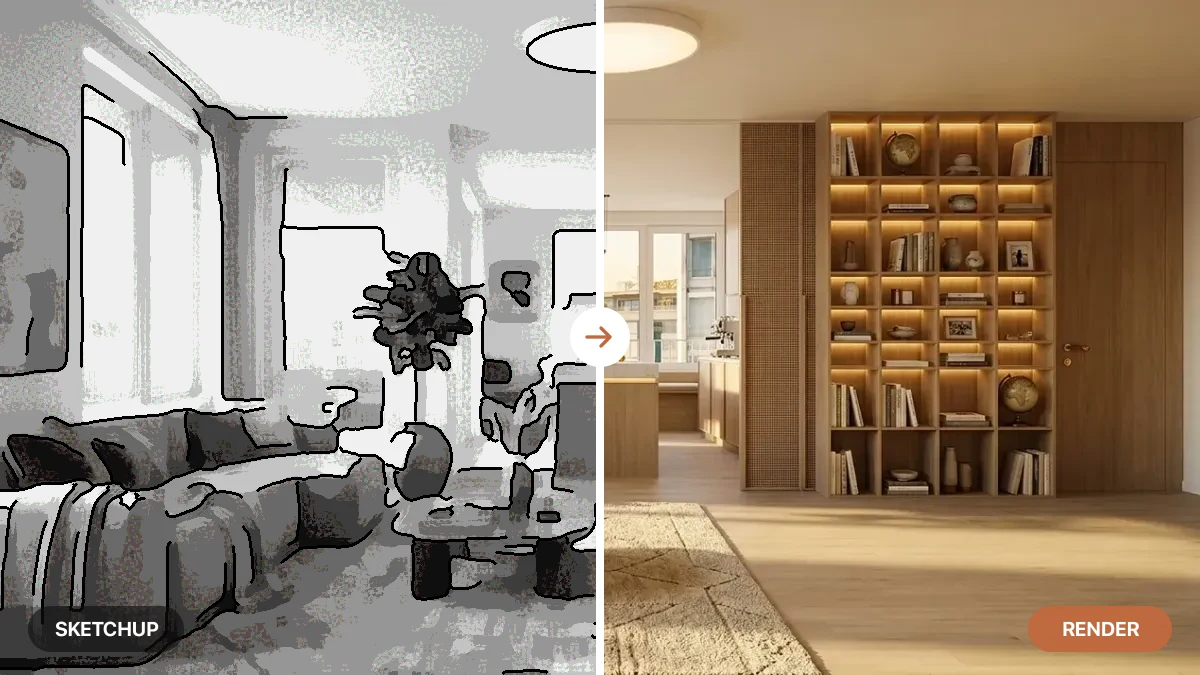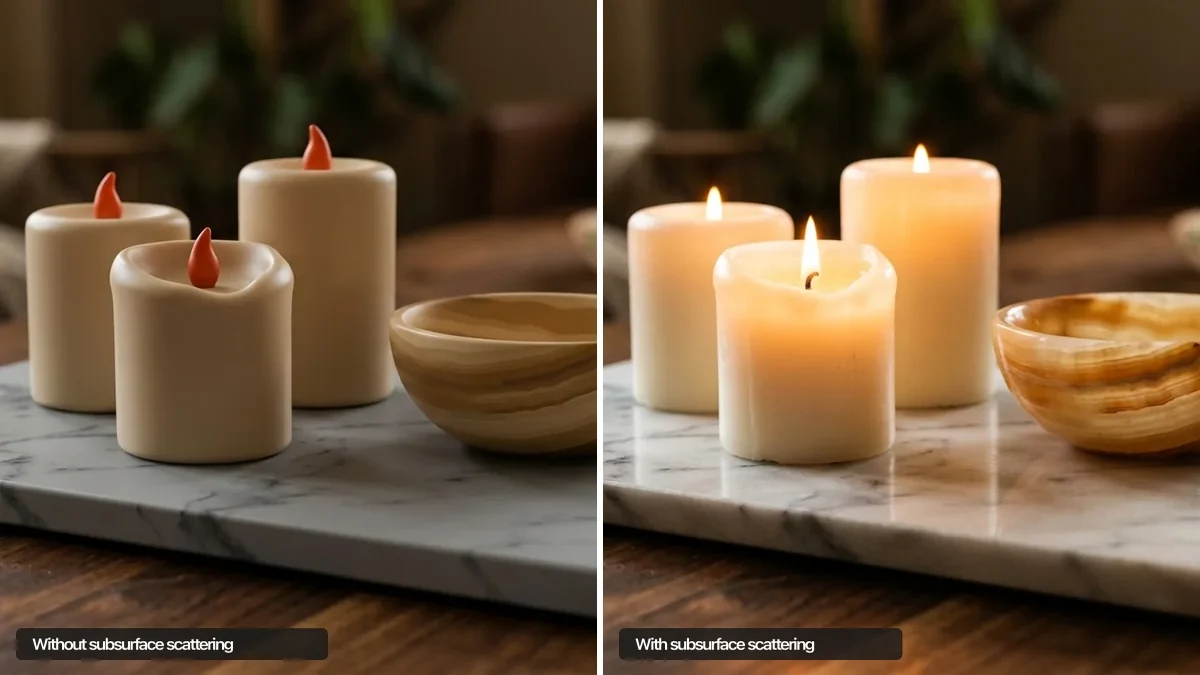
Put two renders of the same marble countertop side by side. One looks like a slab of real stone you want to run your hand across. The other looks like gray plastic with a photo of marble taped on top. Same model, same lighting, same camera angle. The thing that separates them is almost always one quiet detail: subsurface scattering.
Our articles are still written by humans!
Get human written articles in your Google feed.
Most people feel the difference without being able to name it. A room either reads as warm and physical or it reads as computer. This guide names the detail, shows you exactly where it hides in a real interior, and explains why some tools (including AI ones) nail it while others leave everything looking flat and lifeless.
Quick answer: Subsurface scattering (SSS) is the effect where light hits a translucent material, sinks below the surface, scatters around inside, and exits softly from a nearby point instead of bouncing straight off. It is what gives skin, marble, wax and a sunlit curtain their lit-from-within glow, and it is the single biggest reason a render looks real or fake.
Key takeaways
- SSS is light going into a material, not just off it. It enters, scatters, and leaves diffuse and softened.
- It is the realism switch. Get it wrong and marble looks like plastic, skin like a mannequin, curtains like cardboard.
- It only matters on translucent materials: marble, skin, wax, sheers, lampshades, leaves, frosted glass. Opaque drywall and metal barely use it.
- It is not the same as transparency. You cannot see through marble, yet it still catches light under the surface.
- AI renders get it for free. Models trained on real photos reproduce the scattered look without you tuning a single shader.



What is subsurface scattering?
Subsurface scattering, often shortened to SSS, is a way light behaves when it meets a material it can partly pass through. Light penetrates the surface, gets scattered many times at irregular angles inside the material, and then exits from a point that is slightly different from where it went in. Because the light has travelled through the material and picked up its color on the way out, the surface looks soft, warm and lit from within rather than hard and reflective. This is the standard physics definition, described in detail on Wikipedia and in Adobe’s Substance 3D guide.
The easiest way to feel it: hold your hand up to a bright window and look at the edges of your fingers. They glow red. That red is light entering your skin, scattering through the tissue and blood underneath, and leaving on the other side. Your hand is not transparent, but it is not fully opaque either. Almost everything that looks expensive in a room (marble, alabaster, a linen shade, a candle) lives in that same in-between zone.
Why subsurface scattering makes or breaks a render
Skip SSS and the eye notices instantly, even if the viewer cannot explain why. Without it, translucent materials lose all their depth. Light stops at the surface and bounces off like it would off a billiard ball, so marble flattens into painted plastic, a wax candle turns into a colored cylinder, and a person’s skin reads as a shop mannequin. We are wired to read skin and natural materials, so a tiny error here reads as “something is off” before we can name it.
This is exactly why early CGI and cheap product renders look fake. The geometry can be perfect, the lighting can be perfect, and it still feels dead because the materials do not let any light in. Get the scattering right and the opposite happens: the image crosses the line from “nice 3D” to “is that a photo?”. For anyone selling a space, a product or a design, that line is the whole game.
The science: how light moves through a material
When light reaches a translucent surface, three things happen at once. A small part reflects straight off the top, the way it would off any surface. Most of it crosses the boundary and enters the material. Inside, it ricochets off the internal structure (the crystals in marble, the fibers in cloth, the tissue in skin) and loses direction. It eventually finds its way back to the surface and leaves, but softened, spread out and tinted by the material it passed through. The diagram below traces that path.
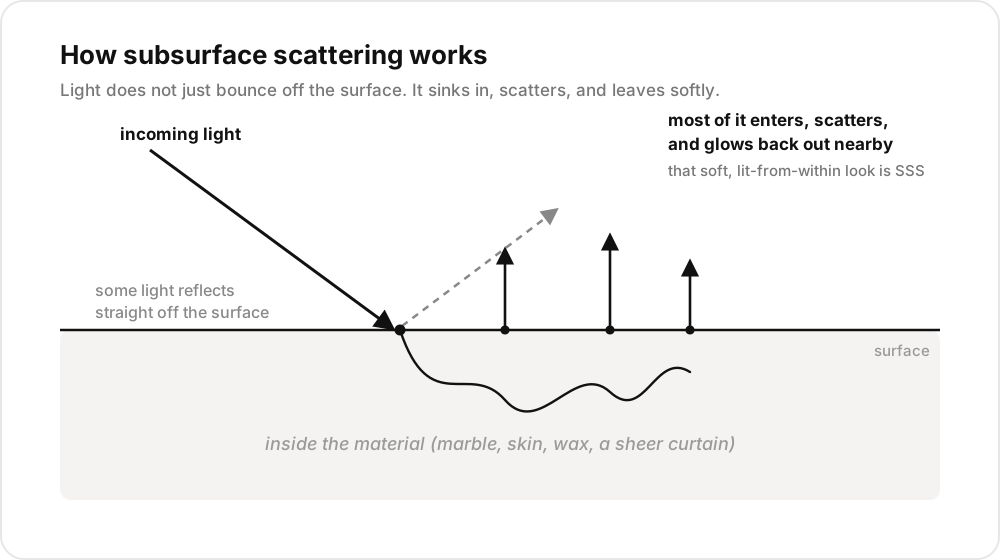
The mechanism in one picture: light goes in, scatters, and glows back out from points near where it entered. The distance it travels inside before leaving is what controls how “soft” a material looks.
How far light travels inside before exiting is the dial that matters. A short scatter distance gives a tight, waxy look (think a bar of soap). A long one gives a deep, translucent glow (think backlit alabaster or a thin slice of jade). Thin parts of an object, like the rim of an ear, a leaf edge or the folds of a curtain, glow the most because light has less material to cross before it escapes. That is why backlighting is the fastest way to show off scattering: put a light behind the object and the thin edges light up.
Where you see subsurface scattering in a room
You do not need to render skin or wax figures to care about this. A normal interior is full of materials that only look right because of subsurface scattering. Here is where it is quietly doing the work, and what each material collapses into when it is missing.
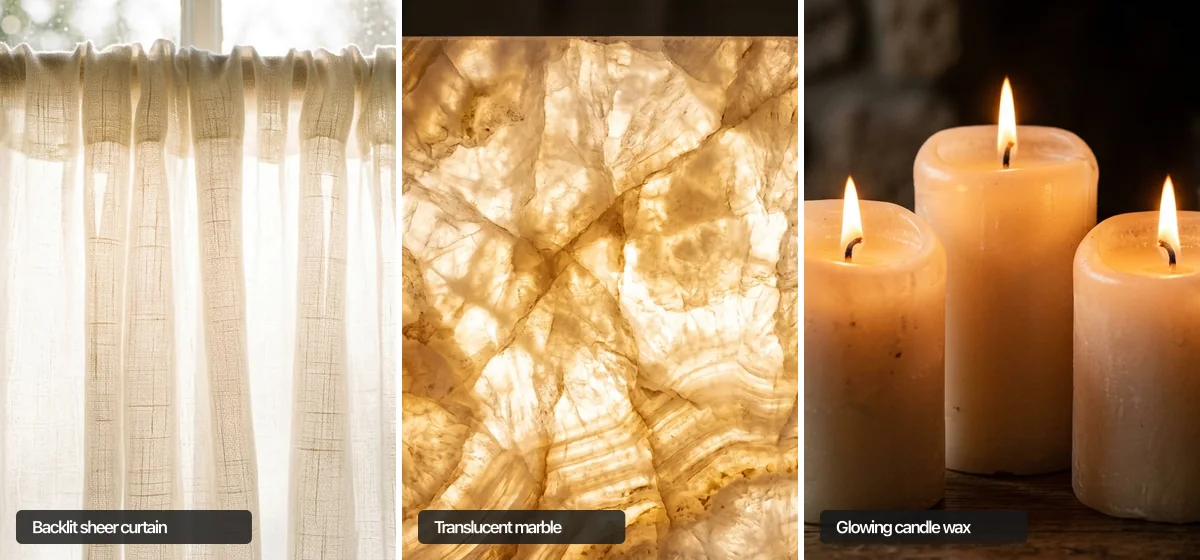
The effect up close: daylight passing through a sheer curtain, light traveling inside a thin onyx slab, and the warm glow of candle wax. Each only looks right because light gets in and comes softly back out.
Subsurface scattering vs reflection vs refraction
These three get mixed up constantly because they all describe light meeting a surface. The short version: reflection bounces off, refraction passes through, and scattering goes in and comes back out diffuse. Knowing which one a material needs is half the battle when something looks wrong.
The trap is treating a scattering material as if it only reflects. Render marble with just a glossy reflection and no scatter and you get that telltale plastic look. Marble is not transparent like glass, so refraction is wrong too. It needs the in-between behaviour, which is exactly what subsurface scattering models.
Why does my render look fake? Common SSS mistakes
If a scene feels off and you cannot place it, walk the translucent materials first. A handful of mistakes cause almost all of it:
- No scattering at all on materials that need it. The most common one. Marble, skin and curtains set to a plain opaque material will always look cheap, no matter how good the lighting is.
- Wrong scatter color. Skin needs a reddish scatter (blood under the surface). Marble needs a warm off-white. Use a flat gray and the material looks dead even with SSS turned on.
- No light passing through. Scattering only shows up when light can reach the thin parts. If there is no window or lamp behind your sheer curtain, you will never see it glow.
- Scatter distance too high or too low. Too much and solid objects look like they are made of jelly. Too little and the effect disappears. It should match how deep light really sinks into that specific material.
The honest part: getting all of this right by hand, per material, is fiddly work. It is the reason photoreal product and architecture rendering has traditionally needed skilled artists and serious render engines. That is also why the workflow is changing fast.
How AI interior rendering handles subsurface scattering
Here is the shift. With a traditional render engine you tell the software how a material behaves: you set the scatter color, the depth, the weight, and you light it so the effect appears. Modern AI image models work the other way around. They are trained on millions of real photographs, so they already know what marble, skin, a paper lampshade and a sunlit curtain are supposed to look like. They reproduce that scattered, lit-from-within quality automatically, without anyone touching a shader.

An AI render of an interior: the curtain glows, the marble catches the light and the onyx vase reads as real translucent stone. The scattering is all there, with not a single shader to set.
This is exactly how MeltFlex produces photorealistic interiors. You upload a photo of your actual room, and the model redesigns it while keeping the real walls, windows and light, then renders new furniture and finishes with the soft, believable materials a manual 3D scene would take hours to tune. The marble reads as marble. The curtains catch the daylight from your real window. You get the payoff of good subsurface scattering with none of the shader work, which is the whole point of using AI for this instead of learning a render engine. If you are weighing up the options, our roundup of the best AI interior design tools breaks down which ones keep your real room and which invent a generic one, and the guide to using AI to grow an interior design business covers where these renders fit in a real client workflow.
The takeaway is simple. Subsurface scattering is the invisible reason a render looks alive. You do not have to master it to benefit from it. You just have to use a tool that already gets it right.
Frequently asked questions
What is subsurface scattering in simple terms?
Subsurface scattering is what happens when light hits a material, sinks below the surface, bounces around inside, and then leaves from a slightly different spot. Instead of reflecting straight off like a mirror, the light glows back out softly. It is why skin, marble, wax and a backlit curtain look warm and alive rather than flat and plastic.
What materials need subsurface scattering to look real?
Any material light can partly pass through. The common ones in interiors are marble and onyx, human skin, wax and candles, sheer curtains and linen, paper lampshades, leaves and houseplants, and frosted or thin glass. Solid opaque materials like painted drywall, dark metal or rough concrete need little or none, which is why they are easy to render while translucent materials are hard.
Why do my 3D renders look fake or plastic?
Nine times out of ten it is missing or wrong subsurface scattering on the materials that need it. Without it, marble reads as painted plastic, skin looks like a mannequin, and curtains look like cardboard. The fix is to give translucent materials a believable scatter color and depth, then light them so some of that light actually passes through, for example a window or lamp behind a sheer.
Is subsurface scattering the same as transparency or refraction?
No. Transparency and refraction are about light passing cleanly through something you can see into, like clear glass or water. Subsurface scattering is about light entering a material, scattering around inside, and coming back out diffuse, so you cannot see through it but it still glows. Marble is not transparent, yet it clearly catches light under the surface. That in-between look is scattering.
Do AI interior renders use subsurface scattering?
Indirectly, yes. AI image models are trained on millions of real photos, so they learn what marble, skin and backlit curtains are supposed to look like and reproduce that scattered, lit-from-within quality without you touching a single shader setting. You get the result of good subsurface scattering automatically, which is why a strong AI render of a real room can look photographic while a hand-built 3D scene with the wrong material settings does not.