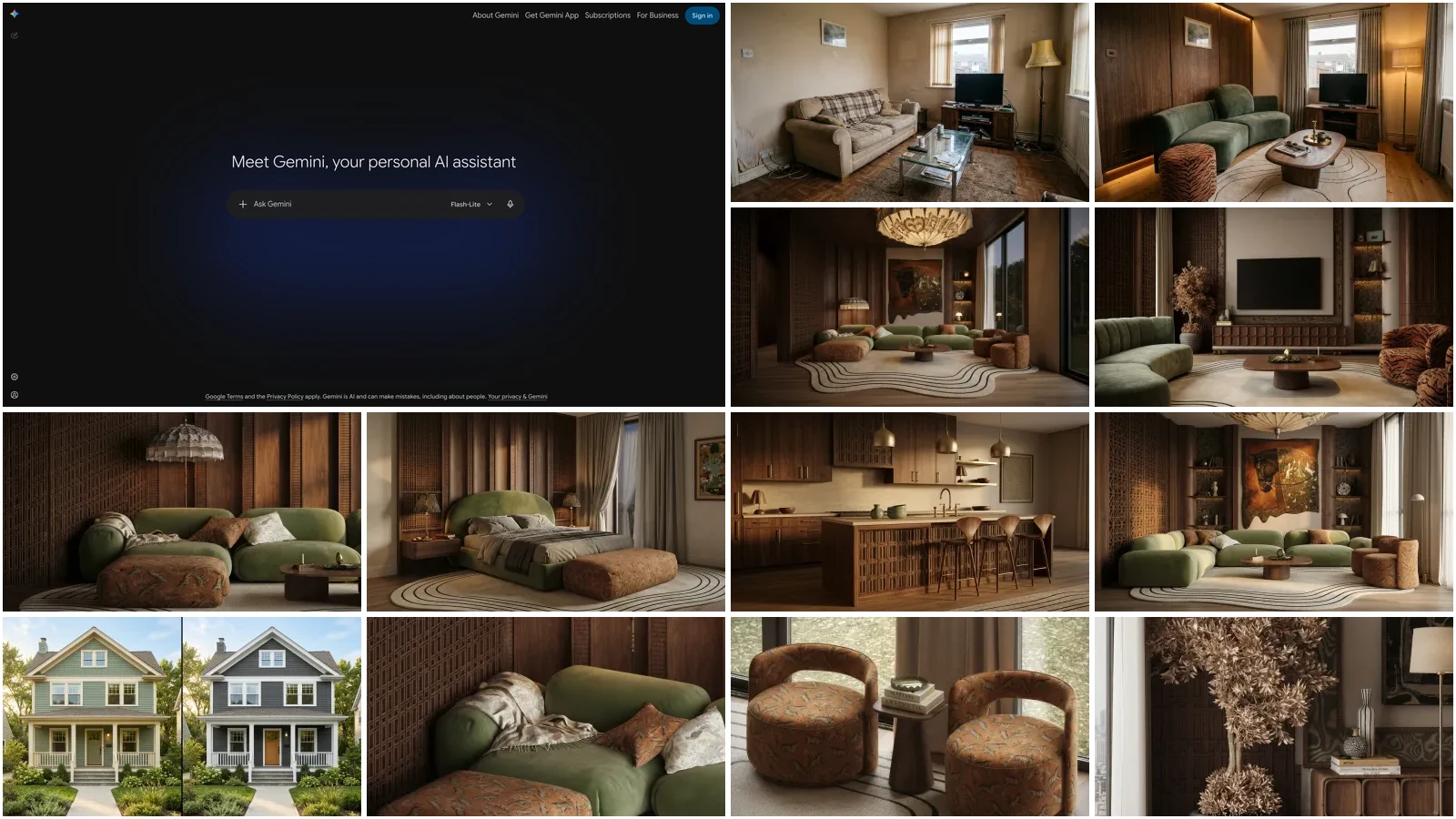
Yes, Google Gemini can design a room, and it is genuinely good at it. Upload a photo of your actual living room, ask for a warm Scandinavian restyle in one specific sentence, and about twenty seconds later you are looking at your own space with new furniture, new materials and better light. We build an AI interior design tool, MeltFlex, on Gemini image models we have tuned for interiors, so we know exactly what these models do brilliantly and exactly where they quietly fail. This guide is both: the precise workflow that gets magazine-grade results out of the free Gemini app, and an honest account of the four places it breaks, so you do not discover them mid-renovation. For the model agnostic version of the same workflow, including a test of exactly what a bad room photo does to the result, see how to use AI for interior design.
Our articles are still written by humans!
Get human written articles in your Google feed.
The short version
- It works from your photo. Gemini edits a picture of your real room rather than inventing a random one. Photo quality decides result quality.
- One specific sentence beats ten vague ones. Style + furniture + materials + colors + lighting, plus “keep the existing layout, walls and windows.”
- Refining is the superpower. Reply “deeper sofa, warmer grey, evening light” and it edits the last render instead of starting over.
- A Gem makes it reusable. Ten minutes of setup turns Gemini into a standing interior designer that never needs re-briefing.
- Free, with a daily cap on image generations. Enough to explore a room; heavy iteration hits the limit.
- The catch: layouts drift between runs and nothing it draws is buyable. Ideas in Gemini, execution in a dedicated tool.
Jump to: What it is · Step by step · Prompt formula · Interior designer Gem · What is free · What it gets wrong · Gemini vs ChatGPT · FAQ
FreeUpload photo · freeRedesign my room for freeUpload a photo and let MeltFlex design your space. Your first AI design is free, no card needed.


What “Gemini room design” actually is
When people say they redesigned a room “with Gemini,” they mean the image models that run inside the Gemini app: the technology that went viral under the codename Nano Banana and now powers image generation and editing across Google. You do not need to pick a model or find a special mode. You open gemini.google.com or the mobile app, attach a photo, and describe the change; Gemini routes it to the right image model. Since 6 October 2026 that model is Nano Banana 2.1, which edits at 1K, 2K or 4K and takes up to 14 reference images. The same models are also available in Google AI Studio on a paid API key, and they are what we run under the hood at MeltFlex, tuned and constrained for interiors.
What makes Gemini different from Midjourney or most image generators is that it was built to edit an existing photo, not just paint from imagination. It reads your room, understands the space, and restyles it while keeping far more of the original than older models could. That one property is why it took over interior design feeds, and it is the property this whole workflow leans on. If you want the deep dive on the model itself, we tested it thoroughly in our Nano Banana Pro room redesign guide.
How to redesign your room with Gemini, step by step
The whole process takes about five minutes. Every render in this article was generated with the exact steps and prompts shown, on the same photo of the same dated living room, so you can judge the results honestly.
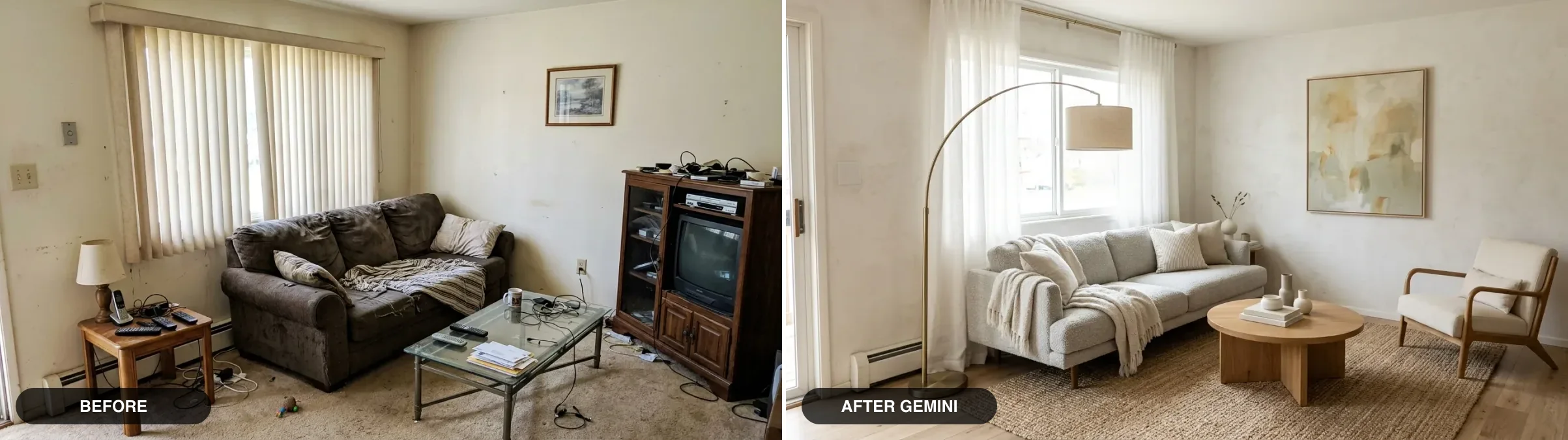
The test room for this entire guide: a genuinely dated living room, redesigned with the single prompt in step 3. Same window, same corner, same camera angle.
1. Photograph the whole room, wide and in daylight. Stand in a corner so two walls are visible, hold the phone at eye level, and open the blinds. This is the step people skim and it decides everything: Gemini can only preserve geometry it can see. A dark, tight, cluttered snapshot is the number one reason redesigns come back warped or half-invented.
2. Upload the photo to a new Gemini chat. App or browser, both work. Attach the image the way you would attach anything to a message.
3. Ask for the redesign in one specific sentence. This is the prompt that produced the “after” above, and it follows a formula we break down in the next section:
Redesign this living room in a warm Scandinavian style. Keep the existing room layout, the same window position, walls and camera angle. Replace the furniture with a low light-grey bouclé sofa, a round solid-oak coffee table, a cream linen armchair and a jute rug on light oak flooring, add an arc floor lamp with a brushed-brass stem, off-white plaster walls, sheer linen curtains and one large calm abstract artwork. Bright natural daylight. Calm, editorial, photorealistic.
4. Refine conversationally instead of re-prompting. This is the most underused feature and the real reason to design in Gemini rather than a one-shot generator. Reply to the render in plain language and it edits the previous image rather than starting from zero. Here is the render above after one such reply: “make the sofa deeper and a warmer greige, swap the artwork for a large round antique-brass mirror, and switch to warm early-evening light with the floor lamp on.”
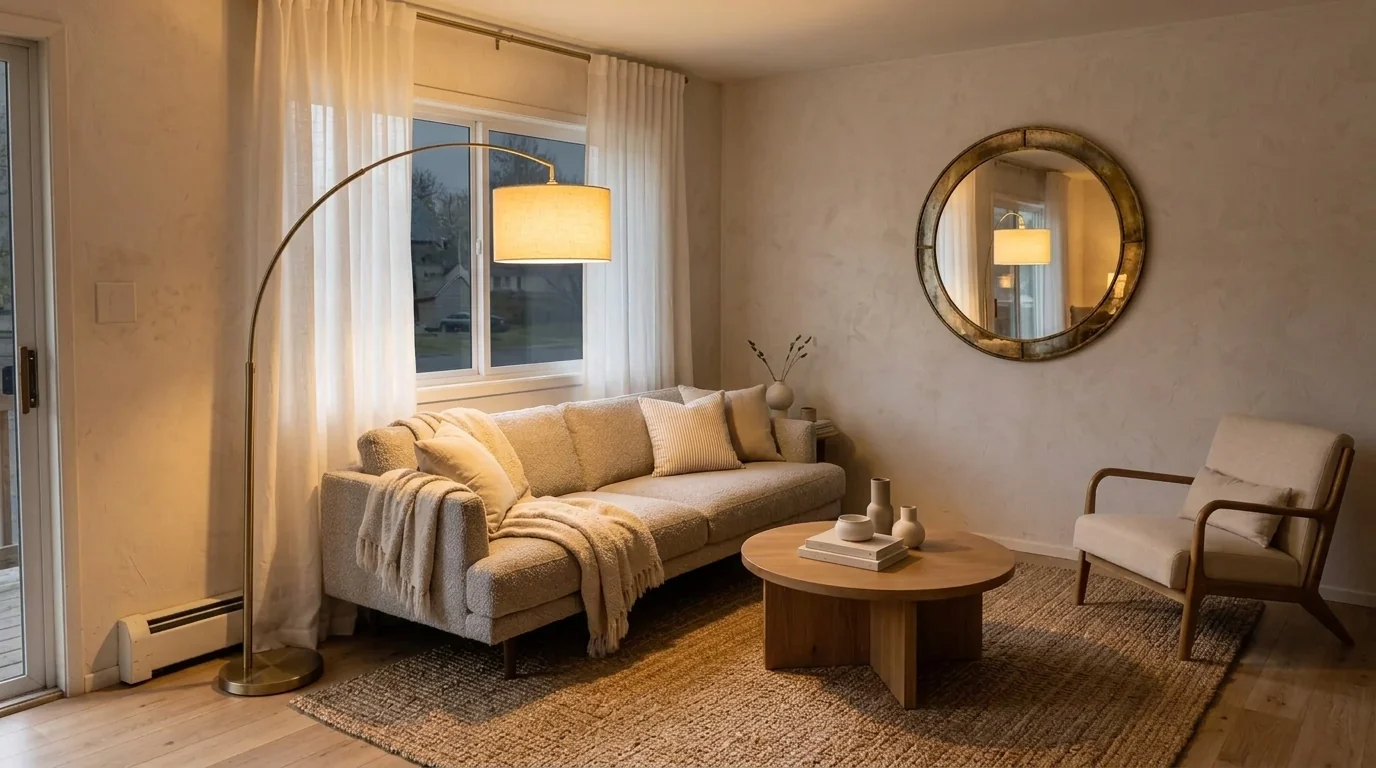
One reply, three precise changes, same room. Iterating in small, named steps is how you steer Gemini; re-writing the whole prompt each time is how you lose the room.
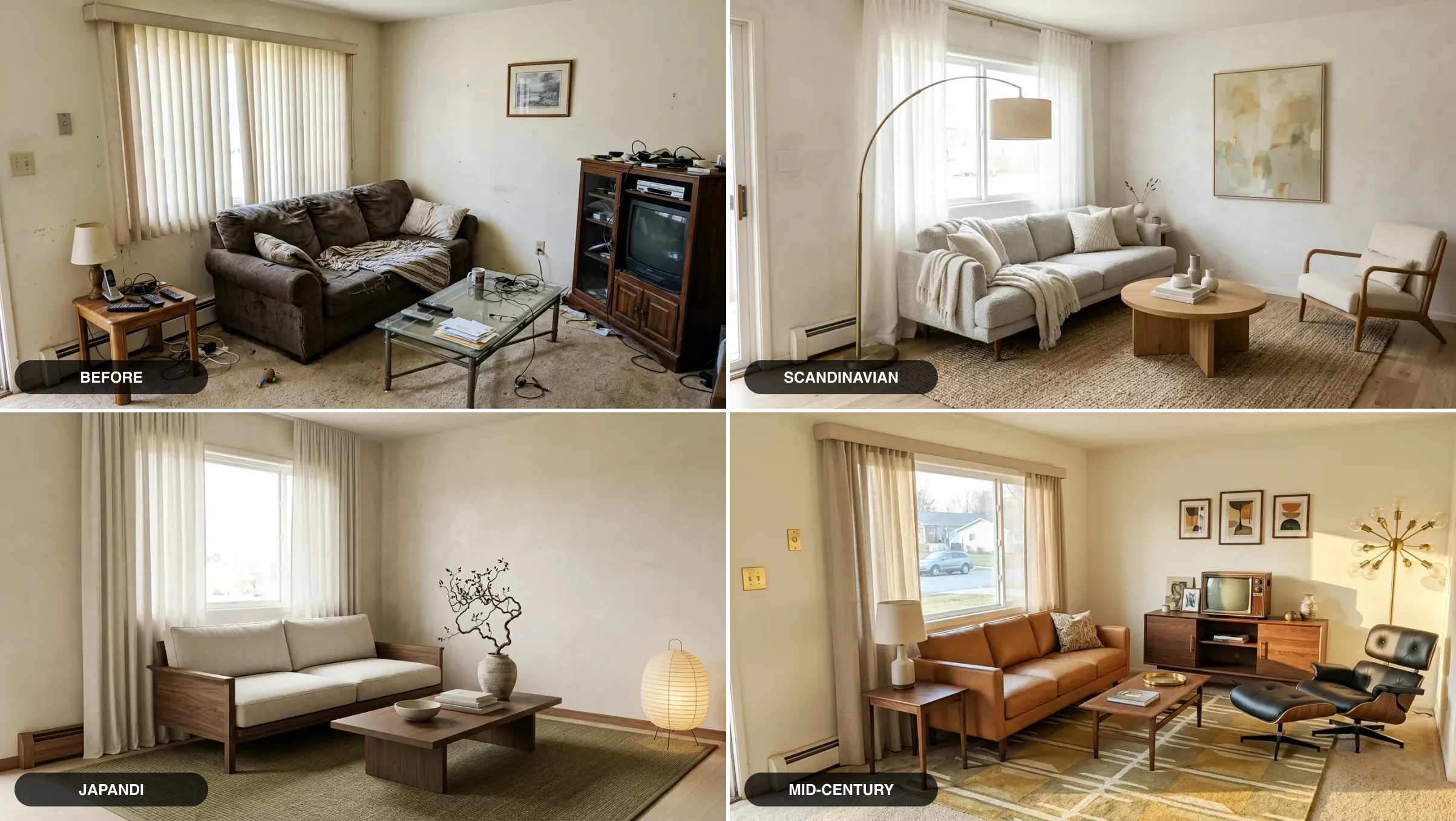
5. Generate variations before you commit. Ask for the same room in two or three other styles while the photo is still in context. Exploration is cheap here, and seeing directions side by side is how you find out you are actually a Japandi person.
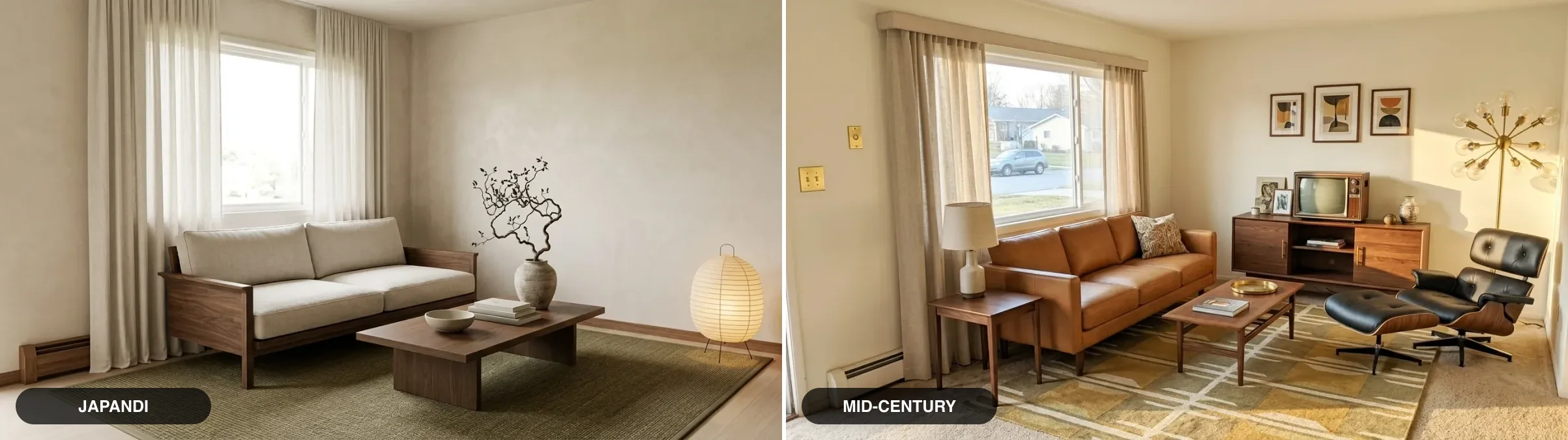
The same room and the same photo, asked for Japandi and mid-century modern. Note how both keep the window wall: that is the “keep the existing layout” line doing its work.
The prompt formula that does the work
Vague prompts get vague rooms. “Make it modern” returns a generic showroom that has nothing to do with you. The prompts that work name five things, in one sentence:
Then always close with the layout lock: “keep the existing room layout, walls and windows.” It is the single highest-impact line in the prompt, and you will see exactly why in the limitations section. If you would rather not write prompts at all, we maintain 52 tested Gemini prompts for interior design covering every room and style, and a matching set of Nano Banana prompts tuned for the image model itself.
Watch: the same workflow on video
If you would rather see the workflow than read it, this tutorial by altArch walks through four practical techniques for interior work with Nano Banana Pro, the same Gemini image model this guide runs on: photo-based restyles, material control and iteration tricks that map directly onto the steps above.
Build a Gemini interior designer skill (Gems are becoming skills)
This is the step almost nobody does, and it is the difference between using Gemini as a toy and using it as a tool. You save a standing brief once, and every future chat starts already knowing your taste, your budget and the rules. No more re-explaining that you rent and cannot paint.
Until this autumn that brief lived in a Gem. On 30 September 2026 Google announced that skills replace Gems: personal accounts lose Gems in November 2026, existing Gems move over automatically as skills, and you call a skill by typing / and its name in any chat, or let Gemini pick it up when your prompt matches. Skills can also hold reference files (text, PDFs and images), so you can attach a photo of the room and of the pieces you already own. Source: Google’s skills announcement.
Ask Gemini to save the brief below as a skill called interior-designer. If your account still shows the Gems menu, create a Gem with the same text instead; it becomes a skill on its own when the migration reaches you. Edit the brief to your situation:
You are my personal interior designer. When I upload a room photo, first audit it in three sentences: what works, what fails, and the one change with the biggest impact. Then propose a redesign and render it. Always keep the existing room layout, walls and windows unless I say otherwise. My preferences: warm minimalist and quiet luxury styles, natural materials (oak, linen, wool, travertine, aged brass), no all-grey palettes, no glossy plastic furniture. I rent, so no structural changes and no repainting radiators. Total budget per room is mid-range: quality high-street, not designer prices. When you render, always end by listing the furniture pieces you used with realistic size estimates in inches.
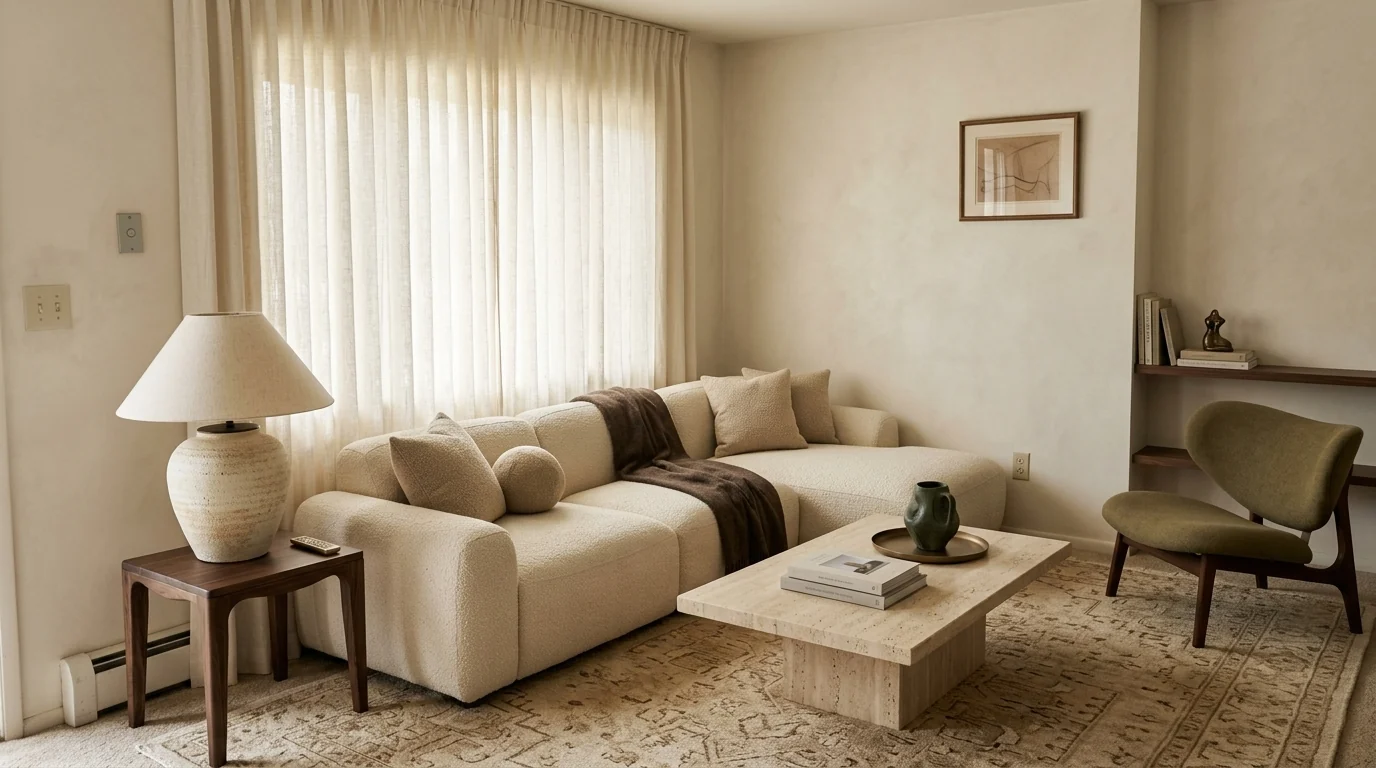
The same test room through the brief above (we ran it as a Gem before the switch; the text works unchanged as a skill): quiet luxury, ivory and olive palette, travertine and walnut. A standing brief produces noticeably more consistent taste than one-off prompts.
Two details make the brief work well. Ask for the audit before the render, because the three-sentence critique regularly catches things you stopped seeing in your own room years ago. And ask for size estimates with every render, because it converts a pretty picture into a rough shopping brief, which softens (though does not fix) the buyability problem below.
What changed in October 2026: Nano Banana 2.1 and Gemini 4 Argon
Google shipped two models in eight days. Nano Banana 2.1 (6 October) is the image model behind the Gemini app now, and it does what used to need Pro: 4K output and up to 14 reference images. Gemini 4 Argon (13 October) is the new top reasoning model; it writes the plan, but the redesign image still comes from Nano Banana. The workflow above does not change.
Read 14 October 2026 from the Gemini API pricing, the Nano Banana 2.1 model page, the DeepMind model card and Google’s Gemini 4 Argon announcement. Nano Banana 2.1 replaces Nano Banana 2 (Gemini 3.1 Flash Image) at roughly half the price per image. On Google’s own preference tests it scores 1050 for text-to-image against 990 for Nano Banana 2 and 935 for Pro, and 1026 for general editing against 938 and 939. Those are Google’s numbers, not ours. In our own side by side of ten real room prompts on 13 October, Nano Banana 2.1 finished in about 20 seconds at 1K, roughly twice as fast as GPT Image 2.5, but it was also the model more likely to repaint a wall or reshape a facade you did not ask it to touch. Say what must stay.
What is free and what is paid
The free Gemini tier includes everything this guide uses: photo upload, image generation and editing, conversational refinement and skills (Gems until November). The constraint is a daily cap on image generations that Google adjusts over time; in practice the free tier comfortably covers exploring one room in two or three directions, and heavy iteration on a whole home will hit it. Google AI Pro and Ultra subscriptions ($19.99 a month for Pro in the US) raise the caps and add Gemini 4 Argon, Google’s strongest reasoning model, for the planning half of the job. Google AI Studio runs the same image models, but on 14 October 2026 none of them had a free API tier, so it is a paid route, not a fallback for cap days. For comparison, dedicated room tools like MeltFlex also start free, so testing both costs nothing.
Google changed the plans in the same month. A free Google account now gets only the Flash-Lite model in the Gemini app (the switch took effect on 9 October 2026); Flash moved to the paid plans and Gemini 4 Argon sits on AI Pro and Ultra. Image generation and editing stay on the free plan, so the picture half of a room redesign still costs $0. What changes is the planning half: Flash-Lite is the smallest of Google’s app models, so the long, measured layout and budget prompts are where a free account will feel the downgrade first, not the renders.
Read 20 October 2026 from Google’s US plans page and the Gemini Apps limits page. Google still publishes limits as multiples, not image counts, and its help page names Nano Banana 2 as the image model on every plan while the Nano Banana 2.1 rollout runs, so which of the two edits a free account’s photo can depend on the day. The Plus card also carries an “Includes Gemini 4 Argon” line, but its feature list names only Flash, so do not buy Plus for Argon. Our take: free is enough for the pictures of one room; $4.99 Plus is the cheapest way to get a better model for layouts with real measurements; Pro only pays off if you plan whole homes or also want the 5 TB of storage.
The four things Gemini gets wrong in a room
We say this as a team that ships Gemini image models in production every day: they are the best general-purpose engine for interior imagery right now, and they have four failure modes that matter specifically for room design. The breathless tutorials skip these. You should not.
1. The layout drifts. Gemini generates a new image guided by your photo; it does not edit your photo pixel by pixel. Run the identical prompt twice and you get two different rooms. The layout lock line helps a lot, and it is still not a guarantee:
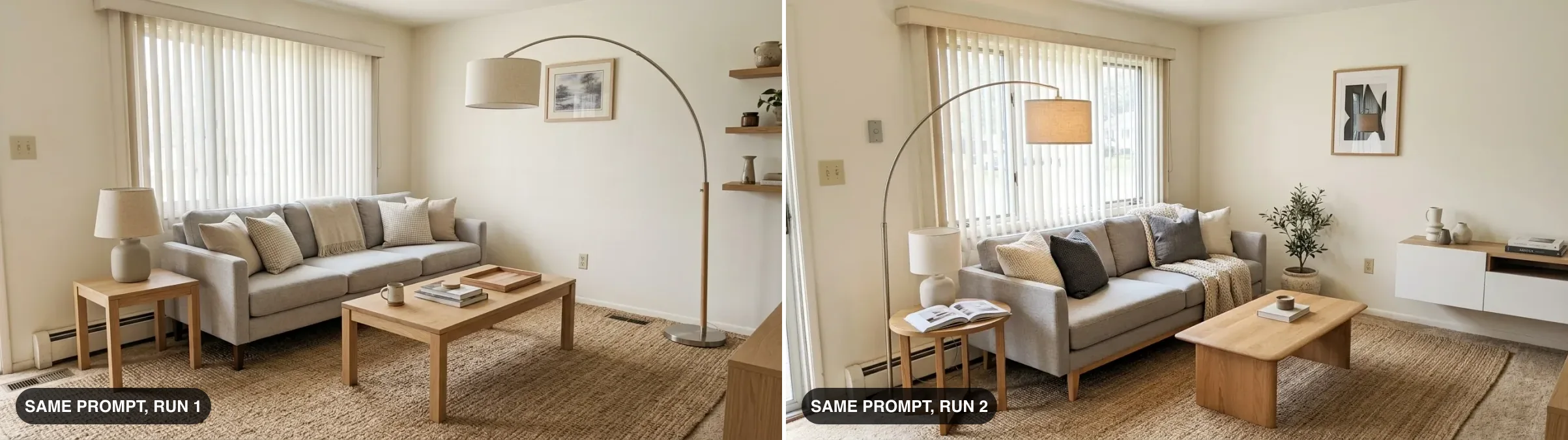
The identical prompt on the identical photo, run twice, without the layout lock. Different sofa position, different walls, different decor. For a mood board this is fine; for planning a real renovation it is the trap.
2. Nothing it draws exists. That perfect sofa is not a product. Gemini cannot tell you what it is, who sells it, what it costs, or whether it fits through your door, and reverse-image-searching furniture that was never manufactured leads nowhere. You fall in love with a room you cannot buy.
3. It has no sense of scale or budget. There are no real dimensions behind the render. It will happily draw a 3.5-meter sectional in a room that cannot physically hold one, and it will never warn you. The Gem trick of requesting size estimates softens this, but the numbers are educated guesses, not measurements.
4. You cannot get the same room twice. Drift compounds across a session: the more turns you take, the further small details wander, and reproducing last week’s winning design exactly is close to impossible. Exploration is Gemini’s strength; locking a decision is not. The full breakdown of these failure modes, with more test renders, is in our Nano Banana Pro deep dive.
Gemini vs ChatGPT vs a dedicated room tool
The honest comparison, from testing all three ways of working every week (the full field test across 14 tools is in our best AI for interior design roundup):
If you work in ChatGPT, we wrote the same step-by-step walkthrough for its side of the fence in our ChatGPT room design tutorial, and our ChatGPT interior design prompts follow the same five-part formula. The pattern that actually wins is not picking a side: plan in a chatbot, explore looks in Gemini, then execute in a tool built for rooms.
When Gemini is enough, and when it is not
Gemini alone is genuinely enough when you want inspiration: testing styles on your own four walls, settling a palette argument, or seeing your room without the wallpaper before you commit. It stops being enough the moment money enters: when you need the design to sit inside your exact footprint, need every piece to be a real product with a real price, or need to hand one locked design to a partner, landlord or contractor. That handoff moment is exactly what we built MeltFlex for, and it is why we run interior-tuned Gemini models rather than the general ones.
What MeltFlex adds on top of the Gemini app
- Your real room, held steady. Same layout, same windows, same footprint across every iteration, no drift.
- Buy what you see. Every placed piece links to a real product with a live price from retailers like IKEA, Amazon and Wayfair.
- A running total, not a guess. The design doubles as a budget you can actually plan around.
- The full pipeline. Photo redesign, floor plan to 3D, and walkthrough video in one place, free to try.
Gemini room design FAQ
Can Google Gemini design a room?
Yes. Upload a photo of your room to the Gemini app or gemini.google.com, describe the restyle in one specific sentence, and Gemini generates a photorealistic redesign of that room, then refines it conversationally. It is currently the best general AI for this because its image models edit your actual photo instead of inventing a new scene. The limits: the layout can drift between generations, and none of the furniture it draws is real, so it cannot tell you what anything is, what it costs, or whether it fits.
How do I ask Gemini to redesign my room?
Attach a wide, daylight, eye-level photo of the whole room, then ask in one specific sentence that names the style, the key furniture, the materials, the colors and the lighting, and ends with “keep the existing layout, walls and windows”. For example: “Redesign this living room in a warm Scandinavian style, keep the existing layout and window, low grey boucle sofa, round oak coffee table, jute rug, arc floor lamp, bright natural daylight, photorealistic.” Then refine in plain replies: deeper sofa, warmer wood, evening light.
Is Gemini room design free?
Yes, with a cap. The free Gemini tier includes image generation and editing, limited to a daily number of images that Google adjusts over time; in practice it covers a few redesign sessions. Since 9 October 2026 free accounts chat with the Flash-Lite model only; Google AI Plus ($4.99 a month in the US) adds Flash, and Google AI Pro and Ultra raise the caps and add Gemini 4 Argon for the planning side. Google AI Studio runs the same image models, but they have no free API tier, so it is not a free fallback. For a typical one-room redesign the free tier is enough to explore two or three directions.
What is the best Gemini prompt for room design?
One specific sentence built from five parts: style, key furniture, materials, colors, lighting, plus the instruction to keep the existing layout, walls and windows. Specificity beats length. “Make it modern” produces a generic room; naming a low greige boucle sofa, a travertine coffee table and warm early-evening lamplight produces a design you could actually follow. We keep 52 tested, copy-paste Gemini prompts for interior design in a dedicated library on this blog.
What is a Gemini interior designer Gem?
It is a saved brief that makes Gemini act as your interior designer in every chat. Until November 2026 it lived in a Gem; Google announced on 30 September 2026 that skills replace Gems, so personal accounts lose Gems in November and existing Gems migrate automatically into skills, which you call by typing / and the skill name. Write it once (an interior designer persona, your style, your budget and the prompt rules) and every room photo you upload gets audited, planned and rendered without re-explaining anything.
Why does Gemini change my room layout?
Because its image models generate a new picture guided by your photo rather than editing your photo pixel by pixel. Run the same request twice and walls, windows and furniture positions can land differently each time. Saying “keep the existing layout, walls and windows” in every prompt helps a lot but does not fully fix it. If the redesign must sit inside your exact room, with the real footprint and window positions, you need a purpose-built room tool rather than a general image model.
Is Gemini or ChatGPT better for room design?
For the image itself, Gemini. Its image models are stronger at editing a real photo, keeping materials believable and furniture proportions plausible, and refining the same image across turns. ChatGPT is the stronger writer, so it wins for long written plans, shopping checklists and renovation budgets. Many people use both: ChatGPT to plan in words, Gemini to see it. Neither can place real, buyable furniture in your room, which is the gap dedicated tools cover.
Can Gemini tell me where to buy the furniture it draws?
No. Every piece in a Gemini render is invented, so there is no product, price or store behind it, and reverse-image-searching a render of a sofa that does not exist is a dead end. That last step is what purpose-built tools add: MeltFlex runs interior-tuned image models on your photo, keeps your real layout, and matches each piece it places to a real product with a live price from retailers like IKEA, Amazon and Wayfair.
Which Gemini model redesigns my room?
Nano Banana 2.1. Since 6 October 2026 Google has been rolling it out as the image model in the Gemini app, so when you attach a room photo and ask for a restyle, that is what edits it, at up to 4K and with up to 14 reference images. Gemini 4 Argon, released on 13 October 2026 for Google AI Pro and Ultra, is a text and reasoning model: it can plan the room and write the prompt, but it does not draw the picture.