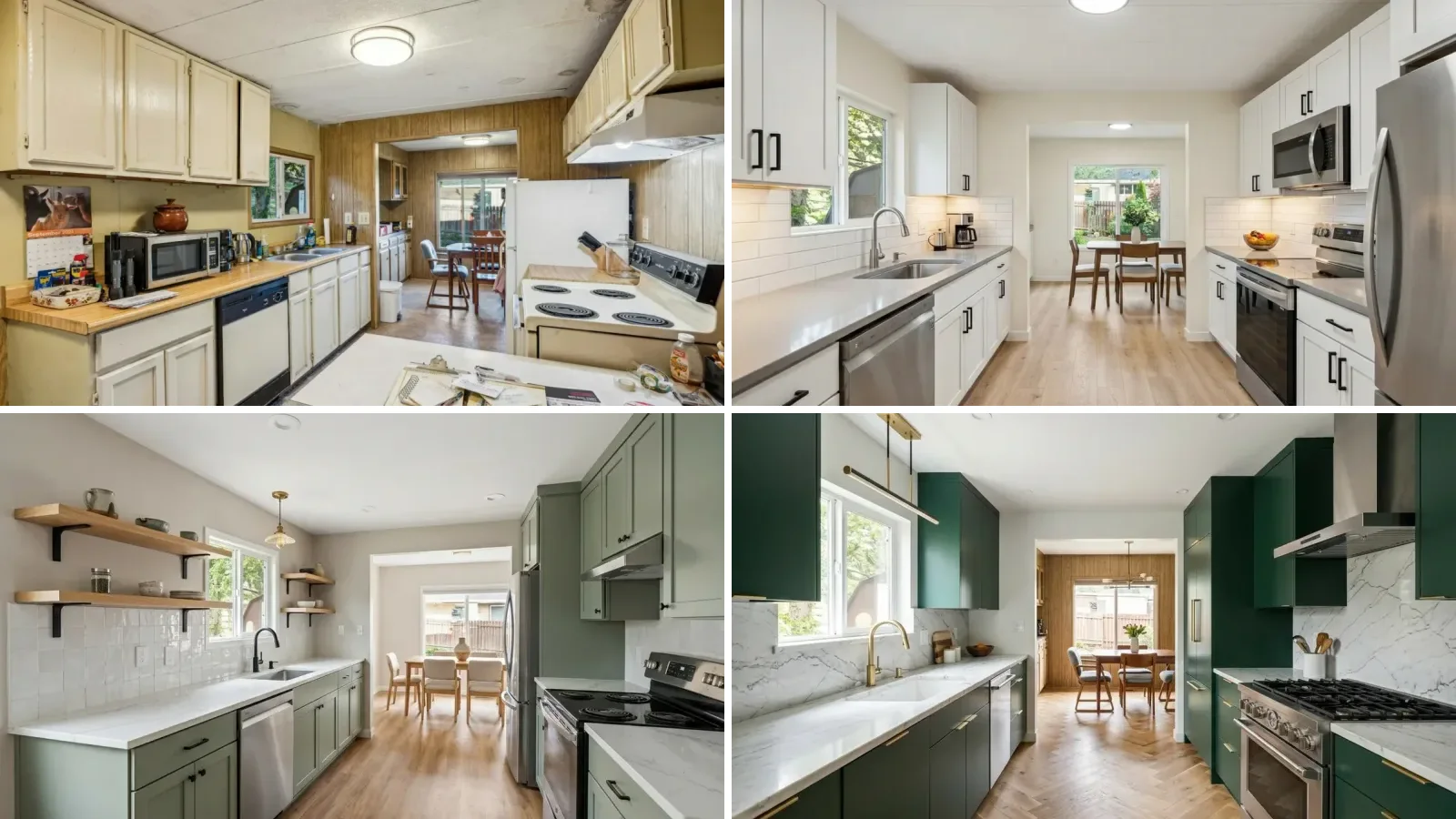
Yes, you can see exactly how your renovation will look before you start. Upload a photo of your current room to an AI visualization tool, describe or pick the change you want, and you get a photorealistic preview of the finished result in under 30 seconds. It works for kitchens, bathrooms, living rooms, and bedrooms, and the basic version costs nothing.
Our articles are still written by humans!
Get human written articles in your Google feed.
That matters because renovation is the most expensive guess most people ever make. The average kitchen renovation costs €8,000-€25,000. The average bathroom costs €5,000-€15,000. And the number one regret among homeowners who renovate? "It looked different than I imagined."
This guide shows you how to visualize every type of home renovation with AI, room by room, with real before-and-after examples generated from real apartment photos. For the kitchen specifically, the AI kitchen remodel before and after guide takes one dated galley through minor, mid-range and major scope on the same photo.
FreeUpload photo · freeRedesign my room for freeUpload a photo and let MeltFlex design your space. Your first AI design is free, no card needed.


Why You Should Always Visualize Before You Renovate
Renovation without visualization is like cooking without tasting. You might get lucky, but the odds are against you. Here is what the data says:
- 54% of homeowners renovated in 2025, with a median spend of $20,000, according to the 2026 Houzz & Home Study.
- 37% of renovators blew through their budget in the same study. A big driver is mid-project changes, things that "looked good on paper" but did not work once installed.
- 26% of homeowners already use AI for home projects, and 67% of them use it for exactly one thing: visualizing the outcome before committing.
- A free AI preview can prevent a €5,000 mistake. Seeing your kitchen with navy cabinets before ordering them costs nothing. Repainting them after installation costs thousands.
Professional interior designers have used mood boards and 3D renders for decades. AI has made this process instant, free, and accessible to everyone. You no longer need to hire a designer or learn CAD software to see your renovation before it happens.
How AI Renovation Visualization Works
AI renovation tools use the same technology behind image generation, but optimized for interior spaces. The process is simple:
- Step 1: Upload a photo of your current room (any angle, any phone camera)
- Step 2: Choose what you want to change, style, colors, furniture, flooring, or everything
- Step 3: The AI generates a photorealistic render of your renovated room in 10-30 seconds
- Step 4: Compare options. Try 5 different styles, 3 color palettes, or 10 furniture arrangements, in the time it takes to drink a coffee
The result is not a rough sketch or a cartoon. Modern AI produces photorealistic images that preserve your room's exact dimensions, lighting, and architectural features while showing the new design.
Room-by-Room Renovation Visualization Guide
Kitchen Renovation: The Highest-Impact Room
The kitchen is the most renovated room in any home, and the most expensive to get wrong. A kitchen renovation typically costs €8,000-€25,000, and decisions are hard to reverse once cabinets are installed and countertops are cut.
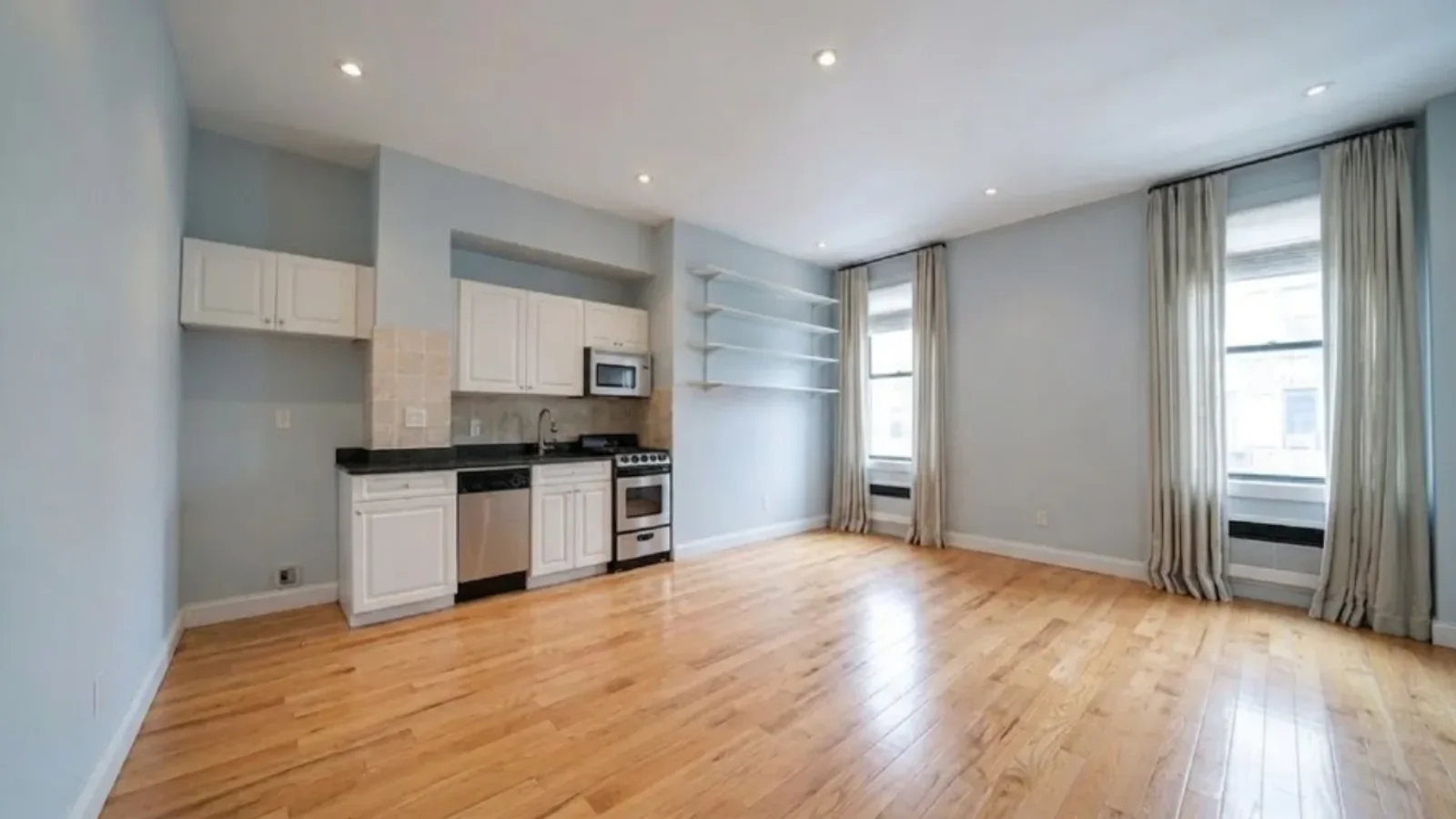
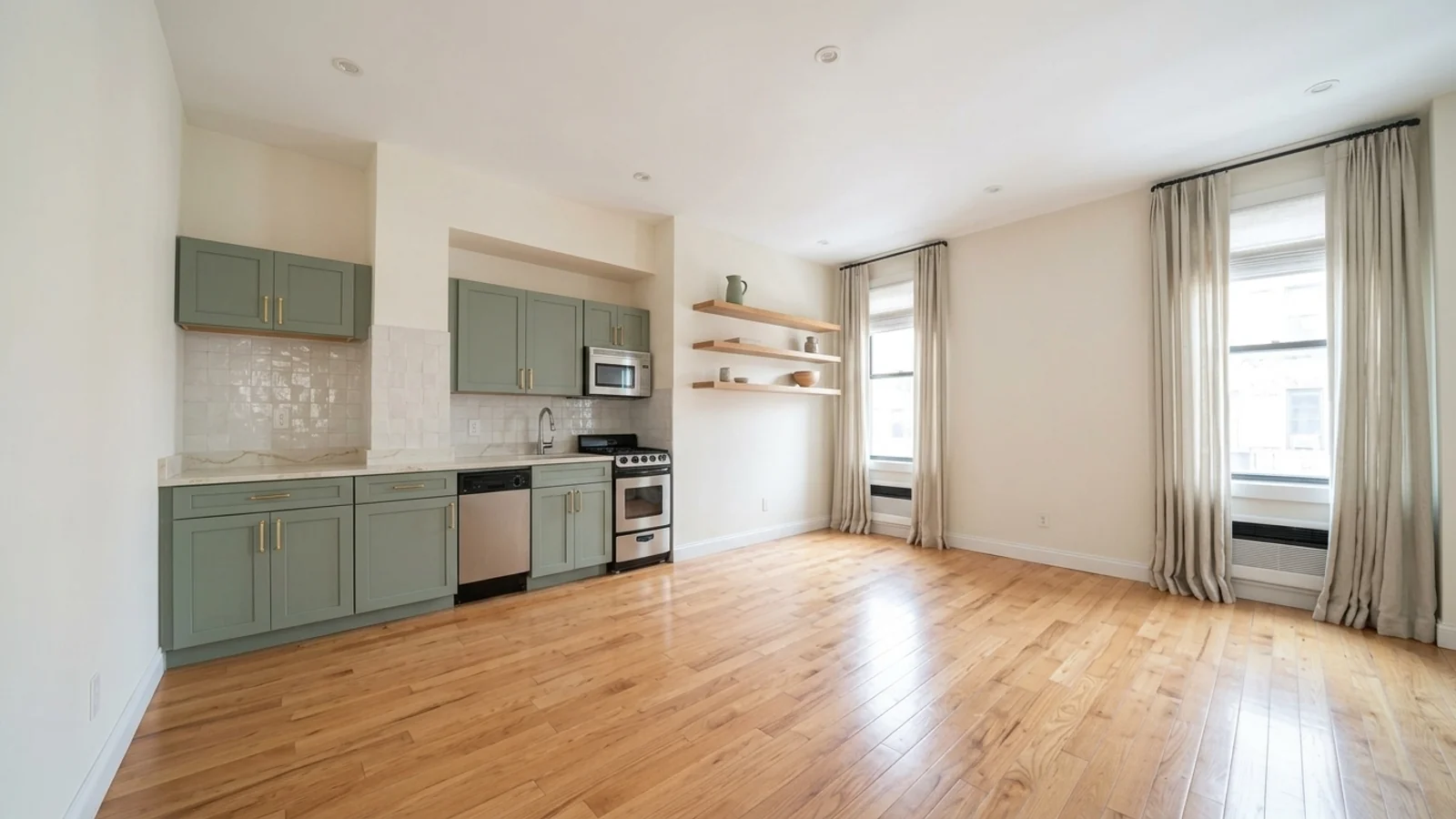
Here is what AI visualization looks like in practice. The first photo is a real, dated apartment kitchen. The second is the AI preview of the same room after a cosmetic renovation: sage-green shaker fronts, quartz countertop, zellige tile backsplash, oak shelves, and repainted walls. Same camera angle, same layout, same windows. This render took about 20 seconds.
What to visualize before starting:
- Cabinet color: This is the #1 kitchen regret. White cabinets look clean but show every mark. Dark cabinets look dramatic but can make small kitchens feel smaller. Test both with AI.
- Countertop material: Marble, granite, quartz, or laminate? Each looks different in person than in a showroom swatch. See them in YOUR kitchen lighting.
- Backsplash: Subway tile, herringbone, natural stone, or solid color? The backsplash sets the style tone. Visualize it against your chosen cabinets and countertop together.
- Layout changes: Adding an island? Removing a wall for open plan? Upload your kitchen floor plan to a 3D converter and see the new layout at exact scale before any demolition.
- Lighting: Under-cabinet LEDs, pendant lights over the island, recessed ceiling lights. Lighting changes are cheap but transform how a kitchen feels. See the effect before installation.
Kitchen renovation ROI: A minor kitchen remodel recovers 71-81% of its cost at resale. A major remodel recovers 54-57%. Cosmetic updates (paint, hardware, lighting) often recover 200-500% of their cost.
For a dedicated kitchen tool that applies whole-kitchen restyles to your photo, try the free AI kitchen design tool.
Bathroom Renovation: Small Room, Big Impact
Bathrooms are the second most renovated room, and mistakes are especially painful because everything is permanent, tiles, fixtures, and plumbing are not easy to change. Typical cost: €5,000-€15,000.
What to visualize before starting:
- Tile selection: Large format tiles make small bathrooms feel bigger. Dark tiles add drama but show water marks. Patterned tiles can overwhelm a small space. Test all three in your actual bathroom dimensions.
- Vanity and mirror: A floating vanity makes the floor visible, creating an illusion of space. A framed mirror vs. frameless changes the entire style direction. See both options.
- Shower vs. bathtub: Removing a tub for a walk-in shower opens up space but affects resale if it is the only bathroom. Visualize both configurations.
- Color scheme: All-white bathrooms are timeless but cold. Warm tones (terracotta, sage green) are trending but might feel dated in 5 years. See both in your space before committing.
Bathroom renovation ROI: A mid-range bathroom remodel recovers 68-73% at resale. Adding a half-bath to a home without one can recover 100%+.
To preview tile, vanity, and fixture combinations on a photo of your own bathroom, use the free AI bathroom design tool.
Living Room Renovation: Biggest Visual Change for the Least Money
Living rooms are the cheapest rooms to renovate because most changes are cosmetic, paint, furniture, lighting, and textiles. No plumbing, no cabinetry, no tile work. A complete living room transformation can cost as little as €500-€3,000.
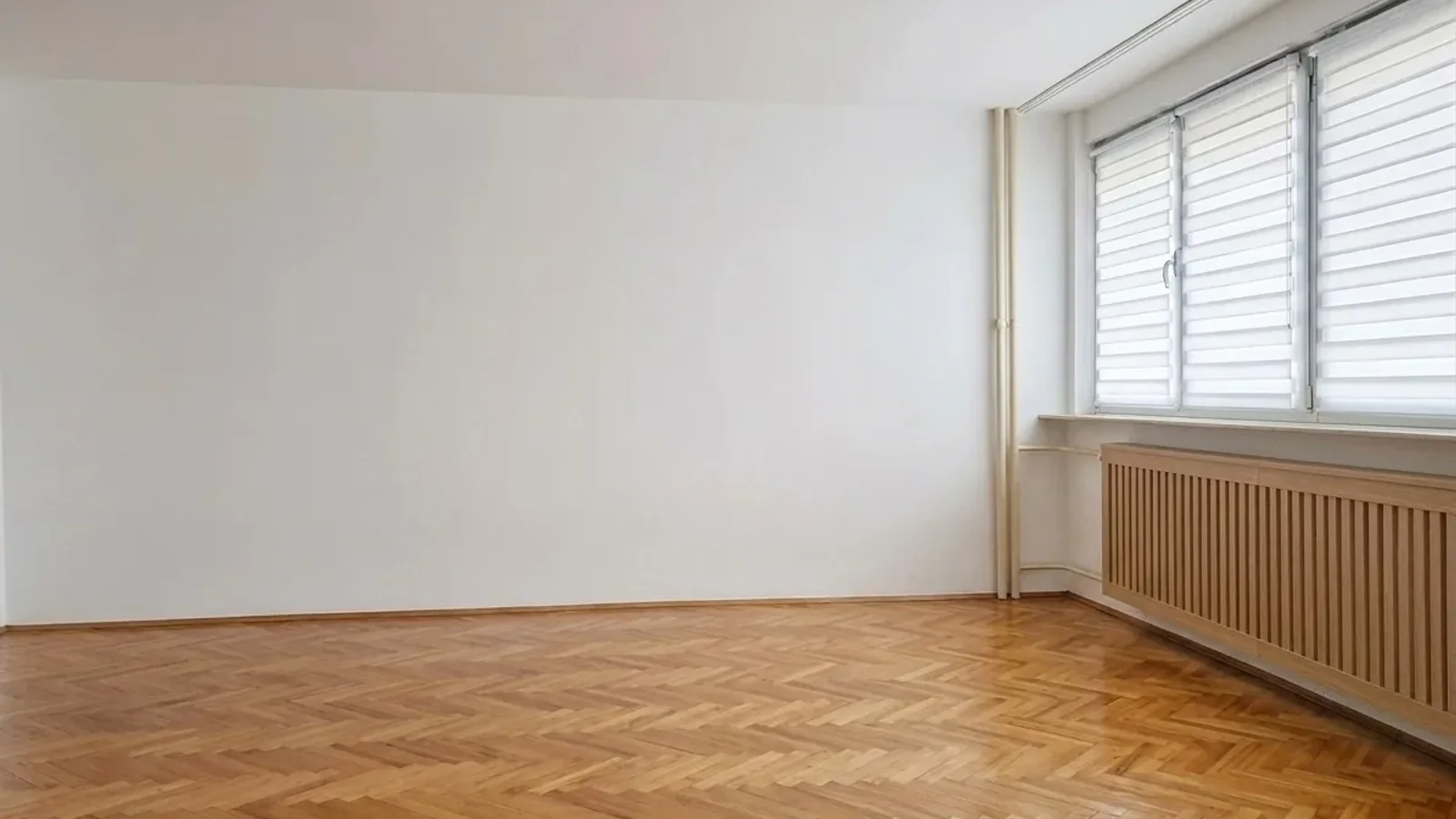
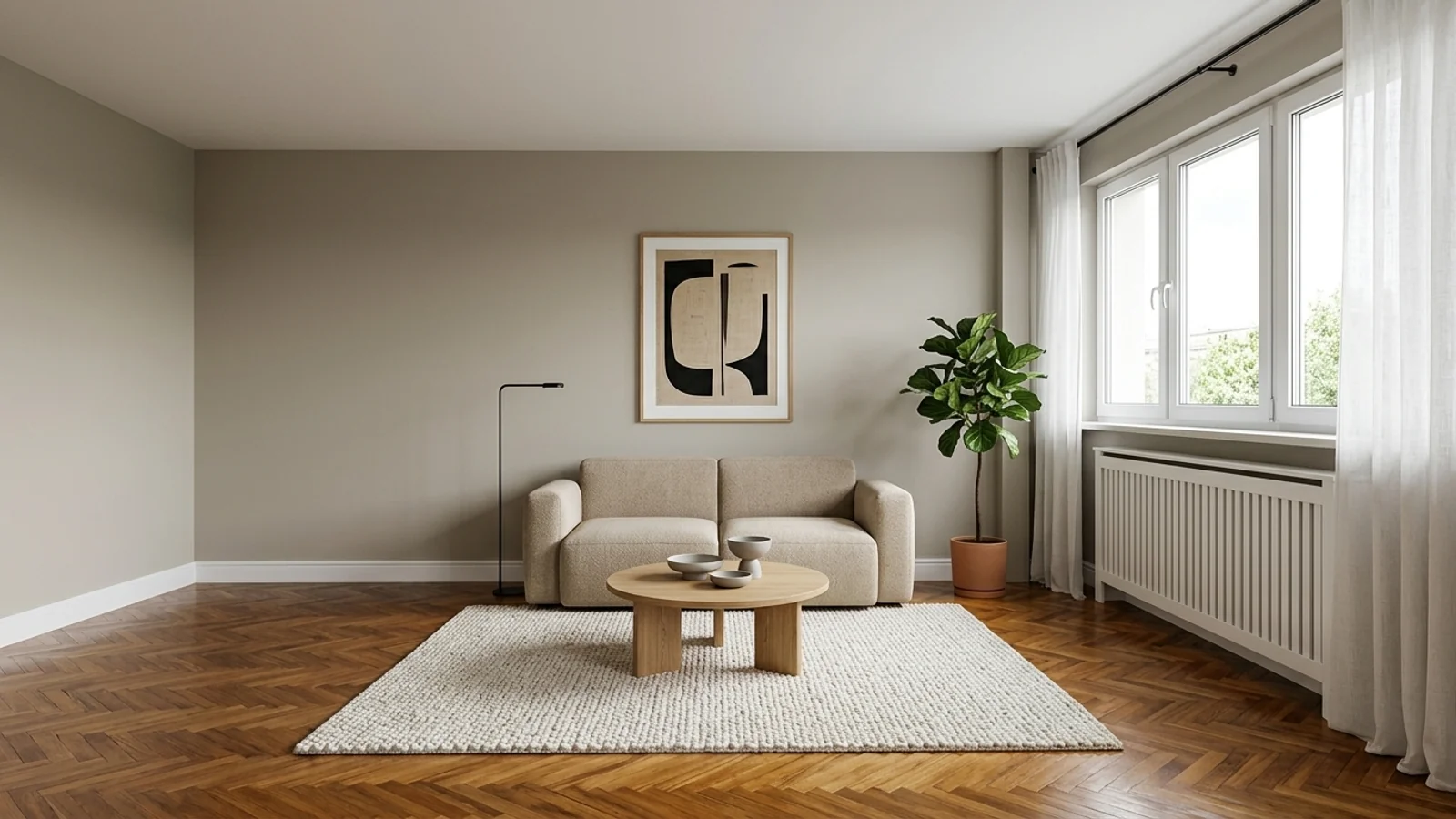
Another real example. The before photo is an empty room in an older apartment building: herringbone parquet, exposed pipes, an old radiator cover, dated blinds. The AI preview shows the same room with repainted greige walls, boxed-in pipes, a modern radiator cover, refinished parquet, and simple modern furniture. This is a €2,000-€3,000 renovation you can evaluate before spending anything.
What to visualize before starting:
- Wall color: The single most impactful and cheapest change. A can of paint costs €30-€50 but completely transforms a room. Test 5 colors with AI in 2 minutes instead of buying 5 sample pots.
- Furniture arrangement: Moving furniture costs nothing but changes everything. Use a 3D room planner to test layouts before you start pushing your sofa around.
- Style direction: See your living room in Scandinavian, modern, mid-century, or industrial style before buying a single piece. This is where AI shines, compare 4 styles in 60 seconds.
- New sofa: The most expensive living room purchase (€500-€3,000). See it in your room at exact scale before ordering. Does the color work? Does the size fit? AI shows you.
For detailed living room inspiration, see our living room interior design guide and AI living room design prompts.
Bedroom Renovation: Where Comfort Meets Aesthetics
Bedroom renovations focus on two things: sleep quality (mattress, lighting, blackout) and visual calm (colors, textures, decluttering). Most bedroom transformations are cosmetic and cost €500-€5,000.
What to visualize before starting:
- Accent wall: A statement wall behind the headboard anchors the room. Test deep greens, navy, terracotta, or textured wallpaper with AI.
- Headboard and bed frame: Upholstered, wooden, or metal? The bed is 60% of the visual weight in any bedroom. See each option in your space.
- Flooring: Carpet for warmth, hardwood for style, or vinyl for durability? See how each changes the bedroom feel in your actual room proportions.
- Lighting: Bedside pendants vs. table lamps, warm vs. cool bulbs. Lighting sets the sleep mood and photographs differently than in-store displays.
See our complete bedroom design guide for more ideas.
The 5 Most Expensive Renovation Mistakes (And How AI Prevents Them)
- 1. Choosing the wrong paint color (Cost: €200-€2,000). Paint swatches in a store look nothing like paint on your walls. Store lighting is fluorescent; your home has natural light, warm bulbs, and shadows. AI renders show you the exact color in your actual room conditions. See our paint color guide for details.
- 2. Buying furniture that does not fit (Cost: €500-€5,000). Size and fit are the top reason online furniture gets returned. A sofa that looked perfect online blocks your doorway. A dining table seats 6 but leaves no room to walk. AI 3D planners show you exact dimensions before you buy, and our free furniture fit calculator checks doorways and room clearances in seconds.
- 3. Committing to a style you end up disliking (Cost: €2,000-€20,000).You saw a beautiful navy kitchen on Pinterest and ordered the cabinets. Six months later, you realize dark cabinets make your small kitchen feel like a cave. AI lets you try 5 styles in 5 minutes, before ordering anything.
- 4. Renovating in the wrong order (Cost: time + frustration). Painting walls after installing the floor wastes time and risks damage. Installing lighting after the ceiling is finished means visible wiring. AI visualization lets you plan the full end result first, then work backward to the correct sequence.
- 5. Over-renovating for the neighborhood (Cost: negative ROI). A €50,000 kitchen in a €150,000 home will never recover its cost. Before you renovate, visualize different levels of renovation, a €5,000 cosmetic refresh might deliver better ROI than a €25,000 gut renovation.
Cosmetic vs. Structural Renovation: Where AI Helps Most
Which tools actually manage which half is a separate comparison: we tested an image model on a load bearing wall and published what came back in the AI renovation tools breakdown.
AI visualization is most powerful for cosmetic renovations, changes that affect how a room looks and feels without altering its structure:
Best for AI Visualization (Cosmetic)
- Paint colors and accent walls
- Furniture selection and arrangement
- Flooring changes (hardwood, tile, carpet, vinyl)
- Lighting fixtures and placement
- Kitchen cabinet colors and hardware
- Bathroom tile and vanity selection
- Decor, art, and textiles
- Style direction (modern vs. traditional vs. Scandinavian)
Combine AI with Professional Plans (Structural)
- Removing or adding walls, use AI for the visual result + architect for structural plans
- Plumbing relocation, AI shows the end result, plumber plans the pipes
- Electrical changes, visualize the lighting result with AI, electrician handles the wiring
- Extensions and additions, use a floor plan to 3D converter to see the new space at scale
The key insight: even structural renovations benefit from AI visualization. You still need to see the end result before you start. AI handles the "what will it look like" question; your contractor handles the "how do we build it" question.
How to Visualize Your Renovation with MeltFlex (Free)
MeltFlex offers two powerful ways to visualize your renovation:
Option 1: Photo-Based Room Redesign
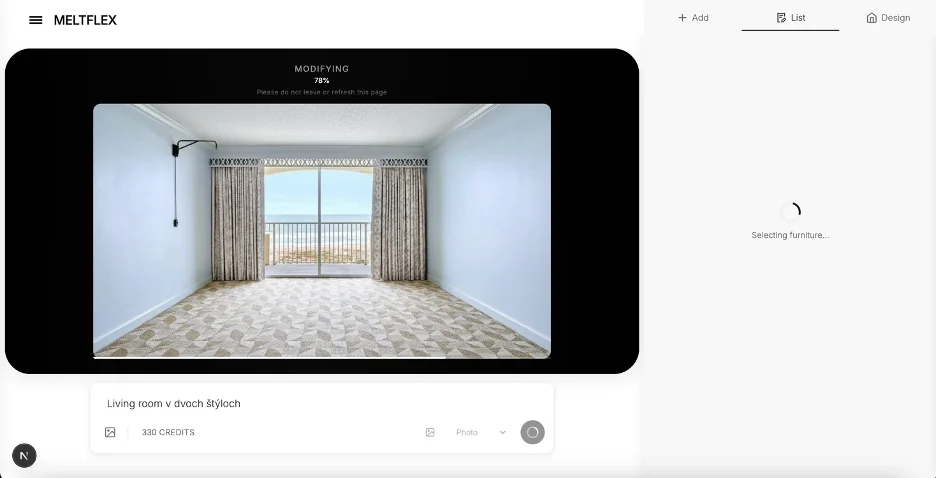
Upload a photo of your current room, any angle, any phone camera. Choose a design style or describe what you want changed. The AI generates a photorealistic render of your renovated room in seconds. Try 5 different styles, compare them side by side, and find the direction you love before spending anything.
Option 2: Floor Plan to 3D Model
For layout changes, moving furniture, adding an island, changing room function, upload your floor plan. MeltFlex converts it to an interactive 3D model where you can place real furniture from real brands at exact scale. Walk through your renovated space virtually. See if that island fits. Check if the new sofa leaves room to walk.
Upload a room photo or floor plan and visualize your renovation, free →
Renovation Budget Planning: How to Prioritize
Not every renovation needs to be expensive. Here is the cost and resale math in one place, followed by how to prioritize by impact per euro spent:
Highest Impact, Lowest Cost (€50-€500)
- Paint: One can of paint (€30-€50) transforms an entire room. Highest ROI renovation at any budget level.
- Light fixtures: Replace dated ceiling lights with modern pendants or flush mounts (€30-€150 each). Instant modernization.
- Cabinet hardware: New handles and knobs (€2-€10 each) make 10-year-old kitchen cabinets look new.
- Textiles: New curtains, cushions, throws, and rugs (€100-€300 total) change the entire color palette and feel.
Medium Impact, Medium Cost (€500-€5,000)
- Flooring: Vinyl plank flooring (€500-€2,000 for a room) looks like hardwood at a fraction of the cost. Can be installed over existing floor.
- Backsplash: A new kitchen backsplash (€300-€1,500) changes the kitchen personality entirely.
- Furniture refresh: One statement piece, a new sofa, dining table, or bed frame, anchors a redesigned room.
Highest Impact, Highest Cost (€5,000+)
- Kitchen remodel: Full cabinet replacement, new countertops, and appliances (€8,000-€25,000). The biggest visual and ROI impact in any home.
- Bathroom remodel: New tile, vanity, fixtures, and shower (€5,000-€15,000). Second-highest ROI room.
- Open plan conversion: Removing a wall between kitchen and living room (€3,000-€10,000). Transforms how the entire home feels.
When to DIY vs. Hire a Professional
AI visualization helps you decide what to tackle yourself and what needs a pro:
- DIY: Painting, furniture rearrangement, light fixture replacement, hardware swap, textile refresh, shelving. Visualize with AI, then do it yourself.
- Semi-DIY: Vinyl flooring (watch tutorials), backsplash tiling (small area), wallpaper (modern peel-and-stick). Visualize with AI, research tutorials, then decide.
- Hire a pro: Plumbing, electrical, structural changes, full kitchen/bathroom remodels, anything load-bearing. Visualize with AI to communicate your vision to the contractor, then let them build it.
The most powerful use of AI in renovation is communicating your vision. Instead of explaining to a contractor "I want something modern but warm with an open feel," you show them an AI render and say "I want this." Clear communication prevents misunderstandings that cost thousands.
Renovation Visualization Checklist
Before starting any renovation, visualize these decisions:
- Have you seen your chosen paint color on your actual walls (not just a swatch)?
- Have you tested your furniture layout at real scale in a 3D planner?
- Have you compared at least 3 style directions for the renovated room?
- Have you checked that new furniture fits through doorways and in the intended position?
- Have you visualized the room in both natural daylight and artificial evening lighting?
- Have you shown your visualization to your partner, family, or roommate for feedback?
- Have you calculated the budget for your chosen design and compared it to alternatives?
- Have you shared the visualization with your contractor (if applicable) for alignment?
Start Visualizing Your Renovation
The best time to visualize is before you make any decisions, before you visit the paint store, before you browse furniture online, before you call a contractor. See the end result first. Then plan backward.
Upload a photo of any room to MeltFlex and see it renovated in seconds, for free. Try different colors, styles, and furniture. Generate photorealistic renders. Find the design you love. Then make it real.
Visualize your renovation with AI, free →
Related guides: room makeover before and after, how to choose paint colors, kitchen design ideas, bathroom design ideas, and complete interior design guide.



)