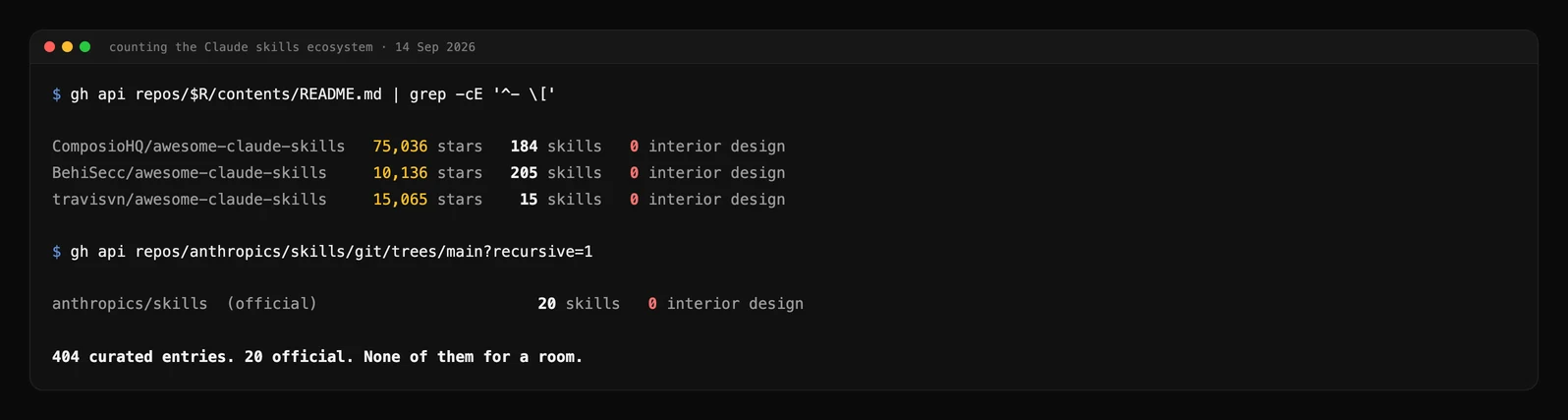
Short answer: there is no official Claude interior design skill. Anthropic publishes twenty open-source Agent Skills and not one of them is for interior design, architecture or anything spatial. We counted the three biggest community lists on GitHub as well, 404 entries between them, and found the same thing: zero. What does exist is a handful of genuinely good hand-written skills, a large amount of auto-generated filler that ranks well and teaches Claude nothing, and a small number of skills wired to an actual render engine. Below are the seven worth installing, and the one technical rule that decides whether any of them will work for you.
Our articles are still written by humans!
Get human written articles in your Google feed.



Is There an Official Claude Interior Design Skill?
No, and it is worth being precise about how empty the shelf is, because most pages answering this question are listing skills that were generated in bulk an hour before they were published.
Anthropic ships pre-built Agent Skills for PowerPoint, Excel, Word and PDF, and publishes a further set in its open-source skills repository. We pulled the file tree on 14 September 2026: twenty skills, covering documents, brand guidelines, canvas design, frontend design, an MCP builder, a skill creator and a few internal tools. Nothing for rooms, buildings, furniture or floor plans.
The community side is larger and no better for our purposes. The three most-starred curated lists are ComposioHQ/awesome-claude-skills at 75,036 stars with 184 entries, BehiSecc/awesome-claude-skills with 205 entries, and travisvn/awesome-claude-skills with 15. That is 404 entries, and not one is for interior design, architecture, furniture, floor plans, landscaping or real estate. Every match for the word architecture was software architecture. The lists overlap, so 404 is the sum of entries rather than a count of unique skills, but the overlap makes no difference to a total of zero.
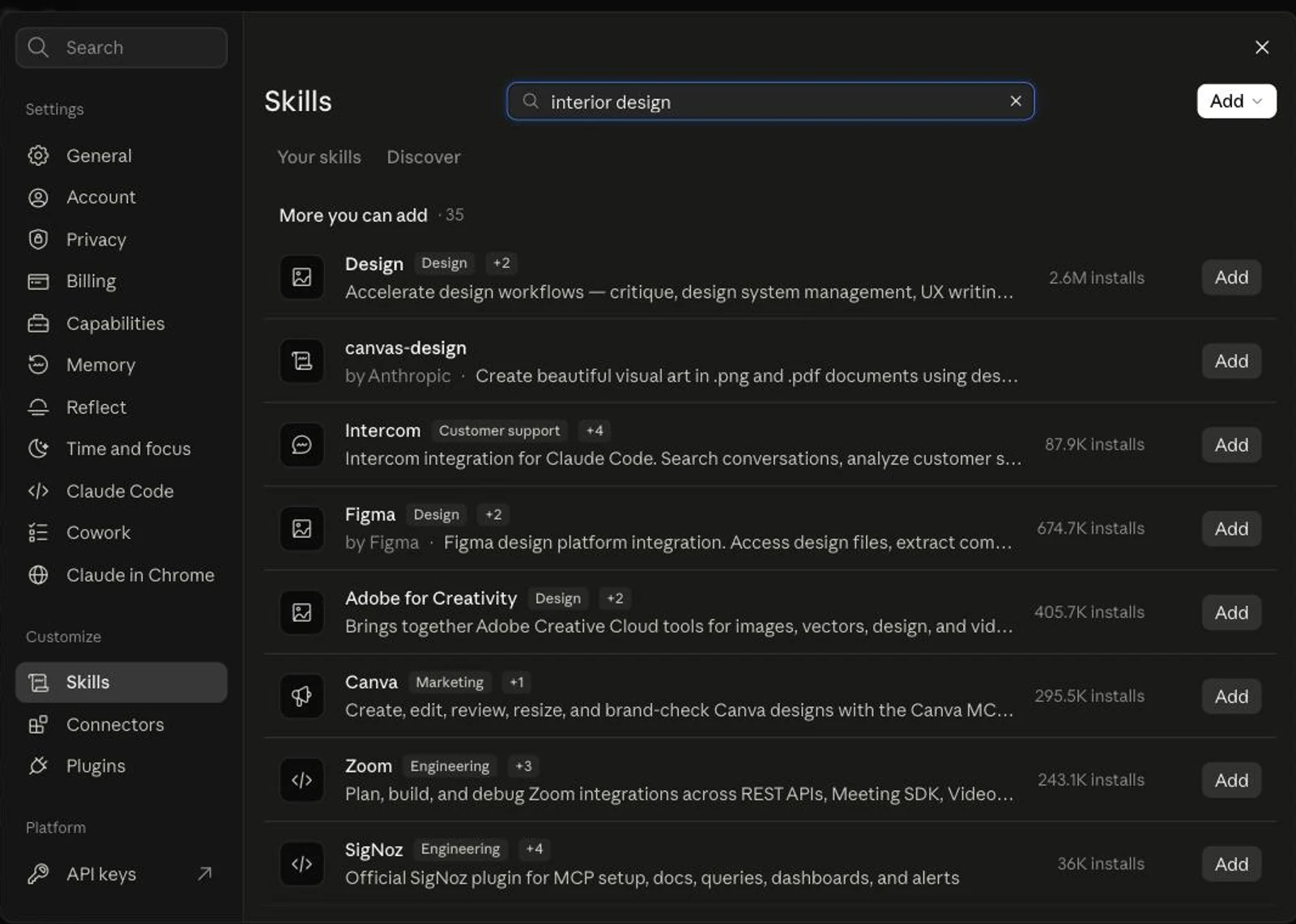
This is the gap, and it is why the question gets asked at all. Designers who already use Claude prompts for interior design hit a ceiling: retyping the same room dimensions, the same client brief and the same supplier list into every conversation. A skill is the fix for exactly that. There is even a directory to install one from now: claude.ai ships Discover, a browsable skill store, right inside Settings. It just has nothing in it for this trade, which is the screenshot at the top of this page.
What Are Claude Skills, and How Do They Differ From Prompts?
A skill is a folder with a SKILL.md file in it, and Claude decides on its own when to open it. The frontmatter carries a name and a description, the body carries instructions, and anything else in the folder is reference material Claude reads only if it needs to.
The part that matters for a design practice is how the loading works. Anthropic calls it progressive disclosure and documents the cost of each stage:
That is the whole argument for skills over a saved prompt. Twenty installed skills cost you roughly 2,000 tokens of standing context, which is nothing, and the one that matches your request is the only one that actually opens. A prompt library, by contrast, sits in a document you have to remember to paste. Anthropic puts it plainly: Skills “load on demand, so you don’t have to repeat the same guidance across conversations”.
The description field is doing more work than it looks. It is the only thing Claude matches your request against when deciding whether to open a skill, so it has to say both what the skill does and when to use it. Hold that thought, because it is exactly where the filler skills fall apart.
The 7 Claude Skills Worth Installing for Interior Design
Three of these are ours, and you should weigh that accordingly. We publish them because we run the render API behind them, so treat the MeltFlex entries as an interested party’s recommendation and the rest as what we would install if we did not. The useful thing is that the seven split into three kinds that do genuinely different jobs, and most people only need one from each column.
The advisory ones: real knowledge, no pictures
interior-design-expert is the best hand-written interior skill we found, and it is not close. It runs to 204 lines, its description explicitly lists what it is not for, and the body carries actual domain content: Munsell notation explained as hue value/chroma, IES illuminance targets, and a set of named anti-patterns including ignoring traffic flow, single light source, scale mismatch and picking paint colour from memory. It cites The Lighting Handbook and Munsell’s A Color Notation at the bottom. Whoever wrote it has done the job.
It lives in curiositech/some_claude_skills, a personal collection of 202 hand-written skills with 221 stars, alongside maximalist-wall-decorator at 486 lines and fancy-yard-landscaper at 409. All three are long, specific and opinionated, which is what a skill should be.
What they cannot do is show you anything. interior-design-expert is honest about this: it declares allowed-tools including a Stability AI MCP tool, meaning the render step is delegated to a service you have to connect separately. Without that, you get a beautifully reasoned layout in text. What it is very good at is writing the prompt for you, which pairs naturally with a proper render prompt structure or our guide to AI interior design prompts that actually work.
The generative ones: they call an API, and that has consequences
Ours are the other half of that split. meltflex-design is 122 lines and describes one endpoint, POST https://www.meltflexai.com/api/v1/generate, plus sixteen modes that are the same endpoint with a different prompt lead-in: restyle, virtual staging, layout boost, declutter, exterior, garden, wall texture, floor restyle, stairs, doors, windows, kitchen, bathroom, photo to render, seasonal and a masked region edit where you paint the area to change in solid red. meltflex-furniture adds referenceImageUrls so Claude can place specific products into a room photo rather than inventing furniture. meltflex-3d covers the three 3D endpoints, including floorplan to 3D conversion, the furniture to GLB generator and the explorable world. All three are thin wrappers over the public MeltFlex API, and the source is on GitHub under MIT.

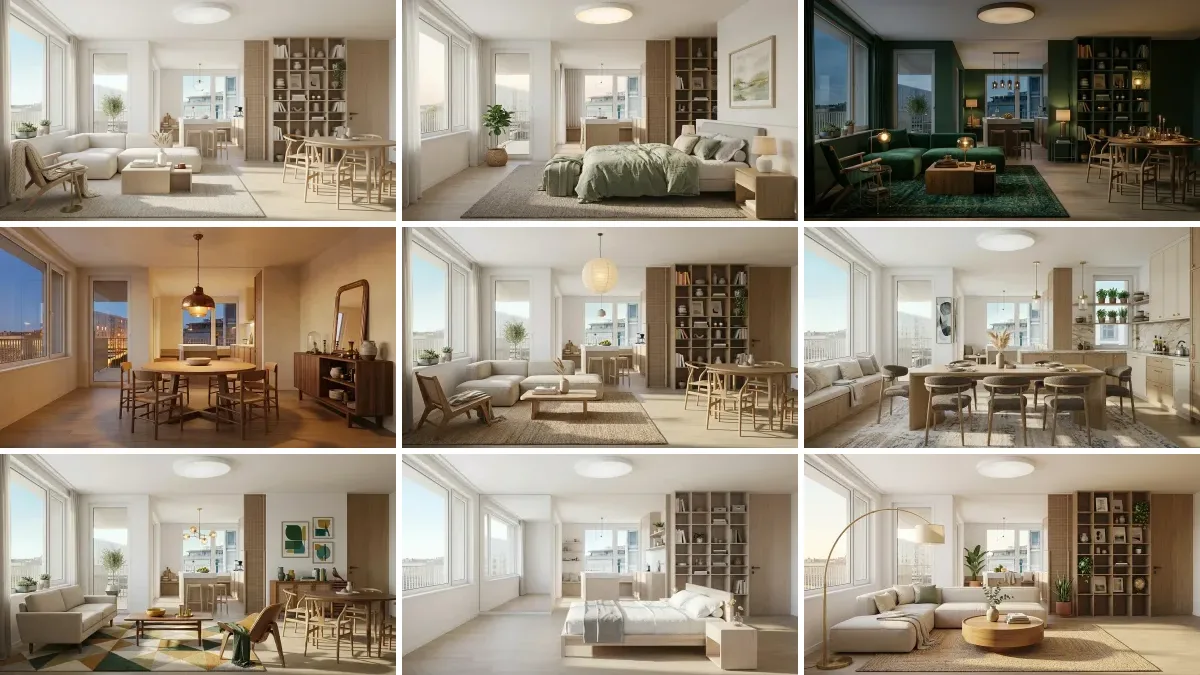
restyle, kitchen, garden, exterior. All four are real outputs from our public creations gallery, each one a single photo in and a finished room back.You can verify the endpoint is live without an account, which is the sort of thing worth doing before you trust any skill that claims to call an API:
curl -i -X POST https://www.meltflexai.com/api/v1/generate \
  -H "Content-Type: application/json" -d '{"prompt":"test"}'

HTTP/2 401
{"error":"Invalid or missing API key",
 "hint":"Pass your API key as: Authorization: Bearer mf_sk_..."}
The honest cost line: a generation is 10 credits, deducted up front and refunded automatically if it fails. The lite design level takes 2 off, pro adds 5. A furniture GLB is 75 credits, a floorplan model is 100, an explorable 3D world is 30 for a draft and 200 for HD. You need an active subscription for the key. That is a real cost, and it is the reason the advisory skills are the right first install for anyone who just wants Claude to think more like a designer.
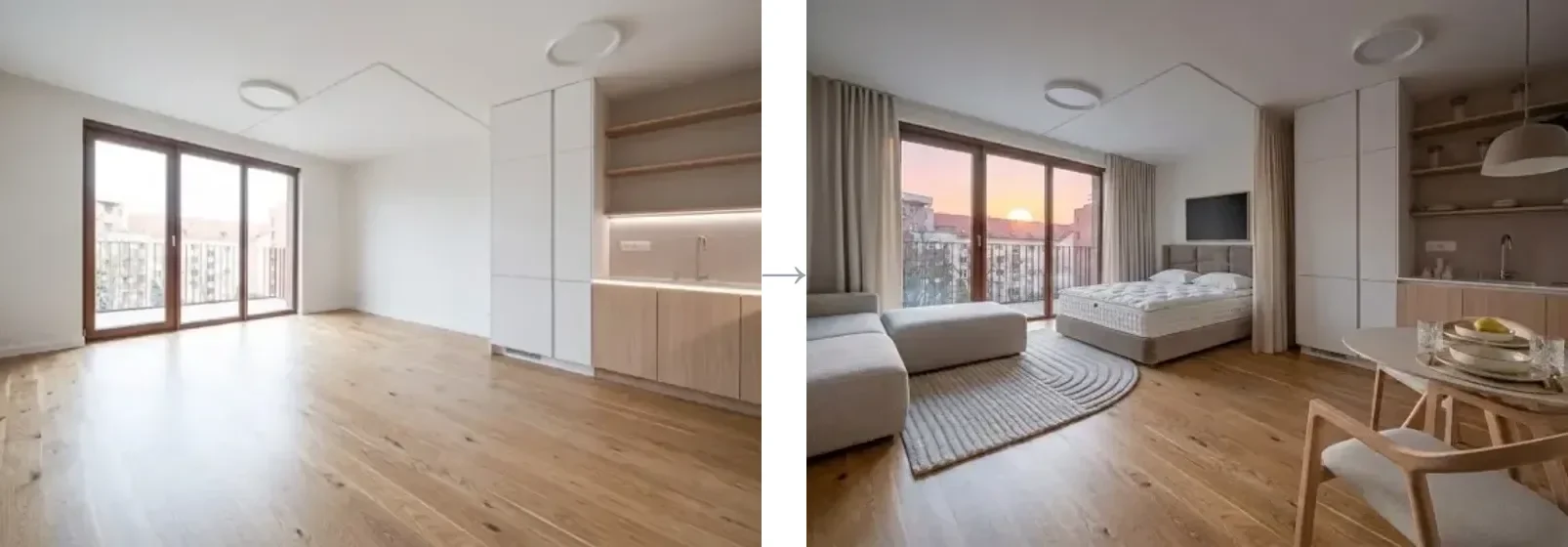
virtual_staging call inside the conversation. The advisory skills cannot do this, and that is the whole distinction.The deliverable ones: the half nobody lists
Anthropic’s pptx, docx and pdf skills are not design skills and that is precisely why they belong here. The output of a design conversation is a client presentation, a specification schedule and a PDF to sign off. These three turn the chat into those files with no setup, and on claude.ai they are already active. Counted as one entry because you will install them together or not at all.
Where Do Claude Skills Actually Run?
This is the rule that decides everything and almost nobody states it: a skill’s network access depends entirely on which Claude you are using. Anthropic documents three different answers for three surfaces, and the difference is not a detail.
Read that against the seven above and the picture resolves. The advisory skills and the document skills work everywhere, because they are pure instruction. Every generative skill, ours included, is useless on the Claude API surface, because it cannot reach the endpoint it was written to call. On claude.ai it depends on settings you may not control. Claude Code is the only surface where a render-capable skill works unconditionally, which is why practices that actually use them tend to run Claude Code with MCP tools for architects and interior designers rather than the web app.
One more constraint worth knowing before you invest time: skills do not sync between surfaces. A skill you upload to claude.ai is not available in Claude Code or the API, and each one has to be installed separately. There is no single place to manage them, and on claude.ai there is no admin console to push a studio’s skills to the whole team. If you want a shared set, the practical answer today is a git repository the team clones. The same applies to the real estate side of this question, where the useful skill is usually one that holds your listing template and calls something that turns a still into a walkthrough.
How to Install a Claude Skill for Interior Design
In Claude Code a skill is a folder, so installing one is copying a folder. Personal skills go in ~/.claude/skills/<name>/SKILL.md and follow you between projects. Project skills go in .claude/skills/ inside the repo, get committed, and follow the project instead. For a studio running a folder per client, project skills are the version you want.
Most published packs ship an installer rather than asking you to copy files. All three of these work for our set, and the first one works for any skills repository on GitHub:
npx skills add MeltFlexDevs/skills        # cross-agent installer
gh skill install MeltFlexDevs/skills     # GitHub CLI 2.90+

# or as a Claude Code plugin, inside a session:
/plugin marketplace add MeltFlexDevs/skills
/plugin install meltflex@meltflex
Installed as a plugin, ours arrive as /meltflex:design, /meltflex:furniture and /meltflex:3d. Then type /skills in a Claude Code session. It lists everything loaded with its description and context cost, and that listing is the only confirmation worth trusting. If a skill is not in it, Claude cannot see it, no matter what the install script printed.
On claude.ai the path is different, and it is not the one the documentation describes. The docs say Settings then Features; the live product as of 14 September 2026 has a dedicated Skills entry under Customize in Settings, with two tabs, Your skills and Discover, and an Add menu offering three routes: Upload skill for a zip, Create a skill in the browser, and Create with Claude, which interviews you and writes the file. It needs a Pro, Max, Team or Enterprise plan with code execution enabled, and the skill is yours alone, not your team’s.
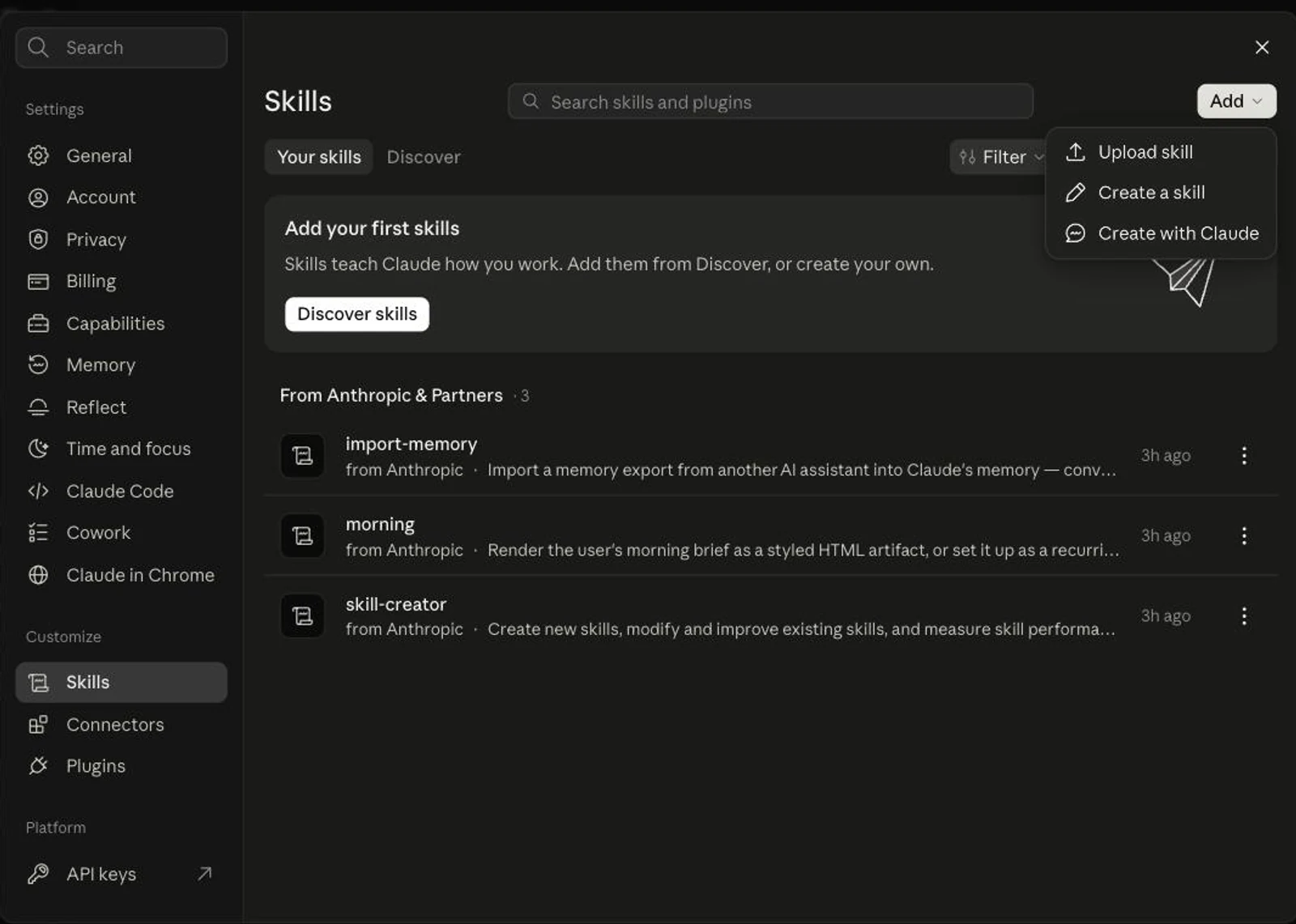
import-memory, morning and skill-creator. None of them designs anything.Before you install anything, read it. Anthropic’s own guidance is blunt: “Use Skills only from trusted sources”, and treat installing one “like installing software”. A skill can direct Claude to run commands and call services, and skills that fetch content from external URLs are the highest risk, because whatever comes back can carry instructions of its own. Open every file in the folder, not just SKILL.md.
How to Spot a Filler Skill in Ten Seconds
Most of what ranks for “claude skill for interior design” is auto-generated, and there is a ten second test that proves it. Open two unrelated skills from the same collection and compare their bodies.
We ran it on the collection that comes back first when you search this. It contains 5,149 skills, which is more than every curated list combined, and includes plausible-looking entries such as restaurant-interior-design, kitchen-design-plan, space-planning, hotel-interior-design and home-staging-design. We pulled all five, plus one unrelated control from the same repository. Every one is 38 lines, 30 of them body. Here is what happens when you hash those bodies:
$ for s in restaurant-interior-design kitchen-design-plan space-planning \
           hotel-interior-design home-staging-design 1031-exchange-guide; do
    curl -s ".../skills/$s/SKILL.md" | tail -n +10 | md5
  done

50158928584a0bfa78dbfae69557a374   restaurant-interior-design
50158928584a0bfa78dbfae69557a374   kitchen-design-plan
50158928584a0bfa78dbfae69557a374   space-planning
50158928584a0bfa78dbfae69557a374   hotel-interior-design
50158928584a0bfa78dbfae69557a374   home-staging-design
50158928584a0bfa78dbfae69557a374   1031-exchange-guide
Identical. Five interior design skills and a 1031 tax-deferred property exchange guide are the same file with a different first line. The shared body is a four-step template reading “Understand Requirements, Research & Analyze, Create Draft, Review & Refine”, followed by an empty table of placeholders. There is not one fact about restaurants, kitchens or space planning anywhere in it.
The descriptions give it away even faster. restaurant-interior-design announces itself, in full, as “Design restaurant interiors. TRIGGERS - Use when user needs help with restaurant-interior-design related tasks.” That is 113 characters that restate the skill’s own name twice, and remember that the description is the only thing Claude matches your request against. A skill defined as being for tasks related to itself gives Claude nothing to decide with. Compare interior-design-expert, whose 627 character description names its triggers and then names five things it is explicitly not for.
That last row is ours to own. Our three skills do not declare allowed-tools, so Claude Code will ask you to approve every curl the skill runs instead of pre-approving the ones it needs. interior-design-expert does declare them and is better for it. It is on our list to fix.
How to Build Your Own Interior Design Skill
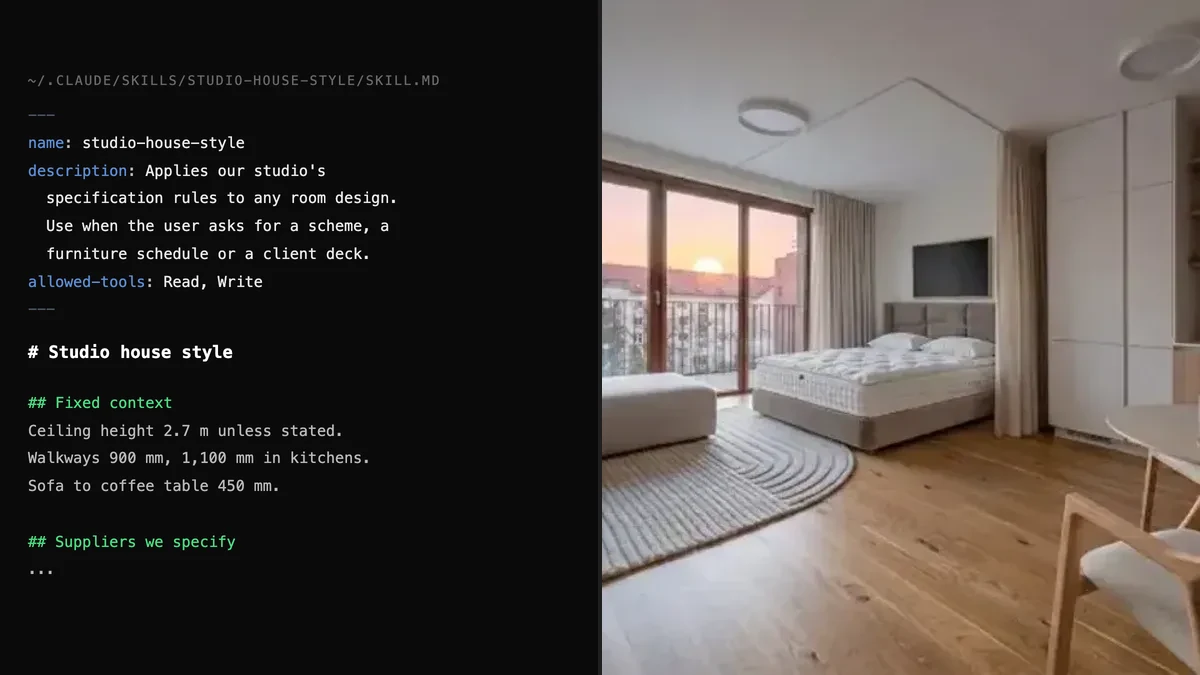
For a studio, a custom skill beats every published one, because the value is your context, not generic design theory. Room dimensions that never change, the suppliers you actually specify, the client’s budget rules, the fixtures that are staying. Written once, loaded automatically, in every conversation afterwards.
The spec is short. A folder, a SKILL.md, two required frontmatter fields:
---
name: studio-house-style
description: Applies our studio's specification rules to any room design.
  Use when the user asks for a scheme, a furniture schedule, a materials
  list or a client presentation for a project. Covers our preferred
  suppliers, our standard clearances and our budget tiers. NOT for
  structural or code questions.
allowed-tools: Read, Write
---

# Studio house style

## Fixed context
Ceiling height 2.7 m unless stated. Walkways 900 mm minimum, 1,100 mm
in kitchens. Sofa to coffee table 450 mm.

## Suppliers we specify
... (your real list)

## Budget tiers
... (your real numbers)
The rules that actually bite: name is capped at 64 characters, lowercase letters, numbers and hyphens only, and it cannot contain the words “claude” or “anthropic”. description is capped at 1,024 characters and must cover both what the skill does and when to use it. Anthropic recommends keeping SKILL.md under 500 lines and moving detail into sibling files, which Claude will read only when it needs them.
Two Claude Code features are worth building around. ! backtick syntax injects live command output into the skill at load time, so a skill can start by reading the current project brief off disk rather than being told it. And disable-model-invocation: true makes a skill user-triggered only, which is what you want for anything with side effects. If writing it from scratch feels like work, Anthropic ships a skill-creator skill that interviews you and writes the file.
The starting material is easier than it sounds if you already have a prompt library. Our 42 Claude prompts for interior design and the room-by-room sets in the ChatGPT prompt pack, the Gemini pack and the Nano Banana pack convert into skill bodies almost directly: the prompt becomes the instruction, the bracketed variables become the fixed context.
Claude Skills, MCP or Projects: Which One Do You Need?
Skills are knowledge, MCP is capability, Projects are memory. They are not alternatives and the common mistake is reaching for the wrong one.
In practice they stack, and the stack is the actual answer to “claude interior design mode”, which is a thing people search for and which does not exist as a setting. A skill that holds your house style, an MCP server that renders, and a Project per client is as close as Claude gets to a mode. We run exactly that combination, which is why we built the MeltFlex MCP server and the skills as two halves of one thing rather than duplicates. If you want to see how another vendor wired the same pattern, the Higgsfield MCP connector is a clean comparison, and it tells Claude Code users to skip MCP and use skills instead.
Where Skills Do Not Help
A skill cannot see your room. It is instructions, not perception. It will not know your ceiling is 2.4 m, your radiator is under the window or your sofa is already the wrong scale, unless you tell it or hand it a photo to work from. Everything a skill knows about your space, you typed.
A skill cannot draw. The advisory ones produce reasoning and text. Anything that comes back as an image came from a service the skill called, at that service’s price. If you want the picture without the plumbing, a dedicated AI interior design tool is the shorter route, and our room restyler does it from a photo with no install at all.
And the lane is young enough to be unstable. Skills only appeared in our own search data in July 2026 and the ecosystem is still mostly individuals publishing personal collections. Our own repository has a single star, which we mention because it is the honest number. The published skill you install today may not be maintained in six months, whereas a skill you wrote holding your own suppliers and clearances will still be correct.
The thing we would not do is wait for an official one. There is no signal that Anthropic intends to publish spatial-design skills, and the twenty-skill list has stayed developer and document shaped throughout. If you want Claude to design like your studio, the 30 minutes of writing the file yourself is the whole project.
Frequently Asked Questions
Is there an official Claude interior design skill?
No. Anthropic publishes twenty open-source Agent Skills and none of them is for interior design, architecture or any spatial discipline. The list is documents, developer tooling and internal tools. The three largest community skill lists on GitHub carry roughly 400 entries between them and contain no interior design skill either. Everything in this space is published by individuals and small companies, so you are choosing from a very short list.
What is a Claude skill?
A Claude skill is a folder containing a SKILL.md file with YAML frontmatter and markdown instructions, which Claude loads by itself when your request matches its description. Only the name and description sit in context at all times, about 100 tokens per skill according to Anthropic. The body loads when the skill triggers, and bundled reference files or scripts load only when they are actually needed. That is why you can install many skills without slowing Claude down.
How do I install a Claude skill for interior design?
In Claude Code, put the skill folder in ~/.claude/skills/ for personal use or .claude/skills/ inside a project, then type /skills to confirm it loaded. Most published packs ship an installer instead: npx skills add owner/repo copies them in for you, and Claude Code can also install a whole pack as a plugin with /plugin marketplace add owner/repo followed by /plugin install. On claude.ai, open Settings, then Skills under Customize, and use the Add menu, which offers Upload skill for a zip, Create a skill in the browser, or Create with Claude. That needs a Pro, Max, Team or Enterprise plan with code execution turned on.
Do Claude skills work on claude.ai as well as Claude Code?
They exist on both but they do not sync, and they do not behave the same. A skill uploaded to claude.ai is not available in Claude Code or through the API, and each has to be uploaded separately. Network access is the bigger difference. Claude Code gives a skill the same network access as any program on your machine, claude.ai gives it full, partial or no access depending on your settings, and on the Claude API skills run in a sandboxed container with no network access at all. Any skill that calls a rendering service only works where the network is open.
What is the difference between a Claude skill and an MCP server?
A skill is knowledge and procedure written in markdown, which costs nothing to run and changes how Claude approaches a task. An MCP server is a live service that gives Claude callable tools, handles authentication and does real work such as generating an image or reading a file. Use a skill when you want Claude to think like your studio, use MCP when you want Claude to operate a system. They stack: a skill can tell Claude exactly when and how to call an MCP tool it already has.
Can a Claude skill actually render a room?
Only if it is wired to something that renders. A skill is a markdown file, so on its own it can plan a layout, calculate lighting or write you a prompt, but it cannot produce an image. Skills that do return renders work by calling an external API or an MCP server from inside the instructions, which is why they need network access and an API key, and why they cost credits per image. A skill that promises renders with no key and no endpoint is describing a prompt, not a render.
How do I tell a good Claude skill from filler?
Open the SKILL.md and read it. A real skill states what it does and when not to use it, carries domain specifics such as clearance distances or lighting standards, and usually runs well past a hundred lines with reference files beside it. Filler is short, generic and circular, with a description along the lines of use when the user needs help with this topic. The fastest test is to open two unrelated skills from the same collection and compare the bodies. If a kitchen design skill and a tax skill say the same thing, the collection was generated in bulk.
Are Claude skills safe to install?
Treat them like installing software, which is Anthropic’s own guidance. A skill can tell Claude to run commands, read files and call external services, so a malicious one can do real damage depending on what access Claude has. Read every file in the folder before you install it, not just SKILL.md, and be especially careful with skills that fetch content from external URLs, because whatever comes back can carry instructions. Prefer skills you wrote or that come from a source you can identify.
Sources and What We Could Not Verify
Skill mechanics, the token costs per level, the frontmatter limits, the per-surface network rules and the security guidance are read off Anthropic’s Agent Skills documentation and the Claude Code skills reference on 14 September 2026. The official skill count comes from the file tree of github.com/anthropics/skills on the same day.
The 404 figure is the sum of link entries in three curated lists, read from their READMEs on 14 September 2026: ComposioHQ (184), BehiSecc (205) and travisvn (15). Star counts are from the GitHub API the same day and move constantly. The duplicate-body finding is reproducible with the command printed above against the public raw files; we hashed six of the 5,149 and not the whole set, so read it as a sample that came back identical six times out of six rather than a proof about every file in that repository.
The claude.ai screenshots are ours, taken on 14 September 2026 on a live account, and they are the reason two sentences in this piece contradict Anthropic’s own documentation: the docs still say Settings then Features, while the product has a dedicated Skills panel with a Discover directory and a three-option Add menu. Where the docs and the product disagree, we went with the product and said so.
What we did not verify: we did not install the three third-party skills into a live session and grade their output, so the assessment of interior-design-expert is a read of its source, not a test of its results. We also did not test whether a network-calling skill succeeds on claude.ai, because that depends on account settings we cannot generalise from; the claim there is Anthropic’s documented behaviour, not our measurement.