Short answer: Higgsfield MCP is a remote Model Context Protocol server at https://mcp.higgsfield.ai/mcp that gives an AI assistant tools to generate Higgsfield images and videos inside the conversation. You add it once as a connector, sign in with OAuth, and generations bill against your existing credits. There is no API key. The one thing most guides get wrong: in Claude Code the vendor tells you not to use MCP at all, and to install their CLI instead.
Our articles are still written by humans!
Get human written articles in your Google feed.



What Higgsfield MCP Actually Is
Higgsfield MCP is a hosted MCP server, not a plugin you install. Model Context Protocol is Anthropic’s open standard for letting an assistant call outside tools, and a remote MCP server is just an HTTPS endpoint that speaks it. Your client discovers what tools exist, asks for permission once, and from then on the assistant can generate an image or a clip as a step inside whatever it is doing.
That matters more than it sounds for anyone running a workflow rather than a single prompt. The alternative is the tab dance: render somewhere, download, upload to a video tool, wait, download again. With the connector in place the assistant does that leg itself, which is the same argument we made when we built our own MCP server for interior design.
We are not neutral here and it is worth saying so plainly: MeltFlex ships a competing MCP server, and our own protected resource metadata was written against theirs as the reference implementation. That is also why this guide can tell you things the others cannot, because we have implemented the same handshake. If you would rather call it directly than through an assistant, our interior design API is the same engine without the connector in the middle.
The Claude Code Trap Most Guides Get Wrong
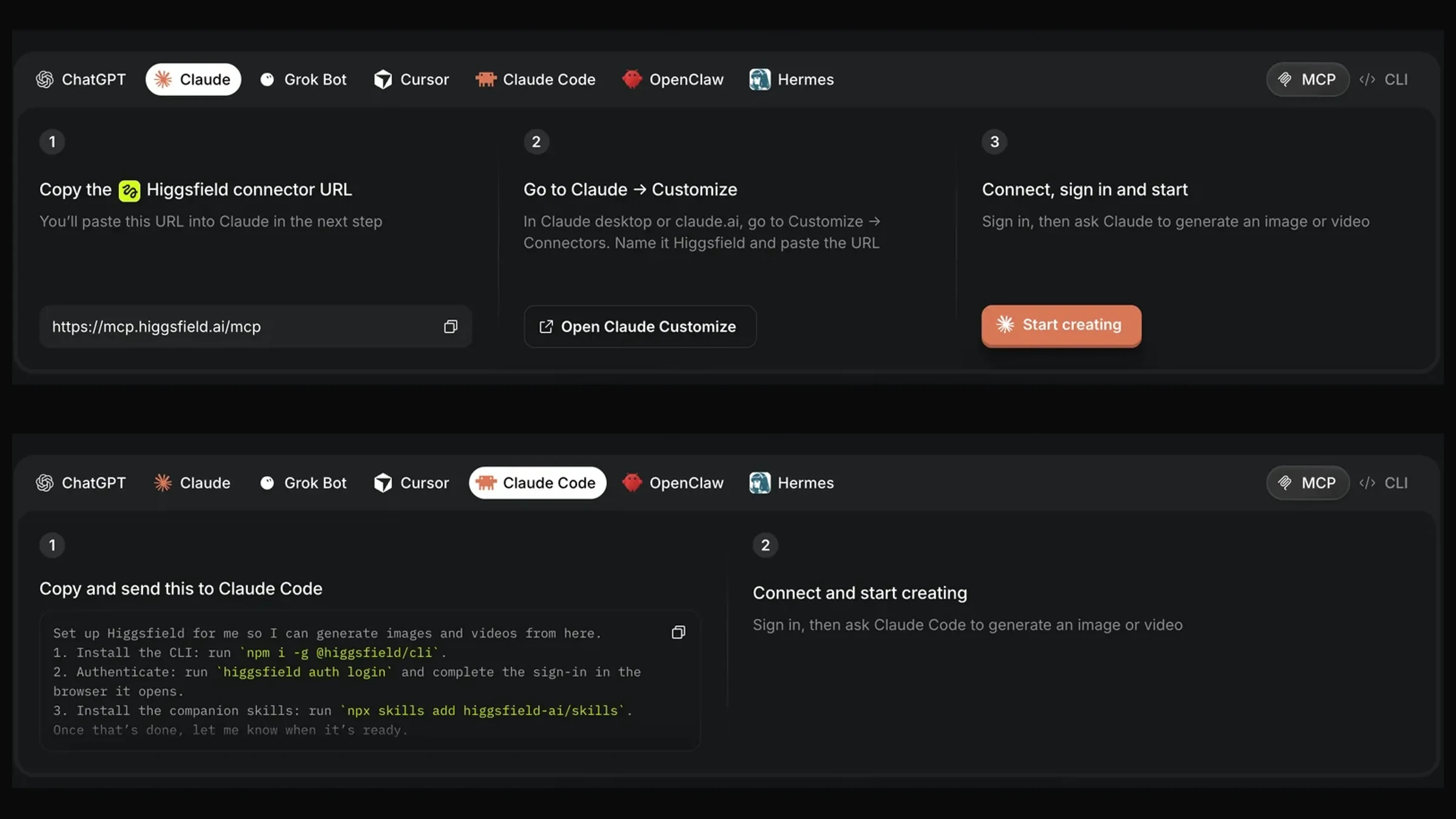
Search for this and the top results tell you to run claude mcp add higgsfield <url> in your terminal. Higgsfield’s own page says not to. It carries a line under every tab reading “If you are using Claude Code or Codex, it’s better to use the CLI”, and the Claude Code tab gives three different commands instead.
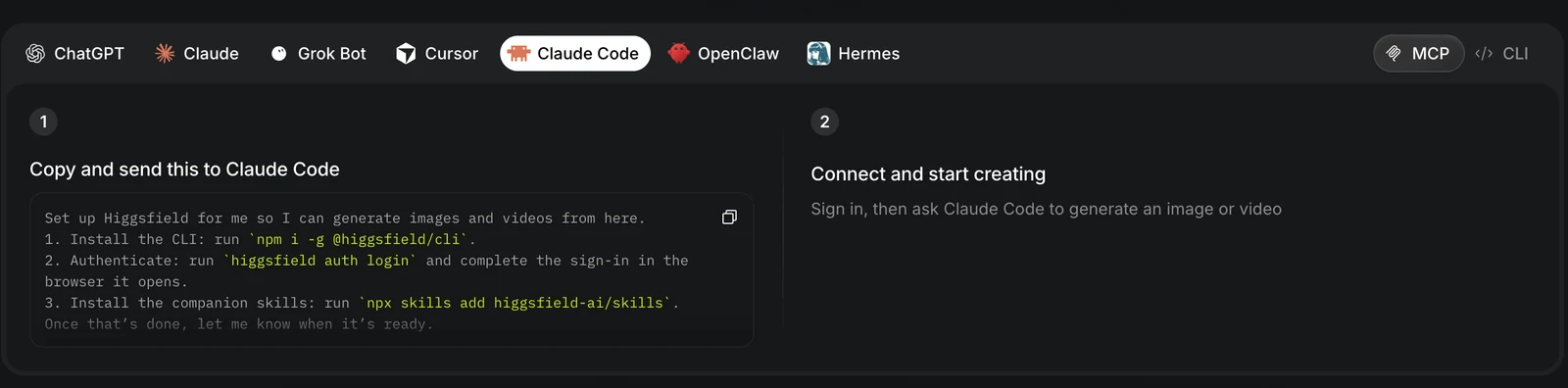
npm i -g @higgsfield/cli
higgsfield auth login
npx skills add higgsfield-ai/skills
Both halves check out. @higgsfield/cli is a real published package, version 1.1.24 as of 29 August 2026, first published 2 May 2026, with 50 releases behind it, which is an actively maintained tool rather than an abandoned one. The companion skills repository at github.com/higgsfield-ai/skills resolves as well.
Why the split exists is the interesting part, and the server itself explains it. See the next section but one.
Setup, Client by Client
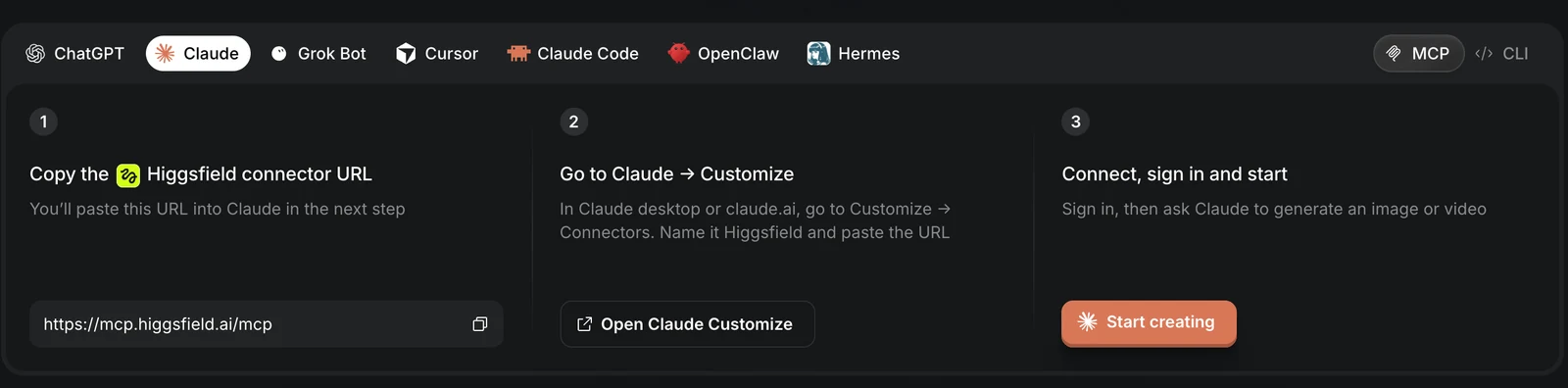
Their MCP page carries a tab per client. This is what each one asks for, as of 14 September 2026.
What the Server Itself Returns
We queried the live server on 14 September 2026 rather than repeating what other guides say. Two commands, no account needed, and you can reproduce both:
curl https://mcp.higgsfield.ai/.well-known/oauth-protected-resource
curl https://mcp.higgsfield.ai/.well-known/oauth-authorization-server
Three things came back that are worth knowing before you set anything up.
There are two authorization servers, not one. The metadata lists clerk.higgsfield.ai and fnf-device-auth.higgsfield.ai, and a non standard higgsfield_auth_hints block explains which you get. Clients that can receive a browser redirect, named explicitly as anthropic, claude, claude-ai and claude-code, take authorization code with PKCE. Clients that cannot, named as openclaw, hermes and memoclaw, get the device code flow and have to be approved out of band. The server picks your login flow based on what kind of client you are, which is why the setup steps differ per tab rather than being one universal recipe.
There is no API key because the server registers your client for you. The authorization server metadata advertises a registration_endpoint, so the client performs Dynamic Client Registration, then an authorization code exchange. Only S256 is accepted for PKCE. The scopes are openid, email and offline_access, and that last one is the one to notice: it issues a refresh token, so the connection survives without you signing in every session.
The unauthenticated endpoint behaves correctly. A POST to /mcp without a token returns 401 with a proper RFC 9728 challenge pointing back at the resource metadata. That is the mechanism that lets a client you have never configured discover the whole flow on its own, and it is the same header our own server returns, because we built ours against theirs.
What It Costs in Credits
The connector is free. Generations are not, and they draw on the same credit balance as the web app, so the honest question is what a working week actually burns.
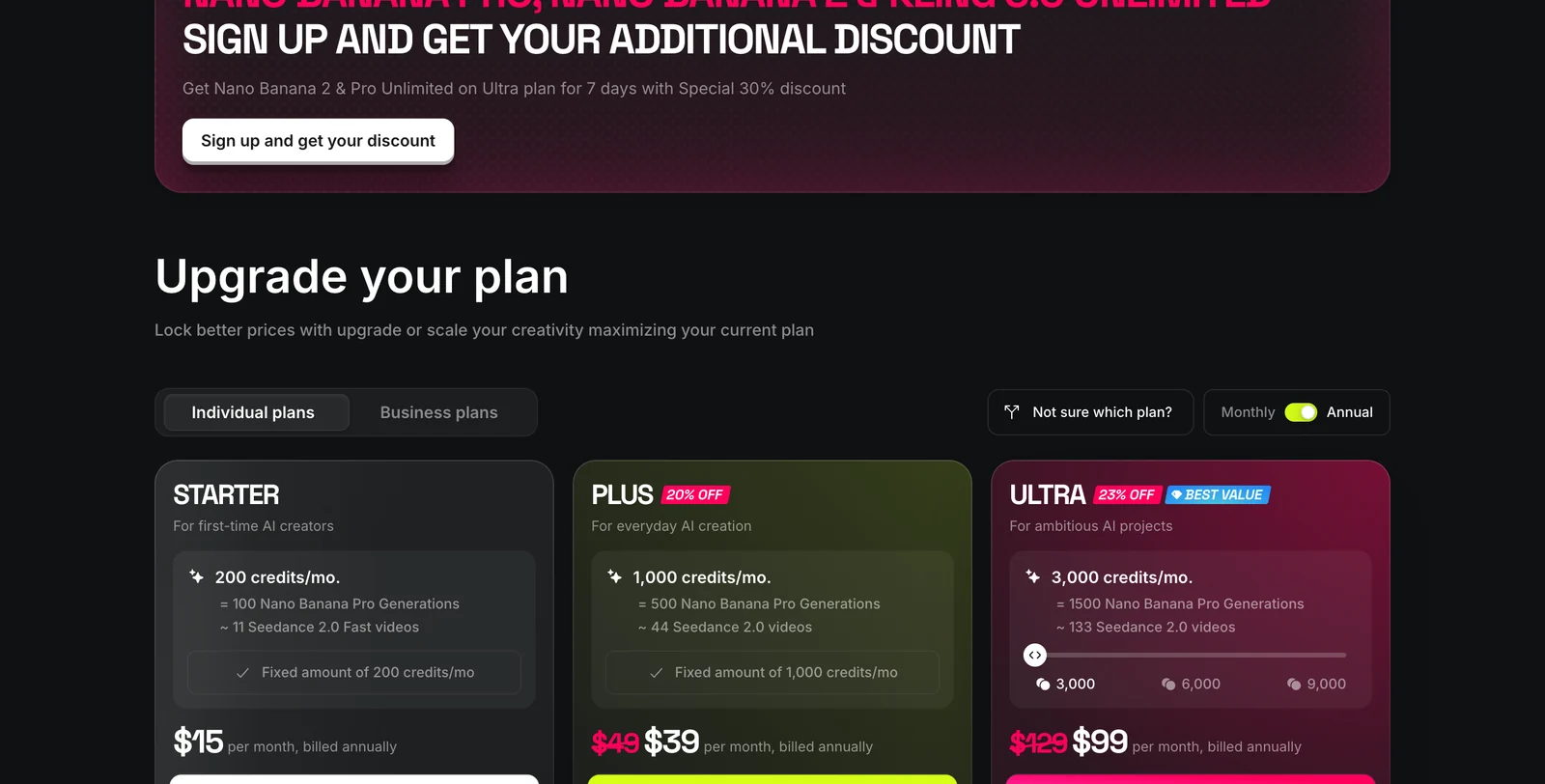
Read the video column, not the image column, if video is why you are here. The Seedance numbers are the ones that matter, and our Seedance prompt guide covers what those clips can and cannot do at 720p. Starter is about eleven clips a month. One property tour is six clips in our own reckoning, so Starter is roughly two tours, before a single retry. Every published per clip price is the price of one generation, and a usable shot is rarely the first one. Connecting MCP also grants a 3 day trial with 100 credits, which is enough to test the connection and not much else.
What It Is Good For in a Design Practice
The honest scope is narrow but real. It is good at the last step: you already have a still, and you want it to move. Put that step inside the assistant and two things get easier.
Batching. Six rooms, one instruction, rather than six trips through a web app. This is the case that actually justifies a connector over a browser tab, and it is the same reason our Higgsfield walkthrough guide is built around a shot list rather than a single clip. If you are still choosing a video model rather than wiring one up, the real estate video generators comparison and the image to video roundup are the earlier decision.
Keeping the brief in one place. If the assistant already holds the material palette, the room list and the client’s notes, the clip prompt inherits all of it instead of being retyped. For the wording itself, our architectural rendering prompts and AI render prompts libraries are the phrasing to paste in, and the MCP servers worth having as an architect covers what else belongs in the same setup.
Where It Does Not Help
Four limits, and the first is the one that costs people the most time.
It generates, it does not design. An MCP tool call is a generation endpoint. It cannot read your model, hold your massing, or keep a real room consistent between calls, because none of that is in the protocol or the product. If you need the actual room preserved, that is an image to image job, which is what photo to render and model to render are for. For the clip itself off a render you already trust, our AI video walkthrough runs the same last step without a credit plan, and the interior design video generator guide covers when that is the better route.
Credits run out faster than you plan. See the table above. Eleven clips on the entry plan is not a practice, it is an evaluation. If that is the blocker, the comparison of Higgsfield alternatives works out the per clip price of every rival engine, and Higgsfield turns out to be the cheap option on premium models and the expensive one on cheap models.
Connector setup is not the hard part, and most guides stop there. Every guide on this SERP is a setup walkthrough. Almost none tell you what a clip costs or what the shot list should be, which is the part that decides whether this is worth having.
It is another dependency in a fast moving product. Higgsfield ships constantly. The CLI has shipped 50 versions since May 2026. Anything written about it, this page included, has a short shelf life, and the two curl commands above are how you check what is true today rather than trusting a guide from three months ago.
The short version for a practice: wire it up if your renders already exist and you want them moving without leaving the assistant. If the renders are what you are missing, start at the editor instead and come back to this page when there is something worth animating.
Frequently Asked Questions
What is Higgsfield MCP?
Higgsfield MCP is a remote Model Context Protocol server at https://mcp.higgsfield.ai/mcp that lets an AI assistant generate Higgsfield images and videos without you leaving the chat. You add it once as a connector, sign in with your Higgsfield account over OAuth, and the assistant gets tools it can call. There is no API key to paste, and generations bill against your existing Higgsfield credits.
How do I connect Higgsfield MCP to Claude?
In Claude desktop or claude.ai go to Customize, then Connectors, add a custom connector, name it Higgsfield and paste https://mcp.higgsfield.ai/mcp. Click connect and sign in with your Higgsfield account. The sign-in is an OAuth redirect, so nothing is stored on your side and no API key is involved.
Does Higgsfield MCP work with Claude Code?
Higgsfield own guidance is to use their CLI rather than the MCP connector in Claude Code and Codex. Their MCP page says so directly and gives three commands: npm i -g @higgsfield/cli, then higgsfield auth login, then npx skills add higgsfield-ai/skills. Several high ranking third party guides tell you to run claude mcp add instead, which contradicts the vendor.
Do I need a Higgsfield API key for MCP?
No. The server advertises an OAuth registration endpoint, so your client registers itself dynamically and then runs an authorization code flow with PKCE. You sign in with your normal Higgsfield account and the client stores a token. The scopes requested are openid, email and offline_access, and offline_access is what keeps the connection alive without re-authenticating each session.
How much does Higgsfield MCP cost?
The connector itself is free. Generations spend your Higgsfield credits at the same rate as the web app. As of 14 September 2026 their published annual plans are Starter at $15 a month for 200 credits, Plus at $39 for 1,000 credits and Ultra at $99 for 3,000 credits, and their own card puts 200 credits at roughly 100 Nano Banana Pro images or about 11 Seedance 2.0 Fast videos. Connecting MCP also grants a 3 day trial with 100 credits.
Which AI clients does Higgsfield MCP support?
Their MCP page shows setup tabs for ChatGPT, Claude, Grok Bot, Cursor, Claude Code, OpenClaw and Hermes. The server metadata backs that up: it names anthropic, claude, claude-ai and claude-code as clients that get the redirect based OAuth flow, and openclaw, hermes and memoclaw as clients that get the device code flow instead because they cannot receive a redirect.
Is Higgsfield MCP useful for architects and interior designers?
It is useful for the last step, turning a finished render into a clip, and for batching that across a set of images without opening another tab. It does not help with the steps before it. It cannot read your model, hold your massing or keep a real room consistent, because it is a generation endpoint rather than a design tool. Treat it as a render to video stage in an agent workflow, not as a visualization pipeline.
Is Higgsfield MCP free to try?
Connecting MCP grants a 3 day trial plan with 100 credits according to the banner on their MCP page, so you can test the connection and a few generations before paying. The connector, the CLI and the companion skills are all free to install; only the generations cost credits.
Sources, and What We Did Not Test
Setup steps, the client list, the trial offer and the prices are read off Higgsfield’s MCP page and pricing page on 14 September 2026, and their own MCP announcement. The screenshots are ours, taken the same day. Package facts come from the npm registry entry for @higgsfield/cli. The OAuth findings are from the two curl commands printed above, which anyone can re-run.
What we did not do, and will not pretend we did: we have not run a generation through a paid Higgsfield account. Everything on this page is either read from a primary source, screenshotted, or returned by the live server to an unauthenticated request. We have not measured how long a clip takes, how a tool call behaves when credits run out, or whether the assistant handles a failed generation gracefully, because that needs a subscription we do not hold. If you have seen any of those, we would rather correct this page than leave it implying more testing than happened.
Two figures we deliberately left out. The tool list some guides publish, naming 16 models including GPT Image 2, Soul V2 and Flux 2 at up to 4K, comes from the connector after authentication, which we could not reach, so we are not restating it as fact. And the “60 second setup” claim in several titles is a marketing number with nothing behind it that we could verify.