You cannot connect Gemini to SketchUp from the Gemini app: there is no Gemini connector or plugin for SketchUp, and Gemini on the web cannot reach SketchUp on your computer. What works is Google Antigravity, Google’s agent app and command line tool, which can run a community SketchUp MCP server and let Gemini build and edit the model you have open. You can also put Gemini inside SketchUp with the free AI Explorer extension and a Gemini API key, or ask Gemini for a Ruby script. And if you want Gemini images of your model, you already have them: SketchUp’s own AI Render runs on Google’s Nano Banana 2.
Our articles are still written by humans!
Get human written articles in your Google feed.
I run MeltFlex, and we ship our own SketchUp extension, so SketchUp’s Ruby plumbing is familiar ground. For this guide, on October 14, 2026, I sent Gemini 4 Argon and Gemini 3.8 Flash the same modeling brief through the Gemini API, set up exactly the way AI Explorer sends it, and checked both scripts line by line. I tested how Trimble’s official SketchUp server reacts to Gemini’s sign-in, read the source code of the two SketchUp servers I recommend below, and stepped through the setup videos that exist. I did not sign in to any of these services or install anything on a client machine, and I say below where I rely on other people’s tests.
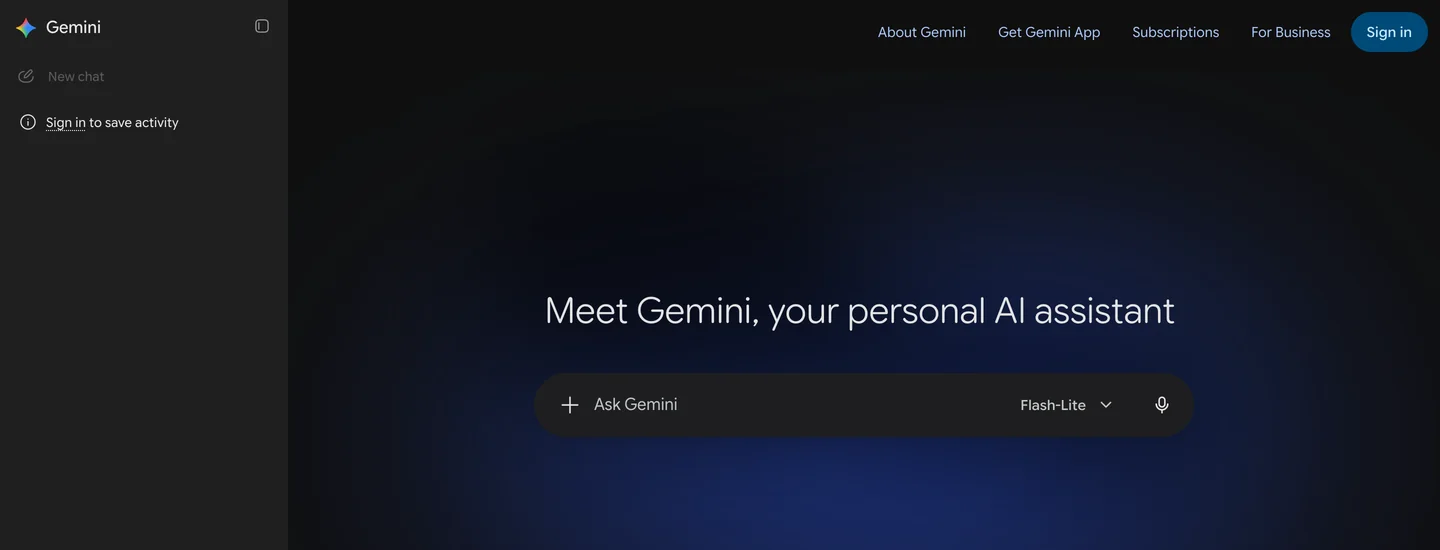

The two products on October 14, 2026. Signed out, Gemini defaults to Flash-Lite. SketchUp shows euros because we browsed from Europe; prices in this guide are US prices.
The short version
- Want Gemini to build and edit your open model? Use Antigravity CLI with the sketchup-mcp2 server. 30 to 60 minutes of setup, SketchUp Pro desktop, and Gemini 3.8 Flash unless you pay for Google AI Ultra.
- Want Gemini inside SketchUp with no server? Install AI Explorer and add a Gemini API key. Raise Max Tokens to about 16000 first.
- Just need a quick script? Ask Gemini for Ruby and paste it into Extensions, Developer, Ruby Console. Check it first.
- Want renders, not geometry? SketchUp’s AI Render already uses Gemini. See what it costs.



Is there an official Gemini plugin for SketchUp?
Not for modeling. When Trimble launched its SketchUp connector in April 2026, Trimble’s Chris Cronin told engineering.com that “Claude is the only 3rd-party AI Assistant that Trimble SketchUp is officially supporting and has announced at this time.” Six months later that is still the case: neither Trimble nor Google has announced a SketchUp app for Gemini.
There is, however, official Gemini inside SketchUp, and almost nobody mentions it. Trimble’s own AI Render extension switched its image model to Google’s. The release notes for version 2.5.0 say it moved “across all Presets and Inpainting tools” to “Gemini 3.1 Flash Image Preview (Google’s Nano Banana 2),” and that each generation now returns one image instead of three.
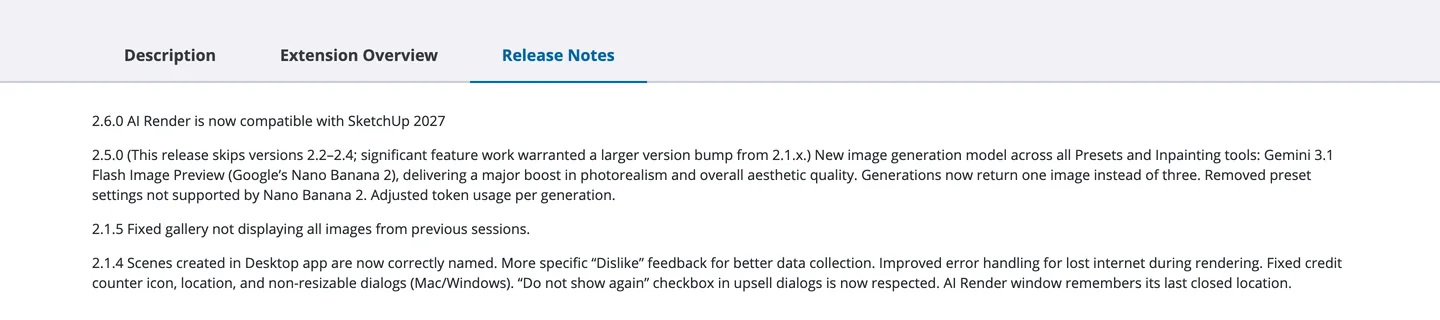
AI Render’s release notes on the Extension Warehouse, October 14, 2026. Version 2.5.0 is where SketchUp’s renders became Gemini renders.
What about adding SketchUp to Gemini yourself? The Gemini web app can now connect custom apps, which are MCP servers, but Google’s help page limits it: you must be 18 or over and in the US, signed in with a personal Google account, with Keep Activity on, and you can only add apps in the web app by URL. That rules out the community servers, which run on your own computer. It also rules out Trimble’s official server, at least today. On October 14 we sent Trimble’s server a test registration using the callback address a developer has documented for Gemini custom apps, on Google’s oauth-redirect.googleusercontent.com relay. It refused with “Only http://localhost and http://127.0.0.1 redirect URIs are allowed.” The same server accepts Claude’s and ChatGPT’s addresses.
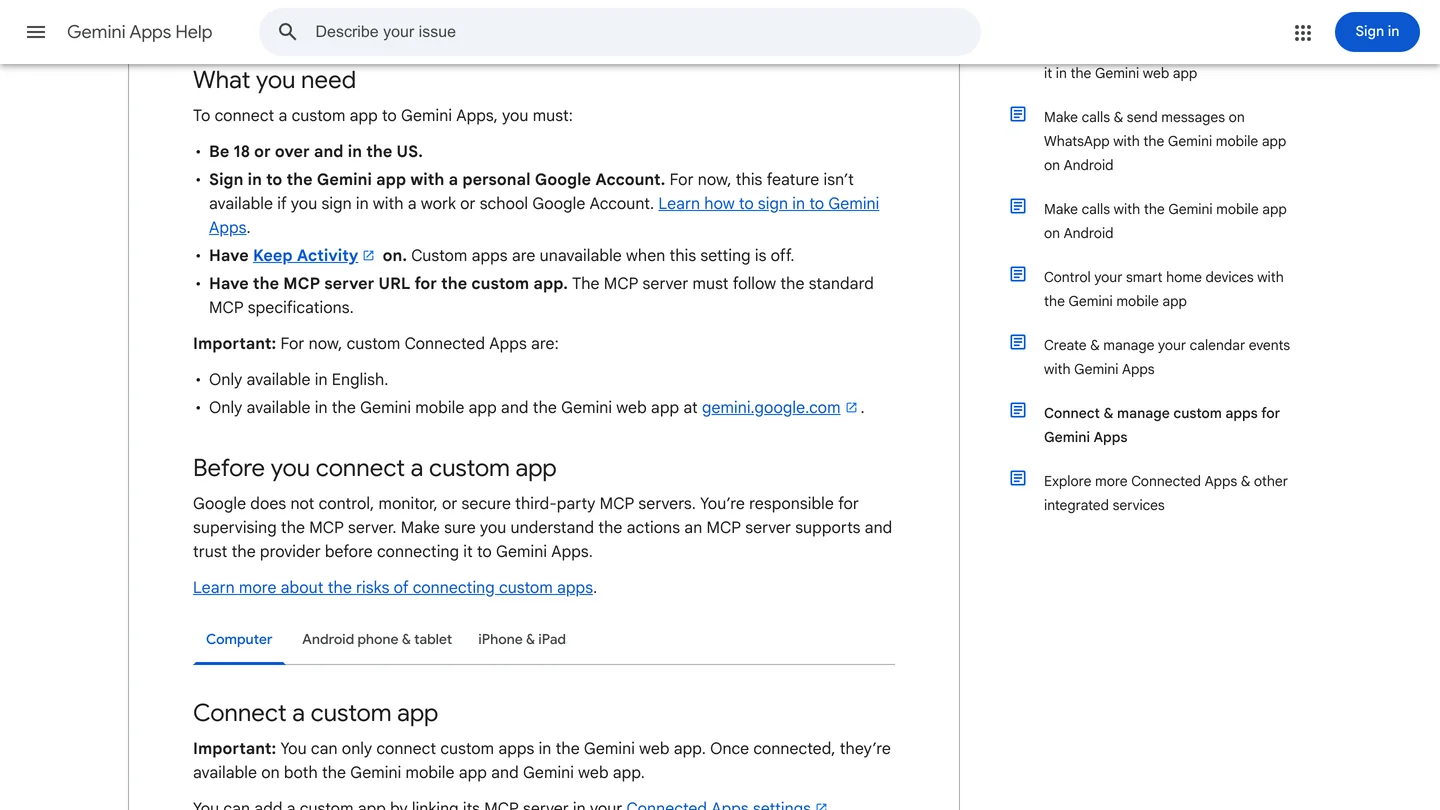
Google’s requirements for custom apps in Gemini. A server on your own laptop has no public URL to paste here.
What are the ways to connect Gemini to SketchUp?
Four work, and they do different jobs. A fifth, the one most people try first, does not.
| Route | What Gemini can do | You need | Setup | Officially supported |
|---|---|---|---|---|
| Antigravity + community MCP server | Build and edit geometry in your open SketchUp file | Antigravity CLI, SketchUp Pro desktop, uv | 30 to 60 minutes | No |
| AI Explorer + Gemini API key | Answer questions, write and optionally run Ruby inside SketchUp | SketchUp desktop, a free Gemini API key | 10 minutes | Community extension |
| Gemini writes Ruby, you paste it | Whatever the script does, once, by hand | Any Gemini plan, SketchUp desktop | None | Not applicable |
| SketchUp AI Render | Render your current view with Nano Banana 2 | Any SketchUp subscription, AI credits | None, it is built in | Yes, by Trimble |
| Gemini app custom app | Nothing yet | US, 18+, a public MCP server URL | Not possible today | No |
- Gemini can
- Build and edit geometry in your open SketchUp file
- You need
- Antigravity CLI, SketchUp Pro desktop, uv
- Setup
- 30 to 60 minutes
- Supported
- No
- Gemini can
- Answer questions, write and optionally run Ruby inside SketchUp
- You need
- SketchUp desktop, a free Gemini API key
- Setup
- 10 minutes
- Supported
- Community extension
- Gemini can
- Whatever the script does, once, by hand
- You need
- Any Gemini plan, SketchUp desktop
- Setup
- None
- Supported
- Not applicable
- Gemini can
- Render your current view with Nano Banana 2
- You need
- Any SketchUp subscription, AI credits
- Setup
- None, it is built in
- Supported
- Yes, by Trimble
- Gemini can
- Nothing yet
- You need
- US, 18+, a public MCP server URL
- Setup
- Not possible today
- Supported
- No
How do you connect Gemini to SketchUp with Antigravity and MCP?
First, ignore any tutorial that tells you to use the free Gemini CLI. On May 19, 2026, Google announced that “On June 18, 2026, Gemini CLI will stop serving requests for Google AI Pro and Ultra, as well as those using it free of charge.” Those users moved to Antigravity CLI (the command is agy), which shares its engine with the Antigravity desktop app. Gemini CLI still works with a paid Gemini API key, but for most designers Antigravity is now the tool.
Antigravity can start local MCP servers, the small programs that let an AI call another app’s tools. Its MCP documentation covers the app, the CLI and the IDE. For a server you add by hand, the CLI is the documented route: it reads a file called mcp_config.json, globally at ~/.gemini/config/mcp_config.json or per project at .agents/mcp_config.json. The desktop app’s documented way to add servers is its MCP Store, so the CLI is the simpler path for a server Google does not list.
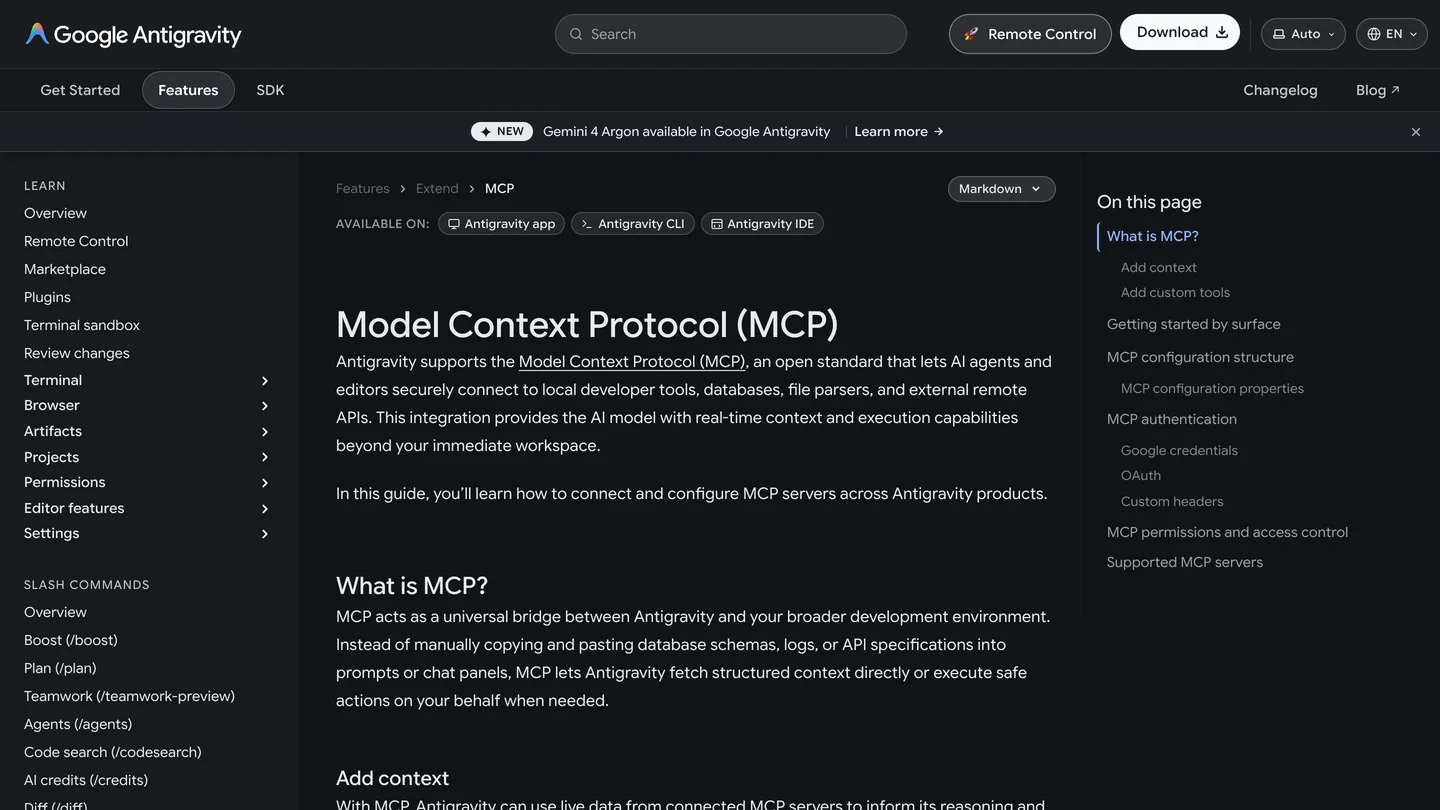
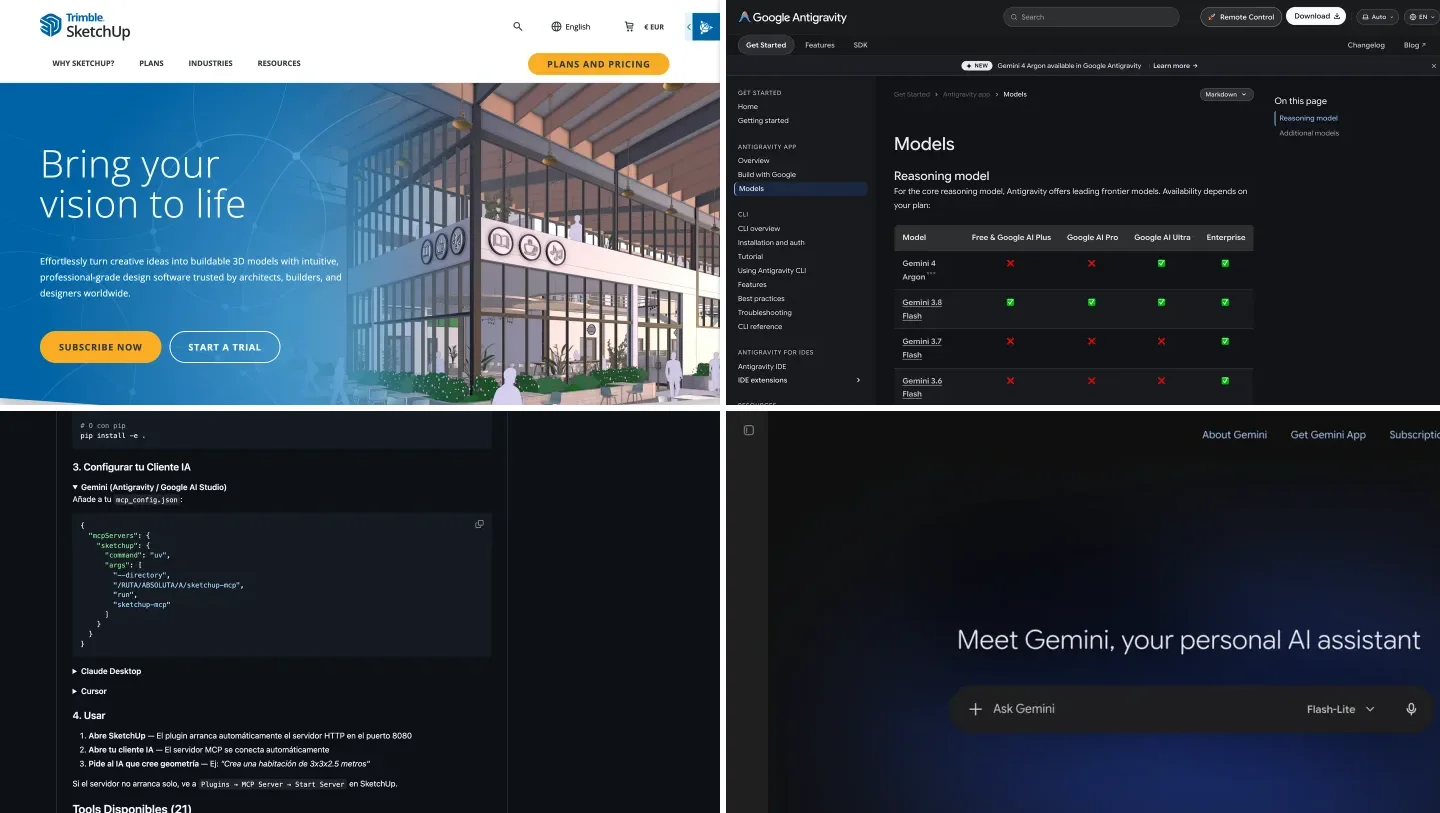
Antigravity’s MCP page on October 14, 2026, with the Gemini 4 Argon banner Google added the day before.
The SketchUp side is the same community software that Claude and ChatGPT users run: a Ruby extension opens a small server inside SketchUp desktop, and a Python program relays the AI’s tool calls to it. Two options matter for Gemini:
- zinin/sketchup-mcp2 (43 stars, updated September 26, 2026): 22 tools, an undo tool, a viewport screenshot tool, and a switch to turn off its run-any-Ruby tool. Its README documents Claude only, but the config is standard MCP. This is the one I recommend.
- Tarkiin/sketchup-mcp (13 stars, updated July 29, 2026): 21 tools including roof trusses, and the only SketchUp server we found with a Gemini and Antigravity section in its README. The README is in Spanish, and there is a security trade-off covered below.
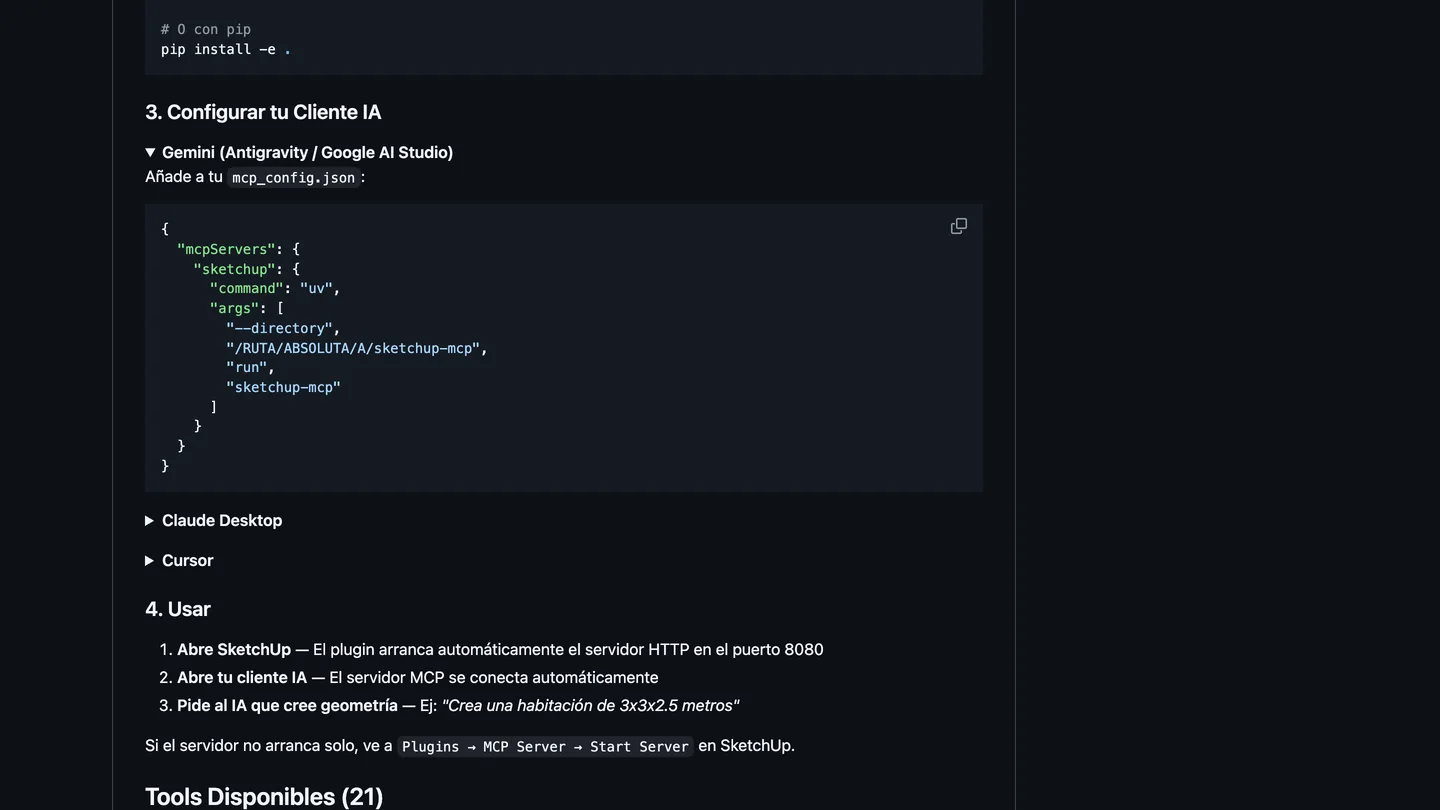
Tarkiin’s README, the only SketchUp server with Gemini instructions. Note step 4: the plugin starts its server on port 8080 by itself.
The steps with sketchup-mcp2:
- Install Antigravity CLI. On a Mac:
curl -fsSL https://antigravity.google/cli/install.sh | bash. On Windows, in PowerShell:irm https://antigravity.google/cli/install.ps1 | iex. Runagyand sign in with your Google account. Install uv too. You need SketchUp Pro or Studio desktop; SketchUp Go has no extensions. - Download the
.rbzfrom sketchup-mcp2’s Releases page and install it in SketchUp under Window, Extension Manager, Install Extension. Restart SketchUp. - In SketchUp choose Plugins, MCP Server, Start Server. It listens on
127.0.0.1, port 9876. - Add the server to
~/.gemini/config/mcp_config.json(create the file if it does not exist; no comments allowed in it):
{
  "mcpServers": {
    "sketchup": {
      "command": "uvx",
      "args": ["sketchup-mcp2"],
      "env": { "SKETCHUP_MCP_PORT": "9876" }
    }
  }
}- Restart
agyand type/mcp. The MCP manager shows each server’s status and logs. - Ask what is in your open model, approve the tool call, then ask for one 24 inch cube. If the cube appears in SketchUp, you are connected.
Antigravity runs unconfigured MCP tools in Ask mode by default, so it stops for your approval before each call. Leave it that way. Two warnings from people who have done this with other assistants: SketchUp’s Ruby runs on its main thread, so one large request freezes SketchUp until it finishes, and the older mhyrr server used in the video below needed a dependency fix before it would start. We wrote this setup from the documentation and the source code; we did not run Antigravity against SketchUp ourselves, and neither server’s author documents sketchup-mcp2 with Gemini, so expect to troubleshoot.
Is there a video showing how to connect Gemini to SketchUp?
Not a good one in English, as of October 14, 2026. We checked what exists. Tarkiin’s own demo is 1 minute 49 in Spanish. A Vietnamese video, Antigravity & SketchUp, shows Antigravity building a dining table and chairs in SketchUp, which proves the route works, but explains nothing. The most viewed Gemini SketchUp clip, a 54,000 view kitchen model by Sketchup Gurus, shows the result without the setup.
The most useful video is not about Gemini at all. The AI Essentials’ 24 minute MCP tutorial walks through the SketchUp half, which is identical whatever AI you use: installing uv, fixing the server’s dependencies (12:22), building and installing the extension (14:27), starting it in SketchUp (20:54) and drawing a 24 inch cube (22:47). Skip the two Codex chapters, installing ChatGPT (3:55) and registering the server with Codex (18:23), and do step 4 above instead.

The AI Essentials, “How to Connect AI to SketchUp (Complete MCP Setup Tutorial)”, September 11, 2026, 24 min 12 s. It uses ChatGPT’s Codex and mhyrr/sketchup-mcp on Windows; the SketchUp steps carry over to Gemini unchanged.
Which Gemini model should you use for SketchUp?
Google released Gemini 4 Argon to developers and subscribers on October 13, 2026, the day before this guide, and calls it its frontier model for demanding software engineering. Google’s announcement shows it building 3D scenes in Blender through MCP, but gives no CAD benchmark. The catch for SketchUp users is the plan: in Antigravity, Argon needs Google AI Ultra or an Enterprise plan.
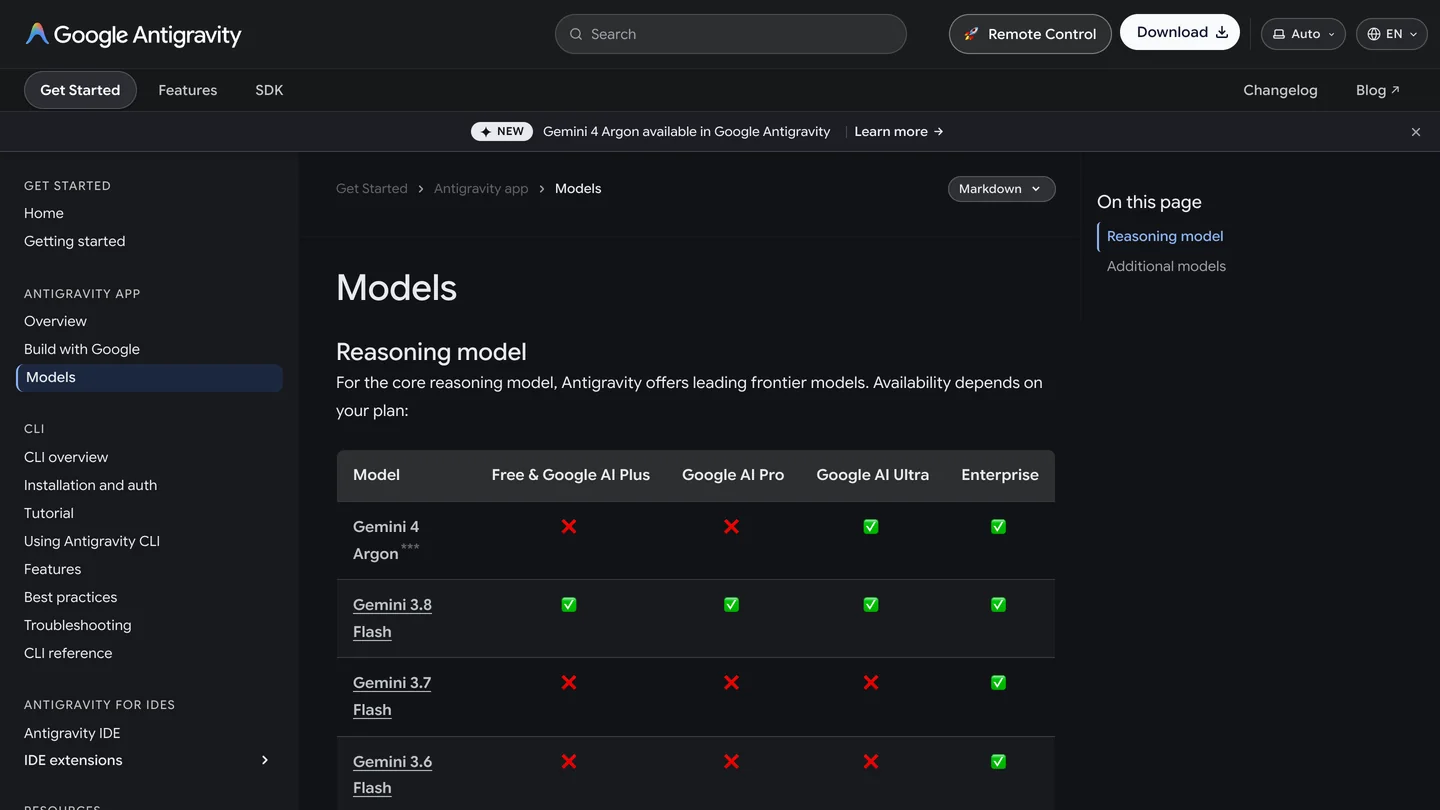
Antigravity’s models by plan, October 14, 2026. Argon has a red cross under Google AI Pro.
| Model | Released | In Antigravity | Gemini API price | For SketchUp |
|---|---|---|---|---|
| Gemini 4 Argon | October 13, 2026 | Google AI Ultra, Enterprise | $2 in, $10 out per million tokens until November 30, 2026, then $4 and $20; no free tier | The more reliable script in our test; use it through the API if you do not have Ultra |
| Gemini 3.8 Flash | September 2026 | Every plan, including free | Free tier, or $0.75 in and $3.75 out until December 31, 2026 | The default for most people; check its geometry |
| Nano Banana 2 (Gemini 3.1 Flash Image) | Earlier in 2026 | Not a modeling model | Billed per image | What SketchUp’s AI Render uses for renders |
- Released
- October 13, 2026
- In Antigravity
- Google AI Ultra, Enterprise
- API price
- $2 in, $10 out per million tokens until November 30, 2026, then $4 and $20; no free tier
- For SketchUp
- The more reliable script in our test; use it through the API if you do not have Ultra
- Released
- September 2026
- In Antigravity
- Every plan, including free
- API price
- Free tier, or $0.75 in and $3.75 out until December 31, 2026
- For SketchUp
- The default for most people; check its geometry
- Released
- Earlier in 2026
- In Antigravity
- Not a modeling model
- API price
- Billed per image
- For SketchUp
- What SketchUp’s AI Render uses for renders
Plans are from Antigravity’s models page and prices from the Gemini API pricing page, both read October 14, 2026. In the Gemini app itself, Google says Argon is available to Google AI Pro and Ultra subscribers, so a Pro plan gets Argon for chat and scripts but not for Antigravity. There is a middle path: Antigravity CLI can run on a Gemini API key instead of your Google account, which should let you pay Argon’s per token price instead of $99.99 a month for Ultra; we have not tried it. Our full Argon script cost about three cents.
Can Gemini write SketchUp Ruby scripts for you?
Yes, and this is the test that tells you most about the models. On October 14 we sent Gemini 4 Argon and Gemini 3.8 Flash the same brief we gave ChatGPT in our ChatGPT and SketchUp guide: a 14 by 12 foot bedroom with 9 foot ceilings and 4.5 inch walls, a door 18 inches from the corner, a centered window with a 30 inch sill, a queen bed centered on the east wall, two nightstands and a dresser, each in its own named group, all as one undo step. We sent it the way AI Explorer does, with its Ruby developer instructions, through Google’s OpenAI compatible endpoint. We did not run the scripts in SketchUp; we checked every line by hand.
| What we checked | Gemini 4 Argon | Gemini 3.8 Flash |
|---|---|---|
| Response | 170 line script in 27 seconds | 143 line script in 47 seconds |
| Room, door, window, sill | Correct | Correct numbers |
| Wall corners | Closed. Walls built from one ring shaped footprint | Closed. The south and north walls run past the corners |
| Which way it builds | Up. Faces point up before each extrusion | Wrong. It turns every face to point down, then extrudes, so per SketchUp’s API the walls and furniture would go below the floor and the wall above the door and window would hang down into the openings |
| Furniture | Correct, with a 2 inch gap between bed and nightstands | Correct, nightstands read as 24 wide and 18 deep |
| Undo and errors | One undo step, aborts cleanly on an error | One undo step, no error handling |
| Weak spots | The door cut depends on SketchUp keeping the wall face’s orientation; defines its helpers globally instead of in a module | Its code comment shows it has the direction of push/pull backwards |
- Argon
- 170 line script in 27 seconds
- 3.8 Flash
- 143 line script in 47 seconds
- Argon
- Correct
- 3.8 Flash
- Correct numbers
- Argon
- Closed. Walls built from one ring shaped footprint
- 3.8 Flash
- Closed. The south and north walls run past the corners
- Argon
- Up. Faces point up before each extrusion
- 3.8 Flash
- Wrong. It turns every face to point down, then extrudes, so per SketchUp’s API the walls and furniture would go below the floor and the wall above the door and window would hang down into the openings
- Argon
- Correct, with a 2 inch gap between bed and nightstands
- 3.8 Flash
- Correct, nightstands read as 24 wide and 18 deep
- Argon
- One undo step, aborts cleanly on an error
- 3.8 Flash
- One undo step, no error handling
- Argon
- The door cut depends on SketchUp keeping the wall face’s orientation; defines its helpers globally instead of in a module
- 3.8 Flash
- Its code comment shows it has the direction of push/pull backwards
Flash’s mistake is worth understanding, because it is invisible in the numbers. Its helper flips each base face downward with the comment “Ensure normal points down so pushpull pushes up.” SketchUp’s Ruby API reference says the opposite: for pushpull, “the distance is measured in the direction that the face normal is pointing.” Every coordinate is right and the model would still come out mirrored under the ground. Argon got corners right where ChatGPT left gaps in our earlier test, but that test went through the ChatGPT app rather than the API, so treat the comparison loosely.
When you paste a script, use Extensions, Developer, Ruby Console, the menu SketchUp has used since 2021 (Tarkiin’s README still says Window, Ruby Console). Run it on a copy of your file.
Can you use Gemini inside SketchUp with AI Explorer?
Yes, and it is the cheapest way to have Gemini in a SketchUp window. AI Explorer (Experimental) is a free, open source extension by Alex Schreyer, who directs the Building and Construction Technology program at UMass Amherst and wrote Architectural Design with SketchUp. It was built for OpenAI, but since version 3.0 it talks to any OpenAI compatible service, and its settings already list Google’s endpoint. We read its source to set it up correctly:
- Install it from the Extension Warehouse and get a free API key in Google AI Studio. The extension’s own menu has a Get Google API Key link.
- In its settings, pick the endpoint
https://generativelanguage.googleapis.com/v1beta/openai/chat/completions, paste the key, and typegemini-3.8-flash(free tier) orgemini-4-argon(paid) as the model. - Raise Max Tokens from 2048 to about 16000. This is the step nobody mentions. Gemini models think before they answer, and the thinking counts against that limit. With the default, Gemini 3.8 Flash spent about 1,965 tokens thinking and returned 167 characters of half finished notes and no code. Argon finished the script but was cut off in its explanation.
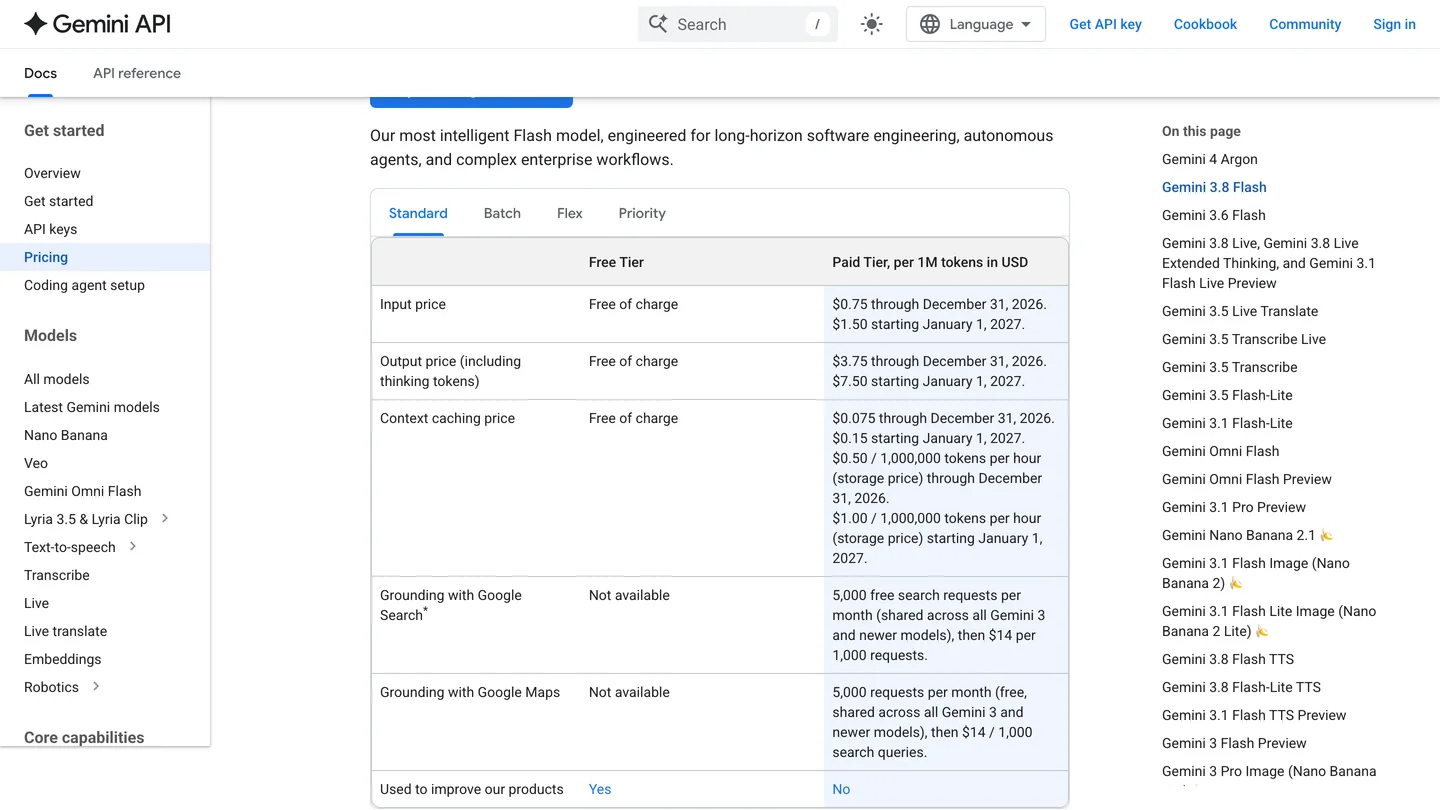
Gemini 3.8 Flash pricing, October 14, 2026. Read the last row before you paste client details into the free tier.
Two more catches. On the free tier, Google’s pricing page answers “Used to improve our products” with Yes, so do not paste client names or addresses. And AI Explorer waits 60 seconds for a reply, according to its code; Flash took 47 seconds for our full room, so ask for smaller pieces. Running generated code is off by default, and Schreyer warns it “can even affect your entire file system” once on. AI Explorer answers one prompt at a time; it is a helper, not an agent like Antigravity.
Is SketchUp’s AI Render powered by Gemini, and what does it cost?
Yes, since version 2.5.0, as shown above. It is the only Gemini route that works in SketchUp Go, on the web and iPad, because AI Render is available to every SketchUp subscriber. It renders your current view with a prompt or preset style, and can inpaint parts of the image. It does not change your model.
The cost is in credits. Trimble’s AI credits page says each AI Render generation costs 10 credits, and its SketchUp AI page adds that a generation is now one image. Go includes 100 credits a month, Pro 150 and Studio 200, so a Pro user gets 15 renders a month. The SketchUp AI add-on adds 1,500 credits for $11.99 a month. Older guides that say 5 credits for three images describe the version before the switch to Gemini. TheSketchUpEssentials’ comparison of AI rendering tools weighs AI Render’s credits against rendering directly in Nano Banana or ChatGPT.
This is where we compete, so read it as a disclosure. MeltFlex has a free SketchUp AI rendering plugin that turns your current view into a photoreal render, and the same engine can turn a 3D draft into a render in the browser from a screenshot. Our Nano Banana architecture prompts and Gemini interior design prompts work in AI Render and in the Gemini app alike.
Is it safe to let Gemini control SketchUp?
Safe enough on a computer you control, if you treat it like installing a powerful macro. Every community SketchUp server has a tool that runs any Ruby code the AI sends, inside SketchUp, with your user’s permissions, and Ruby in SketchUp can read and write files. We read the source of both servers above, and they differ in a way that matters.
sketchup-mcp2 waits until you press Start Server, listens only on 127.0.0.1, uses its own protocol rather than plain web requests, and lets you untick Enable Ruby evaluation in its settings. Tarkiin’s plugin starts a web server on port 8080 every time SketchUp opens, with no password, a setting that lets any website’s scripts read its replies, and its run-Ruby tool always on. It only listens on your own machine, and modern browsers increasingly block or prompt before web pages reach local servers, but we would not rely on that. If you use it, keep SketchUp closed when you are not using it.
Whichever you pick, leave Antigravity’s Ask mode on so you approve each call, never expose the port on office Wi-Fi, and keep client files backed up.
How much does it cost to use Gemini with SketchUp?
| Product | Price (US, October 2026) | What it gets you here |
|---|---|---|
| Antigravity free tier | $0 | Gemini 3.8 Flash in Antigravity CLI, with a weekly quota |
| Gemini API free tier | $0 | Gemini 3.8 Flash for AI Explorer, rate limited, prompts used to improve Google’s products |
| Google AI Pro | $19.99 a month | Higher Antigravity limits and Argon in the Gemini app, but not Argon in Antigravity |
| Google AI Ultra | From $99.99 a month | Gemini 4 Argon in Antigravity |
| Gemini API, paid | Per token | Argon in AI Explorer or Antigravity without Ultra; our test script cost about three cents |
| SketchUp Pro | $33.25 a month billed annually | Desktop app and extensions, needed for every modeling route; 150 AI credits |
| SketchUp Go | $10.75 a month billed annually | Web and iPad, AI Render with 100 credits, no extensions |
- Price
- $0
- Here
- Gemini 3.8 Flash in Antigravity CLI, with a weekly quota
- Price
- $0
- Here
- Gemini 3.8 Flash for AI Explorer, rate limited, prompts used to improve Google’s products
- Price
- $19.99 a month
- Here
- Higher Antigravity limits and Argon in the Gemini app, but not Argon in Antigravity
- Price
- From $99.99 a month
- Here
- Gemini 4 Argon in Antigravity
- Price
- Per token
- Here
- Argon in AI Explorer or Antigravity without Ultra; our test script cost about three cents
- Price
- $33.25 a month billed annually
- Here
- Desktop app and extensions, needed for every modeling route; 150 AI credits
- Price
- $10.75 a month billed annually
- Here
- Web and iPad, AI Render with 100 credits, no extensions
Google shows local currency on its plans page, so the Google AI Pro and Ultra figures are US prices reported by several trackers rather than numbers we could read from Europe. SketchUp prices are from SketchUp’s US plans page, excluding tax. Google does not publish how many Antigravity requests the free weekly quota allows.
Should you use Gemini, ChatGPT or Claude with SketchUp?
For a supported, two minute setup, Claude: Trimble’s connector is in Claude’s directory and works on the free plan, though it only creates new files. See how to connect Claude to SketchUp. For editing your own models, all three drive the same community servers; ChatGPT does it through Codex in its desktop app, Gemini through Antigravity. Gemini’s honest advantages are price, because 3.8 Flash is free in both Antigravity and the API, and the fact that it already renders inside SketchUp. Its disadvantage is that its best model sits behind a $99.99 plan in Antigravity, while ChatGPT puts GPT-6 Astra in its $20 plan.
Whichever you choose, you get geometry, not a picture a client will react to; fix the model before you render it. For the wider field, see the best AI SketchUp plugins, ChatGPT plugins for architects, connecting Claude to Blender (Antigravity can run the same Blender server) and MCP servers for architects. If your work starts from a plan, floor plan to 3D gets you a furnished view without modeling at all.
Sources and what we could not verify
Read on October 14, 2026: Google’s Gemini 4 Argon announcement, the Antigravity MCP, models, plans and install pages, the Gemini CLI transition notice, the Gemini API models, pricing and OpenAI compatibility pages, Google’s custom apps help page, AI Render’s Extension Warehouse listing and SketchUp’s AI credit pages, the engineering.com interview with Trimble, the README and source code of sketchup-mcp2, Tarkiin/sketchup-mcp and AI Explorer, SketchUp’s Ruby API reference, and the YouTube videos linked above. Our own checks: the two Gemini API scripts and their hand review, and a test registration against Trimble’s server.
What we did not do: we did not sign in to Antigravity, Gemini or Trimble, did not run either script in SketchUp, and did not run a SketchUp MCP server with Antigravity for this guide. The Gemini custom app callback address comes from a developer’s report, not from Google; Google did not publish one. We tried asking the signed out Gemini app whether it can connect to SketchUp, and it did not answer, so we quote nothing from it. Google’s Gemini 3.8 Flash release date is from third party coverage, as Google’s own pages do not date it. We will update this page when Trimble or Google announces SketchUp support or Argon reaches Google AI Pro in Antigravity.
Gemini and SketchUp: FAQ
Can Gemini connect to SketchUp?
Not from the Gemini app or website. There is no Gemini connector or plugin that lets Gemini control SketchUp, and Trimble officially supports only Claude as a third party assistant. Gemini can drive SketchUp through Google Antigravity, Google's coding agent app and CLI, which can run a community SketchUp MCP server on your computer. You can also use Gemini inside SketchUp through the free AI Explorer extension with a Gemini API key, or ask Gemini for a Ruby script and paste it into the Ruby Console.
Does SketchUp use Gemini?
Yes, for images. Since version 2.5.0, Trimble's own AI Render extension generates every image with Gemini 3.1 Flash Image, the model Google calls Nano Banana 2, according to its Extension Warehouse release notes. Each render costs 10 SketchUp AI credits and SketchUp Pro includes 150 credits a month. That is Gemini rendering your view, not Gemini building or editing your model.
Does the SketchUp MCP server work with Gemini?
The community servers do, through Google Antigravity, because they are standard local MCP servers and Antigravity's CLI reads them from ~/.gemini/config/mcp_config.json. Tarkiin/sketchup-mcp is the only one with Gemini instructions in its README; sketchup-mcp2 documents Claude only but uses the same config format. Gemini on the web cannot reach a server on your own computer, and in our October 14, 2026 test Trimble's official SketchUp server rejected the sign-in address Gemini custom apps are reported to use.
Is Gemini CLI still free for SketchUp MCP?
No. Google stopped serving Gemini CLI to free, Google AI Pro and Ultra users on June 18, 2026 and moved them to Antigravity CLI. Gemini CLI still works with a paid Gemini API key or a Gemini Code Assist Standard or Enterprise license. Many tutorials from 2025 still describe the old free Gemini CLI, so follow Antigravity instructions instead.
Which Gemini model is best for SketchUp?
Gemini 4 Argon, generally available since October 13, 2026, is Google's strongest model, but in Antigravity it needs Google AI Ultra or an Enterprise plan; over the API it costs $2 per million input tokens and $10 per million output tokens until November 30, 2026. Gemini 3.8 Flash is available on every Antigravity plan, including free, and has a free API tier. In our Ruby test, Argon wrote the more reliable script; Flash made a mistake that would have built the room upside down.
Can Gemini write Ruby scripts for SketchUp?
Yes, but check them. We gave Gemini 4 Argon and Gemini 3.8 Flash the same bedroom brief through the API. Argon's 170 line script had closed wall corners, correct openings and furniture, and an undo step with error handling. Flash's script had correct numbers but flipped every face downward before extruding, which per SketchUp's API docs would push the walls and furniture below the floor. Run any script on a copy of your file first.
Can I use Gemini inside SketchUp for free?
Mostly. AI Explorer is a free extension, and Gemini 3.8 Flash is free of charge on the Gemini API's free tier, with rate limits. Two catches: Google uses free tier prompts to improve its products, so keep client details out, and with AI Explorer's default Max Tokens of 2048, Gemini 3.8 Flash returned 167 characters of half finished notes and no code in our test. Raise Max Tokens to around 16000.
Is it safe to let Gemini control SketchUp?
Only with care. Every community SketchUp MCP server has a tool that runs any Ruby code inside SketchUp with your user permissions. Keep servers on 127.0.0.1, leave Antigravity's default Ask mode on so you approve each tool call, and work on copies of client files. In our reading of the code, Tarkiin/sketchup-mcp starts an HTTP server on port 8080 every time SketchUp opens, with no password and its Ruby tool always on, so only install it if you are comfortable with that; sketchup-mcp2 lets you switch Ruby evaluation off.
Keep reading
- How to connect Claude to SketchUp, the officially supported assistant.
- How to connect ChatGPT to SketchUp, the same routes with Codex.
- Gemini room design, using Gemini on photos of real rooms.
- AutoCAD MCP, if your drawings live in AutoCAD.
- How to render architecture with AI, the step after the model.