Canva AI Interior Design: What It Is, What It Costs, and What a Free Account Gets You

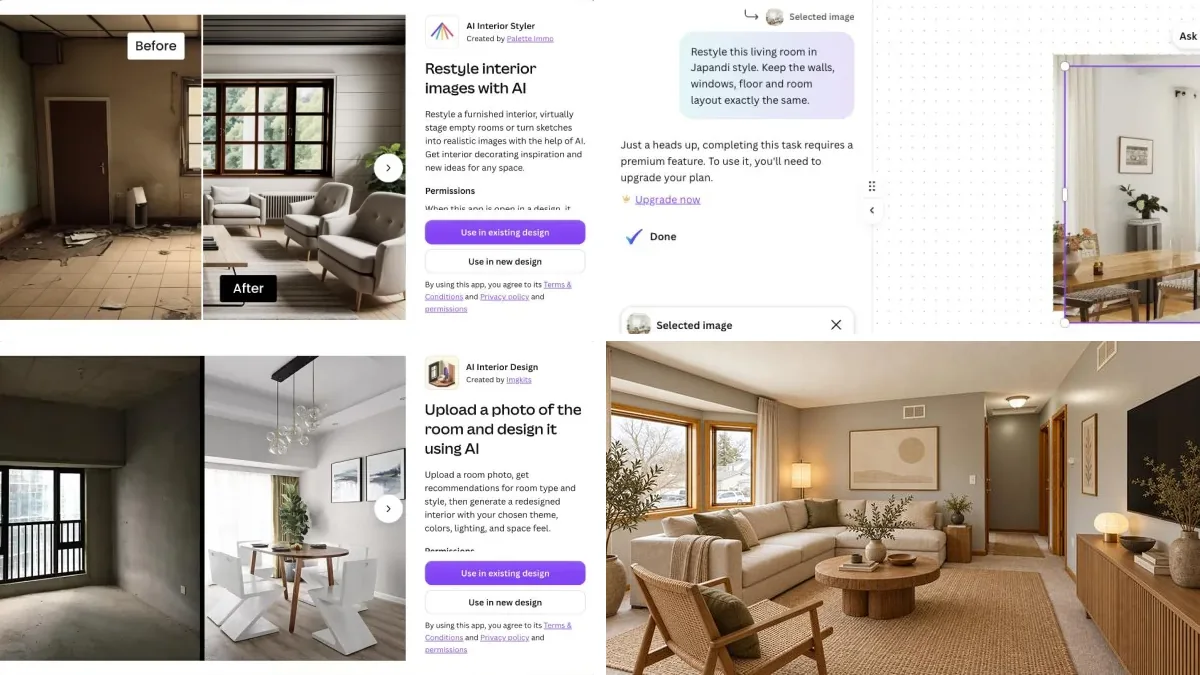
Canva AI interior design is not a Canva tool. It is two third-party apps in Canva’s app store, AI Interior Styler, made by Palette Immo, and AI Interior Design, made by Imgkits, and Canva’s own AI Interior Design page sends you to the first one. On a free Canva account on 24 September 2026, Canva AI refused to restyle a room photo without a paid plan, AI Interior Styler asked us to connect a separate account before its first render, and AI Interior Design allowed exactly one image.
Our articles are still written by humans!
Get human written articles in your Google feed.
That is the short answer to what most people typing “Canva AI interior design” want to know: what it is, whether it is free, and whether it will redesign the room in the photo on your phone. The rest of this page is what we saw, step by step, with dated screenshots, and the quotes from Canva’s own pages that explain why.
One thing to know before you read on: we make MeltFlex, a competing AI interior design tool. We ran the same three room photos through it and published all three results, including one where it deleted a kitchen we never asked it to touch. Where Canva is the better tool, and there is a real job where it is, we say so in its own section.
FreeUpload photo · freeRedesign my room for freeUpload a photo and let MeltFlex design your space. Your first AI design is free, no card needed.


What Is Canva AI Interior Design?
Canva AI interior design is a set of third-party apps that run inside the Canva editor, not a feature Canva built. Searching Canva’s app store for “interior” on 24 September 2026 returned five apps: Interigo, AI Interior Design, AI Interior Styler, Home Exterior and Frame Flow. Two of them redesign a room photo, and neither is made by Canva.

The one Canva points to is AI Interior Styler. Step two of the how-to on Canva’s AI Interior Design page reads: “While in the editor, click ‘Apps’ on the sidebar and select the ‘AI Interior Styler’ app.” Its listing says “Created by Palette Immo” and names the developer as Avari BV. The second app, AI Interior Design, says “Created by Imgkits” and names the developer as NO FRIENDS LTD.
Canva does have native AI that can edit a photo, Canva AI and Magic Edit, which Canva marks as Pro on the same page. That distinction matters for price and for privacy, and it is the thing none of the pages ranking for this search explain. If you want the wider picture of what AI interior design tools do and cost, our guide to how AI interior design works covers the category.
Is Canva AI Interior Design Free?
No. Canva’s own FAQ answers the question directly: “No, the app is not free to use. Users must purchase credits, which are essential for generating interior redesigns or virtual staging. Regardless of the subscription plan chosen, credits are required.” A paid Canva plan does not remove that, because the credits belong to the app, not to Canva.
We tried all three routes a free Canva account has, on the same photo of a furnished living room, on 24 September 2026. This is what each one did:
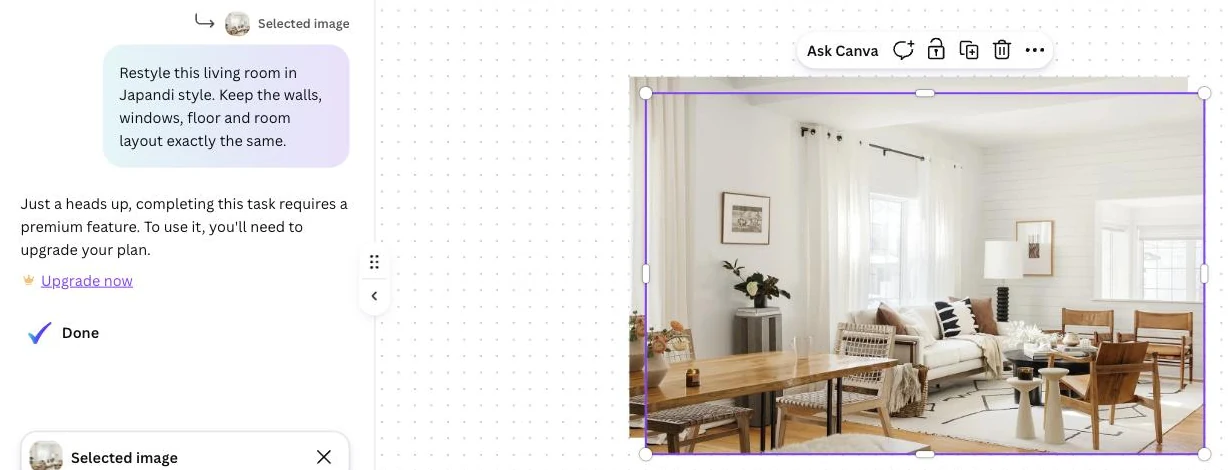
The allowance on Canva’s side is small even when it applies. Canva’s pricing page lists “Up to 20 Standard or Premium AI uses” for Canva Free and “10x more AI than Canva Free” for Pro, and it offers a 30-day Pro trial. So the honest answer to “Canva AI interior design free” is: you can open the apps for free, and you can get one image out of one of them. If free is the whole point, our tested list of free AI interior design tools shows which tools give more than one render without a card, and what each one watermarks.
How Do You Use Canva AI Interior Design, Step by Step?
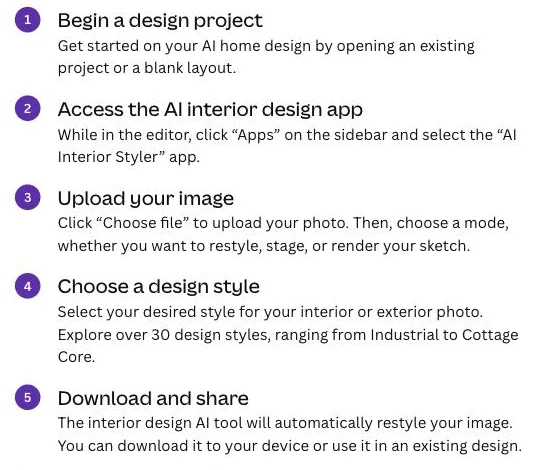
Open a design, drop the room photo on the page, click Apps in the left sidebar, search “interior”, open one of the two room apps, choose room type and style, and click Generate. The steps below are the ones we followed in the Canva editor on 24 September 2026, with the two points where a free account stops.
- Open a design. Any design type works; a Whiteboard gives you the most room for a board around the result.
- Add the photo to the page. Canva’s FAQ says “the image size must be up to 1536px x 1024px to avoid cropping, with a maximum file size of 3MB”. A 12-megapixel phone photo is 4032 by 3024 pixels, so shrink it first or expect the app to crop it.
- Open Apps and search “interior”. You get the five apps shown above. AI Interior Design and AI Interior Styler are the two that redesign a room; Home Exterior does facades.
- Connect, or check what is left. AI Interior Styler stops here and asks you to connect a Palette Immo account. AI Interior Design opens straight away and prints the number of images left on the free plan under the Generate button.
- Pick room type, theme and extras. In AI Interior Design that means a room type drop-down, a row of design themes, and under Advanced settings a color scheme (AI recommended, Neutral, Warm, Cool or Earth), brightness and space size sliders from 0 to 100, and a free-text box for up to 500 characters of “Extra requirements”. There is also an “Analyze my room” button that suggests a room type, style and palette from the photo.
- Generate. The result is placed in the design, where Canva’s own tools take over.
One detail that will catch Japandi and Scandinavian fans: the themes we paged through in AI Interior Design were Modern, Industrial, Summer, Professional, Tropical, Coastal, Neoclassic and Tribal. We did not see Japandi, Scandinavian or Minimalist, which are among the most requested styles, so the only way to ask for them is the 500-character text box. Canva says AI Interior Styler has “over 30 design styles, ranging from Industrial to Cottage Core”; we could not verify that list without the separate account.
AI Interior Styler or AI Interior Design: Which Canva App Should You Use?
AI Interior Styler if you already have, or do not mind opening, a Palette Immo account and want staging and sketch rendering; AI Interior Design if you want to try one image without signing up for anything else. Neither is clearly better on output from what we could see, and we say below why we have no render from either to compare.

Palette Immo’s help page says new users start on a free plan where you “can optionally purchase a credit package” and that “the amount of credits per render depends on the feature you choose”; it does not publish a price per render. Imgkits’ pricing page lists credits at $0.50 each and a Pro plan at $12 a month for 100 credits, but it does not say whether the Canva app draws on the same credits, so treat that as the company’s general pricing, not the app’s.
Who Makes the Canva Interior Design Apps, and What Can They Access?
Two companies other than Canva, and both ask for access to the photos you upload to Canva. The permission screen of each app says that when it is open in a design it can “Read and change the contents of the design” and “Access your uploaded media in Canva and upload new media on your behalf”. AI Interior Design also asks to “Access Brand Kit contents”.
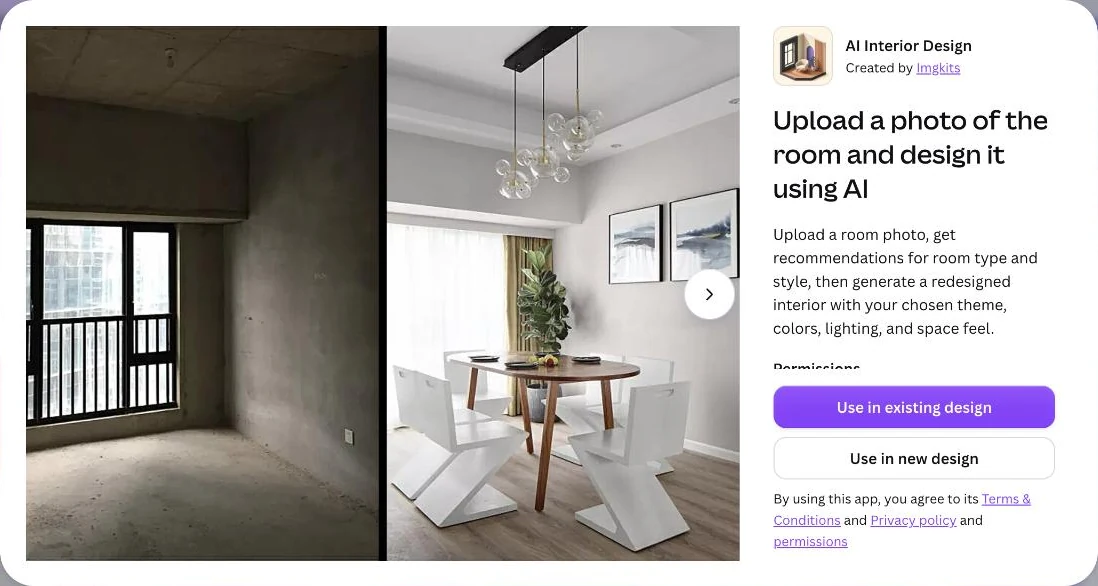
That is normal for an app that edits a picture, and it is not a reason to panic. It is a reason to know who you are sending a photo of the inside of your home to. One detail we could not reconcile: the Canva listing names the Imgkits app’s developer as NO FRIENDS LTD, while imgkits.com’s pricing page names Need You, LLC. They may be related companies; we did not find a public statement that says so. The third interior-adjacent app, Home Exterior, lists its developer as WEN XIU.
If you are a designer working with client photos, the practical rule is simple: read the app’s own privacy policy, linked under “By using this app, you agree to its Terms & Conditions and Privacy policy” on each listing, before you upload a client’s home, not after.
Can You Use Canva AI Room Designs Commercially?
Only on a plan that allows it, and only within the app’s own terms. Canva’s FAQ says: “Users with a subscription plan that supports commercial usage can use the AI-generated designs for commercial purposes. Make sure to review and adhere to the specific terms of your subscription regarding personal and commercial use.” Because the render comes from a third-party app, its terms apply on top of Canva’s.
For real estate the licence is the smaller problem. A restyled or virtually staged listing photo should be disclosed, and in California AB 723 makes that a legal requirement, including access to the unaltered photo; our virtual staging disclosure rules guide goes through the requirements state by state. If staging is the job, a tool built for it, such as MeltFlex virtual staging or the options in our virtual staging software comparison, will be faster than a design app.
What Happened When We Ran the Same Photos Through MeltFlex?
Two of three rooms came back usable and one did not. MeltFlex took 30 to 35 seconds per photo; it kept the structure of the empty room almost exactly, shifted the camera on the furnished one, and on an open-plan studio it removed the kitchen. MeltFlex is our product; this is the section where you should read us most skeptically, which is why the failure is the third image and not a footnote.
We ran the three photos on 24 September 2026 through the same engine a signed-in MeltFlex user gets, at its default quality, with the one-sentence prompt the app itself sends: “Redesign this space as living room in japandi style.” for the two furnished rooms and “Virtually stage this space as living room in japandi style.” for the empty one. Note what that means for fairness: the prompt we typed into Canva AI also asked it to keep the walls, windows and layout, and MeltFlex’s did not.
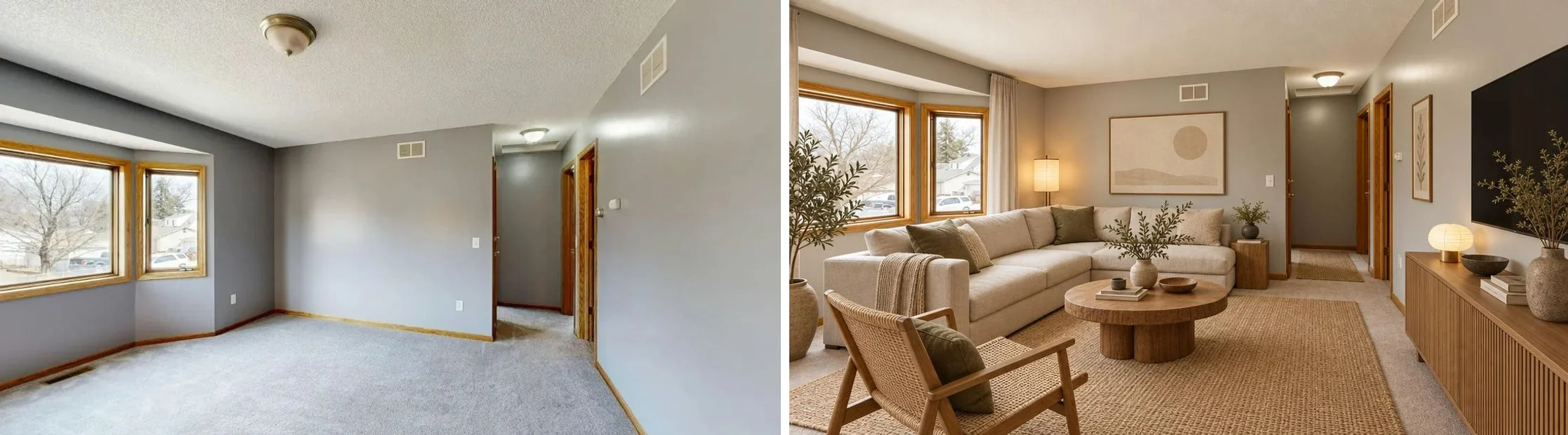
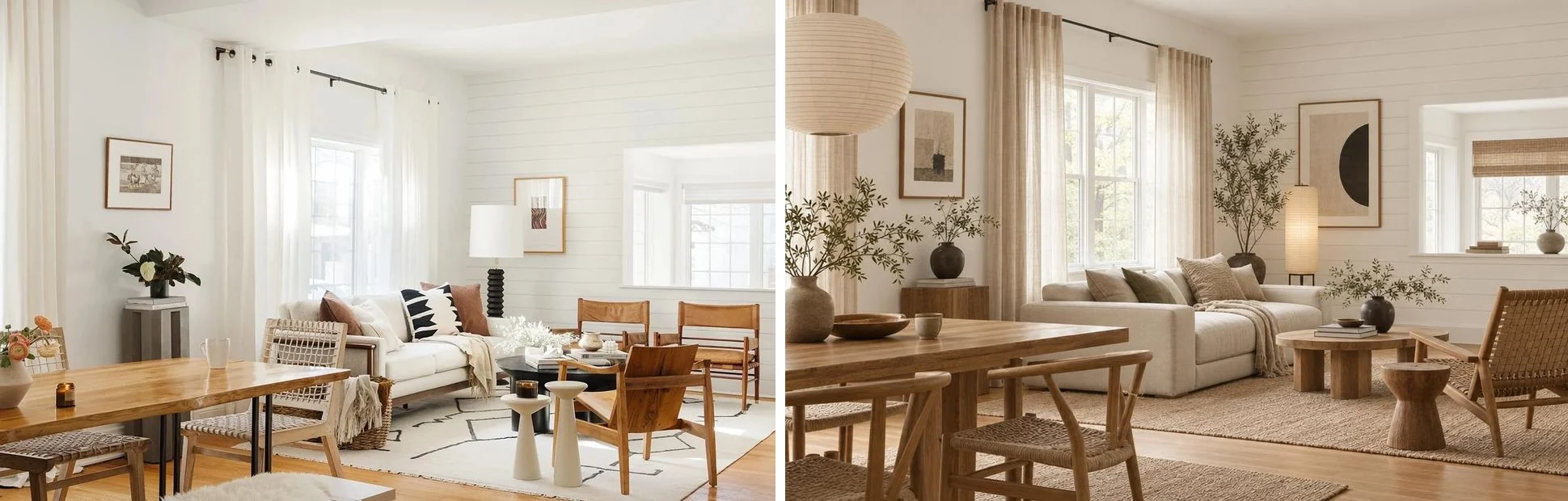
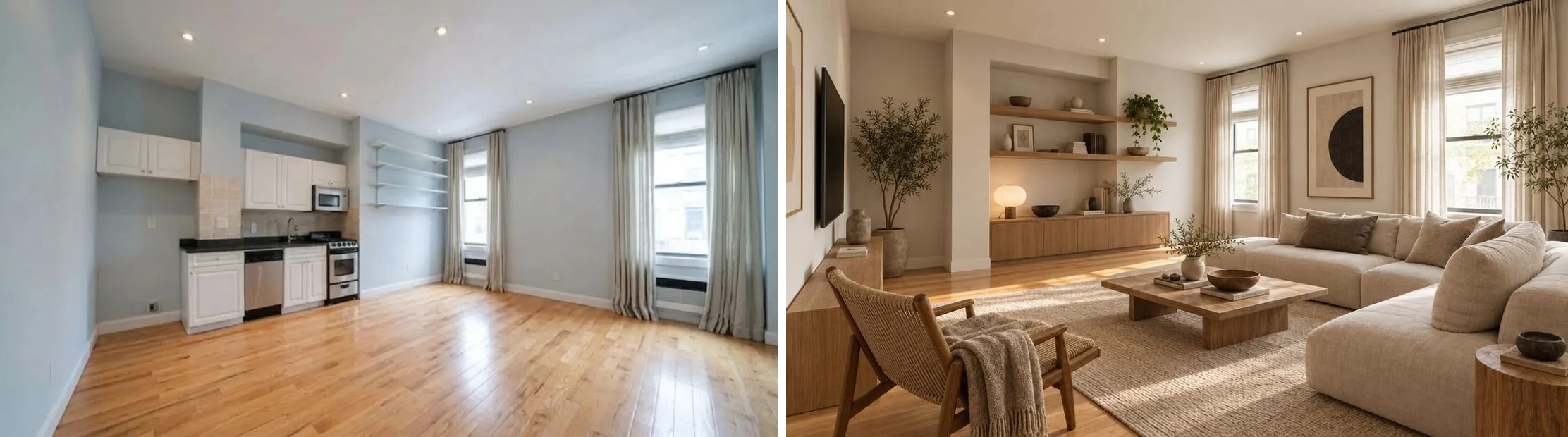
The room C failure is ours to own. We chose “living room” as the room type for a space that is half kitchen, and the engine took that literally. The fix a user would reach for is picking the room type that matches the whole space, or the interior design tool’s custom room text, but a tool should not need a user to know that. The shifted camera on room A is the other thing we would not want in a product built on keeping your real room: a restyle should look like the same photo, taken after a weekend of shopping.
On price, MeltFlex is not free without limits either. The first redesign runs without an account; a free account then gets 15 credits, and one design costs 10 to 15, so you get one more. That is still more than one image, and it needs no second account, but it is not a free unlimited tool, and any page that tells you otherwise about any tool, including ours, is selling something.
Where Is Canva Better Than an AI Interior Design Tool?
Everything after the render: mood boards, client presentations, floor plans on a whiteboard and anything with your brand on it. That is Canva’s actual strength, and no AI interior design tool we have used comes close to its editor.
- Mood boards. Dropping a render, swatches and product shots on one page and exporting a PDF takes minutes in Canva. Our interior design mood board guide walks through a board built exactly that way.
- Client presentations. Brand Kit colors, fonts and templates are the reason designers live in Canva. A render from any tool can go straight into a deck.
- Social posts. Canva Pro designs the post and schedules it, which is enough if you like making each graphic yourself. Our comparison of the best AI for social media posts covers when a tool that drafts and publishes the whole week is less work.
- Simple floor plans. Canva’s page points to Canva Whiteboards for “custom home plans and floor plans on an infinite canvas”. It is a drawing surface, not a CAD tool; for measured plans see our floor plan software comparison or how to draw a floor plan.
The workflow we would recommend to a designer is therefore not Canva or a dedicated tool, it is both: render the room in a tool built to keep the real room, then build the board or deck around it in Canva. The Canva apps are the weakest link in that chain, not Canva.
What Is the Best Canva AI Interior Design Alternative?
For redesigning a real room photo, MeltFlex, which is our product: the first redesign needs no account, it places furniture you can actually buy, and on our test it kept two of three rooms intact, with the third failure shown above. Upload a room photo and judge it on your own room, which is the only test that counts.
If you want to compare more widely, these are the pages where we have done the measuring:
- Free AI interior design tools, tested, for what each free tier gives and watermarks.
- Best AI interior design tools compared, the full field including paid tools.
- Best AI for decorating a room, if you want to keep your furniture and only add to it.
- Interior AI alternatives and RoomGPT alternatives, for the two other names people search next.
- ChatGPT room design, if you already pay for ChatGPT and want to know what it does with a room photo.
If Japandi is the style you were trying to get out of Canva, our Japandi interior design guide and the short answer on Japandi vs Scandinavian will help you write the prompt, whichever tool you use.
How We Checked This, and What We Could Not Verify
Everything on this page was captured on 24 September 2026 in a free Canva account, with screenshots taken at the time. Here is what that covers and, just as important, what it does not.
- Checked first-hand: the app search results, both app listings and their developer fields, the permission lists, Canva AI’s answer to a restyle request, AI Interior Styler’s connect screen, AI Interior Design’s settings and its one-image allowance, Canva’s FAQ text and pricing page.
- Not done, deliberately: we did not start a Canva Pro trial and we did not create a Palette Immo account. The walls a free user hits are the finding for this search, so we report them instead of going around them.
- Not done, and a gap: we have no finished render from either Canva app. AI Interior Design’s panel runs in a sandboxed frame our capture setup could not drive reliably, and with one free image, a failed attempt costs the whole allowance. So this page does not claim the Canva apps produce worse images than MeltFlex. It shows what you have to go through to get one.
- Prices: our Canva account is in Europe, so Canva’s pricing page showed euros; check canva.com/pricing for US dollars.
- Theme list: the eight AI Interior Design themes named above are the ones we paged through; the carousel may hold more.
If any of this changes, and app stores change weekly, we will update the date at the top and say what moved.
Frequently Asked Questions
Is Canva AI interior design free?
Not in any useful sense. Canva’s own FAQ on its AI Interior Design page says “No, the app is not free to use. Users must purchase credits”, and on a free Canva account on 24 September 2026 we got three different walls: Canva AI would not restyle a room photo without a paid plan, the AI Interior Styler app asked us to connect a separate account before its first render, and the AI Interior Design app showed “You have 1 image remaining in your free AI Interior Design plan.”
Does Canva have its own AI interior design tool?
No. When we searched Canva’s app store for interior, all five results were third-party apps. The one Canva’s own AI Interior Design page tells you to open, AI Interior Styler, is made by Palette Immo, with Avari BV listed as developer. The other, AI Interior Design, is made by Imgkits, with NO FRIENDS LTD listed as developer. Canva’s native AI can edit photos with Magic Edit and Canva AI, but on the free plan it declined to restyle our room.
How do I use AI Interior Styler in Canva?
Open a design, click Apps in the left sidebar, search for AI Interior Styler and open it. Before it does anything it shows “AI Interior Styler wants to connect your account” and a Connect button, which means creating or linking an account with Palette Immo, the company that makes it. After that, Canva’s page describes the flow as choose a file, pick a mode (restyle, stage or sketch) and pick one of over 30 styles.
Can Canva AI redesign my room from a photo?
Yes, through the third-party apps, with limits. AI Interior Styler restyles furnished rooms, stages empty ones and renders sketches; AI Interior Design restyles a room photo with a theme, color scheme and a free-text field of up to 500 characters. Canva warns that uploads over 1536 by 1024 pixels may be cropped and caps files at 3 MB. Neither app places real, buyable furniture in the room.
Can I use Canva AI interior designs commercially, for example in a listing?
Canva says users “with a subscription plan that supports commercial usage” can use the designs commercially, and each app has its own terms on top. If the image is for a real estate listing, the bigger issue is disclosure: a restyled or virtually staged photo should be labeled as such, and in California AB 723 makes that law and requires access to the unaltered photo.
What is the best alternative to Canva AI interior design?
For redesigning a real room photo, a dedicated tool: MeltFlex, which is our product, ran the same photos in 30 to 35 seconds each and kept the structure of two of three rooms; on the third it deleted a kitchen we had not asked it to remove, which we show. For mood boards and client presentations, Canva itself is the better tool, and the practical workflow is to render in a dedicated tool and assemble the board in Canva.
Why does Canva keep saying I need to upgrade for AI interior design?
Because the photo restyle is a premium AI feature. Canva’s pricing page lists “Up to 20 Standard or Premium AI uses” on the free plan and “10x more AI than Canva Free” on Pro, and on our free account Canva AI answered a restyle request with “completing this task requires a premium feature.” The third-party apps then add their own credits on top, which Canva’s FAQ says are required “Regardless of the subscription plan chosen”.