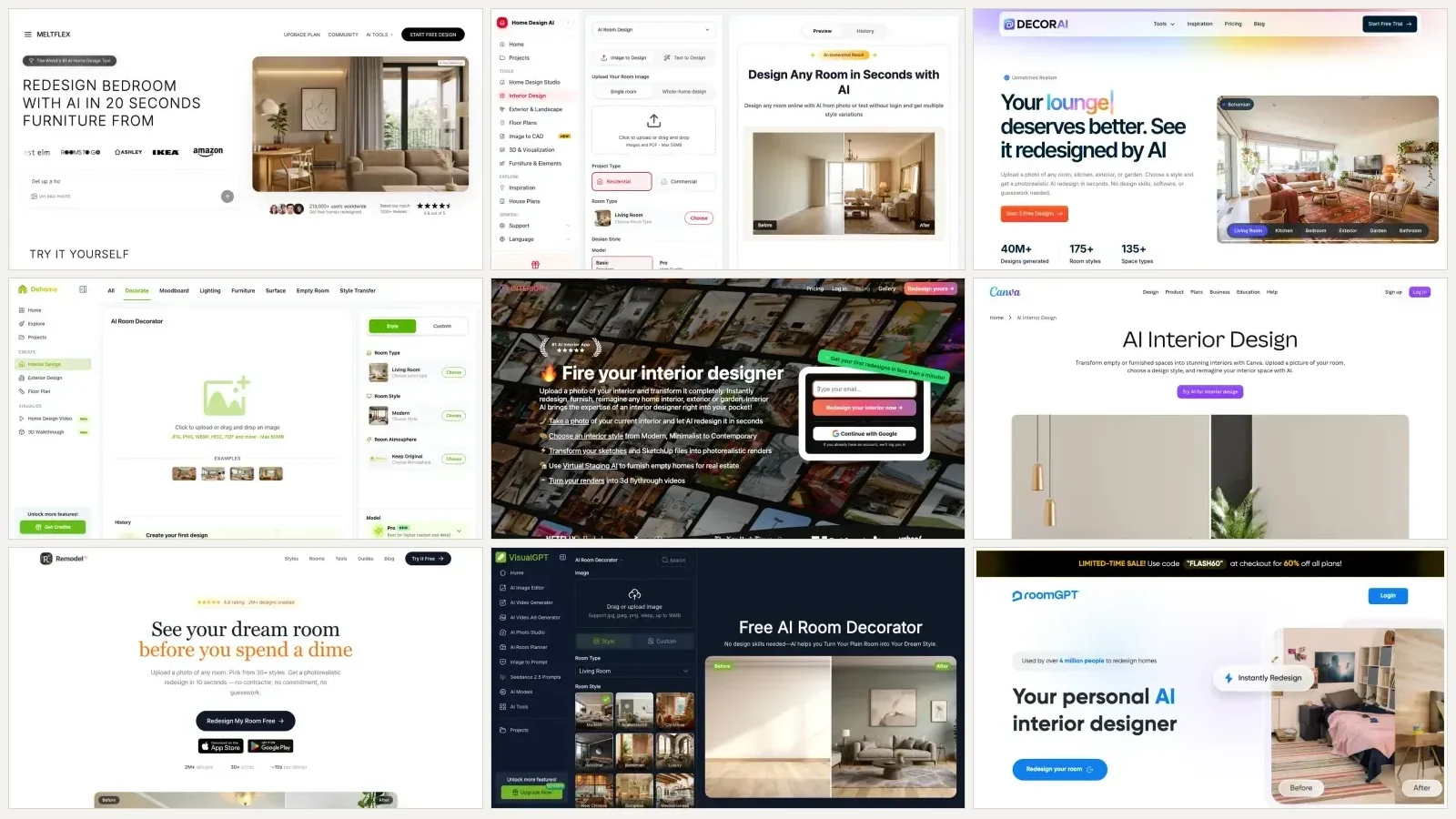
The best AI for decorating a room is the one that leaves your furniture where it is. That rules out most of them. We put nine AI decorating tools through the same five criteria on 8 September 2026 and ranked them on how well they do the decorating job specifically, which is changing rugs, cushions, art, curtains and lamps in a room you are not replacing. MeltFlex came first at 8 out of 10, and it is ours, which we say again in the disclosure below.
Our articles are still written by humans!
Get human written articles in your Google feed.
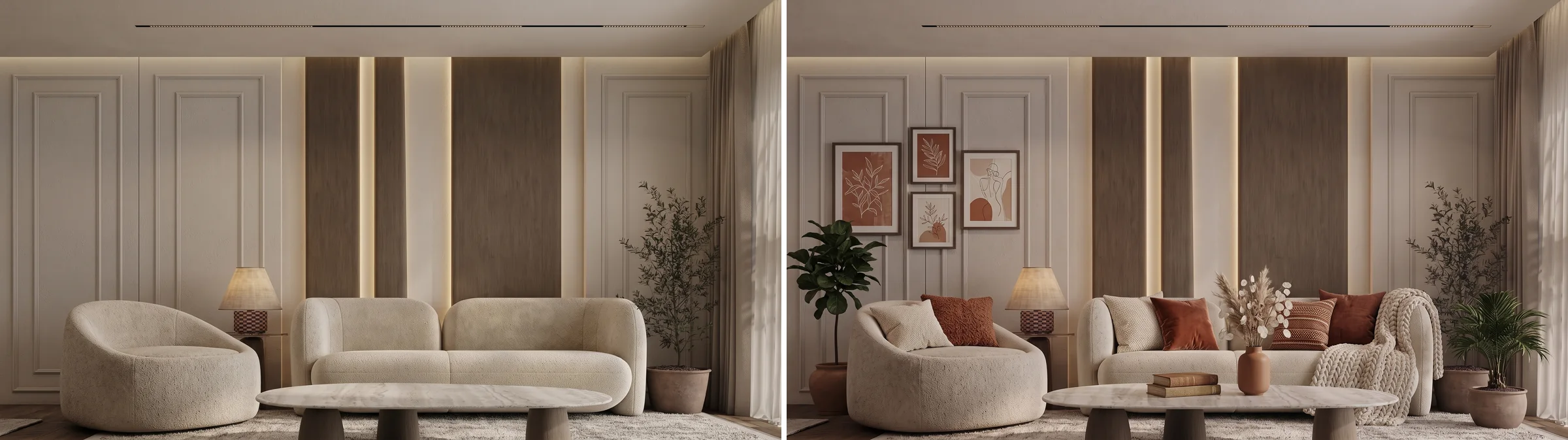
One room, two renders. Left is the room we started with, right is the same room after a decoration only brief. Same sofa, same armchair, same stone coffee table, same lamp, same panelling, same rug. Both images were generated by us for this article.



Decorating Is Not Redesigning, and Most AI Tools Only Do the Second One
This is the whole reason the ranking looks different from every other AI interior design list, including our own. Ask an AI room tool to help and it will, by default, hand you a room with new furniture in it. That is a redesign. It photographs beautifully and it is completely useless if you own a sofa.
Here is the same photograph put through both jobs. The middle frame is a decoration only brief. The right frame is a one line request to redesign the room the way a one click style preset does it. Every image of this room in this article comes from one base render, which we produced for this test from a reference interior photograph and then deliberately stripped back to bare walls, no cushions and clear surfaces, so that decorating it is a job with somewhere to go. The reference itself is a designer’s portfolio photograph and is not published here.

Left: the room as photographed. Middle: decorated, furniture kept. Right: redesigned, furniture replaced. All three are the same room, generated from one base image so nothing but the brief changed.
The middle room costs five cushions, a knitted throw, three framed prints, a vase, a lamp and two plants, which is the kind of list our guide to decorating a room from scratch works through in order. The right room costs a sofa, two armchairs, a coffee table, a sideboard and a rug. Look at the sofa on its own and the difference stops being a matter of taste.

The same view at full resolution. In the first two frames it is the same boucle sofa, the same oval stone table on the same three legs, and the same checkerboard lamp base. In the third every one of them is a different object, which is a purchase, not a decorating decision.
Two honest things about our own images. First, the middle frame is a re render, not a photo edit: the model redraws the whole scene every time, so nothing here composites pixels from your original photo, and no tool in this ranking does. If you need the actual object preserved to the millimetre, none of these are the right instrument.
Second: the keep clause protects what you name, and only what you name. We named the sofa, the armchair, the stone coffee table, the lamp and the rug. All five survived all four decorating passes intact, down to the three legs under the table and the checkerboard base of the lamp. Everything we left unnamed was treated as decor and was fair game. Name the pieces you would be annoyed to lose.
How We Scored Them
Five criteria, two points each, ten available. The criteria are about decorating rather than rendering quality, because rendering quality is now roughly the same everywhere and it is not what separates these tools.
- Keeps your furniture. Is there a documented mode, option or prompt route that keeps the pieces you already own?
- Item level control. Can you ask for a specific rug, cushion or lamp, or only pick a style from a grid?
- Your real room, without a gate. Can you upload your own photo, and how much do you have to hand over first?
- A result you can act on. Does it turn the decor into real products with prices, or does it stop at a picture?
- A free tier you can finish something on. Not whether a free tier exists, but whether it is enough to decorate one room.
Read this before you read the scores. These are scored on what each tool’s own interface and published pricing show, captured on 8 September 2026, plus hands on use of our own. We did not create accounts on the other eight, because we do not sign up to services on a reader’s behalf, so anything that only reveals itself after a signup is marked as not verified rather than guessed at. That is a real limit on this ranking and it is listed in full further down.
And the conflict of interest, stated properly. MeltFlex is ours and it wins. Criterion four, turning the render into products you can buy, is a criterion only we satisfy, and we chose the criteria. So here is the number that matters: delete criterion four entirely and MeltFlex drops to 6 out of 8 and ties with Home Design AI, with DecorAI one point behind. We think shopping belongs in a decorating tool, because decorating is a shopping activity. You are allowed to disagree, and the table below has the per criterion scores so you can re add or remove any of them yourself.
The Ranking at a Glance
Four tools score zero on the first criterion. They are not bad tools, and two of them are excellent at what they actually do, which is show you a different room. They are just not decorators, whatever the page title says.
Positions four to eight are a five way tie on 3 out of 10, so do not read much into the order inside it. We broke the tie by how close each one gets to the decorating job specifically: Dehome has the most decorating literate interface, Interior AI has a real keep mode behind a paywall, Canva is the one you probably already have, Remodel AI has the best free tier, and VisualGPT is the cheapest to try. Pick on whichever of those you care about rather than on the number.
1. MeltFlex, 8/10
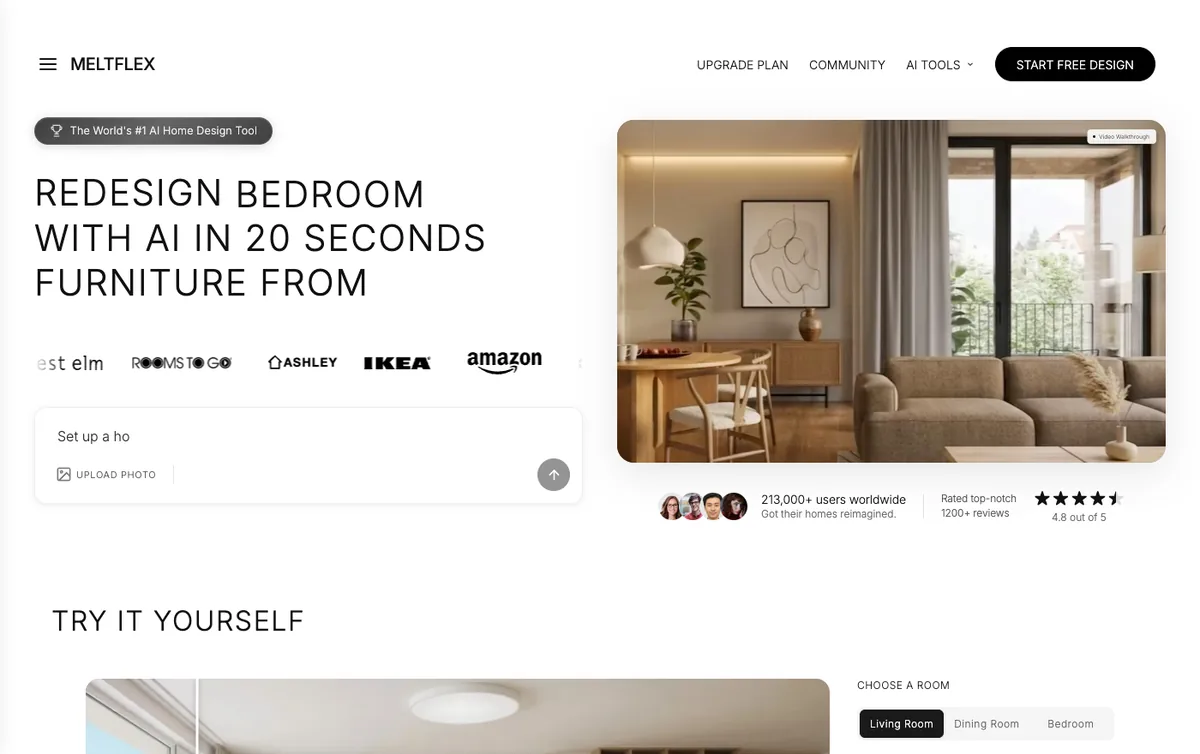
Screenshot taken 8 September 2026. This is our own product, ranked first in our own list, which is the same thing every vendor listicle on this search does. The difference is that we are telling you.
Price: free tier of 15 credits and 3 projects, then plans from 19 euro a month. A design costs 10 to 15 credits, so the free tier is one design. Keeps furniture 2, item control 2, no gate 1, buyable 2, free tier 1.
Two things earn the score. The first is the AI furniture changer, which exists to change one piece and leave the rest of the photograph alone: swap the sofa, recolour a single chair, put a different rug down, or remove a piece entirely. Its own headline is change the furniture, keep the room, which is the decorating job written as a product. The second is that the render does not end at the render. Objects in the finished image are detected and returned as real product cards with prices and retailer links, drawn from a catalog covering IKEA, Amazon, Wayfair, West Elm, Ashley, Walmart and Rooms To Go, so the decorating list has numbers on it before you commit. That is the same mechanism behind our shop the look workflow.
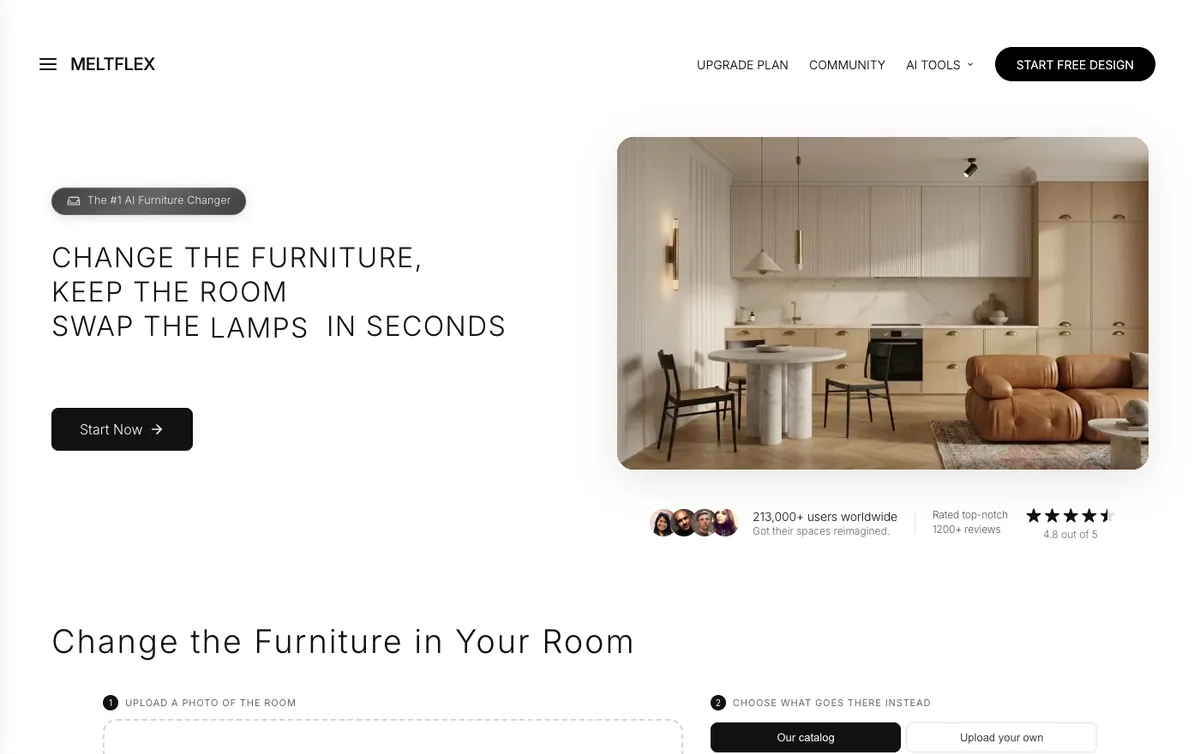
The furniture changer, screenshot taken 8 September 2026. Step two offers either our catalog or your own photo of a product as the reference.
Where it loses, and it loses on two of five. You have to sign in before it will generate, so it is not the no account option on this page, and the free tier is 15 credits against a design that costs 10 to 15, which is one room and then a decision. Home Design AI and Remodel AI both let you get further before asking for anything.
And two limits the rubric does not catch. The keep mode is a re render, not a photo edit, so a decoration only pass still redraws the whole frame and small things drift: that is our own sofa arm changing shape in the detail crop higher up this page, on our own tool. And the product matches come from a visual search rather than a guaranteed catalogue lookup, so they are near matches, which is fine for pricing a scheme and not good enough for ordering the exact cushion without checking.
Start with the furniture changer if you want to change one thing, or upload the room if you want the whole decor scheme at once.
2. Home Design AI, 6/10
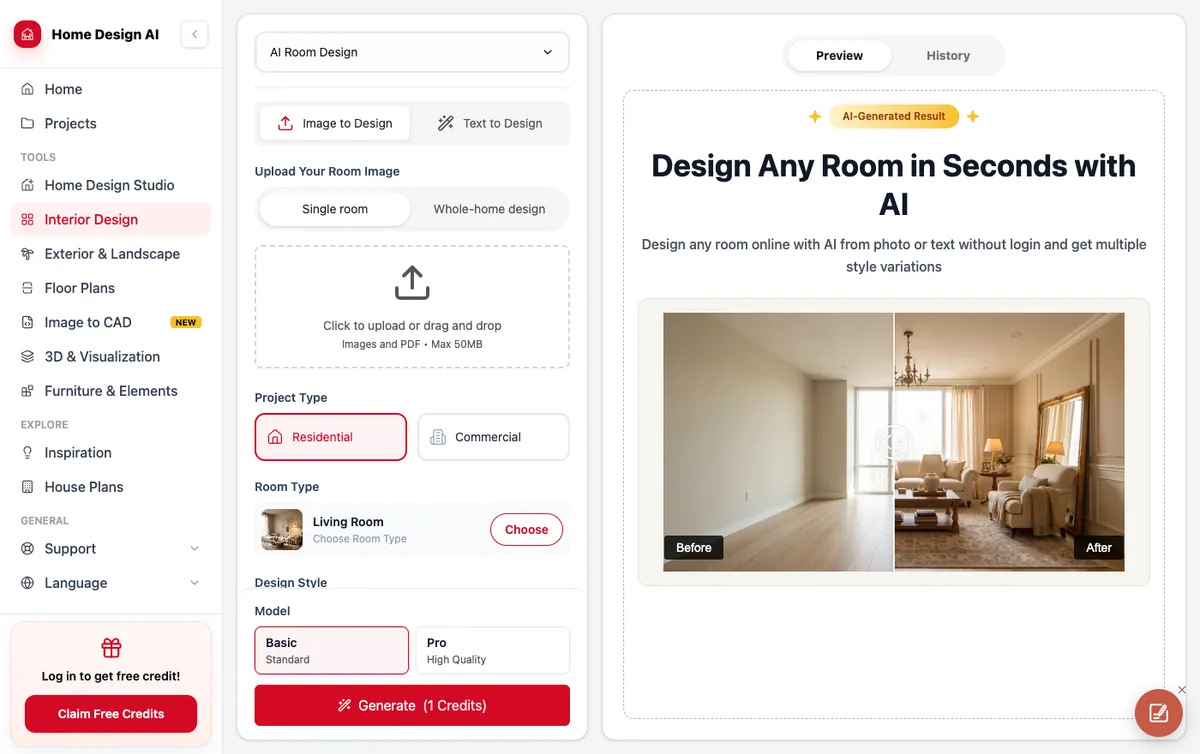
Screenshot taken 8 September 2026. Note the before and after in the preview panel: an empty room being furnished, not a furnished room being decorated.
Price: credit metered, one credit per room design, free credits offered on login. Keeps furniture 1, item control 2, no gate 2, buyable 0, free tier 1.
The one tool here you can genuinely start using without an account, and its own page says so: design any room online with AI from photo or text without login. It takes images and PDFs up to 50MB, runs an image to design and a text to design mode, and it is explicit about custom prompts, suggesting exactly the kind of instruction that makes decorating work, a caramel coloured sofa or a cloud shaped pendant light. That is item level control, and it is rarer here than it should be.
Where it loses. Its keep promise is about the shell, not your things. The page says the AI keeps your real walls and layout, then applies the new style, which is not the same as keeping your sofa, and there is no furniture lock we could find. There is no shopping. And the free credit allowance is not stated anywhere before you log in, which is the kind of thing that is usually small.
3. DecorAI, 5/10

Screenshot taken 8 September 2026. DecorAI also publishes its own ranked list of the best AI interior design apps, in which DecorAI comes first.
Price: a one day free trial with three full quality designs, then 24 dollars a month. Keeps furniture 2, item control 2, no gate 1, buyable 0, free tier 0.
The clearest keep promise of any tool on this page, in its own words: your room layouts remain the same, walls, doors, windows and the ceiling remain the same, and you also have the option to keep the furniture layout. It takes a written prompt alongside the presets, and the style and space coverage is the widest here at 175 styles and 135 space types. On the two criteria that define decorating, it scores as well as we do.
Where it loses. The free trial asks for a card, and the site is upfront that this is deliberate so the account keeps working when the trial ends. A card for three images is a higher price than most people decorating a rented living room want to pay, and it is the only tool here that asks for one. No shopping either.
4. Dehome AI Room Decorator, 3/10
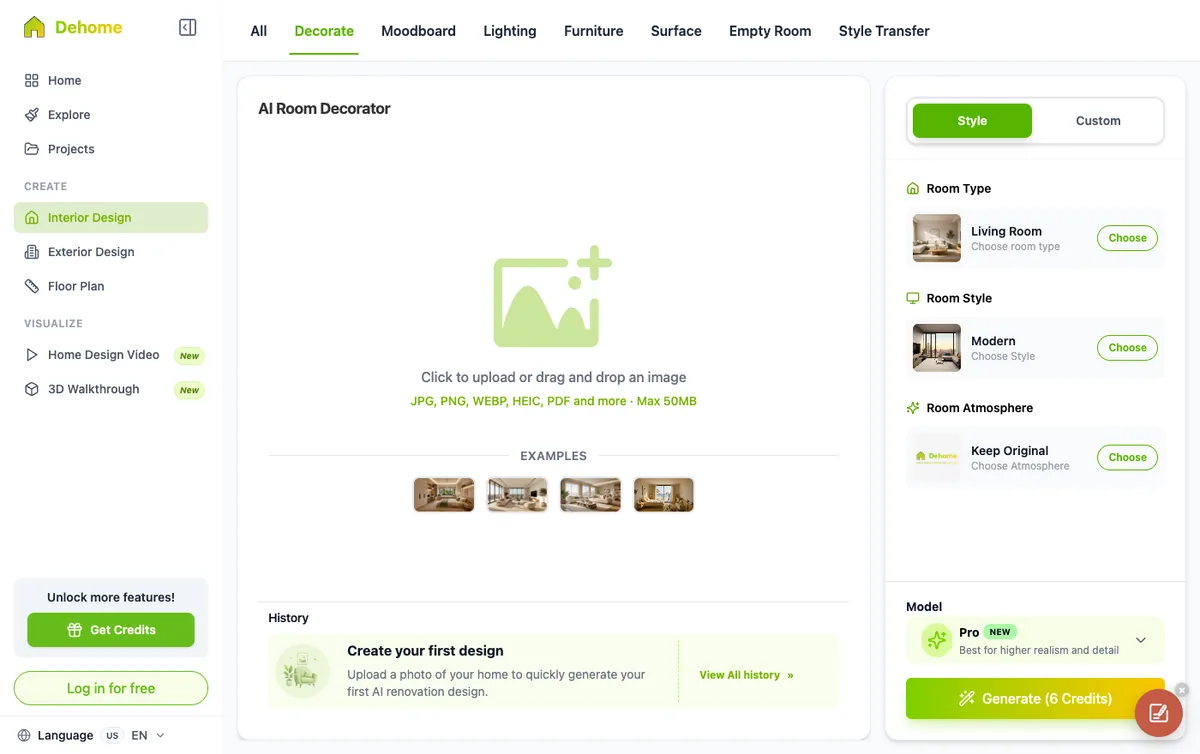
Screenshot taken 8 September 2026. The tab row is the most decorating literate interface in this ranking: Decorate, Moodboard, Lighting, Furniture, Surface, Empty Room, Style Transfer.
Price: credit packs only, 9.99 dollars for 400 credits, 29.99 for 1,600, 99.99 for 8,000, at six credits per generation on the Pro model. Keeps furniture 1, item control 1, no gate 1, buyable 0, free tier 0.
Dehome has thought about this problem harder than most. Decorating is a separate tab from Empty Room and from Style Transfer, lighting has its own tool, and there is a Keep Original option under Room Atmosphere. The panel also carries a Custom toggle next to Style, so a written brief is possible even though the marketing copy never mentions it. Accepts JPG, PNG, WEBP, HEIC and PDF up to 50MB.
Where it loses. Keep Original is documented as maintaining the room’s original layout and structure, which again is the shell rather than the furniture, so we could not score it as a furniture lock. Six credits per generation is the most expensive metering here, three times Home Design AI and half again over VisualGPT, and you log in before anything happens. The bigger problem is that its pricing page publishes no free tier at all, in its own words pay once, use anytime, no subscriptions, so there is nothing to try before you buy. On the arithmetic the packs are not bad value, 400 credits for 9.99 dollars is roughly 66 generations, but you are paying to find out whether it works.
5. Interior AI, 3/10

Screenshot taken 8 September 2026. The email box is the first thing on the page and there is no free tier behind it.
Price: no free tier. Pro 49 dollars a month or 29 billed yearly, Premium 99 or 49, Ultra 199 or 99. Keeps furniture 2, item control 1, no gate 0, buyable 0, free tier 0.
It scores full marks on the criterion that matters most, and then throws the points away. The Interior design with 3D Vision mode is built to maintain the interior of your current room while changing its style, which is a genuine keep mode, and there are 55 plus styles. The headline is fire your interior designer and the subhead promises to transform it completely, which tells you which job the product is really pointed at.
Where it loses. Everything else. Email before you see anything, no free tier at all, and the prompt field carries the site’s own warning that it is experimental and may cause random or bad results, which is a strange thing to say about the input that makes decorating possible. At 29 dollars a month minimum it is the most expensive way on this page to find out whether you want a new rug.
6. Canva AI Interior Design, 3/10
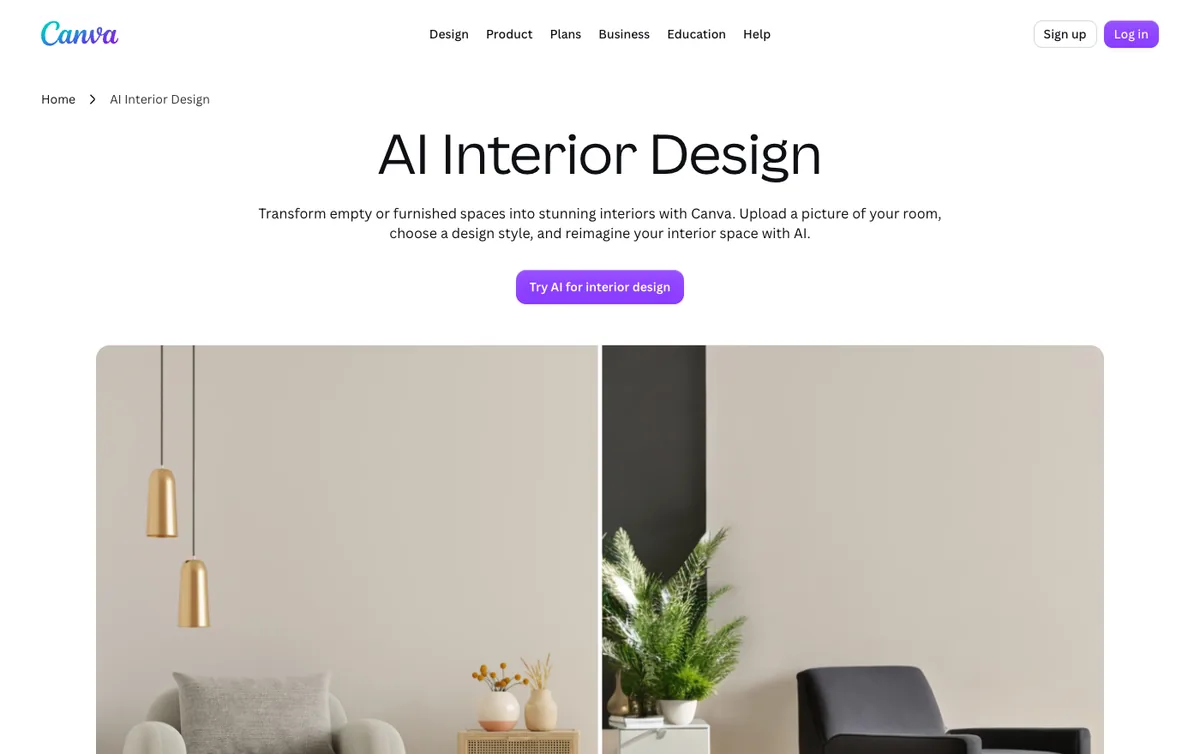
Screenshot taken 8 September 2026. Canva refused our automated fetch, so the facts here come from this capture of the page itself.
Price: inside Canva, so the free Canva tier applies with limited AI runs. Keeps furniture 0, item control 1, no gate 1, buyable 0, free tier 1.
The most accessible tool on this list by a distance, because a very large number of people already have the account. Its own description is transform empty or furnished spaces into stunning interiors with Canva, upload a picture of your room, choose a design style, and reimagine your interior space with AI. Note that furnished is in there, which is more than most of these claim, and note also that the verb is reimagine. For wall colour specifically, a dedicated paint colour visualizer beats any of these general stylers.
Where it loses. It is a styler, not a decorator. There is no keep mode, no furniture lock and no shopping, and the useful decorating instruction, add these five things and change nothing else, is not what the interface is built around. Paying for Canva does not make it free either: Canva’s FAQ says the app needs its own credits whatever your plan, and our hands-on look at Canva AI interior design shows what a free account actually gets. As a quick style test inside a design you are already building, that is the honest ceiling.
7. Remodel AI, 3/10

Screenshot taken 8 September 2026. Remodel AI also publishes several ranked lists of the best AI room design apps, in which Remodel AI comes first.
Price: three free designs at full quality with no credit card required, then paid plans. Keeps furniture 0, item control 0, no gate 1, buyable 0, free tier 2.
The best free tier here and the only perfect score on that criterion. Three full quality designs, no watermark, no card, 30 plus styles, roughly ten seconds a design, and real iPhone and Android apps, which matters if what you wanted was a decorating app rather than a website. If you want to see your room in four styles tonight and spend nothing, start here, or with the wider set in our free AI interior design tools tested roundup.
Where it loses. It is a full transformation tool and it does not pretend otherwise. You pick from 30 plus styles, there is no prompt field to name a cushion with, and there is no mode that preserves what you own. Zero on the two decorating criteria, top marks on access. That combination is exactly what makes it a great first try and a poor decorating tool.
8. VisualGPT AI Room Decorator, 3/10
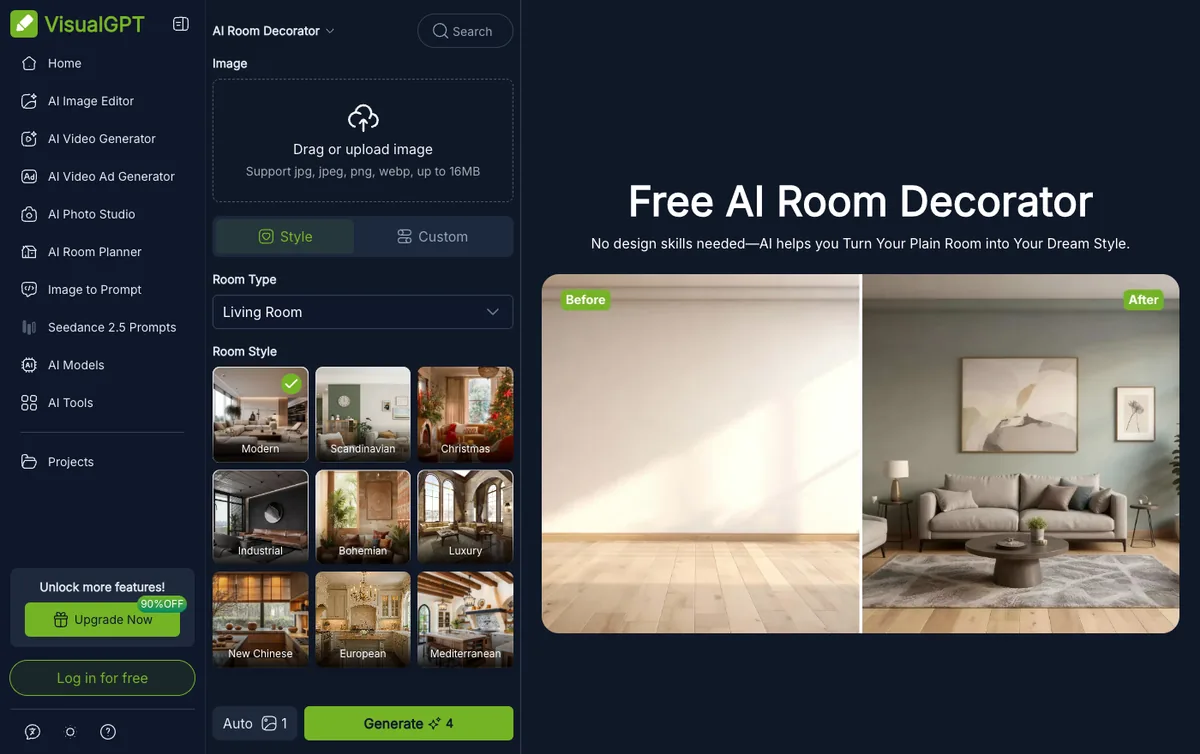
Screenshot taken 8 September 2026. VisualGPT refused our automated fetch, so these facts come from this capture. The before and after on the right is an empty room being furnished.
Price: credit metered, four credits per generation, one on Auto, free credits after login. Keeps furniture 0, item control 1, no gate 1, buyable 0, free tier 1.
A competent generic wrapper with a Style and Custom split, room type selection, and a style grid that includes a Christmas preset, which is the most decorating specific option anywhere in this ranking. Uploads are JPG, JPEG, PNG and WEBP up to 16MB, the smallest limit here.
Where it loses. It is called a room decorator and it demonstrates itself on a bare room with a bare floor, which is staging. There is no keep mode. This is the clearest example of the naming problem across this whole category: the word decorator is doing marketing work that the product does not do.
9. RoomGPT, 2/10

Screenshot taken 8 September 2026, with a 60 percent off sale banner running across the top.
Price: paid plans, discounted at time of capture. The landing page states no free allowance. Keeps furniture 0, item control 0, no gate 1, buyable 0, free tier 1.
The best known name in this category and the one people mean when they say AI room design. Used by over 4 million people to redesign homes, by its own count, and it is genuinely good at the thing it does, which the headline states plainly: your personal AI interior designer, redesign your room. Themes in, new room out, very fast.
Where it loses. It is last here because the ranking is about decorating and RoomGPT is a redesigner with no keep mode, no item level prompt and no published free allowance on the landing page. Judged as an AI redesign tool it would rank far higher, and our comparison of the AI interior design tools is where that judgement belongs.
What It Costs to Try Each One
Prices and free tiers as published on 8 September 2026. Where a page did not publish a number, this table says so rather than guessing.
Read that table next to the ranking and one thing stands out. The cheapest tools to try are not the ones that can decorate, and the ones that can decorate mostly want a card or a subscription first. Remodel AI is the only entry that hands you three full quality images for nothing and asks for nothing, and it cannot keep your furniture.
What We Could Not Test, and What That Costs This Ranking
Every roundup on this search claims to have tested everything. Here is what ours actually rests on, so you can weigh it.
- We used our own tool hands on and scored the other eight from their interfaces and published copy. We did not create accounts on other people’s services. That means anything visible only after a signup, including the true free credit allowances at Home Design AI, Dehome and VisualGPT, is unverified rather than measured.
- Two sites refused our automated fetch with a 403. Canva and VisualGPT facts come from the screenshots we captured on 8 September 2026 rather than from their pages read in full.
- The buyable criterion is scored from published feature lists. None of the other eight publish a shopping feature, so they score zero. If one of them ships product links behind a login, we would have missed it.
- The keep furniture scores are about documented capability, not output quality. A tool can offer a keep mode and still drift. Ours does: see the sofa arm in the detail crop above.
- Prices and interfaces move. Everything here was checked on 8 September 2026 and the RoomGPT page was mid sale when we captured it.
How to Decorate a Room With AI Without Replacing Your Furniture
This works on any tool with a prompt box, including the ones that scored badly above, and it is the difference between a decorating render and a furniture catalogue. The seasonal version of the same method, with one room run through four Christmas briefs, is in our guide to whether AI can decorate your house for Christmas.
- Photograph the room you actually have. Back to the longest wall, phone at seated eye level, daylight, lights off, floor and ceiling line in frame. Whatever you leave in shot stays in shot.
- Write the keep clause first, before the pretty part. Keep the existing sofa, the armchair, the coffee table, the side table with the lamp and the rug in the same positions at the same size. Do not replace or move any furniture. In our test that sentence held every named piece across four separate edits.
- Name the items, not a style. A wool rug under the coffee table, five cushions in terracotta and ochre, a knitted throw, three framed prints above the sofa, floor length linen curtains, one warm table lamp. If you are stuck on the palette, what colour furniture goes with grey walls is the pairing most people are actually solving.
- Change one thing when one thing is the question. Ask for the rug and nothing else and you get an answer about the rug.
- Put prices on it before it feels decided. A render is free. The list it talks you into is not.
Step three is where most people lose the room, so it is worth showing. Here is that same living room given the brief people actually type, which is make this room look nicer.
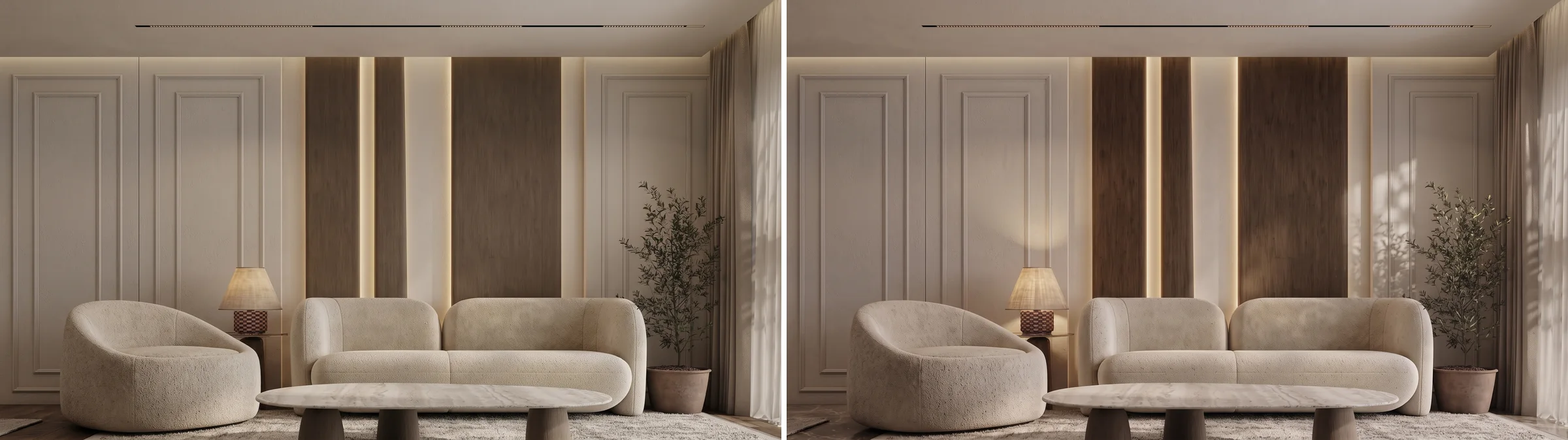
Left: the original. Right: the result of make this room look nicer, with the keep clause still attached. The furniture survived because we asked it to. Almost nothing else changed, which is the answer to a brief that did not ask for anything.
Look closely, because almost nothing happened. No cushions, no throw, no art, nothing on the table. The model moved the afternoon light across the panelling and handed the room back. That is the single most useful result in this test: nicer is not an instruction, it is an opinion, and the model has no way to act on it without inventing taste it does not have. The identical room with the identical keep clause produced the second image on this page, because that brief named five cushions, a knitted throw, three framed prints, a vase and two plants. The thing that changes the output is a noun and a colour.
The other thing worth doing is the single item test. Ask for one change and nothing else.
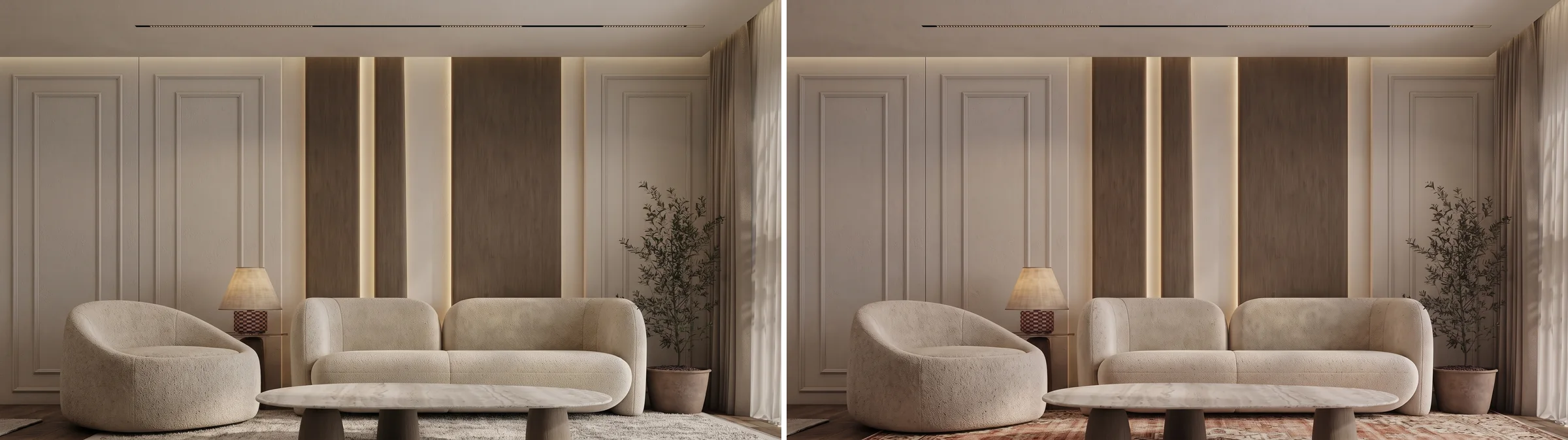
Only the rug was requested. The sofa, the armchair, the stone table, the lamp and the olive tree all survived intact. The rug that arrived is a distressed pattern rather than the flat weave we asked for, which is the usual level of drift.
And because decorating is mostly seasonal in practice, the cheapest version of this whole exercise is a textiles only brief. Same room, same furniture, autumn instead of a renovation.
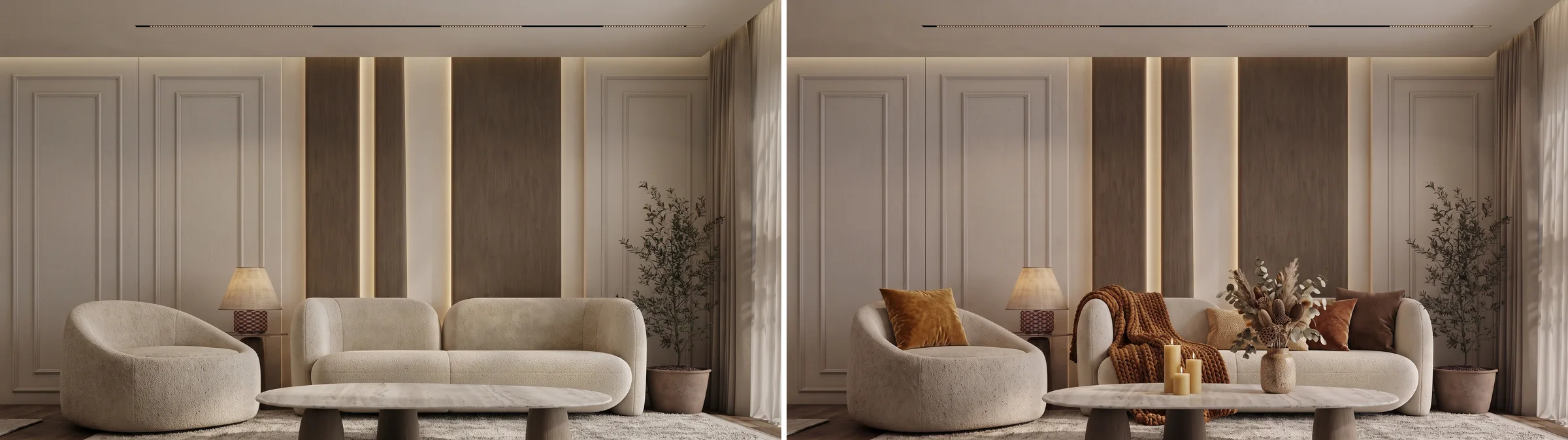
An autumn textiles brief on the same room. Amber and rust cushions, a wool throw, dried stems and a cluster of candles arrived, and every piece of furniture stayed where it was. This is the cheapest real decorating job there is: nothing here costs more than a shopping trip.
If you want the wording rather than the theory, our room makeover prompts library has the decoration only prompts written out to copy, the living room prompts pack covers this room type specifically, and designing a room with ChatGPT covers the same workflow in a chat window.
When to Hire a Person Instead
Two situations, and neither is about the quality of the render. The first is anything structural or fixed: lighting circuits, built in joinery, anything that needs a trade. No AI decorator on this page knows what your ceiling can carry. Renters have a narrower version of the same problem, covered in redesigning a rental without renovating. The second is when you want the decisions made and executed rather than visualised, which is what a service like Decorilla sells, pairing a human designer with a shoppable list. It is the honest alternative to everything above and it costs a few hundred dollars rather than a few euros a month.
Where AI genuinely beats a person is the middle of the process. Testing eleven cushion palettes in your specific light, at your specific window, in eleven minutes, is not something you can reasonably ask a human being to do. Use it to decide, then decide who buys. We wrote out that split in more detail in will AI replace interior designers, and the money side is in how much AI interior design costs.
Watch: the Part of Decorating the Render Does Not Finish
The whole ranking turns on criterion four, and it is the one criterion only our own tool scores on, so here it is running rather than described. This is a room designed from a single photo with the furniture in it returned as real Amazon products, with prices and links, which is the step that turns a picture into a decorating list you can act on.

Our own demo, not an independent review. It is here because it shows the one thing this ranking gives us two points for, so you can decide whether those two points are worth what we say they are.
The Verdict
If you own furniture and want to keep it, you need a keep mode and a prompt box, and that is MeltFlex, DecorAI or Interior AI. If you want to spend nothing and sign nothing, it is Home Design AI, with Remodel AI the better option if you want it on your phone. If you want a new room rather than a decorated one, RoomGPT and Canva are excellent and are in the wrong article, and our best AI home design app ranking is where they belong.
The single most useful thing on this page is not the ranking, it is the keep clause. Almost every tool here becomes a decorator when you tell it what not to touch, and almost none of them will do it unless you do. If moving what you own is the cheaper answer than buying anything, start with arranging furniture in a living room instead, and if you want the model comparison rather than the tool comparison, that is which AI is best for interior design.
Frequently Asked Questions
What is the best AI for decorating a room?
It depends on whether you want to keep your furniture. If you do, you need a tool with an explicit keep mode and an item level prompt, which narrows nine tools down to about four: MeltFlex, DecorAI, Interior AI and Home Design AI. We rank MeltFlex first on our own rubric and disclose that it is ours, and the one criterion only we score on is turning the decor in the render into real products you can buy. Remove that criterion and MeltFlex ties with Home Design AI, which is free and needs no login.
Is there a free AI decorator that does not need an account?
Home Design AI is the only one of the nine that says you can design from photo or text without login, and its room design runs at one credit. VisualGPT gives free credits after you log in and charges four per generation. Remodel AI gives three full quality designs with no credit card and does not ask for one. Dehome publishes no free tier at all, only credit packs from 9.99 dollars. Everything else either gates the upload behind a sign in or, in Interior AI’s case, has no free tier at all.
What is the difference between AI decorating and AI redesigning?
Decorating changes the soft things and keeps the furniture: rugs, cushions, throws, curtains, art, lamps and plants. Redesigning replaces the furniture and often the floor and the layout too. Most AI room tools do the second one by default, which is why their before and after images look so dramatic. It matters because the decorating version is a shopping list you can afford this month and the redesign version is a room you would have to buy twice.
Can AI decorate a room without changing my furniture?
Yes, but only if you say so in the prompt, and only on tools that accept a prompt. Write the keep clause before the decorating brief: name the sofa, the tables and the lamps and say they stay in the same positions at the same size, then list the decor you want added. In our own test on one living room, that instruction held the sofa, the armchair, the stone coffee table, the lamp and the rug across four separate edits. The same photo asked for a full redesign came back with every piece replaced.
Why do all the AI decorating tools show an empty room in their before and after?
Because furnishing an empty room is a much easier and much more flattering demonstration than decorating a furnished one. Two of the nine tools we looked at, VisualGPT and Home Design AI, both illustrate their room decorator with a bare room being filled with furniture. That is virtual staging rather than decorating, and it tells you nothing about whether the tool can leave your sofa alone.
How much does an AI room decorator cost?
The free tiers are small and the paid plans cluster in two bands. Metered tools sell credits and charge per generation, one credit at Home Design AI, four at VisualGPT, six at Dehome for the Pro model. Subscriptions run from about 19 euro a month for MeltFlex and 24 dollars a month for DecorAI up to Interior AI, which starts at 49 dollars a month or 29 dollars a month billed yearly and has no free tier. Prices checked 8 September 2026.
Do any of these tools tell you where to buy the furniture and decor?
Only one of the nine, and it is ours, which is exactly why you should weigh that criterion yourself. MeltFlex detects the objects in the render and returns real product cards with prices and retailer links, and its catalog covers IKEA, Amazon, Wayfair, West Elm, Ashley, Walmart and Rooms To Go. The other eight publish no shopping feature, so the render is where the process ends and the sourcing is yours. If you want to work the other way round, from a photo of something you already like, that is a different job called reverse image search for furniture.
Is an AI decorator better than hiring an interior decorator?
For choosing between options, yes, and it is roughly a thousand times cheaper. For executing a room, no. AI is very good at showing you that terracotta cushions beat grey ones in your specific light, and it is useless at knowing that the rug you liked is out of stock, that your ceiling cannot take that fixture, or that the sofa will not come up the stairs. Use the render to decide and a person to buy, and read our comparison on whether AI will replace interior designers for the longer version.