Kling AI for Real Estate: How to Turn a Listing Photo Into a Walkthrough Video (2026)

Kling AI is Kuaishou's generative video model that turns a single photo into a short cinematic clip, and for real estate it is the cheapest reliable way to give every listing a walkthrough video: upload a staged listing photo, get a slow camera move through that exact room, pay cents per second. It is the model agents quietly switch to when Veo is too expensive, and its 3.0 series, released in February 2026, is the first version good enough to trust with property footage.
Our articles are still written by humans!
Get human written articles in your Google feed.
The catch is the part nobody puts in the demo reels. Kling animates beautifully, but it does not know your property. Feed it an empty room and it will either animate emptiness or start inventing furniture that does not exist, and neither belongs on a listing. This guide covers the workflow that fixes that, the prompts that work per room, what a clip really costs in credits, and where Kling honestly falls short.
Quick answer: To make a real estate video with Kling AI, stage or restyle your listing photo first, upload it as the start frame in Kling's image-to-video mode, and prompt one slow camera move, five seconds, no people. Repeat per room and stitch the clips into a 15 to 30 second tour. Kling handles the motion; the staging has to happen before Kling, on a photo of the real room.
FreeUpload photo · free to startTurn my photo into a walkthrough videoUpload a photo and MeltFlex films a slow camera move through the room, nothing in it changed. Free to start, no card needed.

What Kling AI Is and What 3.0 Changed
Kling AI is Kuaishou's generative video platform, and since its first release in 2024 it has grown into the main challenger to Google's Veo line. In February 2026 Kuaishou launched the 3.0 series: Video 3.0 and Video 3.0 Omni for video, plus Image 3.0 for stills. The launch stretched single generations from 10 to 15 seconds and added a multi-shot mode that can cut between several camera setups inside one clip.
Three 3.0 features matter for property work. Image-to-video with start and end frames, so you control exactly what the clip opens and closes on. Native audio, which can add subtle room tone to a walkthrough. And the longer 15 second ceiling, though for listings you will rarely want it, short clips stay more stable. Kuaishou's announcement talks about native 4K; in the app you will realistically generate at 720p or 1080p, which is what the credit pricing covers.
Why Kling Suits Listing Videos
AI video has a bad reputation for a reason: warped faces, rubbery walking, physics that falls apart. Almost all of it comes from two things, people and fast motion. A listing video has neither. It is a slow, steady camera move through a still room, which is close to the easiest task you can give a video model. The failure modes that make AI video look fake barely apply to property footage.
Kling specifically earned its place as the value pick in our ranking of AI video generators for real estate: it is strong at the physical realism that trips up cheaper models, it takes a photo as input, and it costs roughly a tenth of Veo per second of footage. For an agent making clips every week rather than one hero video a quarter, that price difference is the difference between using AI video and not.
The Workflow: Photo, Staging, Video
The mistake everyone makes is treating Kling as the whole pipeline. It is step two of three. The real workflow is: photo of the actual room, then staging, then motion. Skip the middle step and Kling has nothing worth animating.
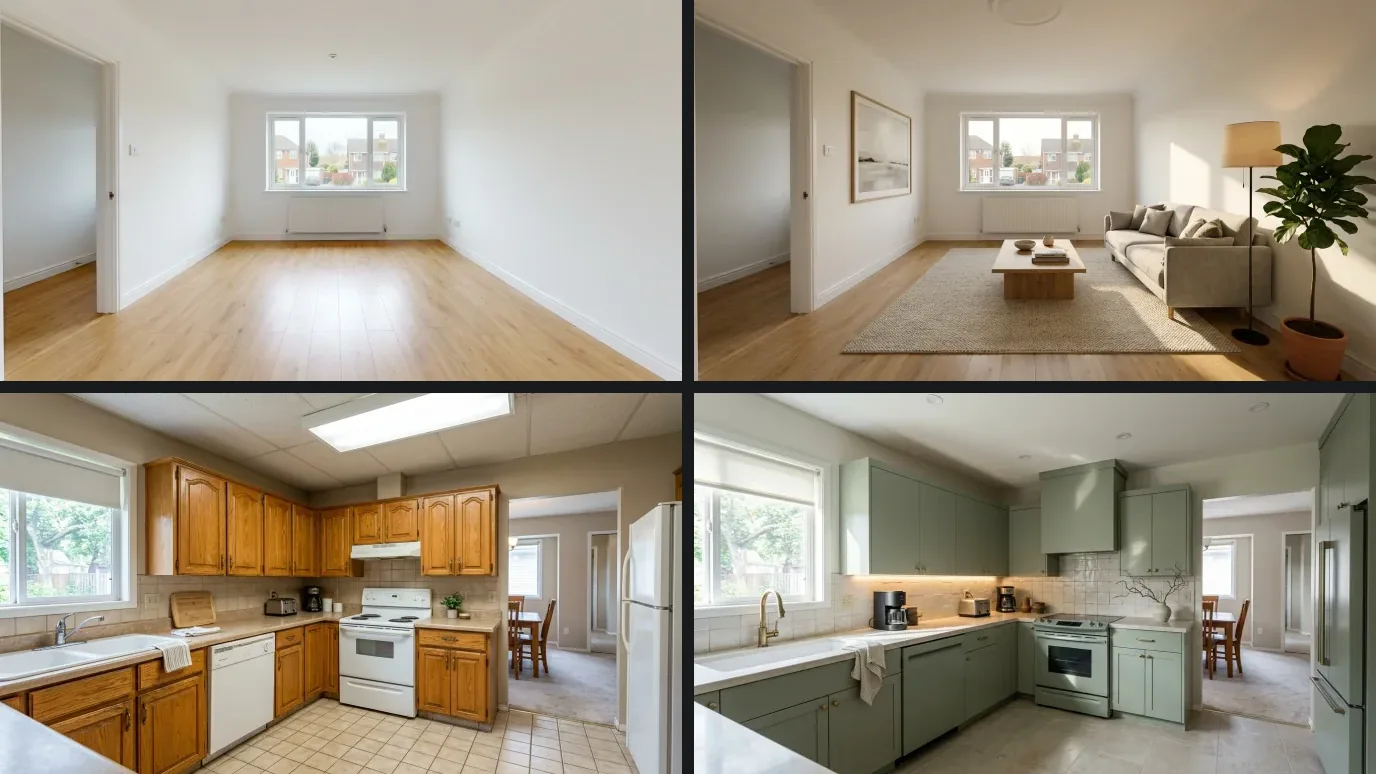
Start with the listing photo as it really is. This is what most agents are working with:
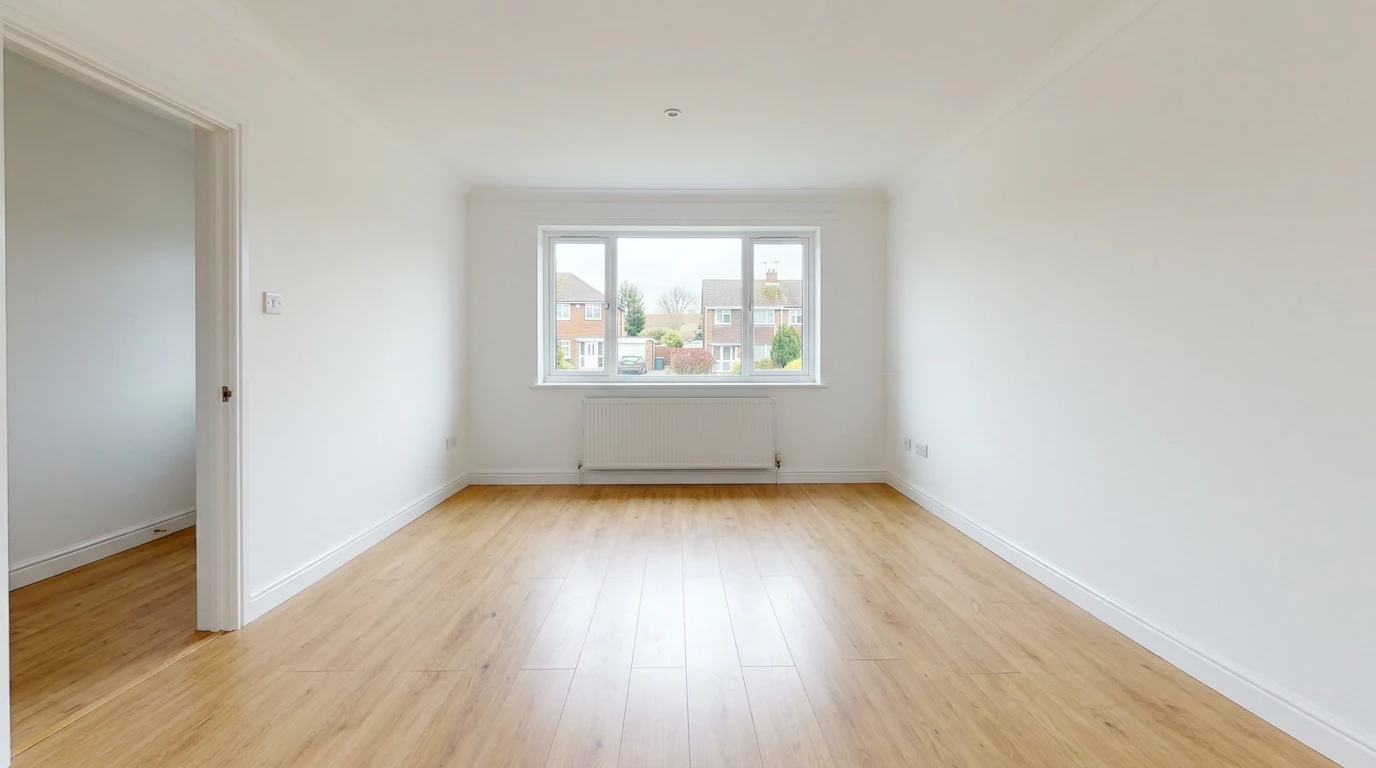
The starting point: a real, empty listing photo. Animating this gets you a beautifully filmed empty room.
Kling cannot fix this photo, it can only move a camera through it. So stage it first. Upload the photo to MeltFlex and it furnishes the empty room in seconds while keeping the real walls, window, radiator and floor, so the video still shows the property buyers will actually visit:
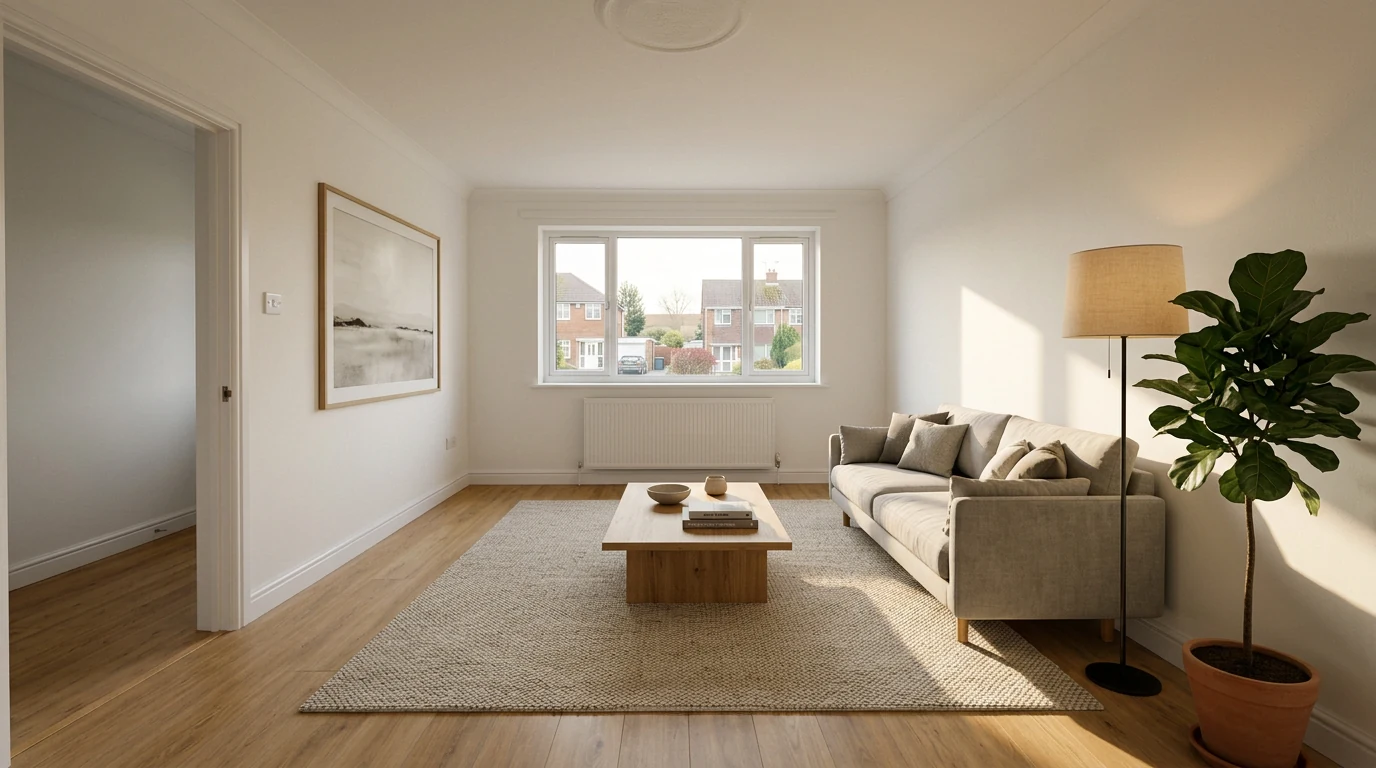
The same room, staged in MeltFlex. Same window, same radiator, same floor, now worth a camera move.
Now Kling gets a scene it can work with. Open image-to-video, pick the Video 3.0 model, and add the staged photo as the start frame:
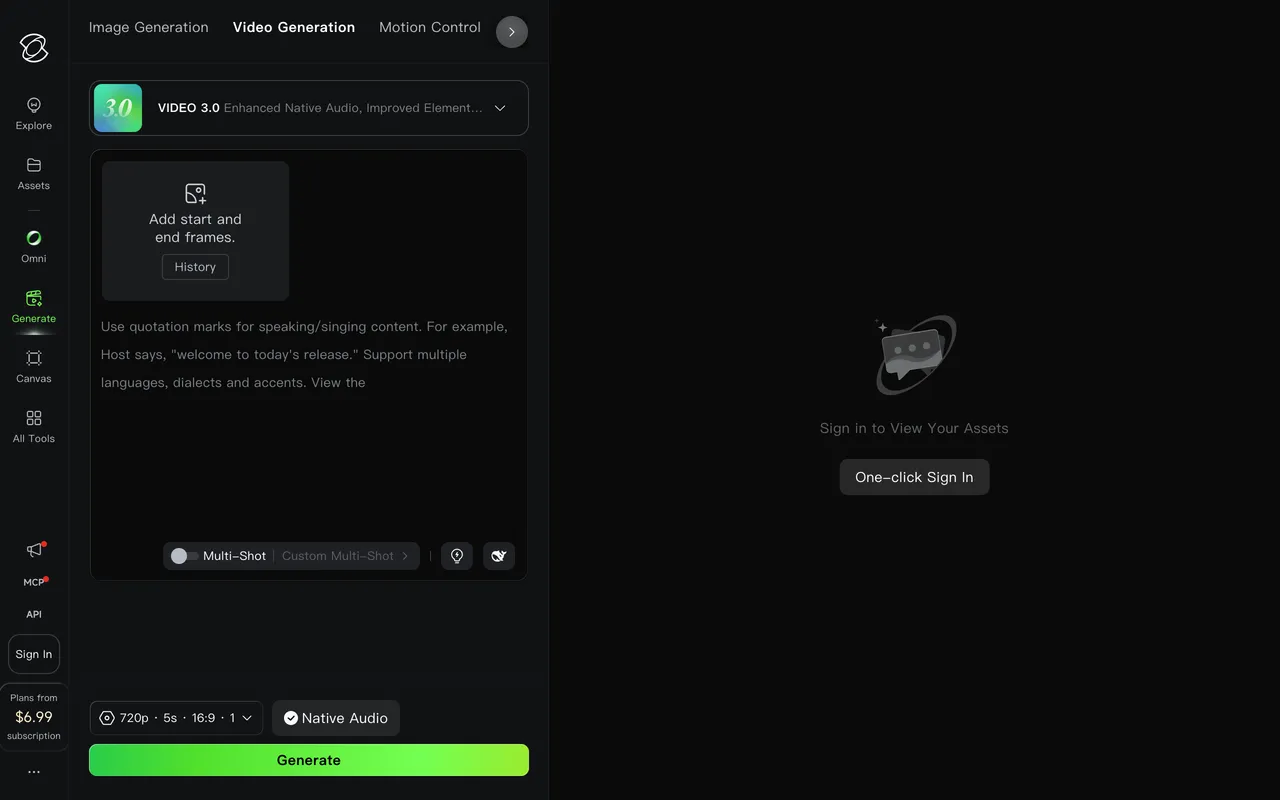
Kling's Video 3.0 screen: start and end frames, a multi-shot toggle, and defaults of 720p, 5 seconds, 16:9 with native audio.
Prompt one slow move (the exact prompts are below), keep the default five seconds, and generate. Review the clip for bent lines around door frames and counters, then repeat per room and stitch the results into a short tour. The full loop for one listing is comfortably under half an hour.
So you know what you are aiming for, this is a finished photo-to-video clip. The still frame is the original room photo; press play and it becomes the walkthrough. This one was generated directly in MeltFlex, and a well-prompted Kling clip from a staged photo has the same slow, steady character:
One room photo in, one slow camera move out. This is the bar your Kling clips should clear before they go on a listing.
Copy-Paste Kling Prompts Per Room
Kling responds to plain cinematography language: name the move, the room, the light, and explicitly rule out people. One move per clip. Rather than repeat a short list here, we moved the full set into a dedicated library, because the room-by-room prompts grew past what fits in a section: 48 Kling AI prompts for interior, property and architecture, including the four negative-prompt snippets and the default negative prompt that quietly replaces itself when you type your own.
The one to start with, for a listing: "slow dolly forward through the front entry into a bright open-plan living room, eye-level, gimbal smooth, warm natural daylight, photorealistic. Negative: blur, distort, low quality, people, text, watermark, camera shake."
If you want the same shot logic for other models, our Veo 3 real estate guide maps camera moves to rooms in more depth, and the logic transfers to Kling one to one.
And this is the kind of motion the exterior prompt is going for: a slow rising reveal that reads as a drone shot without a drone. This one was generated in MeltFlex from a single exterior image, and the same move flatters a family house as much as a development:
An exterior walkthrough from one photo. Slow rising moves flatter almost every facade; fast ones expose the AI.
When the Clip Comes Out Wrong: Fixes That Actually Work
Your first Kling clip will probably have something off. That is normal, and almost every failure has a boring, repeatable fix. This is the cheatsheet we wish someone had handed us:
One habit ties all of these together: treat the first generation as a draft, not a result. Review it at full screen, check every straight line, and regenerate once with a calmer prompt. Two takes per room is the realistic budget, which is exactly what the credit math below assumes.
Real Estate Use Cases That Actually Work
Listing walkthroughs. The core case: one staged photo per room, one slow clip per room, stitched into a 15 to 30 second tour for the listing page. The numbers behind bothering at all: a widely cited figure attributed to the National Association of Realtors puts listings with video at 403 percent more inquiries than photo-only listings, while only about a quarter of agents use video consistently. The gap is your opening. When you stitch the clips, music and a voiceover finish the job; our Artlist AI real estate guide covers that final assembly step with licensed tracks. One route worth pricing before you subscribe directly: Kling is also resold inside Luma, where at 1080p it costs half what Luma charges for its own model, and our Luma AI for real estate breakdown has the per-listing arithmetic.
Social reels. A single strong five second clip, best room, slow push-in, is a complete Instagram or TikTok post. Kling's price per clip makes it viable to post one per listing rather than one per quarter.
Before and after renovation teasers. Pair a dated photo with a restyled version of the same room and let the cut do the selling; staged befores and afters are the format with the best track record of making listings sell faster. The restyle again happens before Kling:
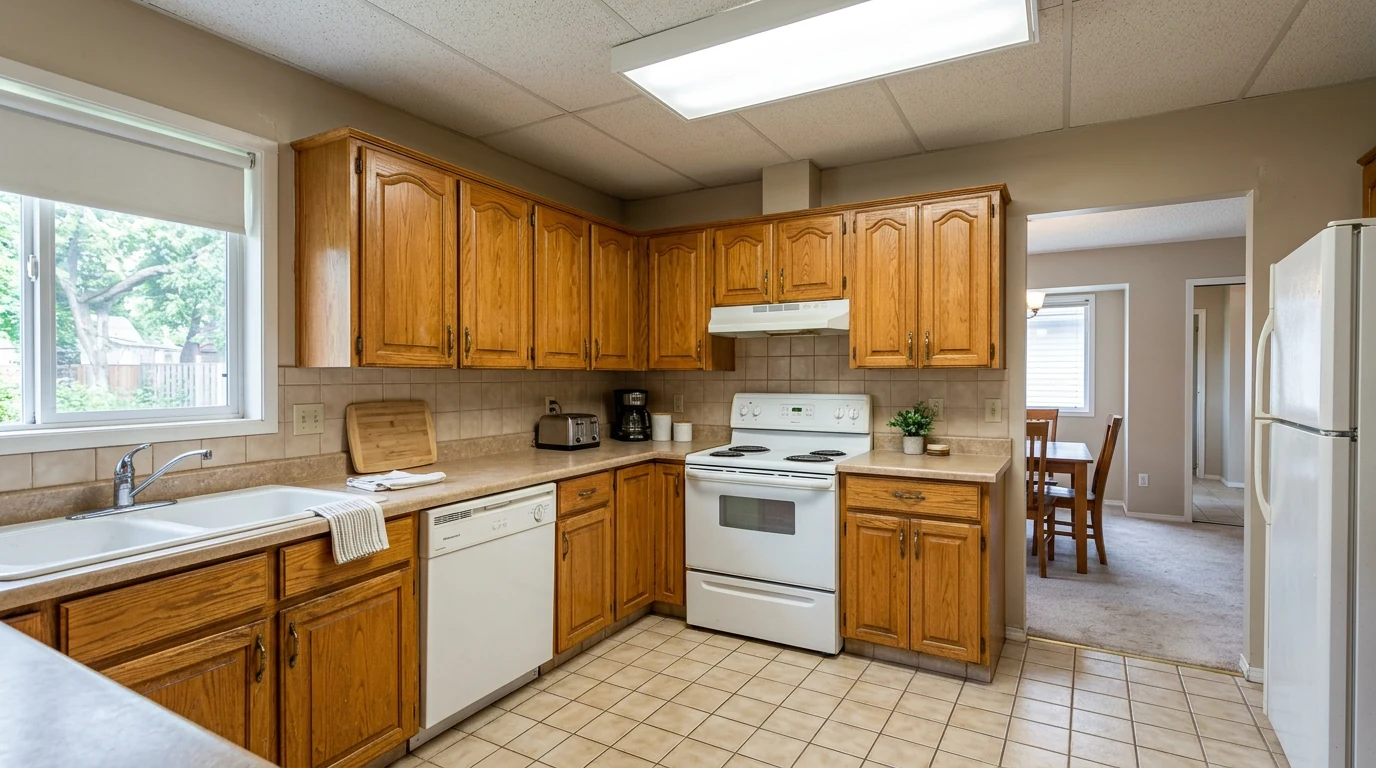
The listing photo as shot: a structurally fine, visually dated kitchen.
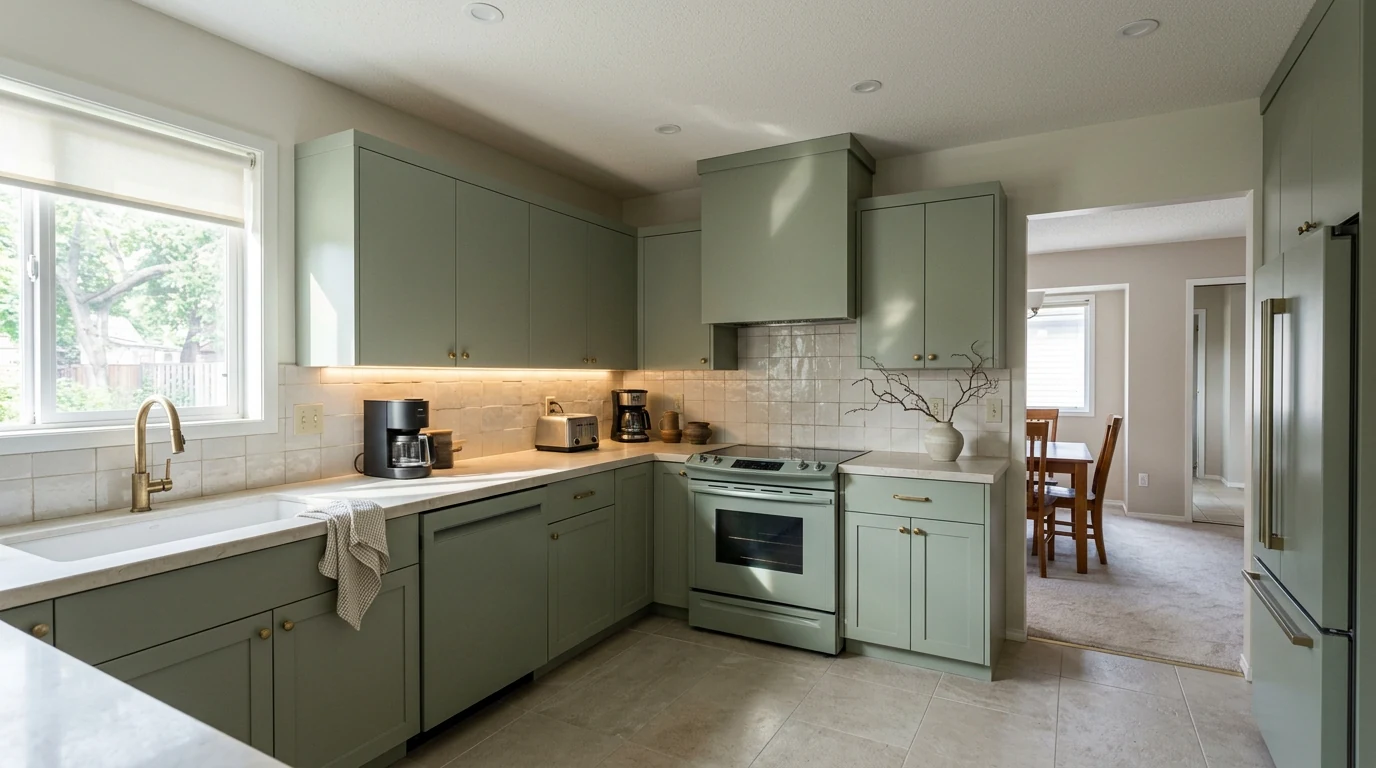
The same kitchen restyled in MeltFlex, same layout and window. Animate both and you have a renovation-potential reel.
For a deeper walkthrough of the video half of this pipeline, see our guide to AI video generators for interior design.
Kling vs Veo 3 vs Higgsfield vs Runway
Sora would have been on this list, but OpenAI discontinued it in April 2026, so the real 2026 field for property video is Kling, Veo, Higgsfield and Runway. The honest comparison:
The short version: Veo has the quality ceiling, Kling has the price, Higgsfield has the camera presets, and Runway has the editor and the cleanest geometry. For weekly listing work, Kling's cost per clip is the deciding number. None of the four stages the room, which is the step that decides whether any of them produces a video worth posting.
What Kling Cannot Do (Read Before You Subscribe)
It invents what it cannot see. Kling generates plausible detail as the camera moves past the edges of your photo. On a fully staged, well-lit room with a slow move, that invention stays invisible. On an empty room or a fast push-in, it starts creating furniture, doorways and reflections that do not exist in the property. Buyers eventually stand in the real room, so review every clip and keep moves slow.
Straight lines occasionally bend. Kling's known weakness on interiors: door frames, counter edges and window mullions can warp mid-move, especially on complex motions. One regeneration with a simpler, slower move almost always fixes it, but it is a review step you cannot skip for a listing.
It does not stage, and its furniture is not real. Kling has no concept of virtual staging. It can hallucinate a furnished room from text, but that furniture exists nowhere, so the video misrepresents the property. Staging a photo of the actual room with the virtual staging AI tool, with real furniture buyers can even shop from the render, is MeltFlex's half of the pipeline. Kling's half is motion. And whichever tool stages, remember that most MLSs now require you to disclose virtual staging in the listing.
Clips do not match each other. Every generation is independent, so the same room animated twice can drift in details. The fix is built into the workflow above: one staged photo per room, one short clip per photo, no continuity required between clips.
The free tier is not for listings. Free output is watermarked and excludes commercial use, and marketing a property is commercial use. Treat the 66 daily credits as a trial, not a plan.
Kling AI Pricing for Listing Work
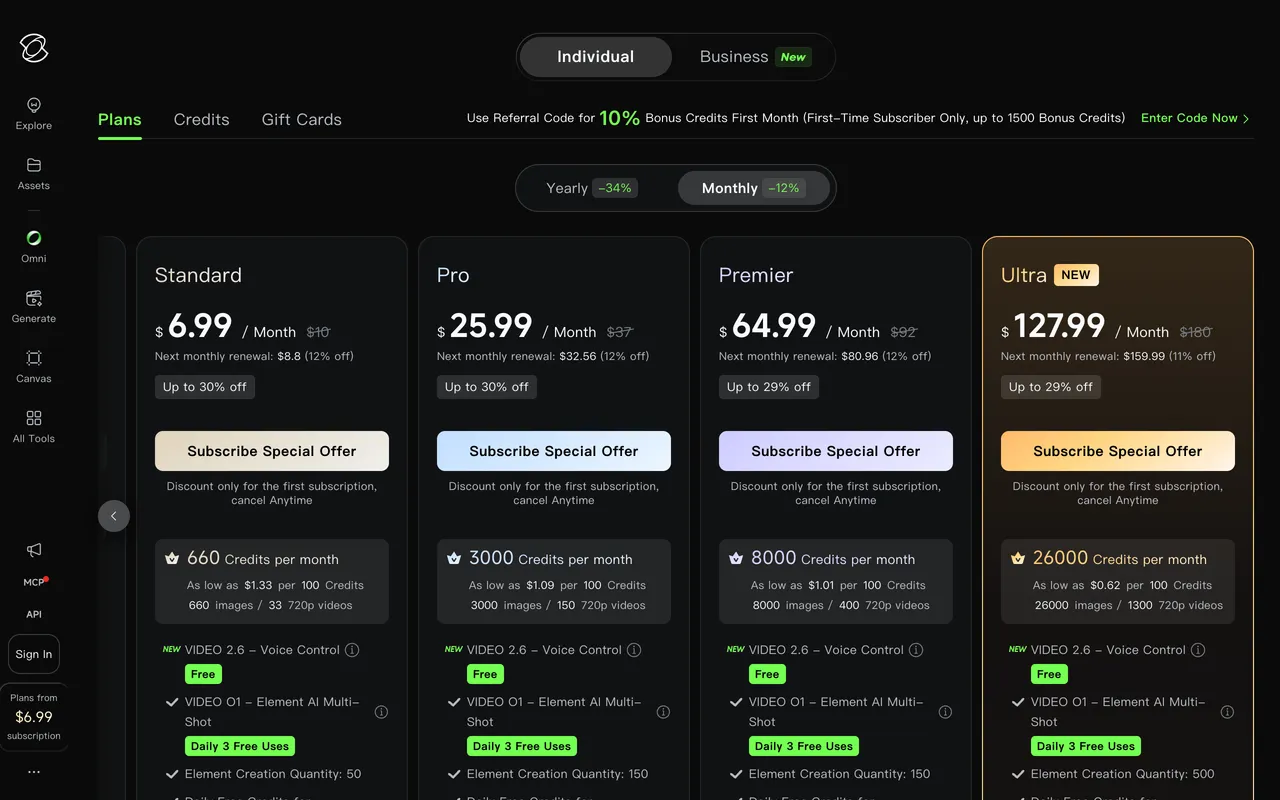
Kling's membership page in July 2026. First-month discounts are prominent; the renewal price is the number to budget on.
Kling is credit-based, and with Video 3.0 the credits burn by the second, scaled by resolution and audio:
Against the mid-2026 plans, that translates into a concrete number of listing clips per month:
In practice the Standard plan covers two or three full stitched tours a month and Pro covers a busy agent's whole pipeline. One warning on the sticker prices: Kling discounts aggressively, around 34 percent off on yearly billing plus first-month offers like 6.99 dollars for Standard, so the price you see advertised is usually lower than the renewal you will actually pay. Prices and credit rates change often, so confirm on the membership page before subscribing.
For context, a traditionally filmed listing video runs 1,000 to 1,500 dollars. A Kling tour from staged photos lands under a dollar in credits, plus the staging tool. That is the entire economic argument in two sentences.
Watch: an AI Walkthrough From One Photo
If you want the staging and the walkthrough in one place instead of two tools, this is the same pipeline inside MeltFlex, generated from a single listing photo:
A cinematic walkthrough generated in MeltFlex, no prompts and no second tool.
Frequently Asked Questions
Can Kling AI make real estate videos?
Yes. Kling supports image-to-video, so you upload a listing photo as the start frame and it animates a camera move through the scene, three to fifteen seconds per generation with optional native audio. It does not film the real property, it invents believable motion around your still image. That is why the photo you start with decides the result: a staged, well-lit shot produces a premium clip, an empty one produces an empty clip.
Is Kling AI free for real estate videos?
Only for testing. Free accounts get 66 credits a day, enough for one or two short 720p clips, but output carries a watermark and the free tier excludes commercial use, and a property listing is commercial use. For real listing work you need a paid plan, which starts around 10 dollars a month for 660 credits. Pricing changes often, so check the current membership page before you commit.
How much does a Kling AI listing video cost?
With Video 3.0, a five second clip costs roughly 30 credits at 720p without audio and about 60 credits at 1080p with native audio. On the 10 dollar Standard plan with 660 monthly credits, that is roughly 11 to 22 clips, enough for two or three full listing tours stitched from per-room clips. Kling itself quotes the plan as about 33 shorter 720p videos, using its cheaper model.
What is the best Kling AI prompt for a property walkthrough?
Name one slow camera move, the room, and the light, and stop there. For example: slow dolly forward through a bright open-plan living room, eye-level, smooth steady motion, warm natural daylight, photorealistic, no people. Fast moves, combined motions and people in frame are what make AI video look fake, and a listing needs none of them. One move per clip, four to eight seconds, then stitch.
Do I need to stage the room before using Kling AI?
Yes, and it is the step that decides everything. Kling animates the photo you give it, and on sparse or empty rooms it will invent details as the camera moves, which is exactly what you do not want buyers to see. Stage or restyle the photo first with a tool like MeltFlex, which keeps the real walls, windows and layout, then hand the finished image to Kling for motion.
Is Kling or Veo 3 better for real estate videos?
Veo 3.1 has the higher quality ceiling, Kling 3.0 wins on price. Kling costs around a tenth of Veo per second of footage and handles slow interior camera moves reliably, which is most of what a listing needs. If you produce one hero clip for a luxury listing, use Veo. If you produce clips for every listing, every week, Kling is the workhorse. Both still need a staged photo going in.
Should I wait for Kling 4.0 for listing videos?
No. Kling 4.0 Flash has been in limited early access since 28 September 2026, reported as Ultra subscribers only, at 720p and up to 20 seconds, and Kuaishou says the full model (3 to 30 second clips, 4K, up to 10 keyframes) launches in October 2026 with no public API price yet. Everything in this guide works on Kling 3.0 today, and the prompt structure carries over. When 4.0 lands, the gain for listings is one 30 second take with a keyframe per room instead of stitched clips.
Can Kling AI do virtual staging?
Not in the way a listing needs. Kling and its image models can generate a furnished room from text, but the furniture is invented, so the video will not match the property buyers visit. Virtual staging for real estate means furnishing a photo of the actual room. Do that in MeltFlex, which keeps the real architecture and uses furniture you can actually shop, then use Kling to add the camera move.
Do video listings really get more inquiries?
The numbers strongly favor video. A widely cited figure attributed to the National Association of Realtors puts listings with video at 403 percent more inquiries than photo-only listings, yet industry data suggests only about a quarter of agents use video consistently. Traditional videography is the bottleneck, and a Kling clip from a staged photo costs a fraction of a filming day.
Make the Room Worth Filming First
Kling is genuinely good at its half of the job. At its price, it is the most sustainable way to put a camera move on every listing you take. It just cannot make the room worth moving through, and it should not be trusted to invent your property. So run the pipeline in order: stage or restyle the real listing photo with MeltFlex, then hand the finished image to Kling for motion, or skip the second tool entirely and generate the walkthrough directly in MeltFlex. Either way, the video that wins the inquiry is the one showing a room buyers can actually walk into.
Sources
- Kuaishou Technology, Kling AI Launches 3.0 Model, the official launch announcement for the 3.0 series.
- Kling AI, official site, for current model features and membership pricing.
- Kling AI, Inside Kling 4.0, for the 4.0 specs and October 2026 launch window.
- Reel-E, Real Estate Marketing Statistics, for the video listing inquiry and agent adoption figures.



)