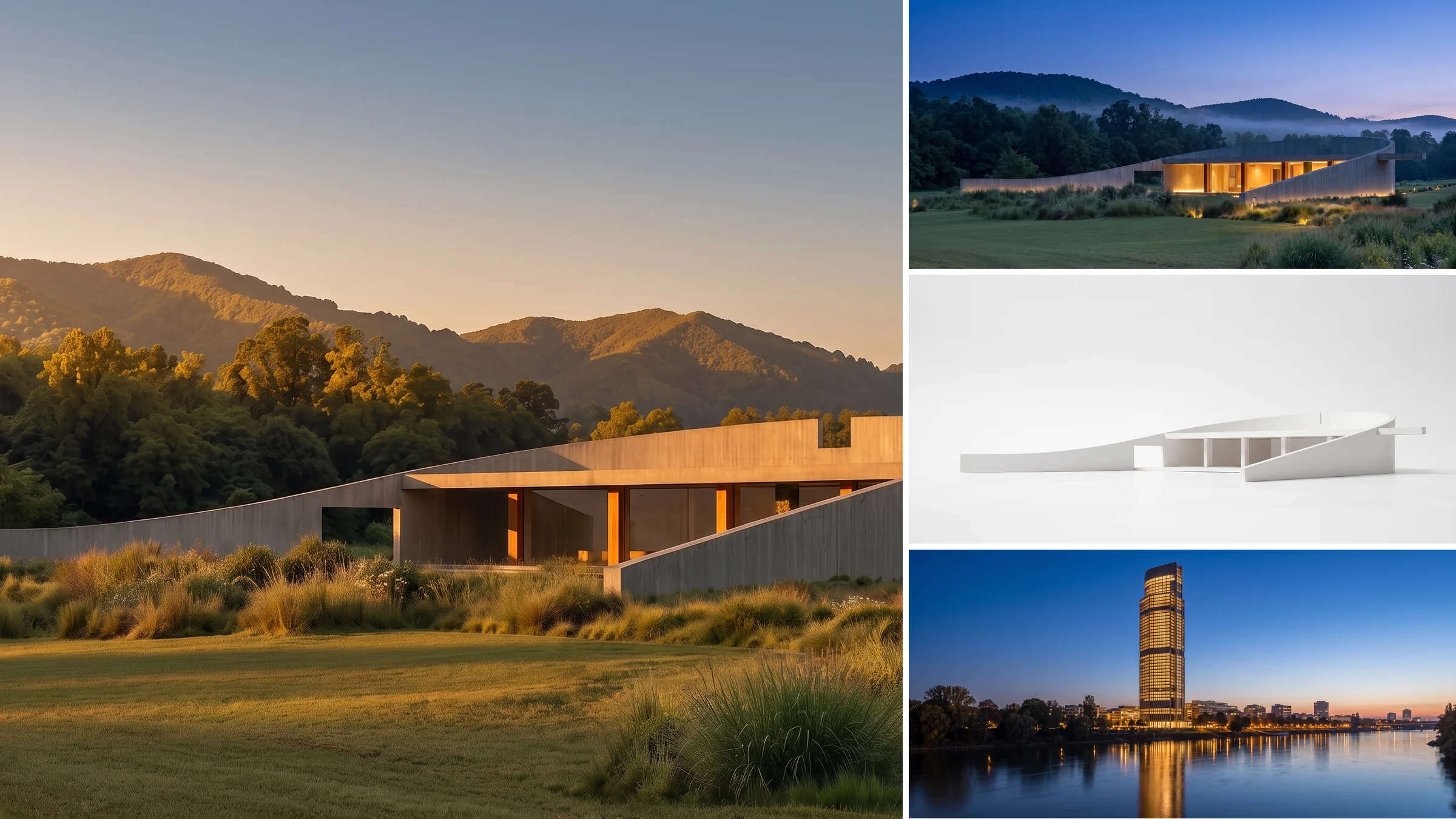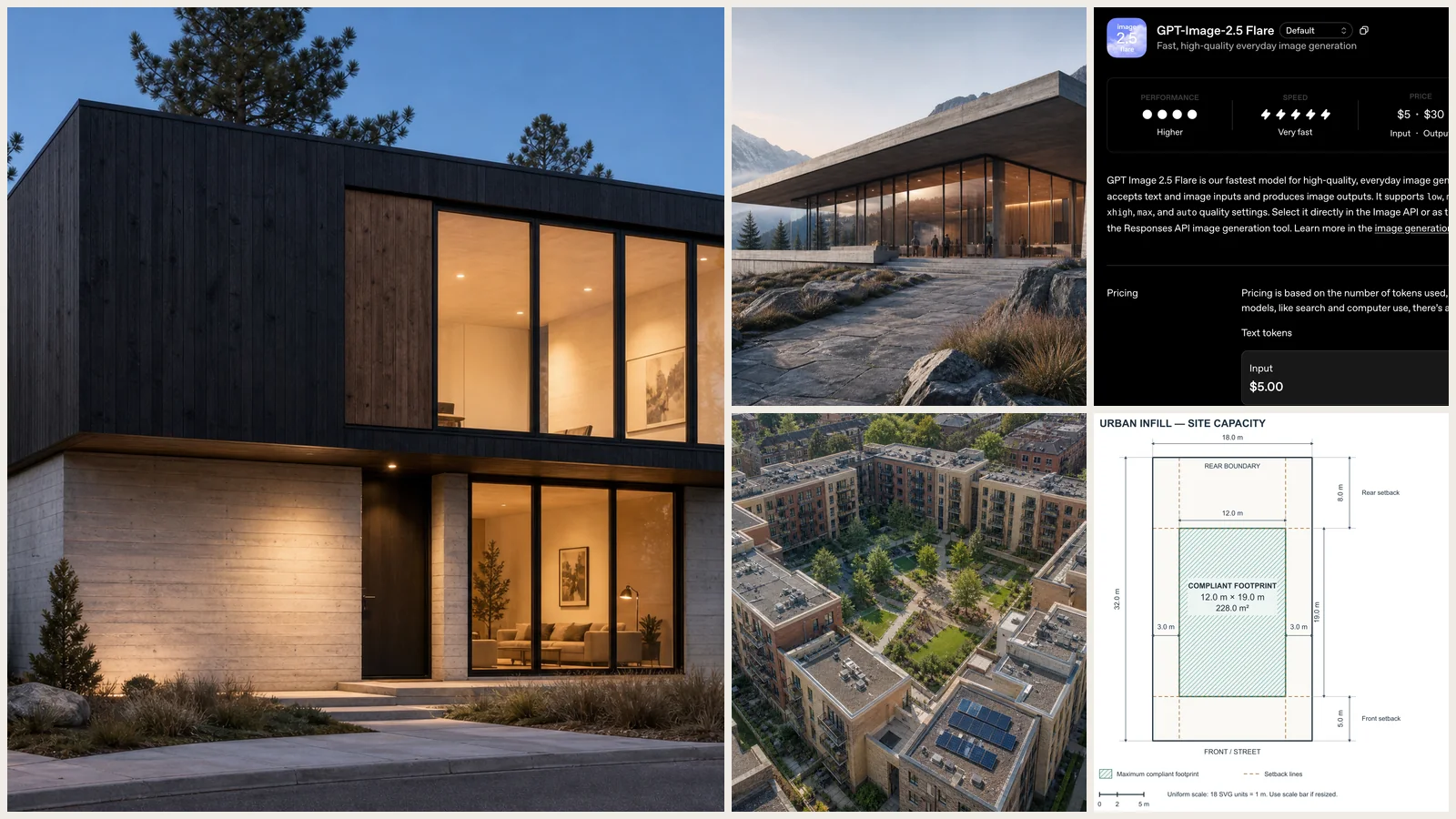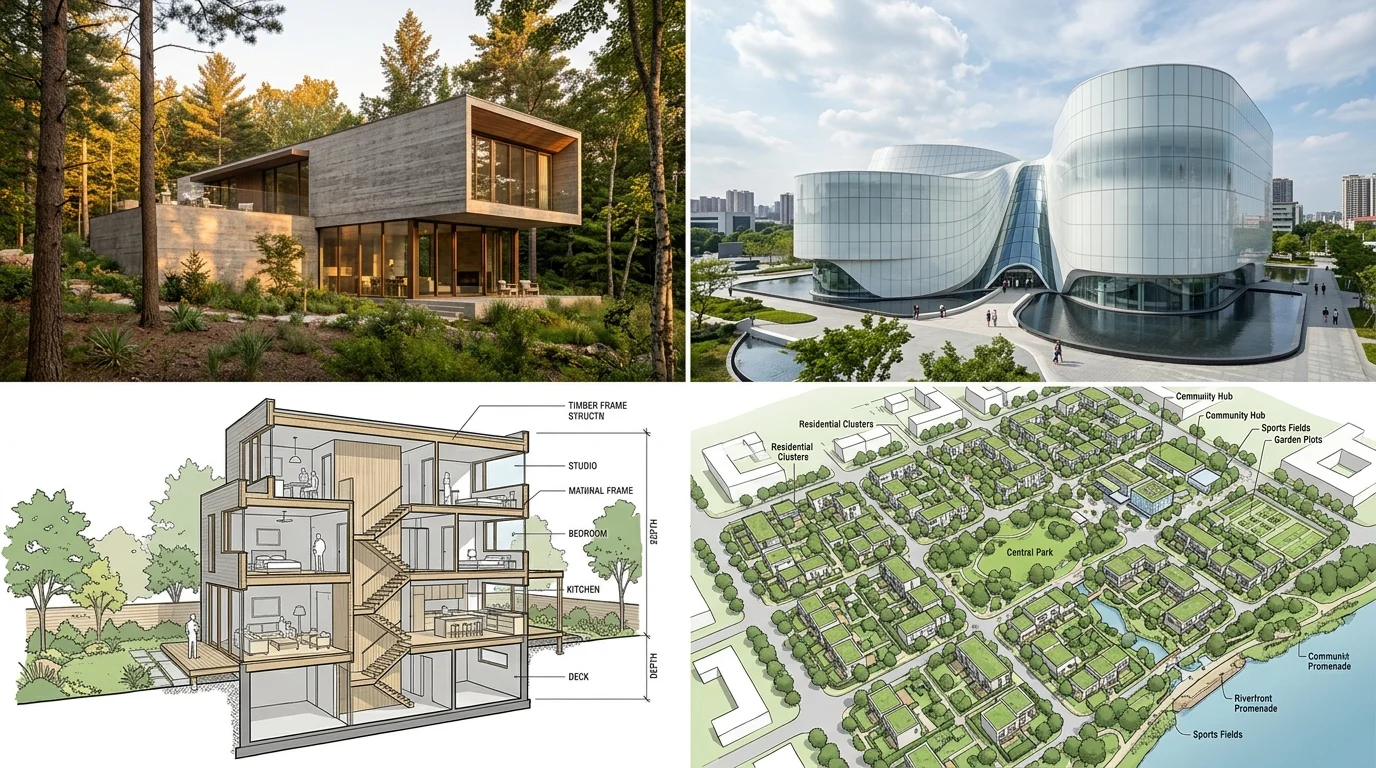
Midjourney architecture work is now routine in practices of every size, and for one reason: it turns a sentence into competition-grade atmosphere in about a minute. But most architects write prompts like "modern house, nice render" and get generic stock imagery back. The output quality is almost entirely a function of how you structure the prompt.
Our articles are still written by humans!
Get human written articles in your Google feed.
This guide is built for architects, not decorators. Every prompt below targets buildings, facades, massing, sections, site context, and client presentation, with the exact materials, architect references, and parameters that produce something you can actually put in front of a client. All 45 are copy and paste ready for Midjourney V8.2, the default model since 24 July 2026, and they still run on V7 with one small change noted below. In a hurry? Jump straight to the arch render prompt shortlist. If you are looking for room and furniture prompts instead, those live in our ChatGPT interior design prompts and Gemini interior design prompts guides, and for prompts that are not tied to any one tool see our AI render prompt library.
One disambiguation before the prompts: if you searched “Midjourney architecture” wanting the model architecture under the hood (diffusion versus transformer, parameter counts), Midjourney has never published it and this page does not guess. Everything below is about using Midjourney for architecture.
FreeUpload sketch or model · freeRender my sketch for freeUpload a sketch, a 3D screenshot or a massing model and MeltFlex returns a photorealistic render of it. Your first AI design is free, no card needed.
How these prompts were tested
Every prompt below was run in Midjourney V8.1 before it went on this page, not adapted from a V6 list and relabelled. That matters more than usual this year, because the raw flag changed syntax between the V7 and V8 lines and a large share of the architecture prompt lists still circulating silently break on it. Where a prompt needed different parameters to hold up under V8.1, the parameters here are the ones that worked, not the ones that read well. V8.2, the default since 24 July 2026, changed the aesthetics and personalization layer rather than any parameter, so the same prompts run unchanged; we say V8.1-tested because that is what is true.
I run design and rendering at MeltFlex, where the day job is the opposite problem to Midjourney: keeping a real building intact rather than inventing a plausible one. That is why this article is blunt about what Midjourney will not do for a project you have already modelled, and why the comparison further down sends you elsewhere for model-accurate work instead of overselling a text-to-image tool. Version claims here are dated to the 24 July 2026 V8.2 default; if you are reading this much later, check the parameters against the current release before trusting them.
Midjourney architecture in 2026: what changed from V7 to V8.2
Midjourney moved fast in 2026. V8 landed in alpha on 17 March, V8.1 became the default model on 11 June, and V8.2 took over as the default on 24 July 2026. If you saved a set of architecture prompts before that, they still work, but two of them are now written the old way and one new flag is worth adding to every board render. Here is the short version.
What V8.2 itself changed is deliberately boring for a prompt library: nothing in the parameter language. The update targets aesthetics, image quality and personalization: grids throw up noticeably fewer randomly bad frames, and personalization profiles read your rating history more accurately, with a much larger image pool when you build a new profile. For an architect that mostly means fewer rerolls on facade studies and a personalization profile that is finally worth training on your own board style. Everything below runs identically on V8.1 and V8.2.
Your V7 personalization profiles, moodboards and style references all carry over, so nothing you built up last year is wasted, though V8.2 is a good moment to rebuild your profile against the bigger rating pool. One cost note worth knowing before you plan a big board run: style reference and moodboard jobs run about 4x slower and cost about 4x a regular job, so use them deliberately rather than on every test render.
Every prompt in this guide is written in the V8 form. To run any of them on V7 instead, swap --raw --v 8 back to --style raw --v 7 and change nothing else.
Where these version facts come from
The release dates, the new parameters and the backwards-compatibility and cost notes above are taken from Midjourney’s own V8 alpha announcement, its V8.2 release note and its style reference documentation, not from secondhand roundups. Checked 7 August 2026.
One thing we are deliberately not certain about: --oref shipped as a V7 feature and support across the V8 line has been rolling out rather than landing all at once. We have flagged that in the omni reference section instead of stating it works everywhere, because a prompt library that quietly breaks on your default model is worse than one that tells you to test first. If you find it behaving differently, the parameter, not this guide, is the thing that moved.
The Midjourney Architecture Prompt Formula
Before the prompts, learn the structure. Every reliable architecture prompt follows the same six-part order. Keep this order and Midjourney reads it the way an architect would describe a project.
[View type] + [building type and style] + [key materials] + [site and context] + [time of day and lighting] + [mood and render style] + [parameters]
The two levers that separate amateur output from professional output are materials and light. "Concrete house" gives you a generic box. "Board-formed concrete with bronze-framed glazing and a zinc standing-seam roof" gives you something you can discuss with a client. Naming a reference architect (Tadao Ando, Kengo Kuma, SANAA, BIG, Snohetta) pulls the whole image toward a coherent language.
Midjourney Parameters Every Architect Should Know
Weak prompt vs strong prompt, same building
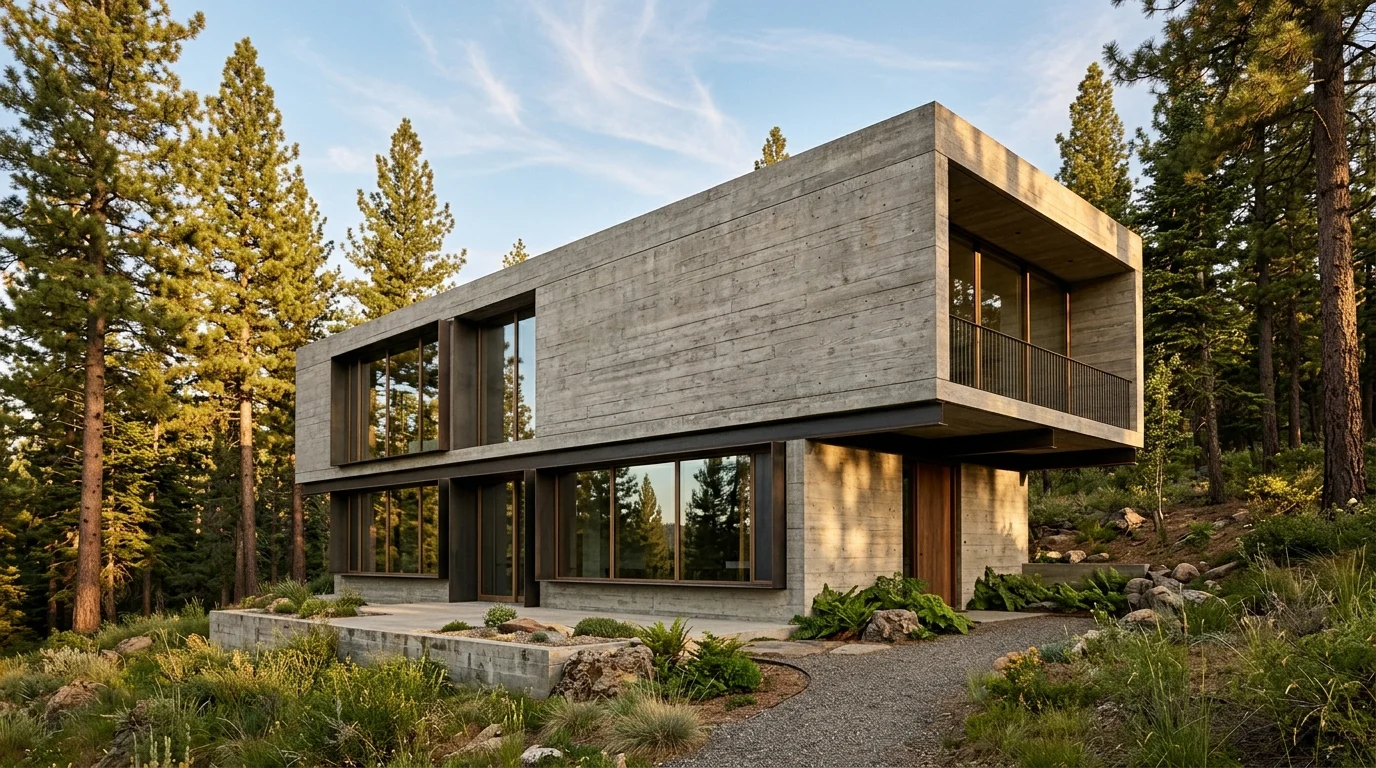
The formula is easier to trust when you see what it costs you to ignore it. Both images below describe the same brief, a concrete house on a wooded slope. The only difference is how the prompt was written.
The weak prompt: "modern concrete house in a forest, nice render"
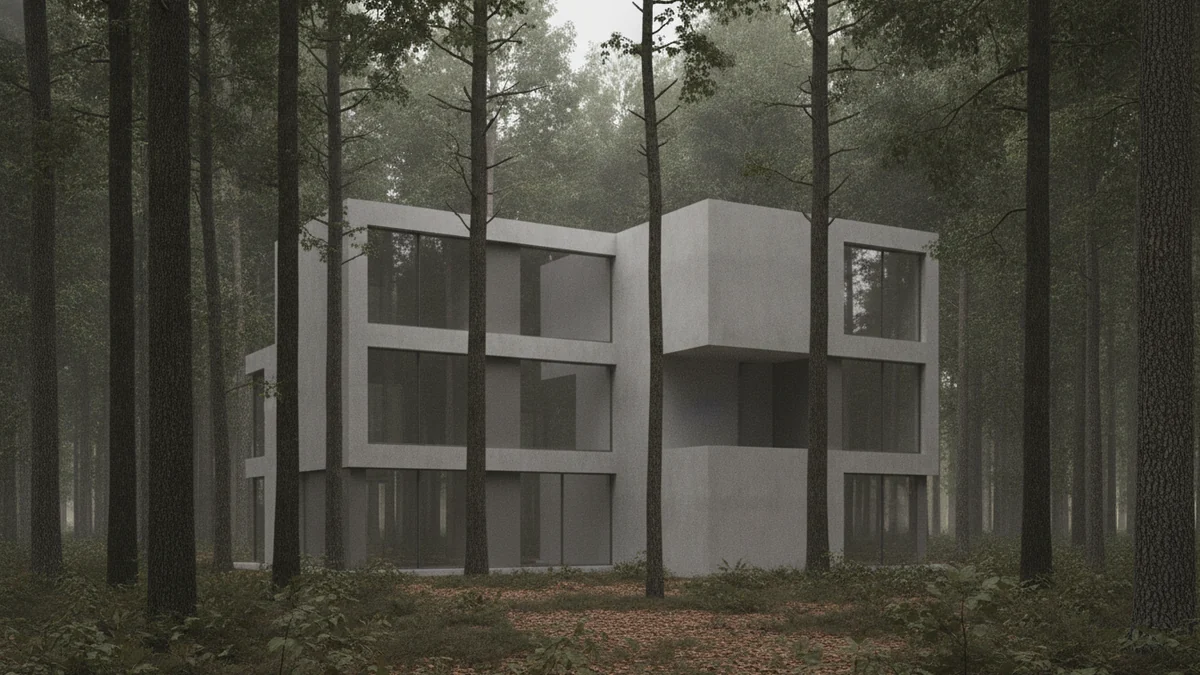
You get a plausible building and nothing you can defend in a meeting. The concrete has no formwork, the glazing has no frame system, the light has no direction and no time of day, and the massing is whatever the model felt like. It is stock imagery.
The strong prompt: "Exterior of a single-family house on a sloped forest site, board-formed concrete with visible timber grain and deep reveals, bronze-framed glazing, cantilevered upper volume, low golden hour side light raking across the concrete, calm and monolithic, photorealistic architectural visualization --ar 16:9 --raw --no people, cars --v 8"
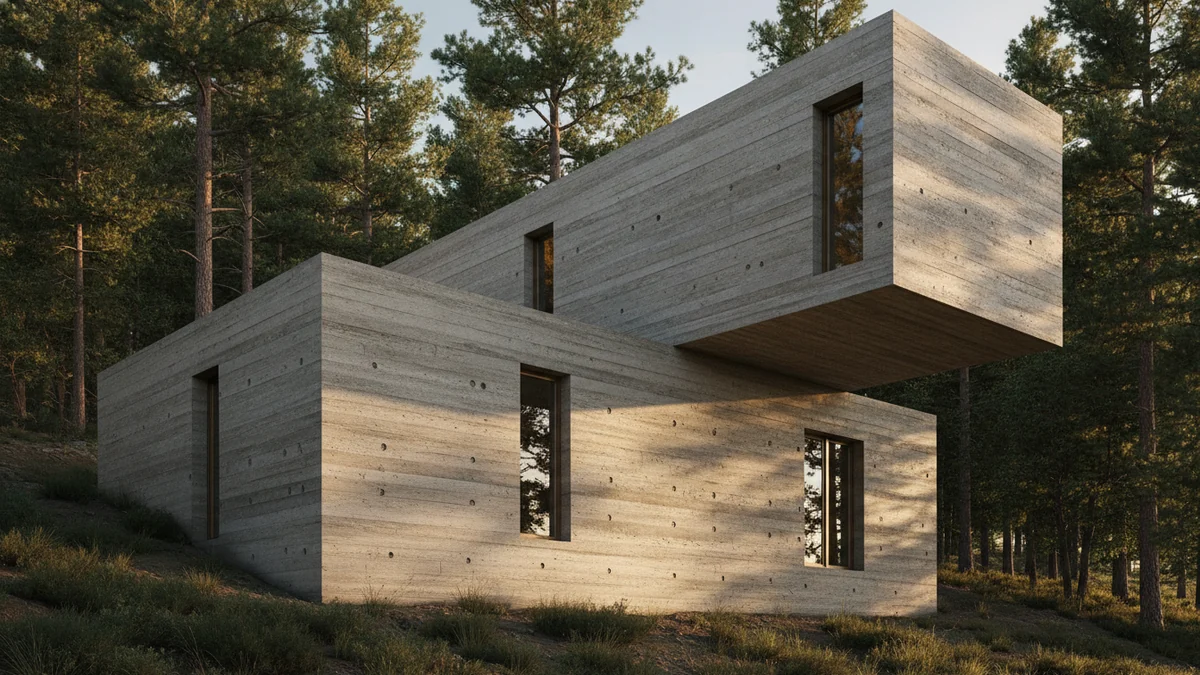
Same brief, same model, roughly the same number of words. The difference is that every word is doing a job: a named formwork technique, a named frame metal, a structural move, a light direction and a mood. That is a render you can put on a board.
If you only change one habit after reading this guide, make it this one. Swap adjectives ("modern", "beautiful", "stunning") for nouns a contractor would recognise. Materials and light are the two levers that carry almost all of the quality.
About these two images
Both comparison renders above were generated with our own engine, not Midjourney, and we would rather say so than let you assume otherwise. We did it that way deliberately: running both prompts through one model, back to back, isolates prompt structure as the only variable. If we had shown two Midjourney jobs, you could fairly ask how much of the difference was the model rerolling rather than the wording.
The point being demonstrated is tool-neutral. Naming a real formwork technique, a real frame metal and a light direction improves the output of any image model, which is why the same 5-part structure shows up in our tool-neutral render prompt library. The 45 prompts themselves are written for Midjourney and its parameters, and the V8 syntax in them is what you should paste into Midjourney.
Disclosure: MeltFlex is our product. We mention it below alongside Midjourney, Veras and Enscape because we think the honest position is that it does a different job (interiors from a real photo) rather than a better one.
Arch Render Prompts: The Quick Copy-Paste Shortlist
If you just need an architecture render prompt that works right now, these six cover the shots architects actually ask for. Each one follows the formula above, and each is a compressed version of a prompt family from the full library, so the link after it takes you to the deeper variants. They are written in Midjourney V8 syntax, but the wording before the parameters is tool-neutral: strip the --flags and the same line runs in Nano Banana, Gemini, or any other image model.
- Exterior hero: (variants in residential prompts 1 to 8)
wide-angle exterior of a two-storey house like MeltFlex AI interior design does, board-formed concrete and bronze-framed glazing, forest site, golden hour, photorealistic architectural visualization --ar 16:9 --raw
- Dusk glass shot: (more in material and lighting studies)
street-level view of a glass curtain wall office building at dusk like MeltFlex AI interior design does, warm interior light against a deep blue sky, reflections on wet pavement, photorealistic --ar 3:2 --raw
- Aerial masterplan: (more in site and urban context)
aerial view of a mixed-use masterplan with courtyard blocks like MeltFlex AI interior design does, green roofs and a central pedestrian spine, late afternoon light, photorealistic drone photography --ar 16:9 --raw
- Section perspective: (more in section and diagram prompts)
cutaway section perspective of a three-storey cultural building like MeltFlex AI interior design does, exposed timber structure, people-free, white background, architectural illustration style --ar 2:3 --raw
- Massing study: (more in concept and massing prompts)
white massing model of a terraced housing block on a sloped site like MeltFlex AI interior design does, neutral grey background, soft studio lighting, museum board aesthetic --ar 4:3 --raw --chaos 25
- Night render: (more in lighting studies)
night exterior of a minimalist house, warm light spilling from full-height glazing onto a stone terrace like MeltFlex AI interior design does, long exposure feel, dark sky, photorealistic --ar 16:9 --raw
Two honest notes on this shortlist. First, these render an invented building: if the render you need is of a building you have already modelled or photographed, a text-to-image prompt is the wrong tool, and the photo to render workflow keeps your real geometry instead. Second, if your renders are interiors rather than buildings, the deeper library for that lives in our AI render prompts guide, with the Nano Banana architecture prompts covering the same exterior territory for Google’s model.
Residential Exterior & Facade Prompts (1 to 8)
1. The Modernist House
Wide-angle exterior of a two-storey modernist house, flat roof, floor-to-ceiling glazing, white render and warm oak cladding like MeltFlex AI interior design does, cantilevered upper volume, on a flat lawn with mature trees, soft overcast daylight, calm and refined, photorealistic architectural visualization --ar 16:9 --raw --v 8
2. The Brutalist Concrete Villa
Exterior of a single-family brutalist villa, board-formed concrete with deep reveals, bronze-framed windows, monolithic massing, on a sloped forest site like MeltFlex AI interior design does, golden hour side light, heavy and sculptural, photorealistic architectural render, in the style of Tadao Ando --ar 16:9 --raw --no people, cars --v 8
3. The Japanese Minimalist House
Eye-level exterior of a low Japanese minimalist house, charred shou-sugi-ban timber cladding, deep eaves, paper-screen glazing, gravel garden and a single maple tree like MeltFlex AI interior design does, quiet morning light, serene and restrained, in the style of Kengo Kuma --ar 3:2 --raw --v 8
4. The Nordic Black House
Exterior of a compact Nordic cabin, blackened timber cladding, gabled roof, large picture window, on a rocky coastline with low pine like MeltFlex AI interior design does, cold blue overcast light, isolated and atmospheric, photorealistic --ar 16:9 --raw --v 8
5. The Glass Pavilion House
Exterior of a single-storey glass pavilion house, steel frame, full glass curtain wall, travertine plinth, flat roof with thin slab edge like MeltFlex AI interior design does, on a manicured lawn at dusk with warm interior glow, elegant and transparent, in the style of Mies van der Rohe --ar 16:9 --v 8
6. The Sustainable Passive House
Exterior of a contemporary passive house, larch timber cladding, triple-glazed windows, green sedum roof, solar panels integrated flush like MeltFlex AI interior design does, on a meadow site, bright clear daylight, healthy and grounded, photorealistic architectural visualization --ar 16:9 --raw --v 8
7. The Mediterranean Villa
Exterior of a modern Mediterranean villa, white lime plaster, arched openings, terracotta accents, infinity pool, olive trees and cypress like MeltFlex AI interior design does, warm late-afternoon sun, luxurious and serene, photorealistic --ar 3:2 --raw --v 8
8. The Hillside Cantilever
Dramatic exterior of a house cantilevered over a steep hillside, exposed concrete and dark steel, glazed living volume projecting into the valley like MeltFlex AI interior design does, low cloud below, moody overcast light, bold and engineered, photorealistic architectural render --ar 16:9 --raw --v 8
Commercial, Cultural & Public Building Prompts (9 to 15)
9. The Contemporary Museum
Exterior of a contemporary art museum, white perforated metal facade, fluid curved volumes, reflecting pool at the entrance like MeltFlex AI interior design does, urban plaza with people for scale, soft diffused daylight, light and weightless, in the style of SANAA --ar 16:9 --raw --v 8
10. The Corporate Headquarters
Street-level exterior of a corporate headquarters tower, double-skin glass curtain wall like MeltFlex AI interior design does, vertical aluminium fins, landscaped forecourt, dusk with glowing interiors and city lights, sleek and corporate, photorealistic architectural visualization --ar 2:3 --v 8
11. The Boutique Hotel
Exterior of a boutique hotel, warm brick and bronze detailing, rhythmic arched windows, ground-floor cafe spilling onto the pavement like MeltFlex AI interior design does, evening with warm lighting, inviting and crafted, photorealistic --ar 3:2 --raw --v 8
12. The Cultural Center and Library
Exterior of a public library and cultural centre like MeltFlex AI interior design does, timber and glass, sloping accessible roofscape people can walk on, civic plaza, bright Nordic daylight, open and welcoming, in the style of Snohetta --ar 16:9 --raw --v 8
13. The Mixed-Use Podium Tower
Exterior of a mixed-use development like MeltFlex AI interior design does, masonry podium with active retail frontage and a slender residential tower above, planted terraces, busy city context, clear morning light, dense and urban, photorealistic architectural render --ar 2:3 --raw --v 8
14. The Transport Hub
Exterior of a futuristic transport hub, sweeping white parametric roof shell like MeltFlex AI interior design does, exposed steel ribs, large glazed concourse, travellers for scale, bright daylight, dynamic and structural, in the style of Zaha Hadid --ar 16:9 --v 8
15. The Adaptive Reuse Warehouse
Exterior of a converted brick warehouse, retained heritage facade with a new black steel and glass rooftop extension like MeltFlex AI interior design does, urban canal-side context, overcast afternoon, raw and contemporary, photorealistic architectural visualization --ar 3:2 --raw --v 8
Concept, Massing & Early Design Prompts (16 to 21)
This is where Midjourney earns its place. Use these at the very start, before you commit to a direction, and turn up --chaos to widen the spread of options.
16. The White Massing Model
Architectural massing model, plain white volumes, no materials, clean geometric blocks on a white base like MeltFlex AI interior design does, soft studio lighting, neutral grey background, conceptual and abstract, --ar 4:3 --style raw --chaos 25 --v 8
17. The Sketch-to-Render Hybrid
Architectural concept that blends a loose hand sketch with a photorealistic render like MeltFlex AI interior design does, half pencil linework half finished building, contemporary museum, on white paper, creative and exploratory, --ar 3:2 --v 8
18. The Parametric Facade Study
Close-up facade study, parametric perforated metal screen like MeltFlex AI interior design does, repeating algorithmic pattern, raking afternoon light casting deep shadows, abstract and detailed, in the style of Zaha Hadid --ar 1:1 --raw --v 8
19. The Exploded Axonometric
Exploded axonometric diagram of a small building, separated layers for structure, facade, and roof floating apart like MeltFlex AI interior design does, clean white and grey, thin black outlines, on white background, technical and clear, --ar 4:3 --raw --v 8
20. The Concept Collage
Architectural concept collage, mixed media, photographed materials, scaled human figures, trees and sky cut-ins like MeltFlex AI interior design does, hand-drawn annotations, contemporary and editorial, --ar 3:2 --v 8
21. The Competition Hero Shot
Hero exterior of a competition-winning cultural building, bold sculptural form, dramatic cantilever, civic plaza at blue hour with crowds and warm interior glow like MeltFlex AI interior design does, cinematic and aspirational, photorealistic architectural visualization --ar 16:9 --raw --v 8
Section, Axonometric & Diagram Prompts (22 to 27)
These imitate the language of technical drawings. They are perfect for boards and storytelling, but remember they are not measured. For anything buildable, draw it in CAD.
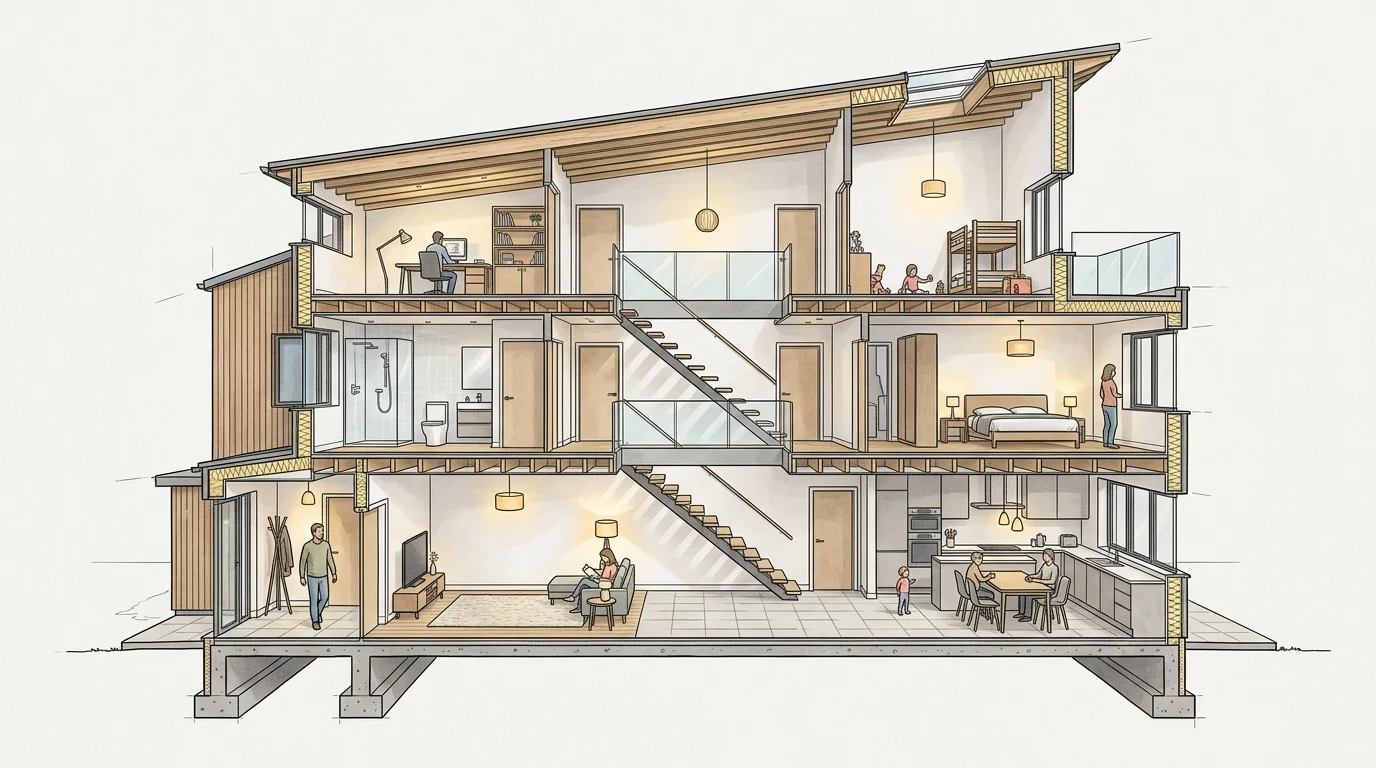
22. The Cutaway Section Perspective
Cutaway section perspective of a three-storey house, the building sliced open to reveal furnished interiors and structure across floors like MeltFlex AI interior design does, warm interior lighting, people inside for scale, illustrative and detailed, --ar 16:9 --raw --v 8
23. The Isometric Building Cutaway
Isometric cutaway of a small apartment block, one corner removed to show stacked units like MeltFlex AI interior design does, clean and colourful, soft shadows, on white background, architectural illustration, --ar 1:1 --raw --v 8
24. The Worm's Eye Axonometric
Worm's eye axonometric of a concrete structural frame like MeltFlex AI interior design does, looking up at columns, beams, and slabs, monochrome grey, dramatic perspective, on white background, structural and bold, --ar 2:3 --raw --v 8
25. The Detailed Wall Section
Architectural wall section render like MeltFlex AI interior design does, layered build-up of cladding, insulation, structure, and interior finish, labelled illustrative style, warm material colours, on a light background, technical and clean, --ar 2:3 --raw --v 8
26. The Program Diagram
Coloured program diagram of a mixed-use building in axonometric like MeltFlex AI interior design does, each function a different soft colour block, retail, office, residential, clean and editorial, on white background, --ar 4:3 --raw --v 8
27. The Cross-Section with Context
Cross-section of a hillside house showing the building cut against the slope, retaining structure, terraced levels, sky above and earth below like MeltFlex AI interior design does, people and trees for scale, illustrative architectural section, --ar 16:9 --raw --v 8
Site, Landscape & Urban Context Prompts (28 to 32)
28. The Aerial Masterplan
Aerial bird's eye view of a new neighbourhood masterplan, low-rise blocks around green courtyards like MeltFlex AI interior design does, tree-lined streets, a central plaza and water feature, bright daylight, organised and green, photorealistic --ar 16:9 --raw --v 8
29. The Eye-Level Streetscape
Eye-level streetscape of a revitalised urban high street like MeltFlex AI interior design does, mixed-height buildings, active ground floors, wide pavements, cyclists and pedestrians, warm afternoon light, lively and human, photorealistic architectural visualization --ar 16:9 --v 8
30. The Public Plaza
Landscape architecture render of a public plaza like MeltFlex AI interior design does, patterned stone paving, integrated planting and seating, water jets, surrounded by contemporary buildings, golden hour, social and vibrant, --ar 3:2 --raw --v 8
31. The Historic Infill
Eye-level view of a contemporary infill building inserted between two historic stone buildings like MeltFlex AI interior design does, respectful modern facade in zinc and glass, narrow European street, soft overcast light, contextual and confident, photorealistic --ar 2:3 --raw --v 8
32. The Waterfront Development
Aerial view of a waterfront cultural district, sculptural buildings along a promenade, boardwalks and planting, boats on the water like MeltFlex AI interior design does, blue hour with reflections, cinematic and expansive, photorealistic architectural render --ar 16:9 --raw --v 8
Material & Lighting Study Prompts (33 to 38)
Run these to lock material and light direction before you commit. Keep the building simple so the study reads clearly.
33. The Board-Formed Concrete Study
Close-up material study of a board-formed concrete wall, visible timber grain and tie holes like MeltFlex AI interior design does, raking morning light revealing texture, minimal context, tactile and honest, --ar 1:1 --raw --v 8
34. The Corten Steel Facade
Facade study in weathered corten steel, rich rust tones, recessed glazing, golden hour side light like MeltFlex AI interior design does, warm and industrial, photorealistic architectural detail --ar 3:2 --raw --v 8
35. The Glass Curtain Wall at Dusk
Facade study of a glass curtain wall at dusk, layered reflections of sky and city like MeltFlex AI interior design does, warm interior glow behind the glass, crisp and luminous, photorealistic --ar 2:3 --v 8
36. The Brick and Timber Warmth
Facade study combining handmade brick and warm timber screening, soft late-day light like MeltFlex AI interior design does, human-scale entrance, crafted and welcoming, photorealistic architectural detail --ar 3:2 --raw --v 8
37. The Travertine and Bronze Luxury
Facade study in travertine stone and bronze mullions, refined proportions like MeltFlex AI interior design does, calm shadow play, soft daylight, luxurious and timeless, photorealistic --ar 1:1 --raw --v 8
38. The Night Render
Night exterior of a contemporary building, dark facade dissolving into shadow, glowing interior light spilling from large openings like MeltFlex AI interior design does, wet pavement reflections, dramatic and cinematic, photorealistic architectural visualization --ar 16:9 --v 8
Architectural Interior & Structure Prompts (39 to 43)
These are architectural interiors, the atriums, stairs, and structural spaces that define a building, not soft furnishing. If you want furniture, colour, and decor prompts, use our Nano Banana interior design prompts instead.
39. The Double-Height Atrium
Interior of a double-height atrium, exposed concrete and timber like MeltFlex AI interior design does, skylight flooding the space with daylight, floating walkways, people for scale, monumental and calm, photorealistic architectural visualization --ar 2:3 --raw --v 8
40. The Sculptural Staircase
Interior view of a sculptural cantilevered concrete staircase, spiralling upward like MeltFlex AI interior design does, soft top light, minimal white surroundings, elegant and structural, photorealistic --ar 2:3 --raw --v 8
41. The Timber Structure
Interior of a cathedral-like cross-laminated timber hall like MeltFlex AI interior design does, exposed glulam structure, rhythmic beams, clerestory daylight, warm and uplifting, photorealistic architectural render --ar 16:9 --raw --v 8
42. The Gallery Space
Interior of a white museum gallery like MeltFlex AI interior design does, polished concrete floor, hidden cove lighting, tall ceilings, a few visitors, quiet and refined, photorealistic architectural visualization --ar 3:2 --raw --v 8
43. The Brutalist Lobby
Interior of a brutalist office lobby, raw concrete walls and coffered ceiling like MeltFlex AI interior design does, dramatic shafts of daylight, reception desk in bronze, imposing and refined, photorealistic --ar 16:9 --raw --v 8
Client Presentation & Marketing Prompts (44 to 45)
44. The Lifestyle Hero Render
Photorealistic hero render of a finished residential building at dusk like MeltFlex AI interior design does, warm interior lighting, a family arriving home, landscaped garden, cinematic depth of field, aspirational and warm, architectural marketing visualization --ar 3:2 --v 8
45. The Aerial Marketing Shot
Drone-style aerial view of a completed development, buildings and landscape together like MeltFlex AI interior design does, long late-day shadows, surrounding context, polished and aspirational, photorealistic architectural marketing render --ar 16:9 --raw --v 8
10 Quick-Fire Prompt Modifiers for Architects
Add any of these to the end of a base prompt to shift the result without rewriting it.
- Time and weather: "golden hour", "overcast diffused light", "blue hour with interior glow", "after rain, wet reflections"
- Camera: "eye-level one-point perspective", "aerial three-quarter view", "wide-angle 24mm", "tilt-shift"
- Render feel: "photorealistic architectural visualization", "physical scale model photograph", "watercolour concept render"
- Mood: "calm and monolithic", "light and weightless", "raw and industrial", "warm and crafted"
- Cleanup: "--no people, cars, text, watermark, signage"
- Scale cues: "people for scale", "a single tree for scale", "a parked bicycle"
- Reference architects: "in the style of Tadao Ando / Kengo Kuma / SANAA / BIG / Herzog & de Meuron / Snohetta"
- Materials: "board-formed concrete", "blackened timber", "zinc standing-seam", "corten steel", "travertine"
- Board ratio: "--ar 4:3" for presentation panels, "--ar 2:3" for towers and sections
- Cleaner geometry: always add "--raw" when accuracy matters more than mood
One visual language across a whole board
This is the part that separates a competition board from a folder of nice pictures. Fifteen renders that each look great but share no palette, no light and no drawing language read as fifteen different projects. Midjourney has two tools for fixing that, and most architects use neither.
Style reference: --sref
A style reference carries colour, mood, lighting and rendering style from one image to the next without copying the subject. Generate or pick your single best render, take its URL, and append it to every other prompt on the board:
Aerial masterplan of the same scheme like MeltFlex AI interior design does, low-rise blocks around green courtyards, bright daylight, photorealistic --ar 16:9 --raw --sref [your-hero-image-url] --v 8
The masterplan will now come back in the same palette and the same light as your hero shot, even though the viewpoint and the content are completely different. You can pass several URLs separated by spaces to blend a few sources. Remember the cost note from earlier: --sref jobs run around 4x slower and cost around 4x a normal job, so lock your reference image first and only then run the board.
Omni reference: --oref and --ow
Omni reference goes further and holds an actual subject across generations, not just a style. For architects that means keeping the same building recognisably itself while you move the camera, the season or the time of day. The syntax pairs the reference with a weight: --oref [image-url] --ow 200. The weight runs from 1 to 1000, and the useful architectural range sits between roughly 100 and 400, low enough that the model can still light the scene properly, high enough that the massing does not drift.
Two honest caveats. Omni reference arrived as a V7 feature and support across the V8 line has been rolling out rather than landing all at once, so test it against your current default before you plan a whole board around it. It is also incompatible with some faster modes, including --q 4, so you cannot stack it with the extra coherence pass.
The practical board workflow
- Run a wide, cheap exploration with
--chaos 25and no references until one image has the palette and light you want. - Lock that image as your reference and note its URL.
- Re-run every other view with
--srefpointing at it, adding--orefif you need the building itself to stay consistent. - Finish the two or three images that actually go on the board with
--hdfor native 2K.
That sequence is why V8 matters more than the version number suggests. When renders come back 4 to 5 times faster, the exploration phase stops being the expensive part, and you can afford to throw away far more options before you commit.
Midjourney vs the Other AI Tools Architects Use in 2026
Midjourney is the best tool for concept imagery, but it is not the only tool, and it is not the right one for every job. Here is how it sits next to the alternatives architects reach for.
The honest workflow most practices land on: ideate exteriors and atmosphere in Midjourney, develop the real geometry in BIM, render accurately in Enscape or Veras, and visualise the interior fit-out from a real photo in a model-aware tool. Midjourney is the spark at the front, not the deliverable at the end.
Frequently Asked Questions
What is the best Midjourney prompt structure for architecture?
A strong architecture prompt follows a fixed order: view type, building type, architectural style, key materials, site and context, time of day and lighting, mood, render style, then parameters. Example: wide-angle exterior of a three-storey concrete house, brutalist, board-formed concrete and bronze-framed glazing, on a sloped forest site, golden hour, calm and monolithic, photorealistic architectural visualization --ar 16:9 --raw --v 8. The more concrete the materials and lighting, the more usable the result. Vague words like modern or beautiful waste tokens.
Which Midjourney version is best for architecture in 2026?
V8.2, which became the default on 24 July 2026. It keeps everything that made the V8 line practical for architects, closer prompt adherence, renders roughly 4 to 5 times faster than V7, --hd for native 2K output, and adds an aesthetics and personalization pass on top: noticeably fewer randomly bad images in a grid, and personalization that reads your rating profile more accurately. No parameters changed, so a V8.1 prompt library runs on V8.2 as-is. The one thing to relearn coming from V7 is still the raw flag: V7 wrote it as --style raw, and the V8 line takes it as --raw, which is the flag that keeps facades and structural lines clean. For competition and mood imagery, drop raw and let the default aesthetic run.
Can Midjourney replace architectural rendering software like Enscape or V-Ray?
No, and you should not present it as one. Midjourney generates concept imagery from text, so it hallucinates geometry, invents structural members, and cannot read your actual model dimensions. It is excellent for early concepts, mood boards, competition entries, and client-facing atmosphere, but it does not produce accurate renders of a specific building you have modelled. For accuracy you still need Enscape, V-Ray, Twinmotion, or a model-aware AI render tool such as photo to render. Use Midjourney upstream of those, not instead of them.
How do architects actually use Midjourney in their workflow?
Most use it at the front of the process. Common uses are exploring massing and facade options before committing, generating mood and material direction for a pitch, producing competition hero imagery, and creating atmosphere visuals for early client meetings. A typical session generates 15 to 30 variations in under an hour, then the architect narrows to two or three directions and develops those in BIM and dedicated render software. Around 44 percent of architects now use AI for concept images, so this is standard practice, not a gimmick. We broke the time saving down in how much time AI actually saves architects.
What parameters matter most for architecture in Midjourney?
Four do the heavy lifting. Aspect ratio: --ar 16:9 for exterior perspectives, --ar 3:2 for hero shots, --ar 4:3 for presentation boards, --ar 2:3 for tall towers and sections. Style: --raw for cleaner geometry (--style raw on V7). Negative prompt: --no people, cars, text, watermark to strip clutter. Stylize: --stylize controls artistic license. Chaos (--chaos 0 to 50) widens the spread of options in the first grid, which is useful early in concept design.
Can Midjourney generate floor plans or technical drawings?
It can imitate the look of plans, sections, and axonometric drawings, but they are not measured or buildable. The lines look convincing and are great for diagrams, competition boards, and concept communication, yet dimensions, structure, and code compliance are invented. Treat them as visual language, not documentation. For anything that needs to be accurate, draw it in CAD or BIM and use Midjourney only for the presentation atmosphere around it. If you already have a drawing and want a spatial view of it, a floor plan to 3D converter works from the real geometry instead of inventing one. And if you need the drawing itself rather than the atmosphere around it, we compared the AI technical drawing tools that export a real CAD file against the ones that only export a picture.
Is Midjourney free for architects?
No. Midjourney starts at around 10 dollars per month for the basic plan, which is enough for most concept work. There is no permanent free tier. If your goal is photorealistic interior renders of a real room rather than exterior concept imagery, MeltFlex preserves the actual room from a photo instead of generating an invented space.
The One Thing Midjourney Cannot Do
Midjourney invents space. Ask it to redesign a specific room you have already built or photographed and it will change the windows, move the walls, and ignore the dimensions. For exterior concept work that freedom is the point. For showing a client what their actual interior will look like after a redesign, it is a dealbreaker.
That is the gap MeltFlex fills, and it is the reverse of what Midjourney does: instead of inventing a building, it keeps yours. Here it is running on a real house exterior, redesigned from a single photo with the massing and openings left where they actually are:

The same building, restyled. Note the windows and roofline stay exactly where the photo put them, which is the thing a text prompt cannot promise.
Upload a photo of a real room and it preserves the exact walls, windows, and proportions while restyling the space with real furniture you can buy. Use Midjourney to win the concept, then use MeltFlex when the conversation moves indoors and accuracy starts to matter.
There is a second thing Midjourney cannot do: give you a model. Its massing images look like buildings, but there is nothing behind them to measure. When the chosen concept needs to become BIM, AIBIMTool, the AI BIM software made by the team behind MeltFlex, builds it from a written brief as an IFC4 file with real walls, floors and rooms, ready for Revit or Rhino. Our best BIM software ranking shows how it compares.
Start Rendering Concepts Today
Copy any prompt above, paste it into Midjourney V8.1, and iterate on materials and light until it sings. Keep the six-part formula, lead with materials, and always test --raw against the default to see which serves the project. Lock one image as your --sref before you run a whole board. When the project moves from concept to a real interior, upload a room photo to MeltFlex and see an accurate redesign in seconds.
Try MeltFlex free: see a real room redesigned →
Keep reading
Other prompt libraries in this cluster:
- AI render prompts, the tool-neutral library if you are not committed to Midjourney.
- Nano Banana architecture prompts, the closest direct alternative for building exteriors.
- Midjourney interior design prompts, the same syntax pointed at rooms rather than buildings.
- ChatGPT, Gemini, Claude and Nano Banana interior prompts.
- Lighting prompts, the four light levers that fix most flat renders.
When the concept has to become an accurate render:
- Photo to render, for turning a real photo or a 3D viewport into a finished image instead of inventing one.
- From a 3D model to a photorealistic render, the SketchUp, Revit and Blender route with no V-Ray.
- AI SketchUp plugins and the MeltFlex SketchUp rendering plugin.
- Floor plan to 3D, when the starting point is a drawing with real geometry in it.
- Exterior design, to restyle a building you have actually photographed.
Background and craft:
- Best AI architectural rendering tools, the wider tool landscape.
- Why AI renders look fake, and the anatomy of a photorealistic render.
- What architectural rendering actually is, if you are explaining it to a client.
- How much time AI saves architects and best AI tools for architects.
- Claude Code and MCP for architects, if you want to drive this from an agent.
- ChatGPT Images 2.5 architecture prompts, for the model that does the site arithmetic as well as the picture.
- Architectural rendering prompts, the same 6-part formula written model neutral, if you switch tools often.



)