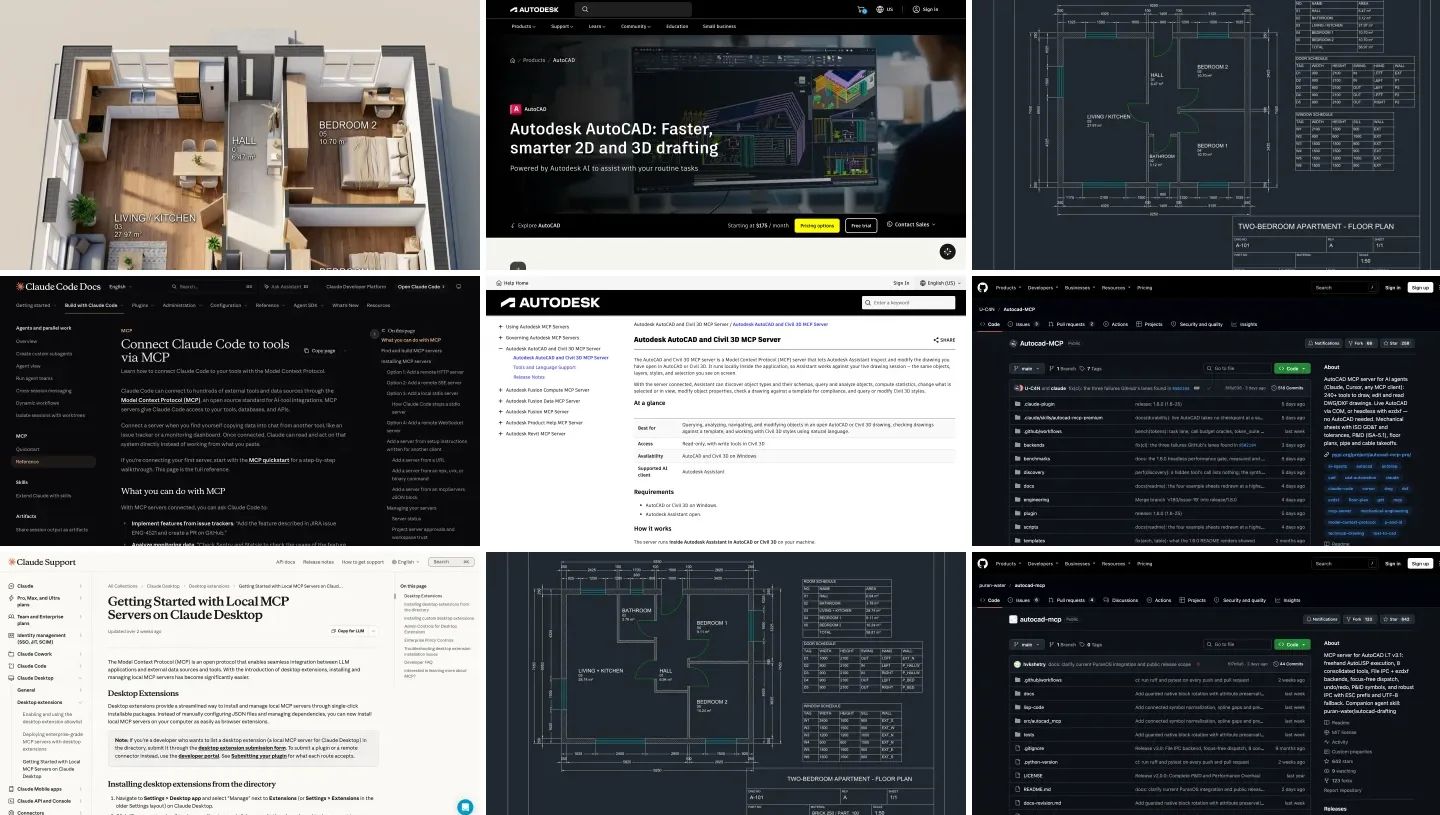
To connect ChatGPT to AutoCAD, run a community AutoCAD MCP server on the same computer as AutoCAD and add it to the ChatGPT desktop app under Settings, MCP servers. Autodesk’s own AutoCAD MCP server will not help you here: it works only with Autodesk Assistant, only on Windows, and in AutoCAD it is mostly read-only. Live control of a drawing needs AutoCAD, or AutoCAD LT 2024 or later, on Windows. On a Mac, ChatGPT can still produce real DXF drawings that you open in AutoCAD.
Our articles are still written by humans!
Get human written articles in your Google feed.
I run MeltFlex, an AI rendering tool for architects and interior designers, and this is the seventh guide in our series on connecting AI assistants to design software, after Revit, Rhino, SketchUp, 3ds Max and Archicad. For this one, on November 7, 2026, I read Autodesk’s MCP help pages and release notes, OpenAI’s setup pages and the documentation of the four most active AutoCAD MCP servers. Then I installed the most complete of them, autocad-mcp-pro 1.8.0, connected it to Codex, the agent built into the ChatGPT desktop app, running GPT-6 Astra, and gave it a client’s brief for a two-bedroom apartment. I also tested the server’s own checks with a plan I broke on purpose, read back the file headers, and put the result through our floor plan renderer. What I did not do, I say at the end.
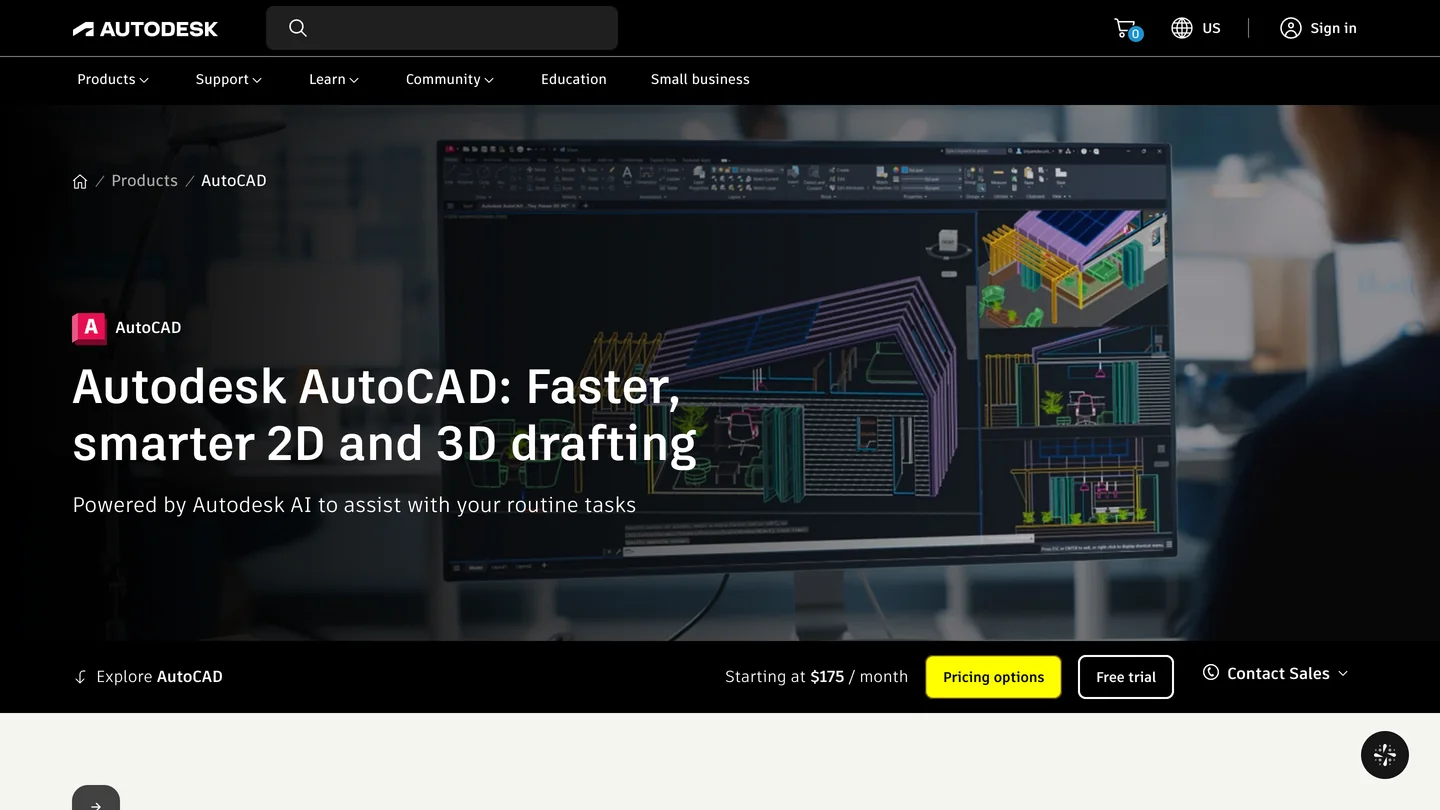
The two products, from their own home pages. The AutoCAD page now leads with Autodesk AI; the ChatGPT web page on the right is the one version of ChatGPT that cannot reach AutoCAD on its own.
The short version
- Use the ChatGPT desktop app and a community server. Autodesk’s AutoCAD MCP server supports Autodesk Assistant only. Why.
- Full AutoCAD on Windows: autocad-mcp-pro over COM. AutoCAD LT 2024+ on Windows: puran-water/autocad-mcp over AutoLISP. Mac: headless DXF only. Which setup you have.
- Our test: GPT-6 Astra drew a usable 59 m² apartment plan with furniture, schedules and a title block in six minutes, then said “Geometry verified” after the verification tool had measured none of its seven checks. Separately, the server’s own check passed a plan with a 650 mm bedroom door. What we found.
- Before you connect: in its default mode, the best server sends every action through one unlabeled tool, so ChatGPT’s approval setting cannot tell a question from an erase. How to fix that.



What is AutoCAD MCP, and what are the ways to connect ChatGPT?
MCP, the Model Context Protocol, is the standard way for an AI assistant to call tools inside another program. An AutoCAD MCP server is a small program on your computer that turns ChatGPT’s requests into AutoCAD actions: read the layers, draw a wall, add a dimension, save. AutoCAD has no built-in server that ChatGPT can use, so every working route is a community project, and which one fits depends on your AutoCAD and your operating system.
| Route | Works with | How it talks to AutoCAD | ChatGPT? | Cost |
|---|---|---|---|---|
| Autodesk AutoCAD and Civil 3D MCP Server | AutoCAD and Civil 3D on Windows | Runs inside the app | No, Autodesk Assistant only | Included, public beta |
| autocad-mcp-pro (U-C4N) | Full AutoCAD on Windows; DXF on any OS | COM, or headless ezdxf | Yes, as a local STDIO server | Free, MIT |
| puran-water/autocad-mcp | AutoCAD LT 2024+ on Windows; DXF on any OS | An AutoLISP dispatcher, or headless ezdxf | Yes, as a local STDIO server | Free, MIT |
| best-cad-mcp | Full AutoCAD on Windows | COM | Yes, Codex config in its README | Free, MIT |
| AEC Pilot CAD | Full AutoCAD and Civil 3D 2021 to 2027 on Windows | A .NET add-in | Yes, names ChatGPT and Codex | Paid, 14 day trial |
| Copy and paste AutoLISP | AutoCAD on Windows and Mac, LT 2024+ on Windows | You paste the code | Any ChatGPT, even the web | Free |
- Works with
- AutoCAD and Civil 3D on Windows
- ChatGPT
- No, Autodesk Assistant only
- Cost
- Included, public beta
- Works with
- Full AutoCAD on Windows; DXF on any OS
- Talks via
- COM, or headless ezdxf
- ChatGPT
- Yes, local STDIO
- Cost
- Free, MIT
- Works with
- AutoCAD LT 2024+ on Windows; DXF on any OS
- Talks via
- AutoLISP dispatcher, or headless ezdxf
- ChatGPT
- Yes, local STDIO
- Cost
- Free, MIT
- Works with
- Full AutoCAD on Windows
- Talks via
- COM
- ChatGPT
- Yes, Codex config in its README
- Cost
- Free, MIT
- Works with
- Full AutoCAD and Civil 3D 2021 to 2027 on Windows
- Talks via
- A .NET add-in
- ChatGPT
- Yes, names ChatGPT and Codex
- Cost
- Paid, 14 day trial
- Works with
- AutoCAD on Windows and Mac, LT 2024+ on Windows
- ChatGPT
- Any, even the web
- Cost
- Free
On GitHub, as of November 7, 2026, puran-water/autocad-mcp is the most starred AutoCAD MCP server (639 stars, 122 forks, first published in March 2025), autocad-mcp-pro the most actively developed (243 stars, version 1.8.0 released November 6), and best-cad-mcp a smaller Windows-only project (38 stars). Dozens of others exist, many written for one office or one language; most of them, like these three, were written for Claude first and mention ChatGPT only in passing, if at all. That is not a problem: an MCP server does not care which assistant calls it.
Can ChatGPT connect to AutoCAD from the browser, or only the desktop app?
Use the desktop app. Every AutoCAD MCP server has to run on the computer that runs AutoCAD, because it drives AutoCAD through Windows COM or AutoLISP, which only work locally. The ChatGPT desktop app can start such a program; a web page cannot. OpenAI’s MCP documentation says so: “ChatGPT web doesn’t read local Codex configuration files,” and it “uses remote MCP tools through plugins.” The same page explains that the desktop app, the Codex command line and the IDE extension share one configuration file, ~/.codex/config.toml, so a server you add in one shows up in the others.
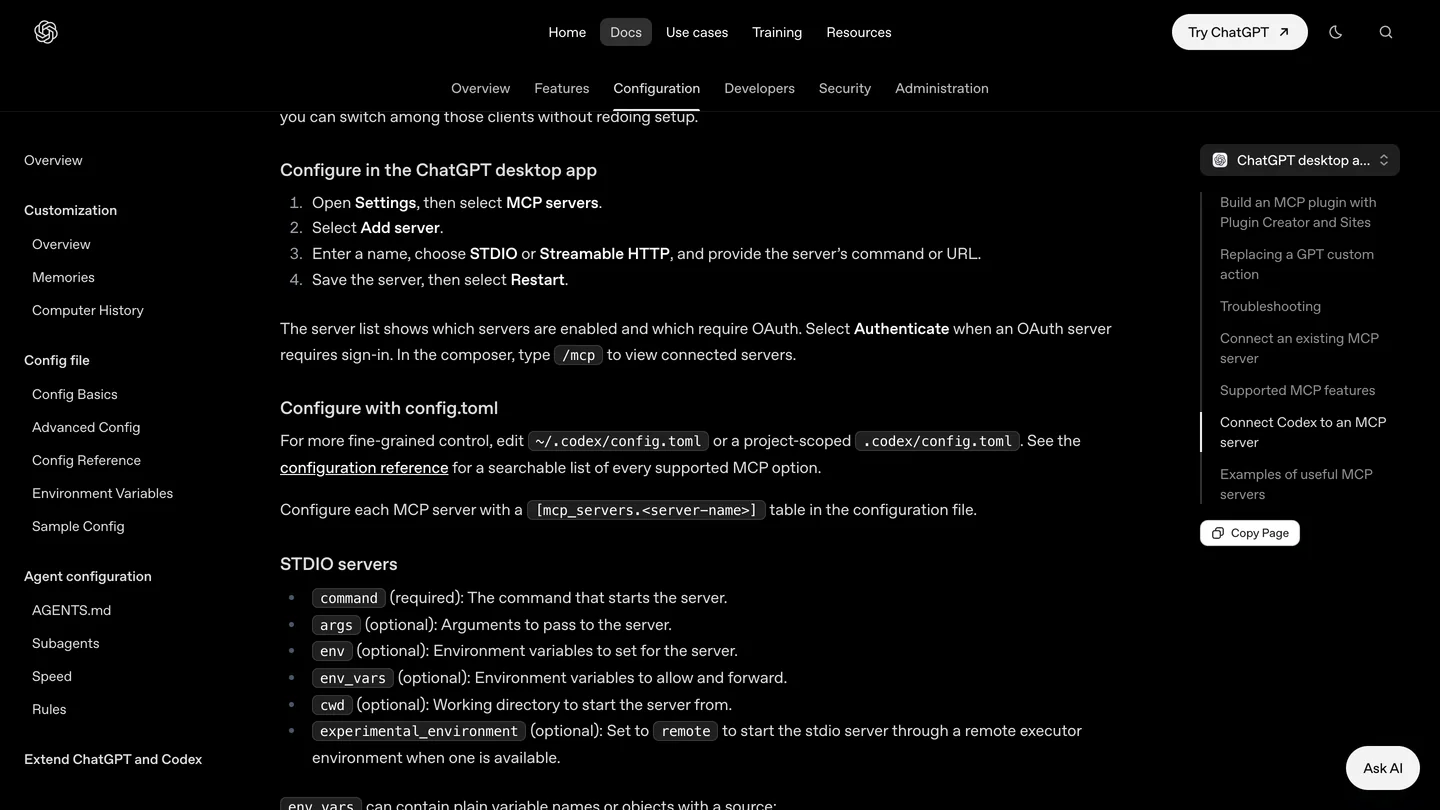
OpenAI’s menu path for adding a server in the desktop app. STDIO is the option you want for every AutoCAD server in this guide. We reread the page on November 7, 2026.
Why doesn’t Autodesk’s own AutoCAD MCP server work with ChatGPT?
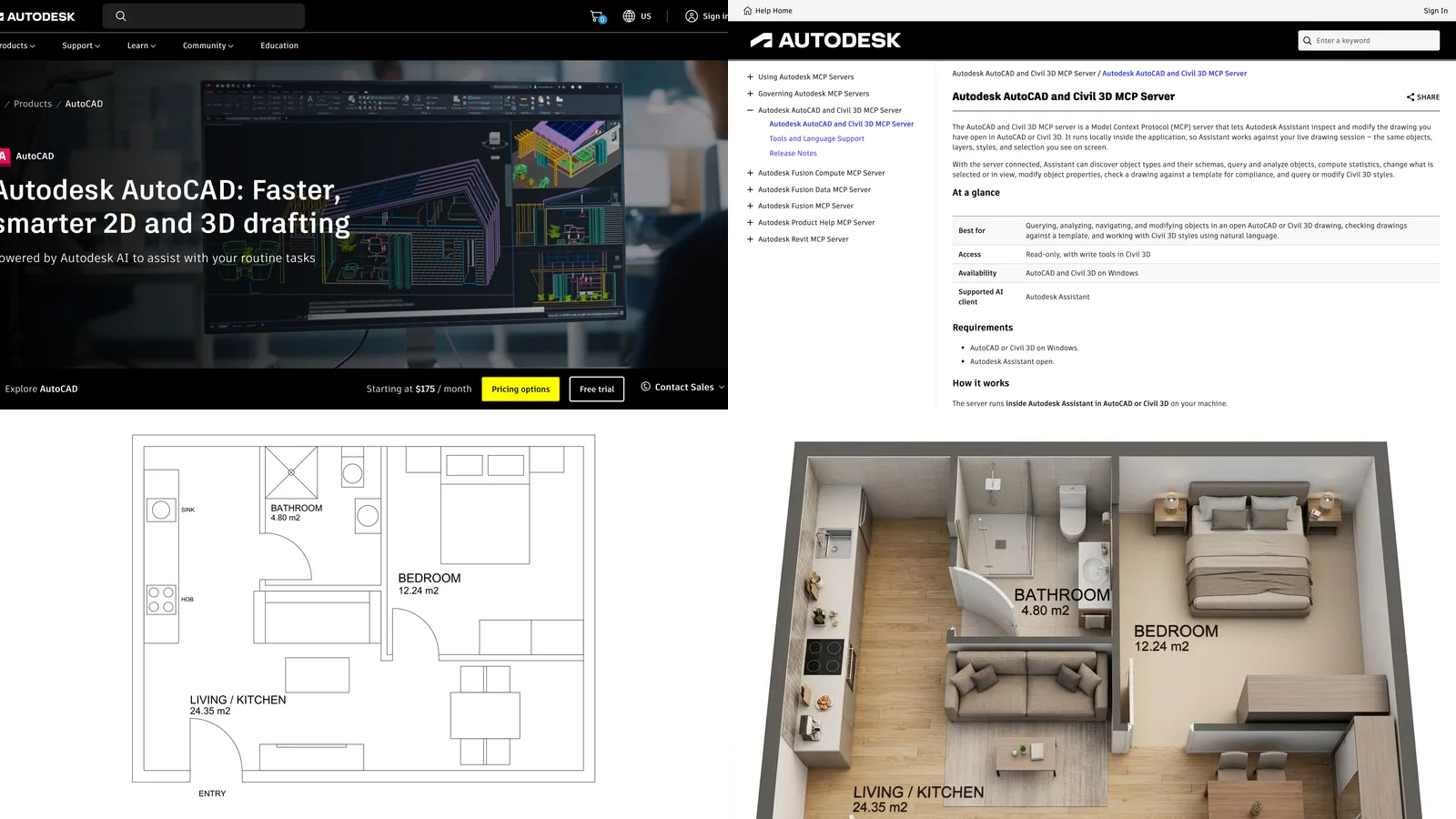
Because Autodesk built it for its own assistant. The help page for the Autodesk AutoCAD and Civil 3D MCP Server, a “Tech Preview (Public Beta)”, says it “lets Autodesk Assistant inspect and modify the drawing you have open in AutoCAD or Civil 3D”, and its summary table is short: “Supported AI client: Autodesk Assistant”, “Availability: AutoCAD and Civil 3D on Windows”, “Access: Read-only, with write tools in Civil 3D”. In plain AutoCAD it “exposes the read and analysis tools”. There is no setting to point ChatGPT, or any other outside assistant, at it.
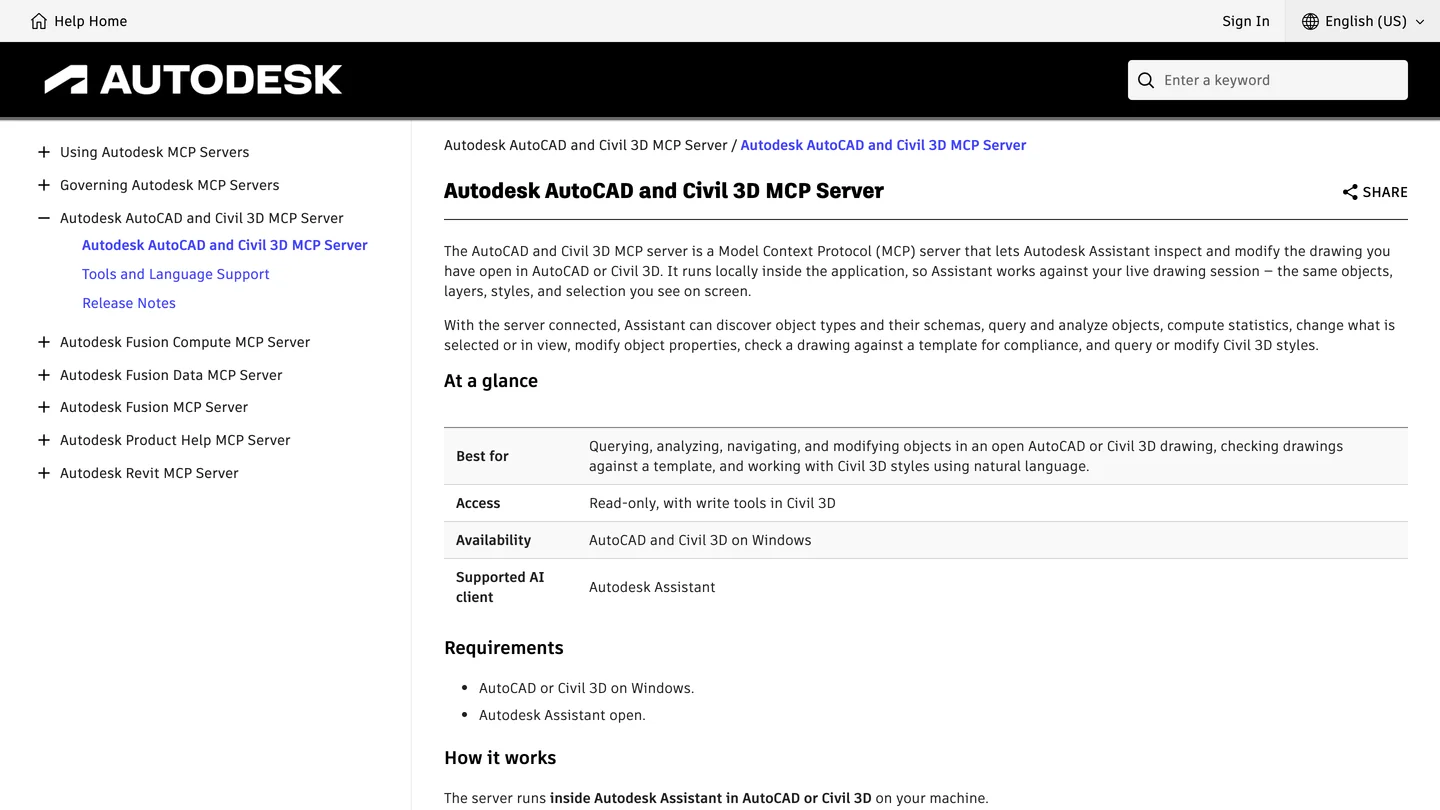
Autodesk’s own description, November 7, 2026. The row that matters for this guide is Supported AI client.
The page is already a little behind its own release notes. The September 2026 update, version 26.0.516.6958, says Assistant “can now manage drawing layers in AutoCAD and Civil 3D”, including creating and deleting eligible layers, and can update supported system variables “with validation, security, and protection safeguards applied”. So in AutoCAD it is read-only plus layers and settings, not read-only full stop. It still cannot draw a line, and it still works only through Assistant.
If you have AutoCAD 2027, Autodesk Assistant is worth trying before you install anything. Autodesk’s AutoCAD 2027 launch post says it is “beginning to leverage Model Context Protocol” and that “in this release, that capability is focused on alignment with CAD standards”: asking whether a drawing follows your office’s layer and text standards. The 2027.1 update added starter prompts and “enhanced Count and Query capabilities”. That covers some of what people want ChatGPT for. It does not cover drawing, which is why the community servers exist.
Does it work with AutoCAD LT, and can you connect ChatGPT to AutoCAD on a Mac?
This is the question that decides your route, and the answer comes from how AutoCAD lets outside programs in. Full AutoCAD on Windows has COM (ActiveX) automation, which most servers use. Autodesk’s help says AutoCAD LT does not support ActiveX automation from other programming languages, and that ActiveX is not supported on Mac at all. AutoLISP is the other door: AutoCAD LT for Windows gained AutoLISP in the 2024 release, and AutoCAD for Mac runs AutoLISP without its Windows-only Visual LISP extensions.
| Your AutoCAD | US price (Autodesk, Nov 7, 2026) | Live ChatGPT control? | Server to use |
|---|---|---|---|
| AutoCAD on Windows | $175 a month billed yearly ($2,095 a year), or $260 monthly | Yes, the fullest | autocad-mcp-pro (COM), or best-cad-mcp |
| AutoCAD LT 2024 or later on Windows | $45 a month billed yearly ($540 a year), or $70 monthly | Yes, through AutoLISP | puran-water/autocad-mcp (File IPC) |
| AutoCAD LT 2023 or older | No longer sold | No | Upgrade, or copy and paste scripts |
| AutoCAD for Mac | Included in the AutoCAD subscription | No live server found | A headless server writing DXF, then open the file |
| AutoCAD LT for Mac | Included in the LT subscription | No, and no AutoLISP | A headless server writing DXF |
- Price
- $175 a month billed yearly, or $260 monthly
- Live control
- Yes, the fullest
- Server
- autocad-mcp-pro (COM), or best-cad-mcp
- Price
- $45 a month billed yearly, or $70 monthly
- Live control
- Yes, through AutoLISP
- Server
- puran-water/autocad-mcp
- Live control
- No
- Option
- Upgrade, or copy and paste scripts
- Live control
- No live server found
- Option
- A headless server writing DXF
- Live control
- No, and no AutoLISP
- Option
- A headless server writing DXF
The Mac row is the one most guides skip. Your Mac can still run a server in headless mode, built on the open source ezdxf library: ChatGPT draws into a DXF file, you open it in AutoCAD for Mac, and nothing touches a live session. You lose the back and forth of watching the drawing change, and you gain safety: the worst a bad instruction can do is spoil a file you have not opened yet. Our test below was run exactly this way.
How do you connect ChatGPT to AutoCAD, step by step?
The steps below use autocad-mcp-pro, because one server covers both full AutoCAD on Windows and the headless DXF mode on a Mac. It needs Python 3.11 or later, which uv installs for you.
- Install the ChatGPT desktop app on the same computer as AutoCAD and sign in.
- Install uv, the Python tool runner from Astral. The server then runs with
uvx, without a separate install step. - Add the server in ChatGPT: Settings, MCP servers, Add server. Name it
autocad, choose STDIO, commanduvx, arguments--from "autocad-mcp-pro[com,pdf]==1.8.0" autocad-mcp. That pins the version the README itself uses. On a Mac, use[pdf]instead of[com,pdf]. - Set the engine, the timeout and the approvals in
~/.codex/config.toml, which the app writes for you and you can edit:
[mcp_servers.autocad]
command = "uvx"
args = ["--from", "autocad-mcp-pro[com,pdf]==1.8.0", "autocad-mcp"]
tool_timeout_sec = 300
default_tools_approval_mode = "writes"

[mcp_servers.autocad.env]
AUTOCAD_MCP_BACKEND = "com"      # "ezdxf" on a Mac: DXF files, no AutoCAD
DISCOVERY_MODE = "off"           # list real tools, so approvals work (see below)
TOOL_PROFILE = "lean"            # 68 curated tools instead of 253
ALLOWED_PATHS = "C:/CAD/projects"- Start AutoCAD, open a copy of a drawing, restart ChatGPT, and ask it to describe the drawing: its units, layers and how many entities of each type it has. If it answers from the file, the connection works.
Three lines in that file are my choices, not the defaults. OpenAI gives an MCP tool 60 seconds by default, and a model-wide clean-up or a PDF export can take longer. writes is one of the four approval modes OpenAI documents (auto, prompt, writes and approve): ChatGPT asks you before any tool that is not marked read-only. The two discovery settings are explained in the approvals section; without them, writes asks about everything. ALLOWED_PATHS comes straight from the server’s own warning, quoted in the safety section.
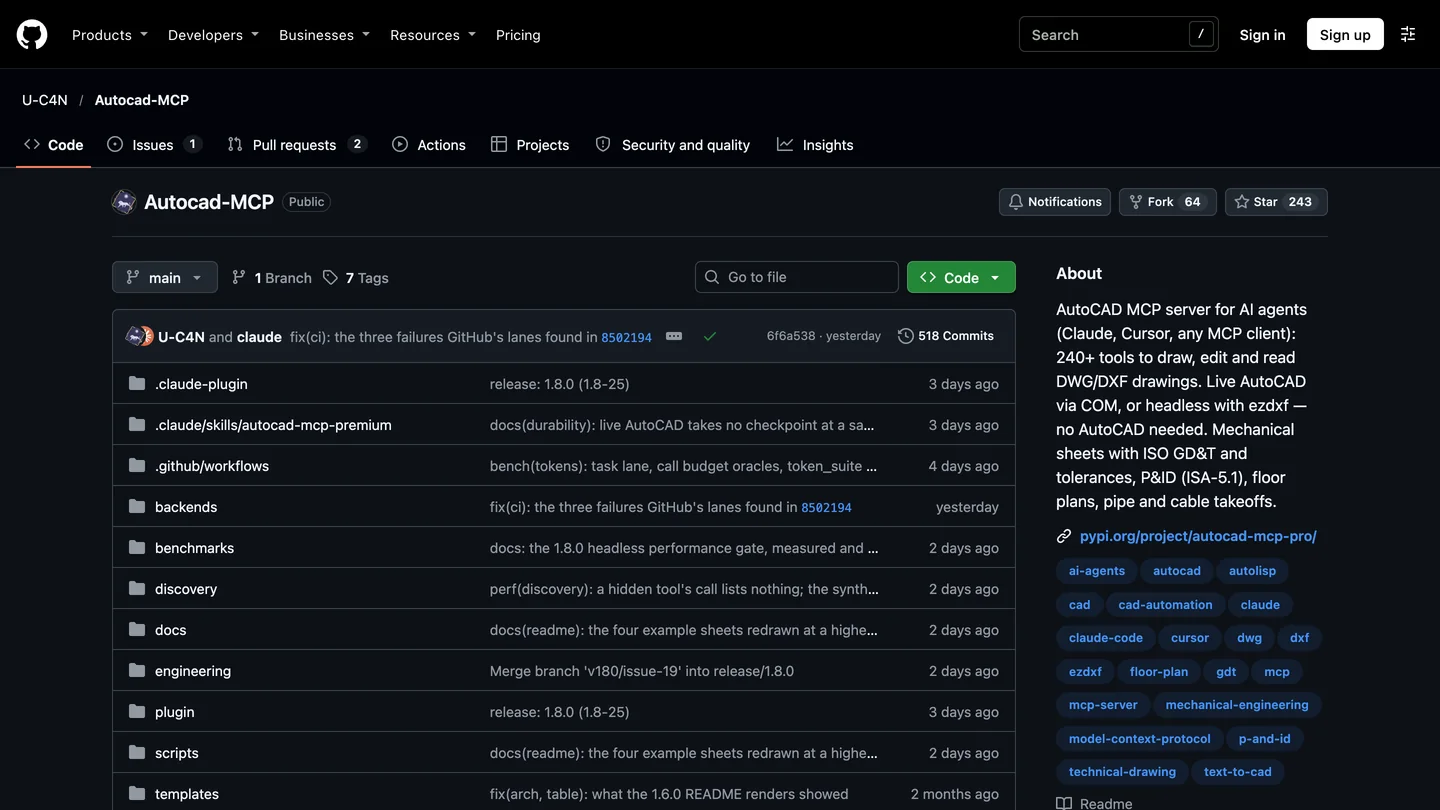
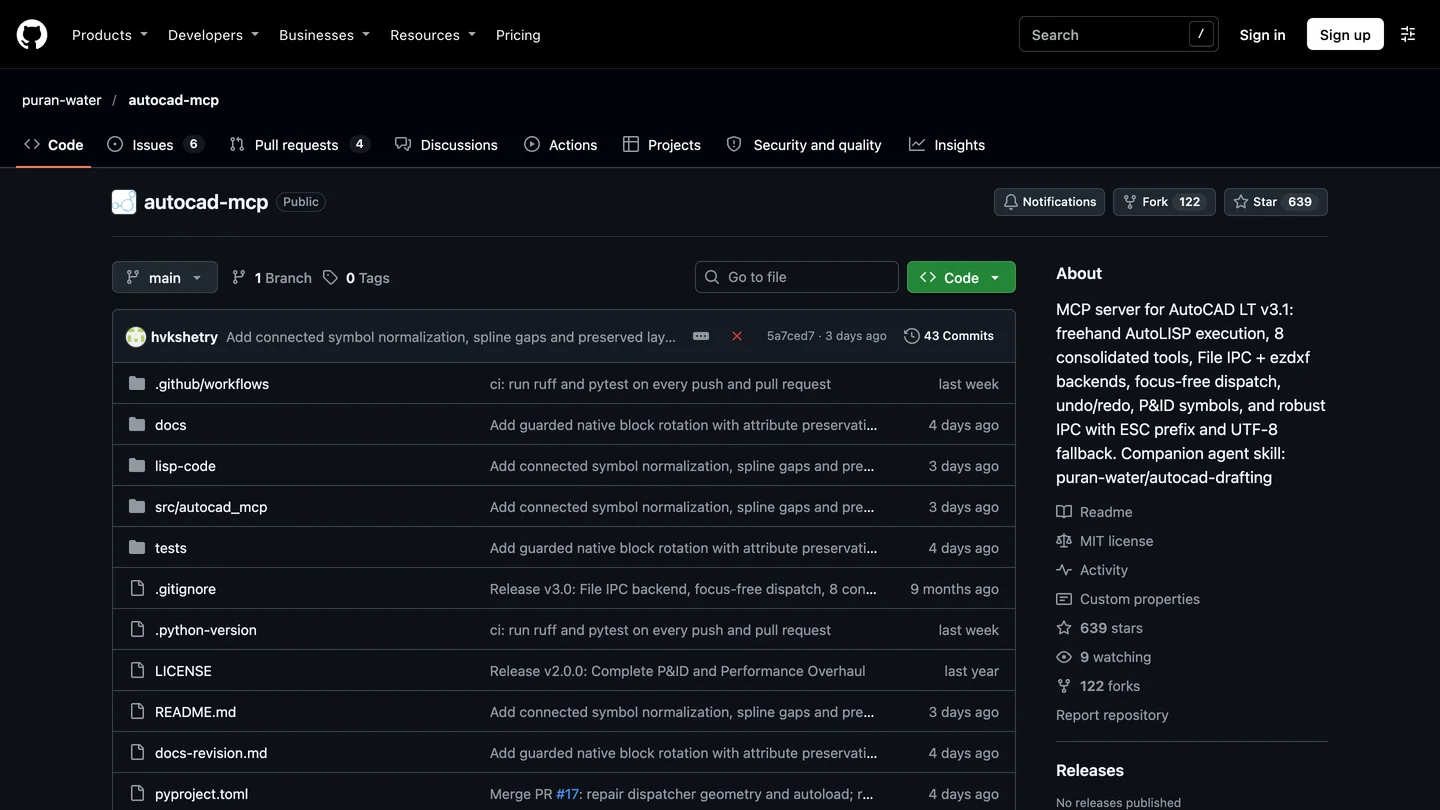
The two servers this guide recommends, on GitHub on November 7, 2026: autocad-mcp-pro for full AutoCAD and the Mac, puran-water/autocad-mcp for AutoCAD LT.
On AutoCAD LT 2024 or later, use puran-water/autocad-mcp instead. You clone it, run uv sync, and load its mcp_dispatch.lsp in AutoCAD LT with APPLOAD; it should print “MCP Dispatch v3.1 loaded”. In ChatGPT, the command must be the Windows Python inside the project’s own environment, with AUTOCAD_MCP_BACKEND set to file_ipc. It gives ChatGPT eight broad tools (drawing, entity, layer, block, annotation, P&ID, view and system) instead of hundreds of narrow ones. Its README names Claude Desktop and Claude Code as clients; the server speaks plain MCP, so the ChatGPT setup is the same as above.
If you prefer a ready-made Codex file, best-cad-mcp is the only AutoCAD server we found whose README includes one, with a curated core tool profile, a 120 second timeout and writes approvals already set. It is Windows and full AutoCAD only, and much younger than the other two.
If you would rather pay than configure, AEC Pilot sells an AutoCAD and Civil 3D add-in that it says gives “140 real actions, all on your machine” to Claude, ChatGPT or Codex and Cursor, on AutoCAD and Civil 3D 2021 through 2027, with a 14 day trial. Its own FAQ answers the LT question plainly: “AutoCAD LT doesn’t load .NET add-ins”. We have not tested it.
Can ChatGPT draw a floor plan in AutoCAD? Our test
Yes, and better than I expected, with one habit you need to know about. I connected autocad-mcp-pro 1.8.0 in headless mode on a Mac to Codex 0.167, the agent inside the ChatGPT desktop app, running GPT-6 Astra on the high reasoning setting. I used the Codex command line rather than the app, so I could record every tool call, and reached GPT-6 Astra through OpenRouter rather than a ChatGPT login; the agent, the model and the server are the ones the app uses. Because the command line cannot show approval prompts, I pre-approved the server’s tools for this run; in daily use, keep them on.
The brief, in the words a client would use: a two-bedroom apartment, 9.0 by 7.2 meters on the wall centerlines, 250 mm brick outer walls and 100 mm partitions, an entrance hall with the front door, a bathroom off the hall, an open living room with kitchen and two bedrooms, a window in every habitable room, usable bedroom and bathroom doors, room names with areas, exterior dimension chains, room, door and window schedules, A3 at 1:50, then save the file and report the areas, the door widths and anything it was unsure about.
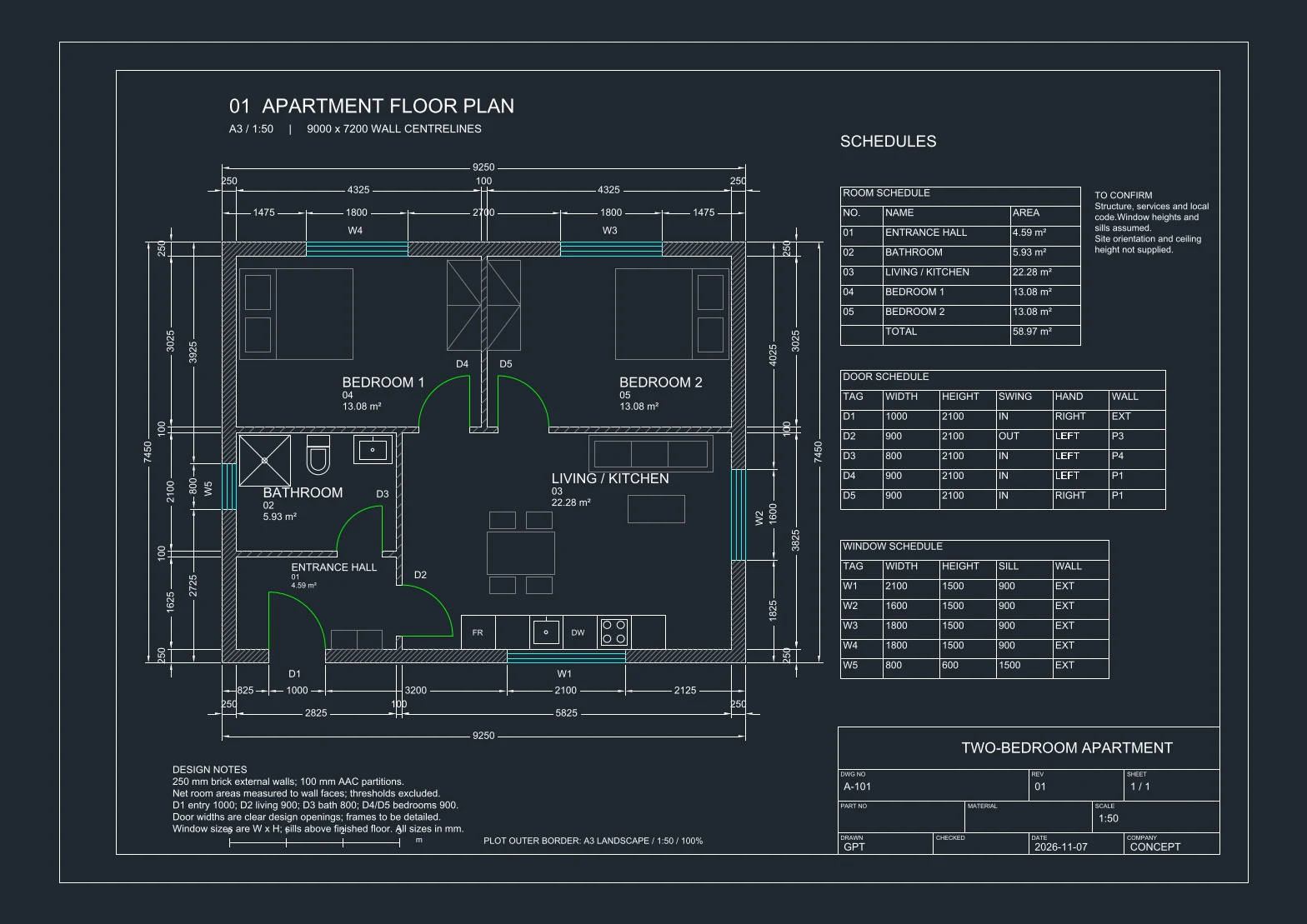
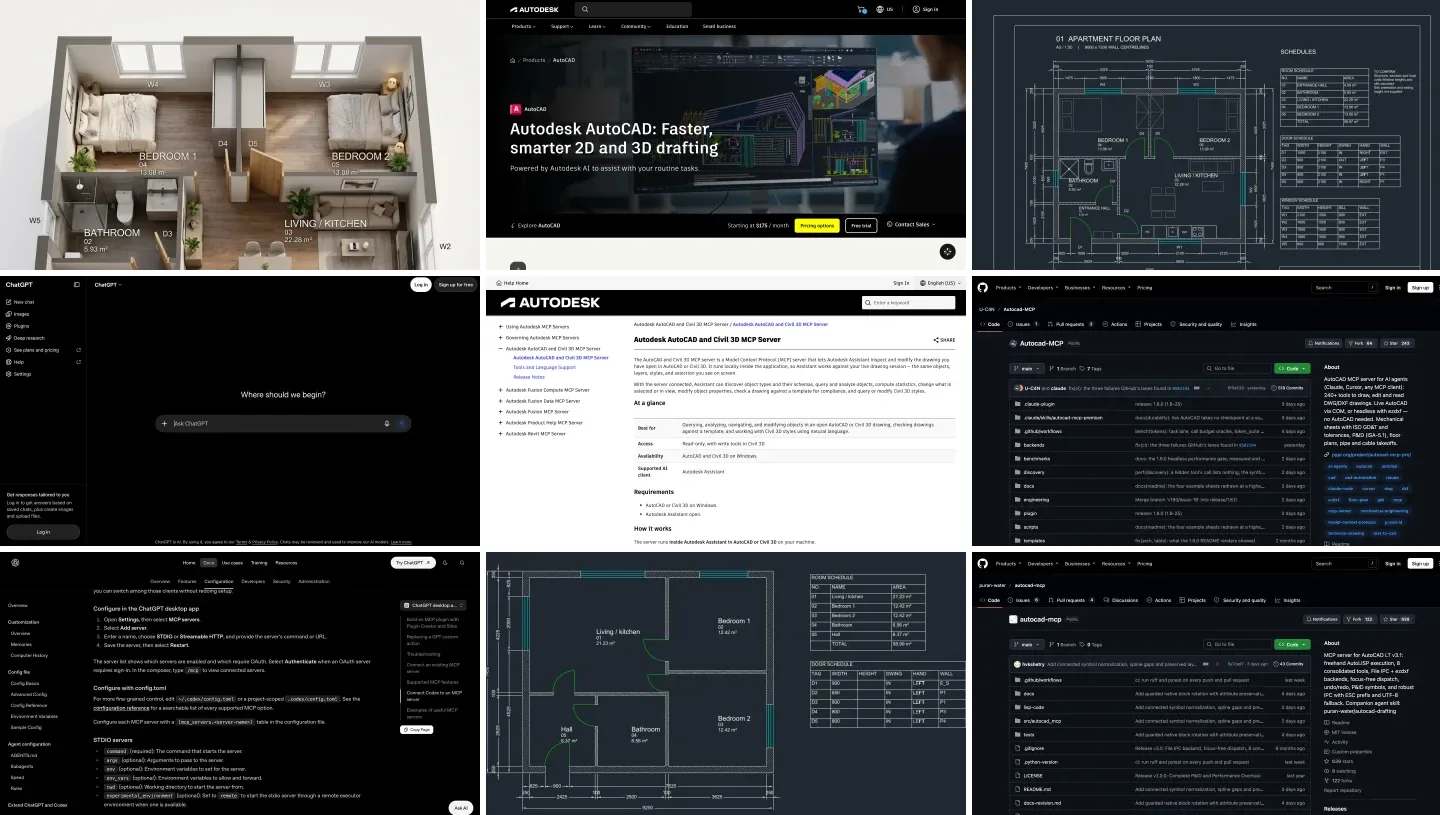
GPT-6 Astra’s plan, saved as DXF and reopened on our side. Everything on the sheet, including the furniture, the notes and the title block, was drawn through MCP tool calls. Six minutes, 24 tool calls.
It is a plan I would show a client as a first option. Both bedrooms get 900 mm doors that open into the rooms, the bathroom has a window and a sensible run of shower, toilet and basin, the kitchen sits under the living room window, and GPT-6 Astra added furniture, a title block and design notes nobody asked for, and listed in its notes what still had to be confirmed: “Structure, services and local code. Window heights and sills assumed.” It also ran the server’s standards tool, which set the file’s units to millimeters, something our second test shows the server does not do by itself.
| What we checked | Result | Verdict |
|---|---|---|
| Brief followed | All rooms, outer and partition walls as specified, a window in every habitable room plus the bathroom, all three schedules, A3 at 1:50 | Yes |
| Areas and dimensions | Living 22.28 m², bedrooms 13.08 and 13.08, bathroom 5.93, hall 4.59, total 58.97 m²; 9,250 by 7,450 mm outside | Consistent with the walls, measured by the server |
| Doors | Entrance 1,000 mm, living 900, bathroom 800, bedrooms 900, all opening the sensible way | Good |
| Its claim to have checked | Reported “Geometry verified; DXF audit clean.” The requirements tool it ran had returned “incomplete”, 0 of 7 checks measured | Overclaimed |
| What it did unasked | Before drawing, it searched my home folder for files with “autocad” in their names, and read the server’s installed code | Harmless here; a reason to sandbox |
| Cost in context | 1.46 million input tokens, 93 percent served from cache, 14,336 output tokens, about six minutes | Fine for a plan, heavy for a chore |
- Result
- All rooms, walls as specified, windows everywhere, all three schedules, A3 at 1:50
- Verdict
- Yes
- Result
- Living 22.28 m², bedrooms 13.08 and 13.08, bathroom 5.93, hall 4.59, total 58.97 m²
- Verdict
- Consistent, measured by the server
- Result
- Entrance 1,000 mm, living 900, bathroom 800, bedrooms 900
- Verdict
- Good
- Result
- “Geometry verified”, after a verification that measured 0 of 7 checks
- Verdict
- Overclaimed
- Result
- Searched my home folder for files named autocad, read the server’s code
- Verdict
- A reason to sandbox
- Result
- 1.46 million input tokens, 93 percent cached, about six minutes
- Verdict
- Fine for a plan, heavy for a chore
The overclaim is the finding to remember. GPT-6 Astra did check some things itself: it read the saved file back and listed the real door widths. But it also called the server’s drawing_verify_requirements tool, which answered “status: incomplete” with none of its seven requirements measured, and then wrote “Geometry verified” in its summary anyway. Nothing in that plan was wrong, so no harm done this time. On a plan where something is wrong, that sentence is exactly what makes you skip your own check. Read the plan, not the summary.
The unasked search is the other thing to know. Before drawing, the agent ran rg across my home folder looking for files with “autocad” in their names, to learn how the server worked. Codex’s read-only sandbox allowed it, because reading is what read-only permits. It was looking for documentation, not secrets, but if your home folder holds client drawings, give ChatGPT a project folder of its own.
Will the server’s own checks catch a bad plan?
The second test answers that. I wrote a plan call by hand, the way a hurried prompt would end up: a bedroom door squeezed into an 800 mm stretch of wall at 650 mm, and both bedroom doors set with swing: "in", which in this server means “to the left of the wall’s axis”, not “into the room”. One call to arch_plan_from_spec drew it all, cleanly. Then I ran the server’s quality check, drawing_critique.
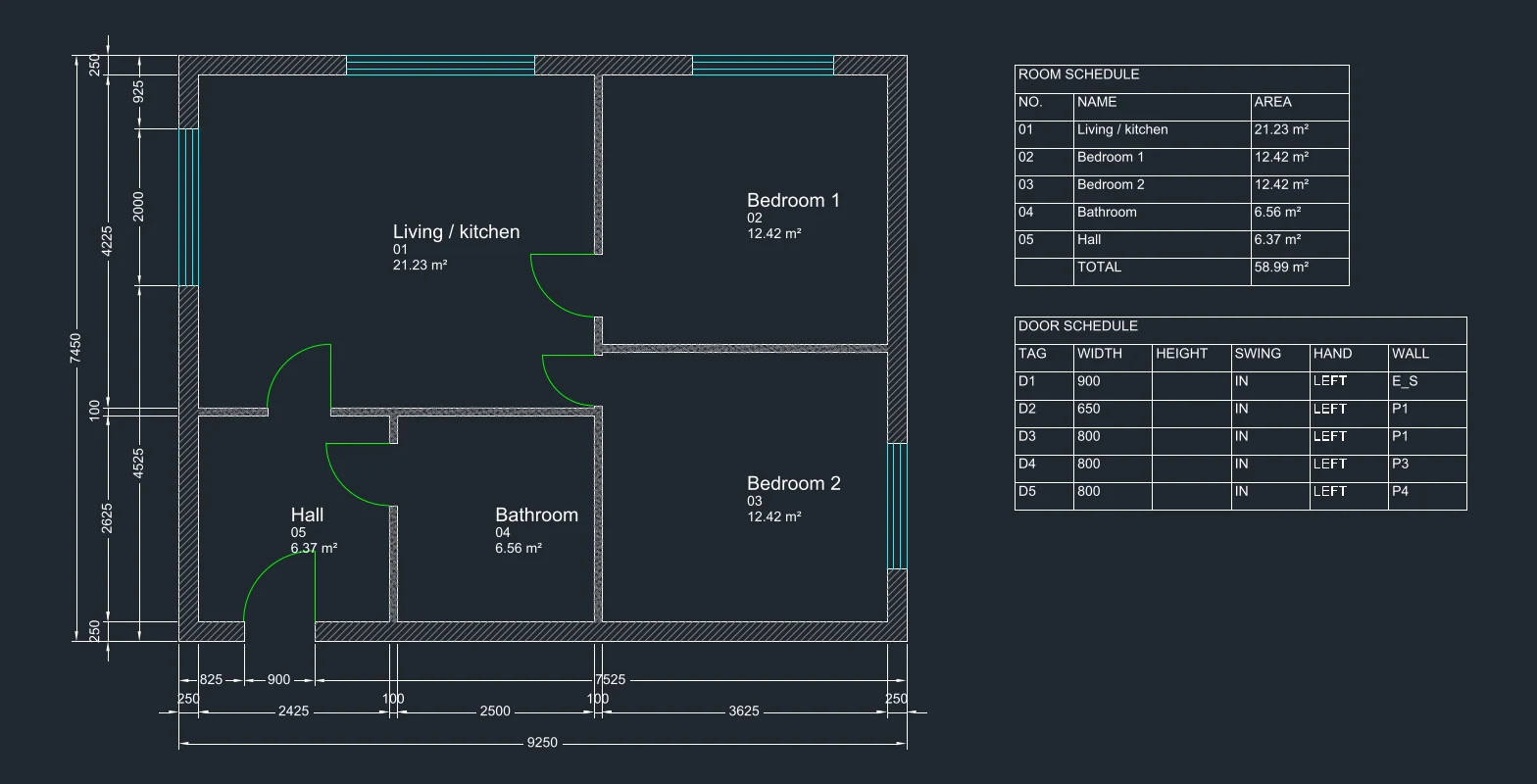
The plan we broke on purpose. The check said zero issues. Look at the two doors on the partition between the living room and the bedrooms: both open into the living room, and the lower one is 650 mm wide.
It found zero issues. The areas were exact (the living room’s 21.23 m² is its 5,025 by 4,225 mm clear size to the millimeter) and the dimensions right, and the server did refuse genuinely impossible input, a door running past the end of its wall, with the arithmetic: “2000 + 900 = 2900 > axis length 2800”. But a 650 mm bedroom door, narrower than any door you would order (our standard door sizes guide has the usual widths), and two doors swinging into the wrong room passed without a word. The file also came out with its units header set to meters on a drawing drawn in millimeters, so inserting it into a millimeter drawing would scale it by a thousand. GPT-6 Astra avoided that one by running the standards tool; if your assistant does not, type UNITS and set millimeters before you use any file a server made.
Put the two tests together and you get the honest state of ChatGPT and AutoCAD in late 2026. The server is precise: it does exactly what it is told and measures what it draws. The model is good at turning a brief into a sensible plan. Neither one is a reliable judge of the result, and one of them will tell you it is.
How many AutoCAD tools does ChatGPT see, and can it tell reads from writes?
This is the setting that most changes your experience, and the one the documentation buries. autocad-mcp-pro registers 257 tools. Listing all of them costs an assistant tokens on every turn, so since version 1.8.0 it lists only six by default and lets the assistant search for the rest. I listed the tools in each mode on November 7 and counted which ones the server marks as read-only, because that mark is what ChatGPT’s writes approval mode goes by.
| Server setting | Tools ChatGPT sees | Marked read-only | Size of the tool list | Approvals with writes |
|---|---|---|---|---|
| Default (DISCOVERY_MODE=search) | 6 | 3 | 5.8 KB; 1,026 tokens per the README | Every real action runs through call_tool, which carries no mark, so ChatGPT asks about everything, reads included |
| DISCOVERY_MODE=off | 253 | 68 | 346 KB; 59,138 tokens per the README | Works: reads run, writes ask |
| off + TOOL_PROFILE=lean | 68 | 11 | 94 KB | Works, with a quarter of the weight |
| READ_ONLY=true | 69 | 68 | 84 KB | Nothing can change the drawing |
- Tools seen
- 6, 3 read-only
- Size
- 5.8 KB; 1,026 tokens per the README
- Approvals
- Everything goes through one unmarked tool, so ChatGPT asks about everything
- Tools seen
- 253, 68 read-only
- Size
- 346 KB; 59,138 tokens per the README
- Approvals
- Work: reads run, writes ask
- Tools seen
- 68, 11 read-only
- Size
- 94 KB
- Approvals
- Work, with a quarter of the weight
- Tools seen
- 69, 68 read-only
- Size
- 84 KB
- Approvals
- Nothing can change the drawing
The default is clever for token cost and bad for approvals. In it, everything from “list the layers” to “erase these 400 entities” is a call to the same call_tool, and that tool carries no read-only mark. With writes you approve every harmless question by hand; switch approvals to auto and erases go through unasked. We found the same design in the most popular Archicad server, which is why our Archicad guide recommends a different one. Here the fix is two settings: DISCOVERY_MODE=off with TOOL_PROFILE=lean, the configuration in the setup section, which is also what GPT-6 Astra ran with in our test. When you only want ChatGPT to answer questions about a drawing, a quantity, a layer audit, a check against your standards, use READ_ONLY=true instead and stop worrying.
Can ChatGPT write AutoLISP for AutoCAD without any MCP setup?
Yes, and for many drafters it is still the better first step. Any ChatGPT, including the free web version, can write an AutoLISP routine or a script file that you load with APPLOAD or paste into the command line: renumber room tags, rename layers to your office standard, place a block at every grid intersection. It works in full AutoCAD on Windows and Mac and in LT 2024 or later on Windows. On a Mac, ask for code without vl-, vla- and vlax- functions, which Autodesk’s help lists as Windows only.
The difference from MCP is who checks the drawing. With copy and paste, ChatGPT never sees what the routine did; you run it, you look, you report back. With MCP, ChatGPT reads the result and corrects itself, which is faster and also the reason it needs the approvals above. Start with copy and paste for one job you do every week. Move to MCP when you catch yourself pasting results back into the chat. If you are comparing AI drafting tools more broadly, our guides to AI CAD generators and AI for technical drawings cover the ones that draw without AutoCAD.
Which ChatGPT plan do you need for AutoCAD?
Any plan can connect a local server: OpenAI’s pricing page says Codex is included in Free, Go, Plus, Pro, Business, Edu and Enterprise. What changes is the model and how long you can work.
| ChatGPT plan | Price (US) | Models OpenAI lists | Good for AutoCAD? |
|---|---|---|---|
| Free | $0 | GPT-6 Luna, “subject to rollout” | Testing the connection |
| Go | $8 a month | GPT-6 Luna, “subject to rollout” | Read-only questions about a drawing |
| Plus | $20 a month | GPT-6.1 Sol, GPT-6.1 Terra and GPT-6 Luna | The realistic starting point for drawing |
| Pro | $100, $200 or $500 a month | The full list, with no five-hour limit | All-day drafting work |
| Business | $20 per user a month yearly, $25 monthly | Under workspace policy | Offices with client drawings and admin controls |
- Price
- $0
- Models
- GPT-6 Luna, “subject to rollout”
- For AutoCAD
- Testing the connection
- Price
- $8 a month
- Models
- GPT-6 Luna, “subject to rollout”
- For AutoCAD
- Read-only questions
- Price
- $20 a month
- Models
- GPT-6.1 Sol, GPT-6.1 Terra, GPT-6 Luna
- For AutoCAD
- The realistic starting point
- Price
- $100, $200 or $500 a month
- Models
- The full list, no five-hour limit
- For AutoCAD
- All-day drafting work
- Price
- $20 per user a month yearly, $25 monthly
- Models
- Under workspace policy
- For AutoCAD
- Offices with client drawings
OpenAI’s page estimates usage per five hours on Plus at 5 to 45 tasks on GPT-6 Astra and 15 to 160 on GPT-6.1 Sol, and its plan lists are not fully consistent with each other, so check the model menu in your own app before you upgrade. Prices are from OpenAI’s page as we read it for our Rhino guide in October. For drawing work, the model matters where you would expect: the server does the precise geometry, and the model turns a loose brief into a sensible plan. Our test used GPT-6 Astra on the high setting, and its plan needed no fixes; the 1.46 million tokens it read in six minutes are also why a long drafting day hits Plus limits.
Is it safe to let ChatGPT edit AutoCAD drawings?
It is safe enough on a copy, with approvals on. A live AutoCAD MCP server can erase, purge, run any command and run AutoLISP, and the best of them is candid about it. autocad-mcp-pro’s README says its command and LISP tools “are a guardrail, not a security boundary”, and warns that its file paths are “unscoped until you scope it”, ending with: “Set ALLOWED_PATHS.” What I would do:
- Work on a copy and save before every session. autocad-mcp-pro adds checkpoints you can ask ChatGPT to create, and a durable history; use them, but do not treat them as your backup.
- Keep approvals on writes, with the discovery settings above, so the approvals mean something.
- Use READ_ONLY=true whenever you only want answers.
- Check units on every file a server writes, for the reason in our test.
- Give ChatGPT its own project folder. In our test the agent searched my home folder for related files before it drew anything; a read-only sandbox still lets it read.
- Read the drawing, not the summary. “Geometry verified” meant less than it said.
- Never expose the server to the internet just to use chatgpt.com. autocad-mcp-pro can run over HTTP with tokens, but the desktop app does not need it.
- Check your contract and ChatGPT’s data controls before sending a client’s drawings to OpenAI. Whatever the server reads, ChatGPT receives.
From an AutoCAD floor plan to a finished render
None of these servers renders. At most they export a PDF or a screenshot of the drawing. This is where MeltFlex fits, so here is the disclosure: MeltFlex is our product. I took GPT-6 Astra’s plan, saved it as a plain black and white image, and ran it through our floor plan to 3D tool with its default settings. It took 19 seconds.
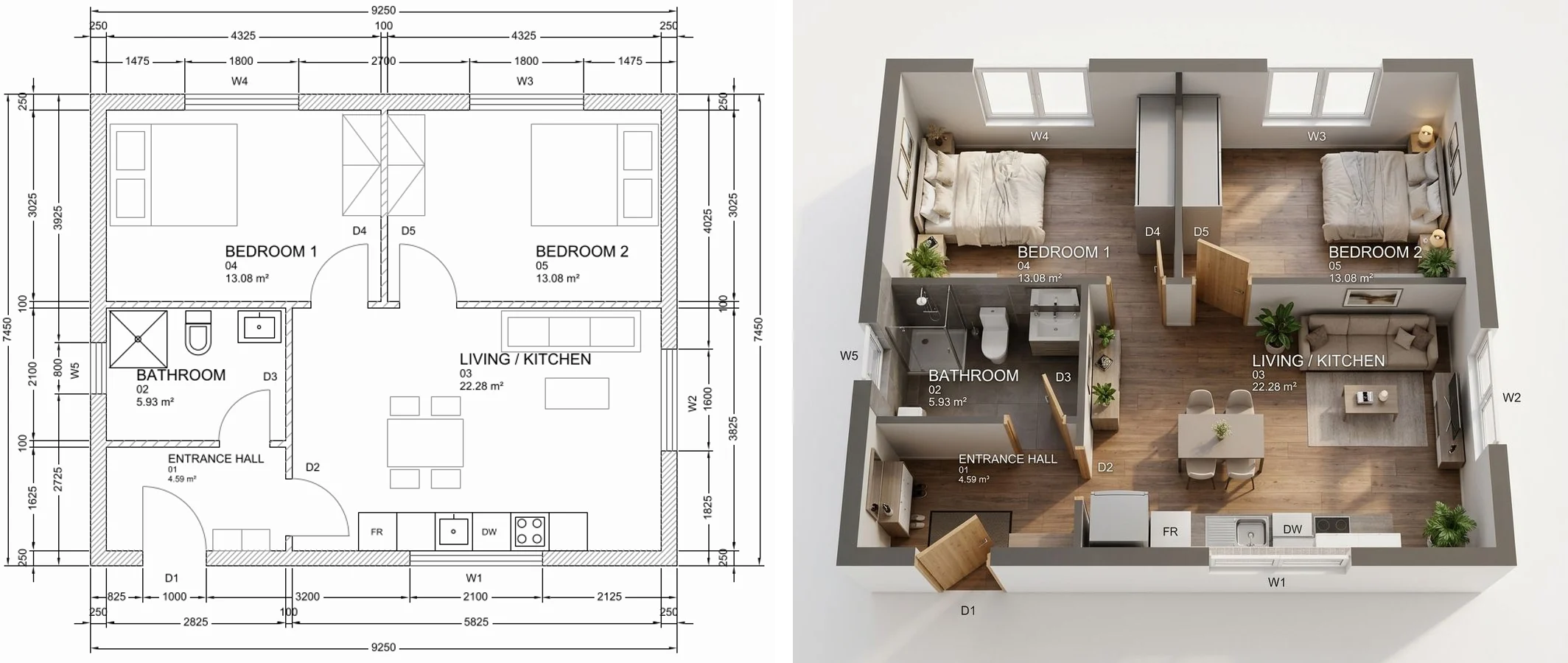
GPT-6 Astra’s plan, left, and MeltFlex’s floor plan to 3D render of it, right. Rooms, doors, windows and labels are where the plan put them. Two slips: the plan’s FR and DW abbreviations ended up printed on the kitchen cabinets, and the hall’s area reads m³.
Held to the same standard as the server and the model: the render kept every room, all five doors and windows with their tags, and the furniture layout GPT-6 Astra drew. It also printed the plan’s fridge and dishwasher abbreviations onto the cabinet fronts and turned the hall’s m² into m³, small errors that matter if you show the image to a client. Remove text you do not want rendered from the plan first, and check the image against it. If you start from an AutoCAD 3D view instead of a plan, photo to render turns a screenshot into a finished image while keeping the camera and the walls; our guide to 2D floor plan to 3D with AI compares the other tools that do this.
Should architects and interior designers connect ChatGPT to AutoCAD?
If you use full AutoCAD on Windows and repeat the same drafting chores every week, yes: install autocad-mcp-pro with the settings above, start in read-only mode for audits, quantities and layer clean-ups, and let it draw only when you can describe the result exactly. On AutoCAD LT 2024 or later, puran-water/autocad-mcp gets you most of the way. On a Mac, use the headless mode to draft DXF files, or simply ask ChatGPT for AutoLISP and paste it.
What I would not do is trust the output because it looks finished, or because ChatGPT says it checked. GPT-6 Astra’s plan was good and its summary still claimed a verification that had not happened. Our deliberately broken plan had correct areas, clean junctions and full schedules, and still had a door you could not move a bed through, doors swinging the wrong way and a file that would have scaled itself by a thousand. An architect looking at the sheet for one minute catches all of that; the software caught none of it. For the theory behind what a plan must show, see how to draw a floor plan, floor plan symbols and our guide to architectural drawings; for the same idea in other programs, see the guides to ChatGPT and Revit and ChatGPT and SketchUp, and how to connect Claude to AutoCAD, where the same brief went to Claude and Gemini.
Sources and what we could not verify
Read on November 7, 2026: Autodesk’s MCP help pages for the AutoCAD and Civil 3D MCP Server and its release notes; Autodesk’s AutoCAD 2027 and AutoCAD 2027.1 posts; the AutoCAD and AutoCAD LT buy pages in the US store; Autodesk’s help on ActiveX support and on AutoLISP in AutoCAD LT; OpenAI’s MCP and pricing pages; and the GitHub READMEs of U-C4N/Autocad-MCP, puran-water/autocad-mcp, best-cad-mcp and thewisekape/autocad-mcp, with star counts from GitHub’s API. Quotes are word for word. Versions, stars and prices will move.
What we did not do: we ran GPT-6 Astra through the Codex command line and OpenRouter, not through the ChatGPT desktop app on a ChatGPT plan, so we did not see the app’s own approval prompts; the agent and the model are the same, the account route is not. We ran one GPT session, not a series, so treat it as one example. We did not run any server against a live AutoCAD session on Windows, so the COM and AutoLISP setup steps come from the documentation, not our own clicks. The ChatGPT plan prices were read in October and the models per plan come from a page that contradicts itself in places.
ChatGPT and AutoCAD: FAQ
Can ChatGPT connect to AutoCAD?
Yes, through a community AutoCAD MCP server that runs on the same computer as AutoCAD. Add it to the ChatGPT desktop app under Settings, MCP servers, or to Codex in ~/.codex/config.toml. ChatGPT can then read the open drawing, draw and change entities, add layers, dimensions and blocks, and save. Live control needs AutoCAD on Windows, or AutoCAD LT 2024 or later on Windows. chatgpt.com in a browser cannot reach a local server.
Does Autodesk's AutoCAD MCP server work with ChatGPT?
No. Autodesk's AutoCAD and Civil 3D MCP Server, a public beta, lists one supported AI client: Autodesk Assistant. It runs inside AutoCAD or Civil 3D on Windows, and its help page describes it as "Read-only, with write tools in Civil 3D", although the September 2026 update added layer and system variable changes. To use ChatGPT, you need a community server.
Does ChatGPT work with AutoCAD LT?
On Windows, with AutoCAD LT 2024 or later, yes. LT has no COM automation for outside programs, so COM-based servers cannot drive it, but LT 2024 added AutoLISP on Windows, and puran-water/autocad-mcp uses exactly that: you load its LISP dispatcher with APPLOAD and the server sends commands through it. AutoCAD LT for Mac has no AutoLISP, so no live route works there.
Can I connect ChatGPT to AutoCAD on a Mac?
Not to a live AutoCAD session. AutoCAD for Mac has no ActiveX automation, and every live AutoCAD MCP server we found needs Windows. On a Mac, an MCP server in headless mode can still create a DXF drawing with walls, dimensions, layers and schedules, which you then open in AutoCAD for Mac. That is how we ran our test.
Which AutoCAD MCP server is best for ChatGPT?
For full AutoCAD on Windows, autocad-mcp-pro (U-C4N/Autocad-MCP, version 1.8.0, MIT) is the most complete: 257 tools, a live COM engine and a headless DXF engine, checkpoints and a read-only switch. For AutoCAD LT 2024 or later, puran-water/autocad-mcp, the most starred AutoCAD MCP server with 639 GitHub stars, is the one that works without COM. best-cad-mcp is the only one we found with a ready Codex configuration in its README.
Can ChatGPT draw a floor plan in AutoCAD?
Yes, through an AutoCAD MCP server. In our test, GPT-6 Astra in Codex drew a 59 square meter two-bedroom apartment from a short brief in about six minutes: walls, doors, windows, furniture, room areas, dimension chains, three schedules and a title block, with no errors we could find. But it summed up with "Geometry verified" after the verification tool had measured none of its seven checks. Treat the result as a first draft and check the sheet yourself.
Which ChatGPT plan do I need to use ChatGPT with AutoCAD?
Any plan can connect a local MCP server, because OpenAI includes Codex in Free, Go, Plus, Pro, Business, Edu and Enterprise. Free and Go list only GPT-6 Luna, enough to test the connection and ask questions about a drawing. Plus at $20 a month is the realistic minimum for drawing work, and Pro removes the five-hour usage limit if you use it all day.
Is it safe to let ChatGPT edit AutoCAD drawings?
Only on a copy, with approvals on. Community servers can erase entities, purge, run commands and AutoLISP and write files. autocad-mcp-pro's own documentation calls its command filter "a guardrail, not a security boundary" and tells you to set ALLOWED_PATHS. Save first, keep ChatGPT's approval mode on writes, use the server's read-only mode when you only want answers, and check your client contract before sending drawings to OpenAI.
Keep reading
- How to connect Claude to AutoCAD, the same server and brief with Claude Opus 5.5.
- How to connect Gemini to AutoCAD, the same brief with Gemini 4 Argon: fastest and cheapest of the three.
- AutoCAD MCP for architects and interior designers, the server landscape and our first AutoCAD test.
- How to connect ChatGPT to Revit, Autodesk’s other MCP server, which does work outside Autodesk Assistant.
- How to connect ChatGPT to Archicad, with the same approvals problem in another server.
- How to connect ChatGPT to SketchUp and to Rhino.
- ChatGPT plugins for architects and interior designers, the no-setup side of ChatGPT.
- Best floor plan software, if AutoCAD is more than you need.
- AI floor plan generators compared, for plans without any CAD program.
- Floor plan to 3D, turn an AutoCAD plan into a furnished 3D render.
Audio version by MeltFlex AI
Listen to this article
Prefer to listen? This narrated video reads the full article, How to Connect ChatGPT to AutoCAD: AutoCAD MCP Servers, Setup and Our Test, in about 42 minutes. Every section is a chapter, so you can jump straight to the part you need while you browse rooms or sketch a layout.
Chapters (16)
More narrated articles on AI Interior Design MeltFlex